
TL;DR:
- Cheap hosting can lead to slow load times, downtime, and security risks impacting sales.
- Different hosting types suit various business sizes and traffic levels, from shared to dedicated servers.
- Investing in reliable hosting with good support and performance guarantees safeguards long-term growth.
Most small business owners assume cheap hosting is fine until it isn't. A slow-loading page, a few hours of downtime, or a security breach can quietly drain leads, damage your reputation, and cost far more than the few dollars you saved on a budget plan. Web hosting is the foundation your entire online presence sits on, and getting it wrong means your business pays the price in ways that never show up on an invoice. This guide breaks down what web hosting really means for small and medium-sized businesses, which types fit your growth stage, and how to choose a provider that works as hard as you do.
Table of Contents
- What web hosting means for your business
- Types of web hosting explained
- How hosting impacts your website's speed, uptime, and sales
- Choosing the right hosting provider for your SMB
- Why cheap hosting isn't always a good deal for SMBs
- Get started with secure, affordable hosting from inSave
- Frequently asked questions
Key Takeaways
| Point | Details |
|---|---|
| Hosting is your website’s foundation | Choosing reliable hosting is crucial for being found and trusted online. |
| Start with shared, plan to scale | Shared hosting is affordable for low-traffic sites; upgrade as you grow to avoid slowdowns and downtime. |
| Performance affects profits | Even small delays or outages can lead to lost customers and revenue for your SMB. |
| Measure, monitor, migrate | Track uptime and speed; migrate or upgrade hosting when your site’s traffic increases. |
What web hosting means for your business
Web hosting is the technology and infrastructure that makes your website accessible to anyone with an internet connection. Think of it like renting commercial space. Your website's files, images, and data live on a server (a powerful computer connected to the internet), and your hosting provider keeps that server running, secure, and reachable around the clock. Without hosting, your website simply doesn't exist online.
For a small business, this matters more than most owners realize. Your hosting directly controls three things that affect your bottom line:
- Uptime: How often your site is actually online and reachable
- Speed (TTFB): How fast your server responds when someone visits your page. TTFB stands for Time to First Byte, the time it takes for a browser to receive the first piece of data from your server.
- Support and backups: Whether someone has your back when things go wrong
Real-world benchmarks show the gap between providers is significant. Best-in-class hosts like Hostinger record 100% uptime with a 246ms TTFB, while SiteGround hits 99.99% uptime with TTFB ranging from 32 to 210ms. Shared hosting generally lands at 99.9% to 99.97% uptime, while VPS and dedicated servers push above 99.99%.
Those fractions of a percent add up fast. A 99.9% uptime guarantee still allows nearly 9 hours of downtime per year. For a business running promotions or relying on online bookings, that's real money lost.
The connection between website speed and hosting is direct. A faster server means faster pages, which means more visitors stay, browse, and buy. Slow hosting is also a security risk, since underpowered servers are harder to protect. Understanding hosting security basics early saves you from expensive fixes later.
Pro Tip: Before signing up with any host, ask for their published uptime SLA (Service Level Agreement) and average TTFB stats. These two numbers tell you more about real-world performance than any marketing claim.
Having outlined why web hosting really matters, let's clarify what types of hosting best fit SMB budgets and needs.
Types of web hosting explained
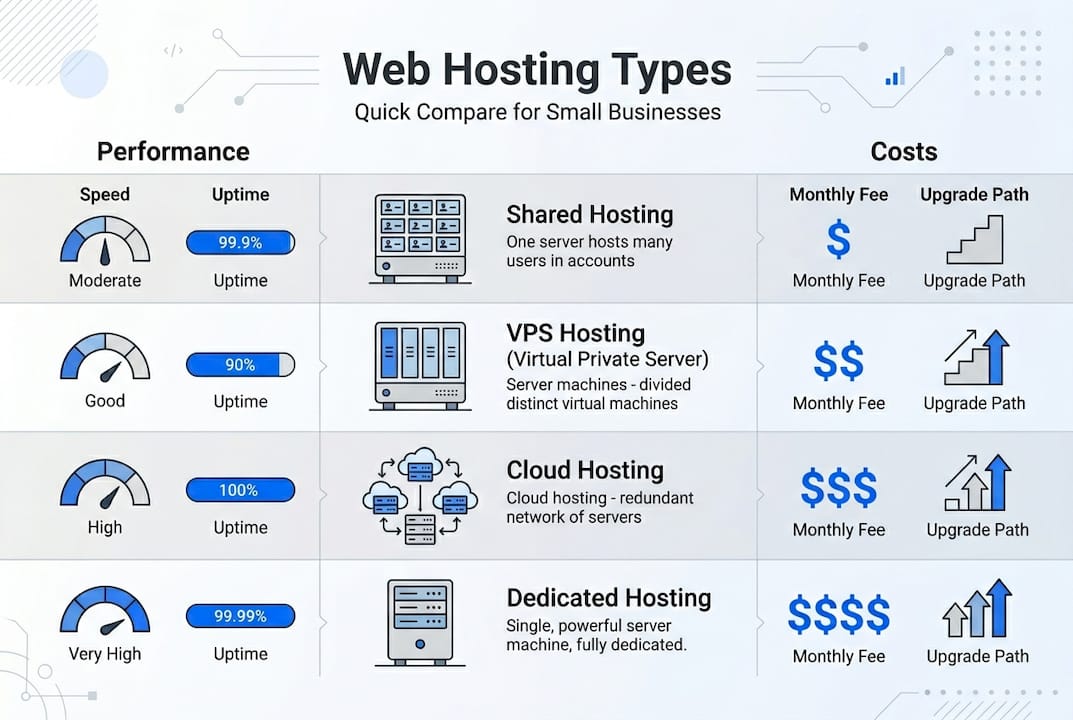
Not all hosting is built the same, and the type you choose has a direct impact on how your site performs as your business grows. Here's a plain-language breakdown of the main options:
- Shared hosting: Your website shares server resources with hundreds of other sites. It's the most affordable option, typically starting under $4 per month, and works well for sites with fewer than 10,000 monthly visitors.
- VPS (Virtual Private Server): You get a dedicated slice of a server's resources. More stable and faster than shared, and suited for sites handling 10,000 to 100,000 monthly visits.
- Cloud hosting: Resources scale automatically based on your traffic. Ideal if your business has seasonal spikes or unpredictable demand.
- Dedicated hosting: You rent an entire server. Maximum performance and control, but expensive. Only worth it when reliability is mission-critical.
- WordPress hosting: Optimized specifically for WordPress sites, with pre-configured settings, auto-updates, and caching built in. Great for non-technical teams.
| Hosting type | Best for | Approx. monthly cost | Traffic capacity |
|---|---|---|---|
| Shared | New or small sites | $2–$5 | Under 10k/month |
| VPS | Growing SMBs | $15–$50 | 10k–100k/month |
| Cloud | Variable traffic | $10–$80+ | Scales on demand |
| Dedicated | High-volume, critical | $80–$300+ | 100k+/month |
| WordPress | WP-based businesses | $3–$25 | Varies by plan |
The temptation to go with the cheapest shared plan is understandable, but hidden costs from slow TTFB and downtime can outweigh the savings. A 32% bounce rate increase per extra second of load time means even modest traffic losses add up quickly. VPS and cloud hosting offer SMB-level reliability without the price tag of a dedicated server.
For a deeper look at the trade-offs, compare dedicated vs shared hosting side by side, or start with our shared hosting guide if you're just getting started. If your business is scaling fast, cloud hosting for SMBs is worth a close look.
Pro Tip: Evaluate your current monthly traffic honestly, then plan for 12 months of growth. Avoid paying for VPS resources you don't need yet, but don't lock into a shared plan that will choke your site in six months.
Now that you know your hosting options, compare how each affects performance and long-term costs for your business website.
How hosting impacts your website's speed, uptime, and sales
Here's where the rubber meets the road. Hosting quality isn't just a technical detail. It directly affects how many visitors turn into customers.
Downtime costs more than you think. Even a 30-minute outage during peak hours can mean lost form submissions, abandoned shopping carts, and a damaged first impression for new visitors who never come back. Shared hosting uptime typically ranges from 99.9% to 99.97%, while VPS and dedicated options hold above 99.99%, which translates to less than an hour of downtime per year.

Speed directly drives revenue. Every extra second your page takes to load increases bounce rates by 32%. For a business with 5,000 monthly visitors and a 2% conversion rate, a two-second slowdown could mean dozens of lost sales every single month. That's not a technical problem. That's a revenue problem.
Google also factors improving website speed into search rankings, which means slow hosting hurts your visibility before a visitor even lands on your page.
Here's a quick reference for matching your hosting tier to your performance needs:
| Traffic tier | Recommended hosting | Target uptime | Target TTFB |
|---|---|---|---|
| Under 5k/month | Shared | 99.9%+ | Under 500ms |
| 5k–10k/month | Shared or entry VPS | 99.95%+ | Under 300ms |
| 10k–100k/month | VPS or cloud | 99.99%+ | Under 200ms |
| 100k+/month | Dedicated or cloud | 99.99%+ | Under 100ms |
To stay on top of your site's hosting reliability, follow these steps regularly:
- Check your host's published uptime and TTFB statistics before signing up
- Use free tools like GTmetrix or Google PageSpeed Insights to test your site monthly
- Set up a free uptime monitor (UptimeRobot is a popular choice) to alert you the moment your site goes down
- Review your traffic growth quarterly and compare it to your current hosting tier
Understanding performance risks, the next step is picking hosting providers that actually meet modern SMB requirements.
Choosing the right hosting provider for your SMB
Selecting a host isn't just about the lowest price on page one. It's about total value over the life of your business website. Here's what to look for and what to avoid.
The checklist every SMB should use:
- 24/7 live support with real response times, not just a ticket system
- Free migration assistance if you're switching from another host
- Real-time monitoring and automatic backups
- Transparent renewal pricing before you commit
- Clear upgrade paths from shared to VPS or cloud
The pricing trap is real. Many hosts advertise intro rates as low as $2.99 per month, then renewal prices jump to $7.99 or more. That's not a scam, but it is a surprise if you're not prepared. Factor in the full 2 or 3 year cost when comparing plans.
For most SMBs, starting with shared hosting at $2.99 to $3.99 per month makes sense. Monitor your TTFB and uptime from day one, and plan to scale to VPS when you hit 10,000 monthly visitors for consistent performance without the cost of a dedicated server.
"The real cost of cheap hosting isn't the monthly bill. It's the customers who left because your page was too slow or your site was down when they needed it."
Red flags to watch for when evaluating providers:
- Renewal prices more than double the intro rate with no warning
- No published uptime SLA or performance guarantees
- Support limited to email only with 24+ hour response times
- No easy migration tools or upgrade options
- Negative reviews specifically about downtime or billing surprises
Look at reliable hosting examples to see what a solid SMB hosting setup actually looks like in practice, and review secure hosting solutions to understand what security features should come standard.
With a practical vendor roadmap, consider how your web hosting choices drive long-term value as your business grows.
Why cheap hosting isn't always a good deal for SMBs
We've worked with enough small business owners to see the same pattern repeat. They launch on the cheapest shared plan, traffic grows, the site slows down, and they spend weeks troubleshooting instead of marketing. The savings from a $2 monthly plan evaporate fast when you factor in lost conversions and the time spent dealing with outages.
The uncomfortable truth is that website speed pitfalls rarely show up as a line item. You won't get an invoice that says "lost 40 leads this month due to slow TTFB." But the data is there if you look.
Investing in a business-ready host from the start, one with real uptime guarantees, fast servers, and responsive support, frees up your time for growth instead of damage control. Start simple, but set performance alerts early and budget for a smart upgrade before you hit a wall. That's not overspending. That's protecting your investment.
Pro Tip: Track your site's average load time and uptime monthly from day one. When load time creeps above 2 seconds or uptime dips below 99.95%, it's time to upgrade your plan, not wait for a crisis.
Get started with secure, affordable hosting from inSave
If you're ready to build your business website on a foundation that actually holds up, InSave Hosting offers plans designed specifically for SMBs who need reliability without enterprise pricing.

Whether you're launching your first site or migrating from a host that's been letting you down, InSave's shared hosting plans give you a fast, secure starting point with free SSL, a free domain for the first year, and 99.9% uptime backed by LiteSpeed technology. Already running WordPress? The WordPress hosting options are optimized for speed and ease, so your team can focus on content, not configuration. Getting started takes minutes, and the performance difference is immediate.
Frequently asked questions
What does web hosting actually do?
Web hosting stores your website's files and makes them accessible worldwide by providing the technology and infrastructure needed for people to find your business online.
How much should a small business spend on web hosting in 2026?
Expect to pay $2.99 to $3.99 per month for shared hosting at first, with renewals around $7.99 and upgrades to VPS when traffic exceeds 10,000 visits monthly.
Does hosting uptime and speed really matter for small business sales?
Absolutely. Every extra second of load time raises bounce rates by 32%, and downtime directly means lost leads and damaged trust.
How do I switch web hosting providers if my business grows?
Choose a host with easy migration tools and support, and plan to scale to VPS or cloud as soon as your traffic or performance needs increase.