
Every day, hackers launch over 90 billion attacks targeting small business websites, yet most entrepreneurs believe their hosting provider shields them completely. This dangerous misconception leaves WordPress sites vulnerable to breaches that cost an average of $25,000 to remediate. Understanding web hosting security requires looking beyond marketing promises to grasp how server defenses, software maintenance, and configuration choices work together. This guide breaks down essential security features, compares hosting options for small businesses, and provides actionable steps to protect your online presence without breaking your budget.
Table of Contents
- Key takeaways
- Understanding the basics of web hosting security
- Common security challenges and misconceptions
- Choosing the right hosting for your small business
- Practical steps to enhance your web hosting security
- Secure and affordable web hosting solutions for small businesses
- FAQ
Key Takeaways
| Point | Details |
|---|---|
| Layered hosting security | Security requires multiple server level protections working together rather than trusting marketing promises from your hosting provider. |
| Core protections to expect | Key features include a Web Application Firewall, account isolation, strict file permissions, automatic updates, malware scanning, DDoS protection, and daily backups. |
| Common vulnerabilities | Most hacks come from outdated plugins, themes, or core WordPress files rather than a sophisticated server breach. |
| Invest in protection | Balancing affordability with strong ongoing protections helps prevent breaches that can cost an average of $25,000 to remediate. |
Understanding the basics of web hosting security
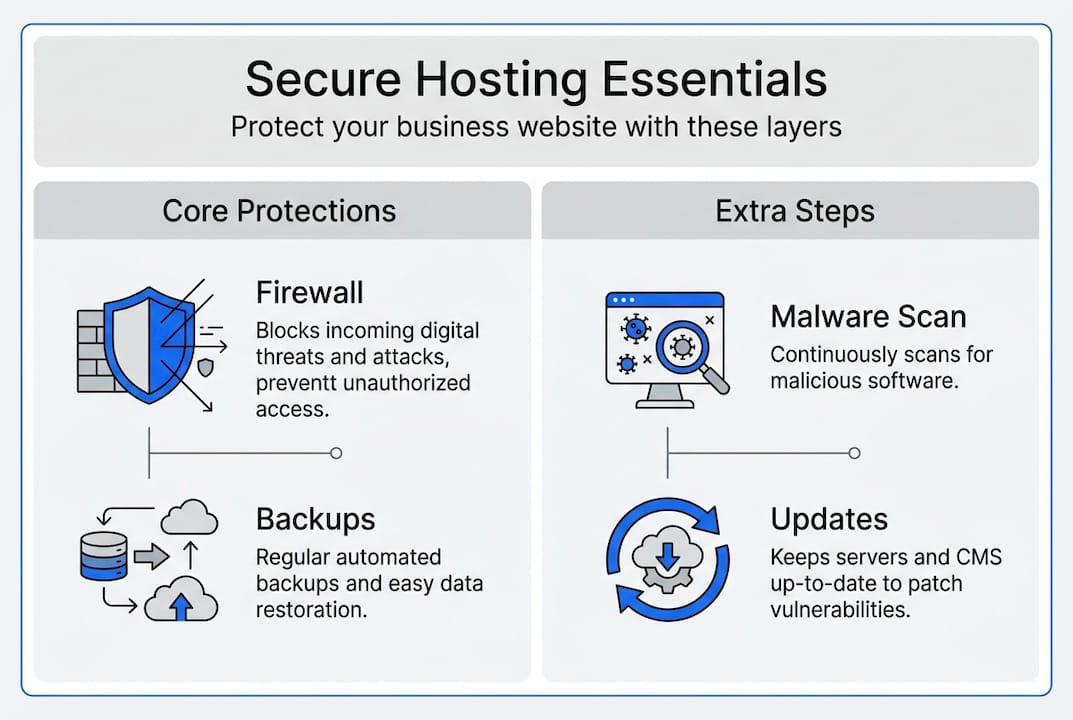
Web hosting security operates through multiple server-level mechanisms working simultaneously to protect your website. A Web Application Firewall inspects every HTTP request before it reaches your site, filtering out malicious traffic patterns and known attack signatures. Account isolation prevents one compromised website from affecting others on the same server, while strict file permissions ensure only authorized processes can modify critical system files. Automatic updates and malware scanning reduce exposure windows by patching vulnerabilities quickly, and DDoS protection mitigates volumetric attacks that could overwhelm your server resources.
Think of these defenses as a security system for your digital storefront. ModSecurity WAF acts as the front door guard, examining visitors before entry. CloudLinux creates separate apartments so neighbors can't access your space. File permissions work like locks on sensitive cabinets. Automatic updates patch holes in walls before intruders notice them. DDoS protection handles crowds trying to block your entrance, routing legitimate customers through while stopping troublemakers.
Cloudflare's global network demonstrates how DDoS protection scales to handle massive attacks. Their infrastructure absorbs terabits of malicious traffic daily, distributing requests across data centers worldwide so your website stays accessible even during coordinated attacks. This high-capacity approach protects small business sites from threats that would otherwise knock them offline for hours or days.
Key security mechanisms your hosting provider should implement:
- Web Application Firewall filtering malicious requests at the server level
- Account isolation using containerization or virtualization technologies
- Strict file permissions preventing unauthorized modifications to core files
- Automatic security updates for server software, PHP, and database systems
- Regular malware scanning detecting infected files before they spread
- DDoS mitigation absorbing volumetric attacks through distributed networks
- Daily automated backups enabling quick restoration after incidents
Pro Tip: Schedule monthly backup tests by downloading and inspecting backup files to verify they contain complete, uncorrupted data. Many businesses discover backup failures only after needing to restore, when it's too late to recover lost information.
Understanding these fundamentals helps you evaluate hosting providers beyond their marketing claims. Website security requires active, ongoing protection rather than passive promises. The right hosting foundation makes implementing additional WordPress-specific defenses far more effective.
Common security challenges and misconceptions
Most WordPress hacks stem from outdated plugins, themes, or core files rather than sophisticated server breaches. Entrepreneurs often assume their hosting provider handles all security concerns, but research shows hosting defenses block only 26% of WordPress vulnerability exploits. This gap leaves sites exposed to attacks targeting application-layer weaknesses that server protections cannot address. Weak file permissions create another entry point, allowing attackers to upload malicious code or modify existing files once they gain initial access through vulnerable plugins.
Brute force attacks represent a persistent threat where automated tools systematically guess login credentials. Without rate limiting or two-factor authentication, attackers eventually succeed through sheer volume of attempts. Marketing materials frequently exaggerate hosting security capabilities, promising complete protection while delivering only basic server-level defenses. This creates false confidence that discourages site owners from implementing necessary WordPress-specific security measures.
"Defense-in-depth requires combining hosting infrastructure protections with application-specific security tools. No single layer provides complete coverage, and vulnerability-specific defenses catch threats that generic hosting security misses." — Patchstack Security Research
The scale of threats facing small business websites exceeds most entrepreneurs' expectations. Wordfence security services blocked 90 billion malicious login attempts in 2025 alone, demonstrating the constant barrage targeting WordPress sites. These attacks don't discriminate based on business size; automated bots scan millions of sites daily, exploiting any vulnerability they discover.

72% of successful hacks exploit outdated software, costing small businesses an average of $25,000 in remediation, lost revenue, and reputation damage.
Top causes of security vulnerabilities affecting small business websites:
- Outdated WordPress core, plugins, or themes with known exploits
- Weak or default passwords enabling brute force entry
- Improper file permissions allowing unauthorized modifications
- Lack of Web Application Firewall at hosting or site level
- Missing security plugins providing malware scanning and monitoring
- No two-factor authentication protecting admin accounts
- Infrequent or absent backup schedules preventing recovery
Understanding these realities helps you move beyond hosting marketing hype toward practical security strategies. Shared hosting basics often prioritize affordability over comprehensive protection, requiring you to supplement with WordPress security measures. The gap between hosting promises and actual protection necessitates layered defenses combining server infrastructure with application-specific tools. Recognizing this truth positions you to make informed hosting choices and implement appropriate safeguards for your business website.
Website security details reveal how comprehensive protection requires addressing both hosting infrastructure and WordPress application layers simultaneously.
Choosing the right hosting for your small business
Selecting appropriate hosting directly impacts your website security posture and ongoing maintenance burden. Managed WordPress hosting ranges from $3 to $35 monthly and provides substantially better security through integrated Web Application Firewalls, daily malware scans, automatic backups, and account isolation compared to basic shared hosting. This price difference reflects the value of expert management, proactive monitoring, and optimized WordPress configurations that reduce your security workload.
| Feature | Shared hosting | Managed WordPress hosting |
|---|---|---|
| Monthly cost | $2-8 | $3-35 |
| Web Application Firewall | Rarely included | Standard feature |
| Daily backups | Manual or add-on | Automatic, tested |
| Malware scanning | Not included | Daily automated scans |
| Account isolation | Basic or none | CloudLinux containers |
| Automatic updates | Manual only | Core, plugins, themes |
| Expert support | General hosting | WordPress specialists |
| DDoS protection | Basic | Enterprise-grade |
Managed hosting delivers superior protection for business websites despite higher costs:
- Server-level WAF blocks attacks before reaching your WordPress installation
- Automatic updates eliminate the maintenance burden of tracking security patches
- Daily backups with tested restoration processes ensure business continuity
- Account isolation prevents cross-site contamination from neighboring websites
- Expert support resolves security incidents faster with WordPress-specific knowledge
- Optimized configurations harden WordPress against common attack vectors
- Proactive monitoring detects and mitigates threats before they cause damage
Pro Tip: Prioritize hosting providers offering managed WordPress services with layered security features rather than choosing solely based on price. The time saved managing updates, monitoring threats, and recovering from incidents typically exceeds the cost difference within months.
Server-level security matters more than WordPress plugins alone because attacks often target hosting infrastructure before reaching your site code. A compromised server can inject malware into multiple websites simultaneously, bypass plugin protections, and steal database credentials directly. Quality hosting establishes the security foundation upon which WordPress defenses build, creating defense-in-depth that addresses threats at multiple layers.
WordPress hosting options designed specifically for business sites incorporate security features as standard rather than expensive add-ons. These plans recognize that small businesses lack dedicated IT staff to monitor threats, apply patches, and respond to incidents. By bundling security into managed services, providers reduce your operational burden while strengthening protection.
Comparing shared hosting plans reveals significant variation in security features even at similar price points. Look beyond storage and bandwidth specifications to evaluate WAF capabilities, backup frequency, malware scanning, and support expertise. The cheapest option often becomes expensive after factoring in security incidents, lost business during downtime, and remediation costs.
Reliable hosting examples for small businesses demonstrate how appropriate infrastructure choices create stable, secure foundations for growth without requiring large upfront investments.
Practical steps to enhance your web hosting security
Implementing comprehensive security requires combining hosting infrastructure protections with WordPress-specific configurations. Layered defenses using hosting WAF, WordPress security plugins like Wordfence, regular updates, and two-factor authentication create overlapping protection that catches threats missed by individual measures. This defense-in-depth approach recognizes that no single tool provides complete coverage, so multiple barriers slow or stop attacks at different stages.
Follow these steps to strengthen your website security immediately:
- Enable Web Application Firewall through your hosting control panel or install a WordPress security plugin providing WAF capabilities
- Configure file permissions to 644 for files and 755 for directories, preventing unauthorized modifications to core WordPress files
- Activate automatic updates for WordPress core, or schedule weekly manual checks if your host doesn't provide this feature
- Set up daily automated backups stored off-server, and test restoration quarterly to verify backup integrity
- Install reputable security plugins like Wordfence or Sucuri providing malware scanning, firewall rules, and threat monitoring
- Enforce two-factor authentication for all administrator accounts using apps like Google Authenticator or Authy
- Review and update plugins monthly, removing unused extensions that create unnecessary attack surface
- Implement strong password policies requiring 16+ characters with mixed case, numbers, and symbols
- Limit login attempts to prevent brute force attacks, blocking IP addresses after five failed tries
- Schedule quarterly security audits reviewing user permissions, installed plugins, and hosting configurations
Security best practices for site administrators:
- Never use "admin" as your username; create unique administrator accounts
- Disable file editing within WordPress dashboard to prevent code injection
- Remove WordPress version numbers from public pages to avoid targeted exploits
- Use SFTP instead of FTP for file transfers, encrypting credentials in transit
- Enable SSL certificates for all pages, not just checkout or login forms
- Monitor security logs weekly for suspicious activity patterns or failed login attempts
- Keep staging and production environments separate with different credentials
Security mistakes to avoid:
- Trusting nulled or pirated plugins that often contain hidden malware
- Ignoring update notifications for weeks or months, leaving known vulnerabilities exposed
- Using the same password across multiple sites or services
- Granting administrator access to freelancers or agencies without time limits
- Skipping backup tests, assuming files will restore correctly when needed
Pro Tip: Never trust user input from forms, URL parameters, or cookies. Always sanitize and validate data before processing to prevent SQL injection, cross-site scripting, and code execution attacks. Treat every external input as potentially malicious until proven safe through proper filtering.
Periodic vulnerability scanning identifies weaknesses before attackers exploit them. Many security plugins include scanning features, or you can use services like Sucuri SiteCheck for external assessments. Address high-priority vulnerabilities immediately, focusing first on outdated software and weak access controls that provide easy entry points.
Combining web hosting security features with WordPress hardening creates comprehensive protection appropriate for business websites handling customer data and transactions. Neither hosting nor WordPress security alone provides adequate defense; layered implementation addresses threats at multiple levels simultaneously.
Understanding shared hosting basics helps you supplement provider protections with site-level security measures appropriate for your hosting environment and business requirements.
Secure and affordable web hosting solutions for small businesses
Protecting your business website requires hosting infrastructure designed with security as a core feature rather than an afterthought. InSave Hosting delivers managed WordPress hosting and shared hosting plans starting at $3 monthly, incorporating Web Application Firewalls, automatic backups, malware scanning, and free SSL certificates as standard features. These plans balance affordability with robust protection, providing small businesses the security foundation needed to operate confidently online without dedicating staff to monitoring threats and managing updates.

Our WordPress-optimized infrastructure includes expert support from specialists who understand both hosting security and WordPress-specific vulnerabilities. This combination reduces your operational burden while strengthening defenses against the attacks targeting small business sites daily. Additional services like domain registration and SSL certificates provide complete website security solutions through a single provider, simplifying management and ensuring consistent protection across all components. Explore packages designed specifically for entrepreneurs seeking reliable, secure hosting that grows with your business.
FAQ
How does web hosting protect my WordPress site from hacks?
Hosting security includes firewalls filtering malicious traffic before requests reach your website, blocking attack patterns and known exploit signatures automatically. Automated updates fix server software vulnerabilities quickly, reducing the window attackers have to exploit weaknesses. Account isolation prevents compromised neighboring sites from accessing your files or database. These server-level protections work continuously without requiring your intervention, establishing the security foundation upon which WordPress-specific defenses build.
Is managed hosting worth the extra cost for small businesses?
Managed hosting provides enhanced security layers, daily malware scans, tested backups, and expert WordPress support that substantially reduce risk and save time for business owners. The cost difference between managed and basic shared hosting typically ranges from $5 to $20 monthly, far less than recovering from a single security breach averaging $25,000 in damages. For businesses lacking dedicated IT staff, managed services eliminate the burden of monitoring threats, applying patches, and responding to incidents while strengthening overall protection.
What simple steps can I take to secure my website on any host?
Keep WordPress core, plugins, and themes updated within 48 hours of security releases to close known vulnerabilities quickly. Use unique passwords with 16+ characters for all accounts, never reusing credentials across sites. Enable two-factor authentication for administrator access, requiring both password and mobile device verification. Install reputable security plugins like Wordfence providing firewall rules, malware scanning, and login protection. These fundamental practices significantly reduce your attack surface regardless of hosting provider, creating essential defenses against common threats.
How often should I back up my business website?
Daily automated backups provide the best protection for business websites with frequent content updates or transactions, ensuring you can restore recent data after incidents. Store backups off-server in separate locations so server compromises don't destroy backup files simultaneously. Test restoration quarterly by downloading backup files and verifying they contain complete, uncorrupted data. Many managed hosting plans include daily backups as standard features, eliminating the need to configure and monitor backup systems manually while ensuring business continuity.
Can cheap hosting provide adequate security for small businesses?
Budget hosting often lacks critical security features like Web Application Firewalls, account isolation, automatic updates, and malware scanning that protect business websites effectively. The cost savings disappear quickly after a security breach requiring professional remediation, lost revenue during downtime, and reputation damage affecting customer trust. Investing slightly more in hosting with robust security features prevents substantially larger expenses and disruptions later. Prioritize providers offering managed services and layered defenses rather than choosing solely based on the lowest monthly price.