
You've heard cloud hosting is the future, but you're not convinced it's right for your business. Many small business owners assume cloud hosting is either too expensive or too complicated for their needs. In reality, cloud hosting offers flexibility and scalability that can transform how your website performs, but only if it aligns with your traffic patterns and budget. This guide cuts through the confusion to explain what cloud hosting actually is, how it compares to traditional hosting options, and whether it makes financial sense for your small business. You'll learn about top providers, cost considerations, security best practices, and when to choose cloud over dedicated or shared hosting.
Table of Contents
- Key Takeaways
- Understanding cloud hosting basics
- Comparing top cloud hosting providers and costs
- When is cloud hosting the right choice for your business?
- Best practices for securing and optimizing cloud hosting
- Explore inSave hosting solutions for your business
- Frequently asked questions
Key Takeaways
| Point | Details |
|---|---|
| Elastic scalability | Cloud hosting distributes data across virtual servers to enable real time resource expansion and automatic failover to maintain site availability. |
| AWS performance edge | AWS leads in raw performance and breadth of services but comes with premium pricing that increases as your needs grow. |
| GCP cost efficiency | Google Cloud Platform can be cost effective for specific workloads such as data processing or API calls. |
| Best fit guidance | It fits businesses with variable traffic but may be less ideal for steady predictable loads due to extra costs, so track traffic for at least three months before choosing cloud hosting. |
Understanding cloud hosting basics
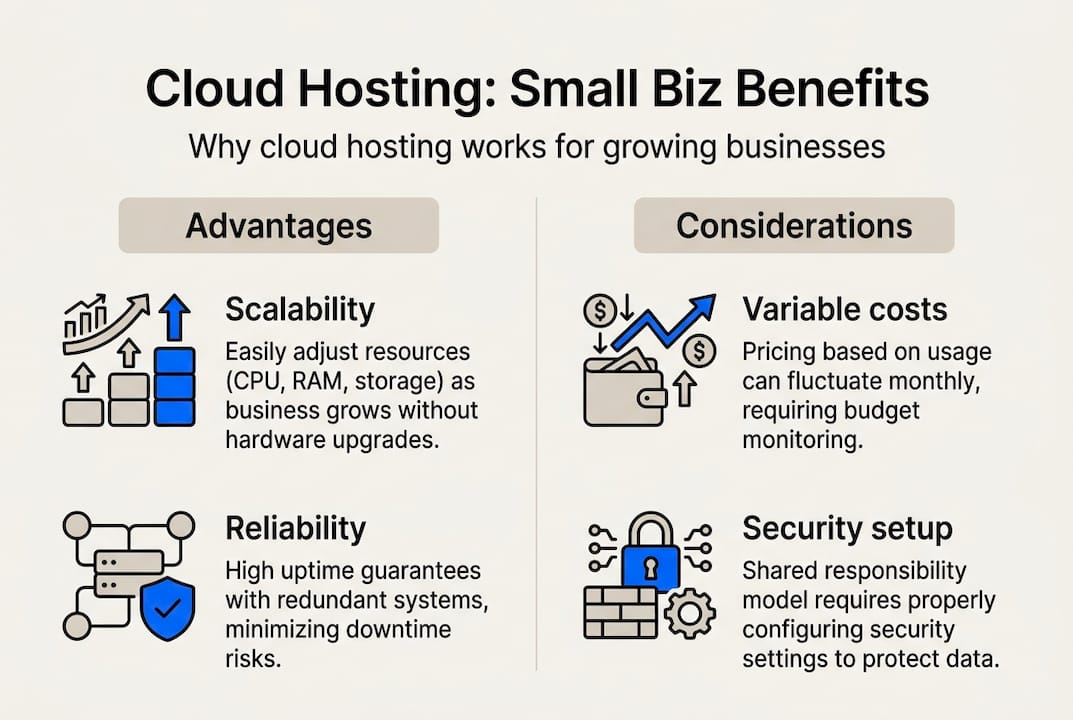
Cloud hosting stores your website data and applications across a network of virtual servers rather than confining everything to a single physical machine. When someone visits your site, they're accessing resources distributed across multiple servers in different locations, creating redundancy that keeps your site running even if one server fails. This architecture enables elastic resource allocation, meaning your hosting capacity expands or contracts based on real-time demand without manual intervention.
The reliability of cloud hosting is impressive. Leading providers like AWS claim 99.999% durability benchmarks, meaning your data remains accessible and intact virtually all the time. This level of uptime exceeds what most small businesses could achieve with traditional single-server hosting. The distributed nature of cloud infrastructure means hardware failures don't translate to website downtime, a critical advantage for businesses that can't afford lost revenue from outages.
For small businesses, cloud hosting delivers several compelling benefits:
- Minimal upfront investment since you're renting virtual resources rather than buying physical servers
- Instant scalability to handle traffic surges during promotions or seasonal peaks
- Geographic distribution that speeds up page loads for visitors in different regions
- Automatic failover that maintains site availability during server maintenance or failures
These advantages make cloud hosting particularly attractive for growing businesses. You can start small and expand resources as your traffic increases, paying only for what you use. This flexibility eliminates the traditional hosting dilemma of either overpaying for unused capacity or risking performance issues when traffic exceeds your plan limits. If you're evaluating hosting options, understanding these fundamentals helps you assess whether cloud hosting aligns with your business model better than reliable hosting examples small business owners typically use.
Pro Tip: Track your website traffic patterns for at least three months before committing to cloud hosting. If your traffic remains relatively steady with predictable patterns, you might pay unnecessary elasticity premiums compared to fixed-capacity hosting options.
Comparing top cloud hosting providers and costs
Choosing the right cloud provider requires understanding how major platforms differ in performance, pricing, and suitability for small business workloads. The three dominant providers each bring distinct strengths and cost structures that impact your bottom line differently.

| Provider | Performance score | Monthly cost (SMB e-commerce) | Key advantages | Considerations |
|---|---|---|---|---|
| AWS | Highest | $4,950 | Superior performance and scalability, extensive service catalog | Higher costs, complex pricing structure |
| GCP | Strong | $3,820 | Cost-efficient for API-heavy workloads, competitive pricing | Smaller ecosystem than AWS |
| Azure | Good | $5,420 | Strong Microsoft integration, enterprise features | Highest costs at scale |
AWS dominates in raw performance and service breadth, making it the default choice for businesses prioritizing speed and reliability over cost optimization. The platform's maturity means more third-party tools, better documentation, and a larger community for troubleshooting. However, this leadership position comes with premium pricing that adds up quickly as your resource needs grow.
Google Cloud Platform offers compelling value for specific workloads, particularly those involving data processing or API calls. The cost advantage of roughly $1,130 monthly compared to AWS for similar e-commerce operations represents meaningful savings for budget-conscious small businesses. GCP's pricing transparency and sustained-use discounts make it easier to predict monthly expenses, a crucial factor when you're managing tight margins.
Azure typically costs more than both competitors for equivalent workloads but shines for businesses already invested in Microsoft's ecosystem. If your team relies heavily on Microsoft 365, Active Directory, or other Microsoft services, Azure's seamless integration might justify the premium. For most small businesses without existing Microsoft dependencies, the higher costs are harder to rationalize.
Beyond base pricing, several cost factors significantly impact your actual monthly bill:
- Data egress fees charged when information leaves the cloud provider's network to reach your users
- Elasticity tax from scaling resources up and down, which sounds efficient but adds overhead costs
- Storage costs that accumulate as you retain backups, logs, and historical data
- Vendor lock-in risks that make switching providers expensive once you've built infrastructure around one platform
These hidden costs often surprise small business owners who focus solely on advertised base rates. A hosting plan that looks affordable at first glance can balloon when you factor in data transfer fees, especially if your site serves large media files or experiences high traffic volumes. For comparison, shared hosting affordable website management 2026 options eliminate these variable costs entirely with predictable monthly pricing.
Pro Tip: Request detailed billing breakdowns from your shortlisted providers showing actual customer costs for businesses similar to yours. Marketing materials highlight best-case scenarios, but real invoices reveal the true expense of cloud hosting including all the fees that accumulate beyond base compute and storage charges. If you're ready to explore cloud options with transparent pricing, check out cloud servers designed for small business budgets.
When is cloud hosting the right choice for your business?
Cloud hosting excels in specific scenarios but isn't universally superior to traditional hosting options. Understanding when it delivers genuine value versus when it creates unnecessary complexity helps you make a financially sound decision.
The multi-tenant nature of cloud environments introduces a noisy neighbor effect where other customers' resource usage can impact your site's performance. Cloud providers isolate virtual machines to minimize this issue, but perfect isolation remains impossible when multiple businesses share underlying physical hardware. Performance variability becomes more pronounced during peak usage periods when many tenants compete for the same resources simultaneously.
Cloud hosting truly shines when your business exhibits these characteristics:
- Unpredictable traffic patterns with significant variation between peak and baseline loads
- Rapid growth trajectory requiring frequent capacity increases
- Global customer base benefiting from geographic distribution
- Limited capital for upfront infrastructure investment
- Technical team capable of managing cloud complexity
For businesses matching this profile, cloud hosting's elasticity and scalability justify the premium costs and management overhead. You're essentially paying for flexibility and avoiding the risk of outgrowing your hosting capacity during critical growth periods.
To evaluate whether cloud hosting suits your specific needs, follow these steps:
- Analyze your traffic data from the past six months to identify patterns, peaks, and baseline loads
- Calculate the ratio between your highest traffic day and average daily traffic to quantify variability
- Estimate your monthly hosting budget including not just compute but also bandwidth, storage, and support costs
- Assess your team's technical capabilities for managing cloud infrastructure or budget for managed services
- Project your growth trajectory to determine if you'll need significant capacity increases within 12 months
If your analysis reveals steady, predictable traffic with minimal variation, cloud hosting may incur higher costs than necessary due to the elasticity tax you're paying for flexibility you don't actually need. Businesses with consistent baseline loads often achieve better value with dedicated servers offering fixed capacity at predictable monthly rates.
The drawbacks of cloud hosting become particularly relevant for small businesses:
- Egress fees that penalize high-traffic sites serving media-rich content
- Vendor lock-in that makes migration expensive once you've built custom integrations
- Complexity requiring either technical expertise or managed service fees
- Variable costs that complicate budgeting and financial planning
For many small businesses, these challenges outweigh cloud hosting's benefits. If your traffic remains relatively stable and you prefer predictable monthly expenses, consider alternatives like shared hosting for cost-effective reliability or dedicated servers for consistent performance. Similarly, specialized services such as role email hosting boosting smb communication brand might better serve specific business functions than trying to handle everything through cloud infrastructure.
Best practices for securing and optimizing cloud hosting
Once you've chosen cloud hosting, implementing proper security measures and optimization strategies protects your investment and ensures you're not overpaying for unused resources.
Security in cloud environments requires vigilance because you're sharing infrastructure with other tenants and relying on internet connectivity for all access. Start with SSL certificates to encrypt data transmission between your servers and visitors' browsers. Even if you're not processing payments, SSL certificates build trust and improve search rankings since Google prioritizes secure sites. Consider wildcard or organization-validation certificates for comprehensive protection across multiple subdomains without managing separate certificates for each one.
Firewall configuration forms your second line of defense. Cloud providers offer virtual firewall services that filter traffic before it reaches your servers, blocking malicious requests and limiting access to authorized IP addresses. Configure rules that allow only necessary ports and protocols, closing potential entry points for attackers. Regular security audits help identify misconfigurations before they're exploited.
Optimizing cloud hosting performance and costs requires active management:
- Monitor resource utilization daily to identify waste and right-size your instances
- Enable auto-scaling with carefully chosen thresholds to avoid unnecessary scaling events
- Minimize data transfer by using CDNs for static assets and optimizing image sizes
- Schedule non-critical workloads during off-peak hours when resource costs may be lower
- Archive old data to cheaper storage tiers rather than keeping everything in high-performance storage
- Review your cloud bill monthly to spot cost increases and usage anomalies early
These optimization strategies directly impact your monthly expenses. A poorly configured auto-scaling policy might spin up expensive instances during minor traffic increases that don't actually require additional capacity, wasting money on unnecessary resources. Similarly, failing to move old backups to archive storage means you're paying premium rates for data you rarely access.
Pro Tip: Implement automated daily backups with retention policies matching your recovery needs. Keep daily backups for the past week, weekly backups for the past month, and monthly backups for the past year. This tiered approach balances data protection with storage costs, ensuring you can recover from disasters without paying to store redundant backup copies indefinitely. Explore website backup solutions that automate this process.
Staying informed about your provider's terms and pricing changes prevents surprise bills. Cloud providers occasionally adjust their pricing structures, introduce new fees, or change service terms. Subscribe to provider announcements and review billing statements carefully each month. If costs suddenly spike, investigate immediately rather than assuming it's normal growth. Often, configuration changes or unexpected traffic patterns cause cost increases that you can address through optimization.
Security and optimization aren't one-time tasks but ongoing responsibilities. Schedule monthly reviews of your security posture, performance metrics, and costs. This regular attention helps you catch issues early and ensures your cloud hosting continues delivering value as your business evolves. For comprehensive security, pair cloud hosting with ssl certificates that protect your site and build customer confidence.
Explore inSave hosting solutions for your business
Now that you understand cloud hosting's benefits and considerations, it's time to find a hosting solution tailored to your business needs. InSave Hosting provides multiple options designed specifically for small and medium-sized businesses seeking reliable, affordable hosting without sacrificing performance or security.

Whether you need the scalability of cloud infrastructure or prefer the simplicity of traditional hosting, InSave Hosting delivers solutions that grow with your business. Our platform combines cutting-edge technology with straightforward pricing, eliminating the surprise fees and complexity that plague many cloud hosting experiences.
Our hosting options include:
- Cloud servers offering flexible resources and geographic distribution for businesses with variable traffic
- Shared hosting providing cost-effective reliability for sites with steady, predictable loads
- WordPress hosting optimized specifically for WordPress sites with automatic updates and security hardening
- Free SSL certificates, daily backups, and 99.9% uptime guarantees across all plans
Visit Web Hosting, Domain Names, WordPress & More - inSave Hosting to explore our complete range of services. Our team provides expert guidance to help you choose the right hosting solution based on your traffic patterns, budget, and growth plans. Start with Shared Hosting for affordable simplicity or explore WordPress Hosting if you're running a WordPress site. Whatever your hosting needs, InSave Hosting delivers the performance, security, and support your business deserves.
Frequently asked questions
What is cloud hosting and how does it work?
Cloud hosting distributes your website across multiple virtual servers in different geographic locations rather than storing everything on one physical machine. When visitors access your site, they connect to the nearest available server, which pulls resources from the distributed network to serve your content. This architecture provides redundancy so hardware failures don't cause downtime, and it enables automatic scaling where resources expand during traffic spikes and contract during quiet periods.
Is cloud hosting more expensive than traditional hosting for small businesses?
Cloud hosting typically costs more than shared hosting due to variable fees for data transfer, storage, and compute resources that scale with usage. For businesses with fluctuating traffic, cloud hosting can actually save money by avoiding overprovisioning, but companies with steady, predictable loads often find dedicated or shared hosting more cost effective. The elasticity tax and egress fees in cloud environments add expenses that fixed-capacity hosting avoids entirely.
What are the security risks of cloud hosting and how can I mitigate them?
Cloud hosting introduces risks from shared infrastructure where other tenants might compromise security, plus increased exposure through internet-based access to all resources. Data breaches, unauthorized access, and service disruptions represent the primary threats. Mitigate these risks by implementing SSL certificates for encrypted connections, configuring strict firewall rules, enabling multi-factor authentication, maintaining regular automated backups, and keeping all software updated with security patches.
Can cloud hosting improve my website's performance?
Yes, cloud hosting improves performance through geographic distribution that reduces latency for distant visitors and through redundancy that maintains availability during server issues. The ability to scale resources instantly during traffic spikes prevents slowdowns that would crash traditional hosting. However, actual performance depends heavily on provider quality, proper configuration, and how well you manage resources to avoid the noisy neighbor effect from other tenants competing for shared infrastructure.