
Choosing between dedicated and shared hosting can feel overwhelming when you're launching or growing your business online. The wrong choice might leave your website slow during peak traffic or drain your budget on features you don't need. Understanding how these hosting types differ in cost, performance, and control helps you make a decision that supports your business goals without unnecessary complexity or expense.
Table of Contents
- Key takeaways
- What is shared hosting and how does it work?
- Exploring dedicated hosting: exclusive resources and control
- Dedicated vs shared hosting: side by side comparison
- How to choose the right hosting type for your business needs
- Explore hosting solutions tailored for your business
- FAQ
Key Takeaways
| Point | Details |
|---|---|
| Exclusive resources | Dedicated hosting allocates an entire server for your site, delivering consistent performance and full control over software and configurations. |
| Cost effective option | Shared hosting offers affordable plans by sharing resources among many sites, keeping pricing low for small businesses. |
| Performance tradeoffs | Shared hosting can slow down during traffic spikes because resources are shared among multiple sites. |
| Decide by needs | Choosing between hosting types should reflect your business size, traffic expectations, and your technical expertise. |
What is shared hosting and how does it work?
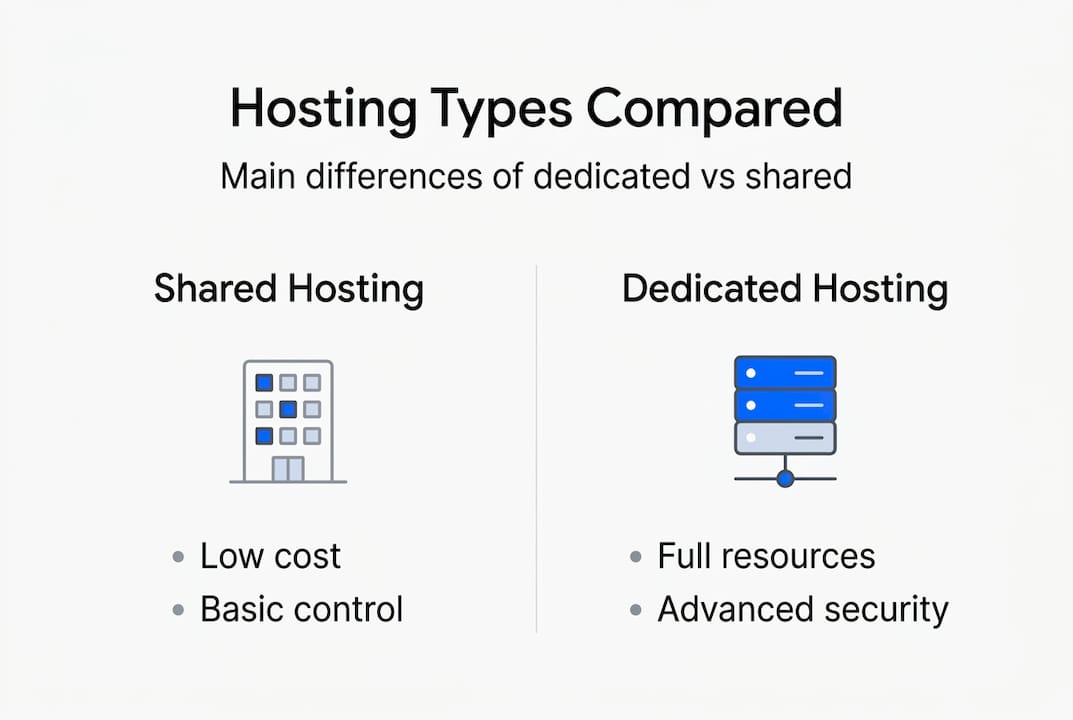
Shared hosting means your website lives on a server alongside dozens or even hundreds of other websites, all drawing from the same pool of CPU, memory, and bandwidth. Think of it like renting an apartment in a building where everyone shares the same utilities and common areas. When your neighbor uses excessive water, your shower pressure drops.
This resource sharing creates the main trade off with shared hosting. During normal traffic periods, your site runs smoothly because the server distributes resources efficiently across all tenants. But when multiple sites experience traffic spikes simultaneously, performance can suffer noticeably. Your pages might load slower, forms could time out, and visitors may experience frustrating delays that hurt your conversion rates.
Most shared hosting plans include managed features that make them attractive for business owners without technical teams:
- Automated daily backups that protect your content
- Basic SSL certificates for secure browsing
- One click WordPress installation and updates
- Email hosting with spam filtering
- Control panel access for simple site management
The cost advantage makes shared hosting incredibly popular for new businesses and small websites. Plans typically range from $3 to $15 monthly, making professional web hosting accessible even for tight budgets. This pricing works because the hosting provider spreads infrastructure costs across many customers sharing the same physical hardware.
You'll encounter limitations on server configurations with shared hosting. The provider controls the operating system, software versions, and security settings to maintain stability for all tenants. You can't install custom software, modify server level configurations, or access root directories. These restrictions protect all sites on the server but limit your ability to optimize for specific business needs.
Shared hosting works best for small business websites, personal blogs, portfolio sites, and informational pages that receive moderate traffic under 30,000 monthly visitors. If your site primarily displays content without complex database queries or resource intensive applications, shared hosting delivers reliable performance at an unbeatable price point.
Pro Tip: Monitor your site's resource usage through your hosting control panel. If you consistently hit CPU or memory limits during normal traffic periods, you've outgrown shared hosting even if your visitor numbers seem manageable.
Exploring dedicated hosting: exclusive resources and control
Dedicated hosting gives your business an entire physical server exclusively for your website and applications. No other customers share your CPU cycles, RAM, storage, or bandwidth. You're essentially buying or leasing the entire apartment building instead of renting a single unit, gaining complete control over how every resource gets used.
This exclusive access delivers several powerful advantages for growing businesses:
- Consistent high speed performance regardless of traffic volume
- Zero impact from other websites' security breaches or traffic spikes
- Full root access to install custom software and configurations
- Ability to optimize server settings for your specific applications
- Enhanced reliability with dedicated resources always available
Security improves dramatically with dedicated hosting because you don't share the server environment with unknown websites. A vulnerability in another site can't compromise your data or create backdoor access to your systems. You control which software versions run, when security patches get applied, and how firewalls filter incoming traffic. This isolation proves critical for businesses handling sensitive customer data, payment information, or proprietary content.

The flip side involves greater responsibility and higher costs. Someone needs to manage server maintenance, security updates, software installations, and troubleshooting when issues arise. You can either hire technical staff with server administration skills or purchase managed dedicated hosting where the provider handles these tasks for an additional fee. Unmanaged dedicated servers require Linux or Windows Server expertise to configure properly and maintain securely.
Dedicated hosting pricing reflects these premium features and exclusive resources. Plans typically start around $80 monthly for basic configurations and can exceed $300 monthly for high performance servers with substantial RAM, storage, and processing power. The investment makes sense when your website generates revenue that justifies the cost or when performance issues directly impact your business operations.
Pro Tip: Choose dedicated hosting when your website consistently exceeds 100,000 monthly visitors, runs resource intensive applications like video streaming or complex databases, or requires specific compliance standards like PCI DSS for payment processing. The upfront cost pays for itself through improved conversion rates and customer satisfaction.
Dedicated vs shared hosting: side by side comparison
Comparing these hosting types reveals distinct strengths that align with different business priorities and growth stages. The right choice depends on matching hosting capabilities to your current needs and near term expansion plans.
| Factor | Shared Hosting | Dedicated Hosting |
|---|---|---|
| Monthly Cost | $3 to $15 | $80 to $300+ |
| Setup Complexity | Instant activation, no technical skills needed | Requires configuration knowledge or managed service |
| Traffic Capacity | Up to 30,000 monthly visitors comfortably | Handles hundreds of thousands of visitors |
| Page Load Speed | 2 to 4 seconds average, variable under load | Under 2 seconds consistently |
| Customization | Pre configured environment, limited changes | Complete control over all server settings |
| Security Level | Standard SSL, shared firewall protection | Isolated environment, custom security rules |
| Scalability | Limited by shared resource pool | Easy vertical scaling with hardware upgrades |
| Support Needs | Basic troubleshooting and platform guidance | Advanced technical support or self management |
Several common considerations help determine which hosting type matches your business situation:
- Budget constraints often make shared hosting the only viable option for startups and small businesses just establishing their online presence
- Technical expertise availability determines whether you can effectively manage a dedicated server or need the simplicity of shared hosting
- Traffic predictability matters because sudden spikes affect shared hosting performance more severely than steady moderate traffic
- Revenue per visitor influences hosting decisions since high value conversions justify premium hosting investments
Your growth trajectory plays a crucial role in this decision. A new business blog expecting gradual audience growth over 12 to 18 months fits perfectly on shared hosting initially. An e-commerce store planning aggressive marketing campaigns that could triple traffic within months should consider dedicated hosting from launch to avoid costly migrations during critical growth periods.
How to choose the right hosting type for your business needs
Making the right hosting choice requires honest assessment of your current situation and realistic projections about where your business heads in the next year. Follow these steps to evaluate your needs systematically:
-
Analyze your current traffic patterns and resource usage. Check your analytics for monthly visitor counts, peak traffic periods, and page load times. If you're migrating from existing hosting, review resource usage reports to understand your CPU and memory consumption. Sites consistently using over 80% of allocated resources on shared hosting need more capacity.
-
Project your growth realistically based on business plans. Consider marketing campaigns, seasonal fluctuations, and expansion initiatives planned for the next 12 months. A conservative estimate adds 50% to 100% growth for established businesses, while new ventures might see 200% to 300% increases if marketing succeeds. Choose hosting that accommodates projected peak traffic, not just average loads.
-
Evaluate your budget against the total cost of ownership. Shared hosting appears cheaper initially but might require upgrading to VPS or dedicated hosting within months, creating migration costs and potential downtime. Dedicated hosting costs more upfront but eliminates upgrade disruptions. Calculate the true cost including your time or staff hours spent managing hosting issues.
-
Assess your team's technical capabilities honestly. Unmanaged dedicated hosting demands Linux administration skills, security knowledge, and troubleshooting experience. If nobody on your team possesses these skills, factor managed hosting costs into your budget or stick with shared hosting until you can afford managed dedicated services.
-
Match hosting features to your specific application requirements. E-commerce sites need PCI compliance capabilities, consistent uptime, and fast page loads that dedicated hosting provides. Content blogs and informational sites function well on shared hosting. Custom applications with specific software dependencies might require dedicated hosting's configuration flexibility.
-
Review security and compliance requirements for your industry. Healthcare, finance, and legal businesses often face regulatory requirements that shared hosting can't meet. Dedicated hosting provides the isolation and control needed for HIPAA, PCI DSS, or other compliance frameworks.
Start with shared hosting if you're launching a new site with uncertain traffic, have a limited budget under $50 monthly, and lack technical expertise. You can always upgrade later as your needs grow. Choose dedicated hosting from the start if you're migrating an established high traffic site, running applications with known resource requirements, or operating in regulated industries requiring enhanced security.
Consider WordPress hosting as a middle ground option that optimizes shared infrastructure specifically for WordPress sites, delivering better performance than standard shared hosting without dedicated hosting costs. This specialized hosting works well for growing WordPress sites that have outgrown basic shared plans but don't yet need full dedicated resources.
Explore hosting solutions tailored for your business
Now that you understand how dedicated and shared hosting differ, finding the right plan for your specific needs becomes straightforward. InSave Hosting offers both hosting types with features designed specifically for small to medium businesses like yours. Our shared hosting plans include 99.9% uptime guarantees, free SSL certificates, and one click WordPress installation, making them perfect for businesses just starting their online journey or running moderate traffic websites.
For businesses ready to scale or requiring enhanced performance and security, our dedicated server plans provide exclusive resources with full customization options and expert support. Every plan includes free migration assistance, so switching from your current provider happens smoothly without technical headaches or extended downtime.

Explore our complete range of hosting solutions at InSave Hosting to find the perfect match for your business size, traffic levels, and growth plans. Our team can help you evaluate your needs and recommend the most cost effective hosting type that supports your success.
FAQ
Is shared hosting suitable for growing small businesses?
Shared hosting works well for small businesses in early growth stages with traffic under 30,000 monthly visitors. As your audience expands and you add more interactive features, you'll eventually need to upgrade to VPS or dedicated hosting. Monitor your resource usage regularly and plan your migration before performance issues affect customer experience.
What are the main security differences between dedicated and shared hosting?
Dedicated hosting isolates your website completely from other users, eliminating the risk of cross site contamination from compromised neighboring sites. Shared hosting places multiple websites on the same server, so a security breach in one site could potentially affect others. Both hosting types benefit from SSL certificates, firewalls, and regular security updates, but dedicated hosting gives you complete control over implementing additional security measures specific to your business needs.
Can I switch from shared to dedicated hosting easily?
Most hosting providers, including InSave Hosting, offer migration assistance to move your site from shared to dedicated hosting with minimal disruption. The process typically involves copying your files and databases to the new server, updating DNS records, and testing functionality before going live. Plan for a few hours of potential reduced performance during the transition, though experienced providers can often complete migrations with zero visible downtime.
How much traffic can shared hosting handle before I need to upgrade?
Shared hosting typically handles 20,000 to 30,000 monthly visitors comfortably, depending on your site's complexity and resource usage per visit. Simple content sites with mostly text and images can serve more visitors than database heavy applications or sites with lots of plugins. Watch for warning signs like slow page loads, timeouts during traffic spikes, or resource limit warnings from your hosting provider. These indicators suggest you've outgrown shared hosting regardless of your exact visitor count.
Does dedicated hosting require technical expertise to manage?
Unmanaged dedicated hosting requires server administration skills including Linux or Windows Server knowledge, security configuration experience, and troubleshooting capabilities. If you lack these skills in house, choose managed dedicated hosting where the provider handles technical maintenance, security updates, and server optimization for an additional monthly fee. Managed services let you enjoy dedicated hosting benefits without needing a technical team.