
You've compressed images, picked a clean theme, and installed every caching plugin you can find. Yet your WordPress site still loads slowly. The frustrating truth is that no amount of front-end optimization can compensate for a server that responds slowly in the first place. For small and medium-sized businesses, hosting is often the single biggest factor separating a fast, revenue-generating site from one that quietly drives visitors away. This guide breaks down exactly how hosting affects speed, what the benchmarks actually show, and how to make the right choice for your business.
Table of Contents
- How hosting affects website speed: The basics
- Hosting benchmarks: Real-world evidence on speed
- Hidden speed risks: Shared hosting and global audiences
- Choosing optimal hosting for speed: SMB action plan
- Why hosting is the unsung hero of website speed
- Find faster, reliable hosting solutions for SMBs
- Frequently asked questions
Key Takeaways
| Point | Details |
|---|---|
| TTFB drives speed | Server response time (TTFB) is the main hosting factor that affects website loading speed. |
| Premium hosts outperform | Managed and premium hosting consistently deliver faster speeds than budget shared hosting. |
| Noisy neighbors slow sites | Shared hosting can suffer unpredictable speed drops when other sites use excess resources. |
| Global reach needs edge | Using edge hosting or a CDN ensures fast website performance for global visitors. |
| SMB action plan | Upgrading to optimized hosting is the smartest step for lasting speed improvements. |
How hosting affects website speed: The basics
When a visitor types your URL, their browser sends a request to your server. The time it takes for that server to respond with the first byte of data is called Time to First Byte, or TTFB. Think of TTFB as the moment a waiter acknowledges your order. Even if the food arrives quickly after that, a long wait just to be noticed ruins the experience.
Hosting and website speed are directly linked through TTFB. Google recommends a TTFB under 200ms to 600ms, and poor hosting pushes this number well beyond that range regardless of how optimized your site is. You can minify JavaScript all day long, but if your server takes 1.5 seconds just to respond, your visitors are already frustrated.
Here is what hosting quality directly controls:
- Server hardware: Faster CPUs and NVMe storage reduce processing time significantly.
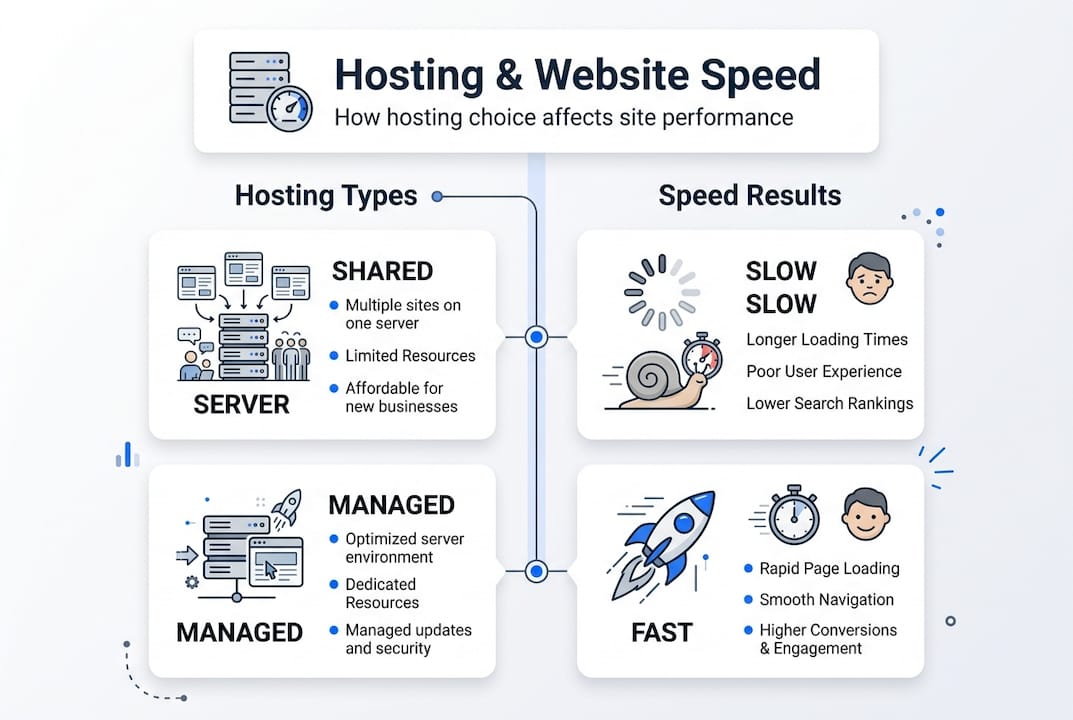
- Resource allocation: Shared environments divide CPU and RAM across many sites, limiting what yours can use.
- Software stack: Technologies like LiteSpeed, PHP8, and MariaDB process requests faster than older alternatives.
- Server location: Physical distance between the server and the visitor adds measurable latency.
- Uptime and reliability: Frequent downtime or instability creates inconsistent load times.
WordPress sites are especially vulnerable to slow hosting because WordPress is a dynamic platform. Every page request typically triggers multiple database queries and PHP processes. A slow server compounds this work. Static sites can partially mask poor hosting through caching, but WordPress sites with active users, WooCommerce stores, or logged-in members cannot rely on cached pages alone.
If you want to go deeper on squeezing performance from your setup, the hosting optimization guide covers practical techniques that work best when your foundation is solid. You can also review the WordPress hosting features that matter most for SMBs before making any decisions.
With the basics defined, let's examine how hosting types stack up in real benchmarks.
Hosting benchmarks: Real-world evidence on speed
Numbers tell a clearer story than marketing copy. Real-world WordPress hosting benchmarks reveal a stark performance gap between premium and budget providers. Kinsta averages a TTFB of 182ms with a standard deviation of just 28ms, meaning consistent results. Liquid Web comes in at 215ms. Hostinger, a popular budget option, averages around 345ms but with high variance, meaning your visitors might experience anything from acceptable to very slow.

| Hosting provider | Avg. TTFB | Consistency | TTFB at 500 concurrent users |
|---|---|---|---|
| Kinsta | 182ms | High | Under 320ms |
| Liquid Web | 215ms | High | Under 320ms |
| Hostinger | 345ms | Low | Can spike to seconds |
| Generic shared | 500ms+ | Very low | Often 2 to 5+ seconds |
Under load, the gap widens dramatically. Premium hosts maintain under 320ms at 500 concurrent users, while budget hosts can spike to multiple seconds. For an SMB running a product launch or a seasonal sale, that spike is the difference between conversions and abandoned carts.
Why do spikes happen? Three main reasons: shared hardware getting overwhelmed, software stacks not optimized for WordPress, and poor resource isolation between accounts on the same server.
"Page caching helps, but it only serves pre-built pages to anonymous visitors. The moment a user logs in, adds a product to a cart, or submits a form, caching is bypassed and raw server speed takes over."
Pro Tip: Before choosing a host, ask specifically about their TTFB benchmarks under load, not just average uptime. A host with 99.9% uptime but inconsistent response times can still hurt your conversions.
Understanding the types of WordPress hosting helps you match your traffic patterns to the right environment. If you are weighing your options, the dedicated vs shared hosting breakdown explains the tradeoffs in plain terms.
Beyond averages, speed depends on specific hosting environments and their unpredictable factors.
Hidden speed risks: Shared hosting and global audiences
Shared hosting is where most SMBs start, and for good reason. It is affordable and easy to manage. But it carries a risk that rarely appears in sales pages: the noisy neighbor effect. When another site on your shared server experiences a traffic surge or runs a resource-heavy process, your site slows down too, even if you did nothing wrong.
Shared hosting noisy neighbors cause unpredictable slowdowns that are nearly impossible to diagnose without server-level access. You might notice your site is fast on Tuesday and sluggish on Friday afternoon, with no obvious explanation.
| Hosting type | Speed | Reliability | Best for |
|---|---|---|---|
| Shared | Slow to moderate | Unpredictable | Personal blogs, low traffic |
| Managed WordPress | Fast | Consistent | SMBs, WooCommerce |
| VPS | Fast | Consistent | Growing businesses |
| Edge/CDN-enhanced | Very fast globally | High | International audiences |
Dynamic pages make this worse. A WooCommerce checkout page, a membership login, or a contact form submission cannot be served from cache. These pages hit the server directly every single time. If your hosting environment is strained, these critical conversion moments are exactly where visitors will experience the worst delays.
For businesses with global audiences, server location alone is not enough. Edge hosting and CDN integration through tools like Cloudflare can bring TTFB below 100ms for visitors worldwide by serving content from nodes physically close to each user.
Here is how to reduce hidden speed risks:
- Move away from generic shared hosting if your site handles transactions or logged-in users.
- Choose a host that offers resource isolation so other accounts cannot affect your performance.
- Enable a CDN, ideally one built into your hosting plan, to serve static assets from edge locations.
- Test your site from multiple geographic locations using tools like GTmetrix or Pingdom.
For more context on what reliable hosting actually looks like in practice, the reliable hosting for SMBs guide walks through real examples. And if you are still evaluating whether shared hosting fits your needs, shared hosting basics is a solid starting point.
Now, let's turn technical nuance into actionable steps to optimize hosting for speed.
Choosing optimal hosting for speed: SMB action plan
Knowing the problem is half the battle. Here is a practical, step-by-step approach to choosing or upgrading your hosting for maximum speed.
- Audit your current TTFB. Use Google PageSpeed Insights or GTmetrix to measure your server response time. If it is consistently above 600ms, your hosting is the bottleneck.
- Identify your site's dynamic needs. Do you run WooCommerce, a membership plugin, or a booking system? These require hosting that handles uncached requests well.
- Prioritize NVMe storage. NVMe drives are significantly faster than traditional SSDs for database reads and writes, which directly speeds up WordPress.
- Look for resource isolation. Managed WordPress hosts and VPS plans isolate your resources so other sites cannot slow yours down.
- Check the software stack. LiteSpeed, PHP8, MariaDB, and HTTP/2 are the combination that delivers the fastest WordPress performance in 2026.
- Confirm CDN availability. A free, integrated CDN is not a bonus feature. It is a baseline requirement for any SMB serving visitors beyond a single city.
- Review migration support. Switching hosts is only worth it if the transition is smooth. Look for free migration services to avoid downtime.
Managed hosts with NVMe and resource isolation consistently deliver 2 to 3 times faster performance than cheap shared alternatives in benchmarks. That is not a marginal improvement. It is the kind of difference that shows up in your bounce rate and conversion data.
Pro Tip: Spending an extra $10 to $20 per month on better hosting often delivers more measurable speed improvement than 20 hours of plugin tweaking. Prioritize the foundation before the details.
For SMBs ready to act, WordPress hosting plans built around these features are the most direct path to faster load times. If you want a full feature checklist before committing, the hosting feature checklist covers every spec worth asking about. And if you are still deciding between plan types, choosing WordPress hosting walks through the decision clearly.
Having a clear plan, SMBs can finally choose hosting that directly boosts website speed.
Why hosting is the unsung hero of website speed
After years of watching SMBs chase speed improvements through plugins, themes, and front-end tweaks, we keep arriving at the same conclusion: the hosting environment is almost always the root cause when a site is genuinely slow.
The conventional advice is to install a caching plugin, optimize images, and reduce HTTP requests. That advice is not wrong. But it is incomplete. Those optimizations work best on top of a fast server. On a slow server, they are just decorating a house with a cracked foundation.
Here is the contrarian insight most guides skip: your hosting choice is the single highest-leverage speed decision you will make. A well-optimized site on bad hosting will still underperform. A moderately optimized site on great hosting will often outperform it. TTFB is the metric that exposes this truth most clearly because it measures raw server performance before any front-end optimization even enters the picture.
The hard-won lesson is this: invest in hosting first. Before you spend hours testing plugins or debating image formats, check your TTFB. If it is above 600ms, no amount of optimization will make your site feel fast. Fix the foundation, and the rest becomes much easier. The hosting success stories from real SMBs reinforce this point consistently.
Find faster, reliable hosting solutions for SMBs
If your TTFB is too high or your site slows down under traffic, the right hosting upgrade can transform your results faster than any plugin or design change.

At InSave Hosting, we build our plans around the performance features SMBs actually need: LiteSpeed servers, NVMe storage, free CDN, resource isolation, and one-click WordPress setup. Whether you are starting fresh or moving an existing site, our fast WordPress hosting is designed to keep your TTFB low and your visitors happy. Explore all web hosting solutions or check out our shared hosting plans if you are looking for an affordable entry point with real performance built in.
Frequently asked questions
What is Time to First Byte (TTFB) and why does it matter?
TTFB measures server response speed before any page content loads. A low TTFB means your site starts loading quickly, which improves both user experience and search engine rankings.
Does upgrading hosting always improve site speed?
Switching to managed or premium hosting almost always reduces TTFB, especially for WordPress sites. Benchmarks show 2 to 3x speed gains when moving from cheap shared to managed environments with NVMe and resource isolation.
How do 'noisy neighbors' affect my website speed on shared hosting?
Noisy neighbors cause unpredictable slowdowns by consuming shared server resources, which raises your TTFB without any change to your own site. The effect is random and difficult to diagnose without server-level access.
Is CDN or edge hosting necessary for global website speed?
For audiences spread across multiple countries, edge hosting and CDN can bring TTFB below 100ms by serving content from locations physically close to each visitor.
Which hosting features should SMBs prioritize for speed?
Managed hosting with NVMe, resource isolation, and optimized stacks are the most impactful features for consistent WordPress performance. A free CDN and a modern software stack round out the essentials.