
TL;DR:
- Modern hosting technologies like cloud, edge, and CDN significantly improve website speed and reliability.
- Advanced hosting offers enhanced security, redundancy, and performance for small businesses.
- Regularly evaluate and upgrade hosting setups to support business growth and optimize user experience.
Most business owners treat web hosting like a utility. You pick a plan, pay monthly, and assume all hosts are roughly equal. That assumption quietly costs you. A site running on outdated shared infrastructure can be 3 to 5 times slower than one built on modern cloud or edge architecture, and slow sites bleed revenue. Google's own research links a one-second delay to a 7% drop in conversions. This guide breaks down the technologies reshaping what hosting can do, shows you real performance numbers, and helps you choose the right setup for your business without overpaying or overcomplicating things.
Table of Contents
- What are advanced hosting technologies?
- Speed, scale, and reliability: The real-world impact
- Security and resilience: Protecting your business reputation
- Which hosting setup is right for you?
- What most guides miss about hosting for SMBs
- Upgrade your business with inSave Hosting
- Frequently asked questions
Key Takeaways
| Point | Details |
|---|---|
| Performance advantages | Advanced hosting technologies significantly speed up your website and improve conversions. |
| Stronger security | Modern solutions offer built-in protection and redundancy, keeping your business safe from disruptions. |
| Scalable options | Tech like cloud and edge hosting allow you to grow smoothly as your business or traffic increases. |
| Smart selection | Choosing the right setup depends on your needs; hybrid options often offer the best balance for SMBs. |
What are advanced hosting technologies?
Hosting has moved far beyond a single server sitting in a rack somewhere. Today's advanced options span several distinct architectures, each solving a different problem. Understanding what cloud hosting means is a great starting point, because cloud is the most widely adopted modern approach.
Cloud hosting distributes your website across multiple servers. If one goes down, another picks up the load. You scale resources up or down based on traffic, so you only pay for what you use.
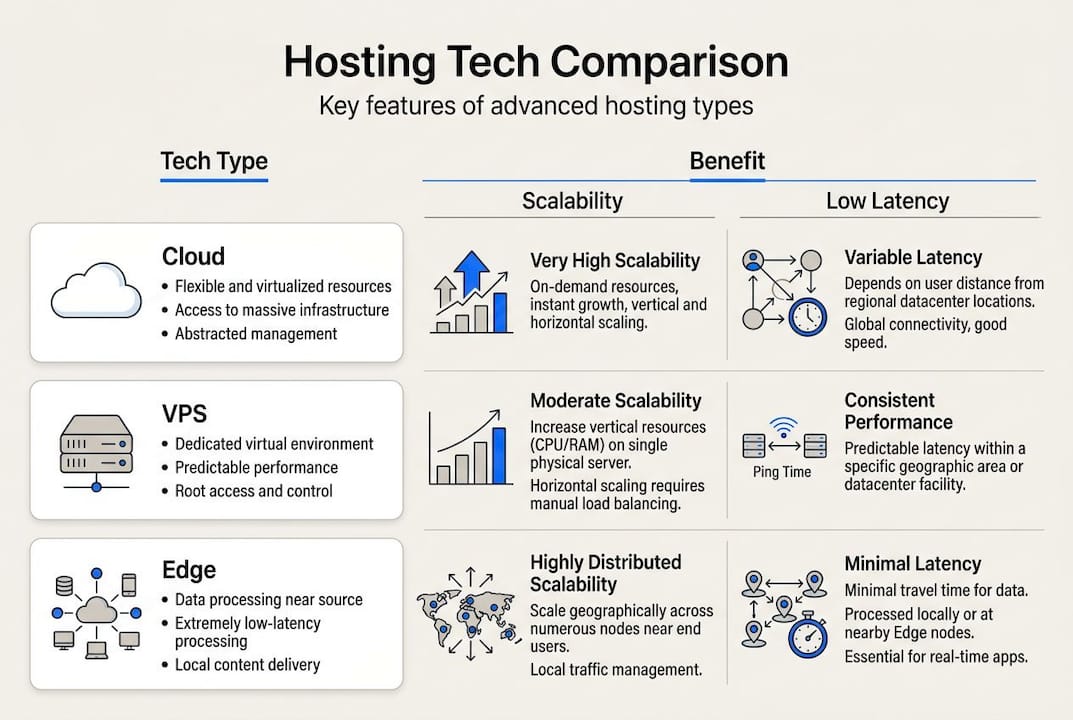
VPS (Virtual Private Server) carves a physical server into isolated virtual partitions. You get dedicated CPU and RAM that neighboring sites cannot touch, which means more predictable performance than shared hosting.
Edge computing moves processing closer to the user's physical location. Instead of a request traveling to a central data center, it hits a nearby node. This is what makes edge computing so powerful for global audiences.
CDNs (Content Delivery Networks) cache your static files, images, CSS, and scripts across dozens or hundreds of locations worldwide. Users pull files from the nearest server, not yours.
Serverless runs individual functions on demand without you managing any server infrastructure. It is ideal for event-driven tasks but less suited to traditional database-heavy applications.
As noted in the Cloud Provider Comparison Guide, advanced hosting for SMBs now includes cloud, VPS, edge, CDN, and serverless architectures that enhance performance through scalability, low latency, and resource isolation.
| Technology | Best for | Cost level | Complexity |
|---|---|---|---|
| Cloud hosting | Growing sites, variable traffic | Medium | Low to medium |
| VPS | Steady workloads, dev environments | Medium | Medium |
| Edge computing | Global audiences, low latency | Low to medium | Low |
| CDN | Static assets, media-heavy sites | Low | Very low |
| Serverless | Event-driven tasks, APIs | Variable | Medium |
Pro Tip: Many SMBs assume edge and CDN solutions are only for enterprise brands. They are not. Prices have dropped significantly, and both are now essential for any site competing for search rankings and user experience.
Speed, scale, and reliability: The real-world impact
Knowing the technology types is useful. Seeing what they actually do to your numbers is what makes the decision real.
The cloud hosting benefits for SMBs are well documented: faster load times, better uptime, and the ability to absorb traffic spikes without crashing. But let's get specific.
According to cloud provider benchmarks, Cloudways records a TTFB (Time to First Byte) of 85 to 180ms, while Vultr and Linode NVMe storage consistently outperforms traditional SSD setups. Edge computing cuts dynamic content latency by 60 to 85%, and a well-configured VPS handles 2 to 4 vCPU steady loads without performance degradation.
Stat callout: Cloudflare Workers report 0ms cold starts compared to 100 to 500ms for traditional serverless functions. That gap matters enormously for interactive applications.
For cloud hosting performance, the real-world translation is this: sites on modern infrastructure load up to 60% faster, and that speed directly correlates with 15 to 25% higher conversion rates. Uptime can reach 99.99% with the right provider, compared to 99.9% on entry-level plans. That difference sounds small but equals roughly 8 hours of additional downtime per year on the lower tier.
Critical metrics to monitor after any hosting upgrade:
- TTFB (Time to First Byte): Measures server response speed. Target under 200ms.
- Total page load time: Aim for under 2.5 seconds on desktop and mobile.
- Uptime percentage: Track monthly, not just annually.
- Core Web Vitals: Google's LCP, FID, and CLS scores directly affect search rankings.
- Error rate: Spikes in 5xx errors signal server strain before full outages occur.
| Metric | Shared hosting | Cloud/Edge hosting |
|---|---|---|
| TTFB | 400 to 800ms | 85 to 180ms |
| Uptime SLA | 99.9% | 99.99% |
| Load time improvement | Baseline | Up to 60% faster |
| Cold start (serverless) | N/A | 0ms (edge) |
Security and resilience: Protecting your business reputation
Performance gets the headlines, but security is where businesses quietly win or lose. A single breach or extended outage can erase months of customer trust.

Modern advanced hosting environments are built around layered protection. Tier III and Tier IV data centers offer physical redundancy with multiple power feeds and cooling systems. Beyond the physical layer, why secure hosting matters becomes clear when you consider that DDoS attacks, unauthorized access, and data loss are not rare edge cases. They happen to small businesses every day.
As detailed in Cyber Resilience for SMBs, advanced hosting security includes DDoS protection, zero-trust access models, multi-layered authentication, and redundancy that eliminates single points of failure.
"Hosting with multi-layered security can absorb large-scale attacks that would take a standard server offline in minutes."
The hosting security guide for small businesses consistently points to the same must-haves. Make sure your provider checks every box on this list:
- DDoS mitigation at the network level, not just application level
- Web application firewall (WAF) to filter malicious traffic
- Redundant storage with automated, offsite backups
- Multi-factor authentication for admin access
- Access logs with real-time alerting
- SSL/TLS certificates included and auto-renewed
Pro Tip: Ask your host how often backups run and where they are stored. Daily backups stored on the same server as your site offer almost no protection. You want offsite, automated, and tested restores.
Reviewing provider security features across major platforms shows significant variation. Not all hosts that claim enterprise security actually deliver it at the SMB price point. Read the fine print on SLAs and incident response times.
Which hosting setup is right for you?
Understanding the options is half the battle. Matching them to your actual business needs is where the real decision happens.
Start with your traffic pattern. A local service business with steady, moderate traffic is a strong candidate for a VPS. An e-commerce store with seasonal spikes needs cloud auto-scaling. A media site serving global readers benefits most from a CDN plus edge layer. For most growing SMBs, a hybrid VPS and edge setup delivers the best balance of speed, control, and cost.
Edge computing is exceptional for dynamic personalization, A/B testing, and geo-targeted content delivery. It is not the right tool for heavy back-end compute tasks or complex database queries. Know the limits before you commit.
Use these resources to sharpen your evaluation: how to choose web hosting, business hosting solutions, and reliable hosting examples from real SMBs.
| Decision factor | Cloud | VPS | Edge/CDN | Hybrid |
|---|---|---|---|---|
| Cost | Medium | Medium | Low | Medium |
| Performance ceiling | High | Medium | Very high | Very high |
| Failover | Automatic | Manual | Automatic | Automatic |
| Management effort | Low | Medium | Very low | Low to medium |
Three-step process for evaluating or upgrading your hosting:
- Audit your current performance. Run your site through Google PageSpeed Insights and record your TTFB, Core Web Vitals, and uptime logs from the past 90 days. This is your baseline.
- Map your needs to a technology type. Match your traffic pattern, geographic audience, and application complexity to the right architecture using the table above.
- Test before you commit. Use edge computing case studies and provider trials to validate performance gains before migrating your full site.
What most guides miss about hosting for SMBs
Here is something we see constantly: small business owners spend thousands on a custom website design and then host it on a $5 shared plan. The visual investment is visible. The hosting investment is invisible. So it gets minimized. That logic is backward.
Your hosting is the foundation everything else runs on. A beautifully designed site that loads in 4 seconds loses to a plain site that loads in 1.2 seconds. Every time. Speed is not a technical vanity metric. It is a revenue driver.
The other mistake is treating hosting as a one-time decision. Your business grows, your traffic patterns shift, and your security exposure increases. The setup that worked at launch may be actively hurting you 18 months later. Small business hosting wins consistently come from businesses that treat hosting as an ongoing strategic choice, not a sunk cost.
Pro Tip: Benchmark your Core Web Vitals before and after any hosting upgrade. A 40% improvement in LCP is a concrete ROI figure you can take to any stakeholder.
The practical framework we recommend: prioritize speed first, security second, and proven provider support third. Everything else, price, features, control panels, is secondary to those three pillars.
Upgrade your business with inSave Hosting
Ready to put these insights to work? InSave Hosting delivers modern, high-performance solutions built specifically for SMBs who want speed, security, and simplicity without enterprise-level complexity or pricing.

Explore shared hosting plans for lean sites, or step up to WordPress hosting optimized with LiteSpeed, LSCache, and free CDN integration. For businesses ready to move to advanced web hosting, InSave offers free migration, 24/7 support, managed security, and a 99.9% uptime guarantee. The next step is simple: find the plan that fits your current stage and start seeing the difference that real infrastructure makes.
Frequently asked questions
What is the difference between cloud, VPS, and edge hosting?
Cloud hosting uses distributed servers for automatic scaling, VPS virtualizes a single server for isolated resources, and edge hosting runs code at network perimeter nodes for near-zero cold starts. Each solves a different performance problem.
How do advanced hosting technologies improve website uptime?
Cloud and edge architectures provide built-in redundancy and auto-scaling, enabling uptime SLAs of 99.99% compared to 99.9% on standard plans, while DDoS mitigation absorbs attacks that would take basic servers offline.
Are advanced hosting solutions suitable for small businesses?
Absolutely. Prices for edge, CDN, and hybrid hosting have dropped significantly, and these solutions are now accessible for SMBs, offering faster speeds, better security, and more flexibility than entry-level shared hosting.
What should I check when upgrading my web hosting?
Prioritize TTFB, uptime SLAs, security feature depth, and CMS compatibility. Benchmarks show 40 to 60% speed gains from edge and cloud upgrades, so always measure before and after to confirm the improvement is real.