
TL;DR:
- Small businesses are prime targets for cyberattacks due to weaker defenses, risking significant costs.
- Effective hosting security relies on layered prevention, detection, and recovery measures beyond provider protections.
- Regular security habits and thorough provider questions are essential for comprehensive SMB website protection.
Many small business owners treat hosting security like a smoke detector: install it, forget it, assume it works. That assumption is expensive. 43% of cyberattacks target small businesses, and the average breach now costs companies over $150,000. Your hosting provider is the first wall between your business and those attacks, but it is rarely the last one you need. This article covers the real risks SMBs face, which security features actually protect you, where typical hosting plans fall short, and exactly what to ask before signing up with any provider.
Table of Contents
- Why security matters in choosing a hosting provider
- The three pillars of hosting security: Prevention, detection, recovery
- Why hosting alone isn't enough: The limits of provider defenses
- Evaluating hosting security for your SMB: What to look for, what to ask
- Conventional wisdom is holding SMBs back: Why the right approach to hosting security is counterintuitive
- Secure your online growth with hosting built for peace of mind
- Frequently asked questions
Key Takeaways
| Point | Details |
|---|---|
| Hosting alone isn’t enough | Even 'secure' hosting leaves gaps—layered security is essential for SMBs. |
| Check the three pillars | Prevention, detection, and recovery each play a vital role in online safety. |
| Know what to ask | Ask your provider about SSL, backups, update policies, and security response. |
| Affordable options exist | Robust hosting security is possible without huge budgets if you know what to look for. |
Why security matters in choosing a hosting provider
Most SMB owners assume the biggest cyber targets are large corporations with deep pockets. The reality is the opposite. Small and mid-sized businesses are attractive precisely because their defenses are thinner. A successful attack does not just cost you money in recovery. It costs you customer trust, search engine rankings, and in some industries, legal standing.
The numbers are not abstract. The average breach cost for a small company exceeded $150,000 in 2024. That figure covers incident response, lost revenue during downtime, customer notification, and potential fines under data protection regulations. For a business running on tight margins, that is not a setback. That is a shutdown.
Here is what typically goes wrong after a breach:
- Downtime: Your site goes offline, sometimes for days, killing sales and credibility.
- SEO damage: Google flags compromised sites, stripping your hard-earned rankings.
- Customer trust: Visitors who see a malware warning rarely come back.
- Legal exposure: Depending on your industry and location, a data breach can trigger regulatory fines.
- Recovery costs: Cleaning an infected site, restoring data, and patching vulnerabilities adds up fast.
"The question is not whether your site will be targeted. It is whether your hosting setup will hold when it is."
This is why secure hosting for small business is not a marketing label. It is a measurable decision. The problem is that "secure" means very different things depending on the provider. Some plans include a basic SSL certificate and call it security. Others layer firewalls, malware scanning, intrusion detection, and automated backups together. Those are not the same product, even if they carry the same label.
Before you compare prices or storage, read the hosting security guide to understand which protections actually reduce your risk versus which ones just look good on a feature list. With the risks clear, let's break down what "hosting security" really means.
The three pillars of hosting security: Prevention, detection, recovery
Think of hosting security in three distinct layers. Each one handles a different phase of an attack, and a weakness in any single layer undermines the others. Experts describe hosting security pillars as prevention, detection, and recovery working together as a system.
| Pillar | Key features | What it protects against |
|---|---|---|
| Prevention | Firewall, DDoS filtering, SSL/TLS, WAF | Keeps attackers out before damage occurs |
| Detection | Malware scanning, intrusion detection systems | Catches threats that slip through prevention |
| Recovery | Daily backups, disaster recovery tools | Restores your site after a successful attack |
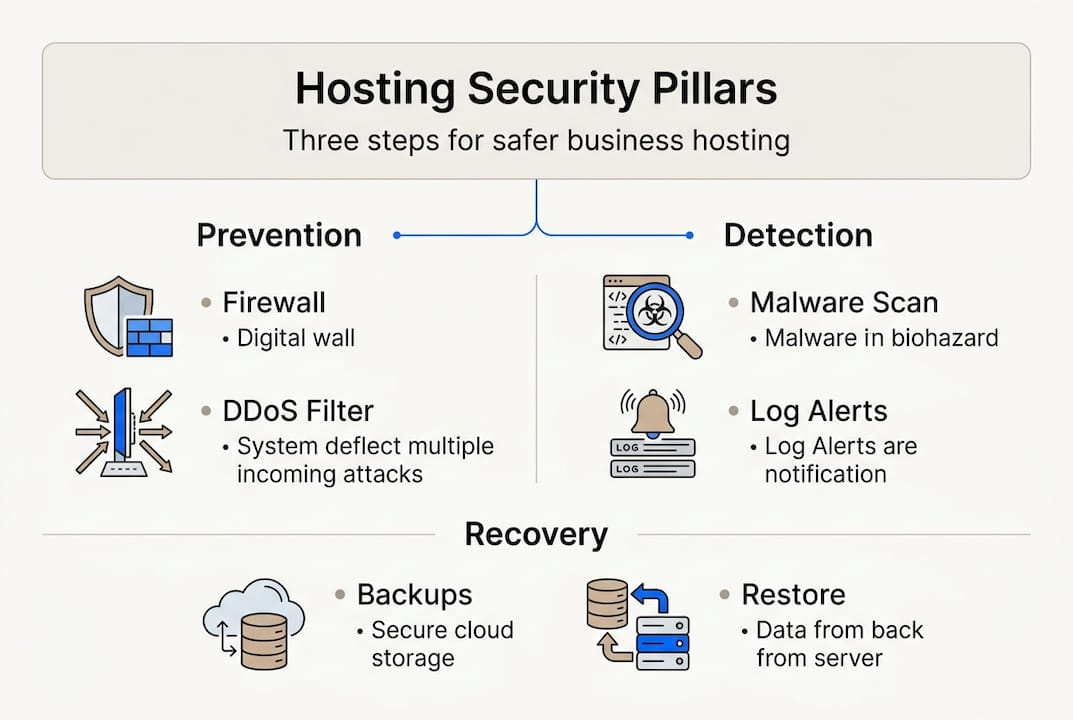
Prevention is what most people think of when they hear "hosting security." Firewalls block unauthorized traffic. DDoS filtering absorbs large-scale traffic floods that aim to knock your site offline. SSL/TLS encrypts data between your visitors and your server, protecting sensitive form submissions and login credentials. A web application firewall (WAF) filters malicious requests before they reach your site code.

Detection is where many SMB hosting plans get thin. Even strong prevention tools miss zero-day vulnerabilities, compromised plugins, or sophisticated phishing scripts. Malware scanners watch your file system for known threat signatures. Intrusion detection systems (IDS) flag unusual behavior, like a login attempt from an unfamiliar country at 3 a.m. These tools do not stop attacks, but they catch them early, before real damage spreads.
Recovery is the pillar most business owners skip until it is too late. Daily automated backups mean that if your site is compromised, you restore to yesterday rather than rebuild from scratch. The FTC small business cybersecurity guide specifically calls out backups as a core requirement, not an optional add-on.
Pro Tip: Ask your hosting provider specifically where backups are stored. Backups kept on the same server as your live site do not protect you if that server is compromised. Off-site or cloud-based backup storage is the standard you want.
For a detailed breakdown of which features matter most, check out this guide on essential hosting security features and WordPress hosting security tips if you're running WordPress. Now that the key concepts are clear, see how real-world "secure" hosting actually stacks up.
Why hosting alone isn't enough: The limits of provider defenses
Here is the uncomfortable truth that most hosting marketing glosses over: even a well-configured hosting security stack does not come close to blocking everything. Independent testing by Patchstack found that hosting defenses blocked only 26% of real WordPress vulnerability exploits tested. That means roughly 74% of real-world attack attempts got through standard hosting defenses.
"Believing your hosting plan makes you secure is like locking your front door and leaving every window open."
Why does this gap exist? Hosting providers operate at the server and network level. They block traffic patterns and known attack signatures. But modern attacks increasingly target the application layer, meaning your WordPress plugins, themes, and core files. Those exist above the server, in the space your host cannot fully monitor or control.
Here is how the protection breakdown typically looks:
| Attack type | Host-level defense | What gets through |
|---|---|---|
| DDoS floods | Usually blocked | Sophisticated low-volume attacks |
| Brute force logins | Partially blocked | Distributed attempts from many IPs |
| Plugin vulnerabilities | Rarely blocked | Most plugin exploits bypass host defenses |
| Malicious file uploads | Sometimes caught | Encoded or obfuscated payloads |
Layering your security beyond the host is not paranoia. It is standard practice. The "Swiss cheese model" from safety engineering applies perfectly: no single layer is perfect, but stacking layers means the holes rarely line up. Here is how to build that stack:
- Start with your host's baseline. Enable every security feature your plan includes, including WAF, malware scanning, and automatic updates.
- Add a CDN with WAF capabilities. Cloudflare's free tier adds meaningful application-level filtering on top of your host.
- Install an application-layer security plugin. Tools like Patchstack or Wordfence monitor plugin vulnerabilities and block exploits your host misses. Review detailed hosting security test results before choosing.
- Enable two-factor authentication (2FA). Most breaches involve stolen credentials. 2FA stops them cold.
- Keep everything updated. Unpatched plugins are the single largest attack surface for WordPress sites.
To build this stack efficiently, follow the steps to secure your WordPress site and treat hosting security as the foundation, not the whole structure. So what does an effective, layered approach look like in practice?
Evaluating hosting security for your SMB: What to look for, what to ask
Choosing the right hosting provider starts with knowing what to demand and what questions expose the gaps. The FTC recommends asking hosts specific questions: Is TLS/SSL included? What are your security practices? How do you handle software updates? Do you support email authentication protocols like SPF, DKIM, and DMARC? What is your breach history?
Those questions are not aggressive. They are basic due diligence. A provider that stumbles over any of them is telling you something important.
Here is what your hosting security checklist should include before you commit:
- Free TLS/SSL certificate included with every plan, not just premium tiers
- Daily automated backups stored off-site with at least 7-day retention
- DDoS protection at the network level, documented and not just implied
- Web application firewall (WAF) with regular rule updates
- Automatic CMS and server software updates or clear guidance on your responsibilities
- Two-factor authentication (2FA) for your hosting control panel
- Malware scanning with alerts, not just scheduled scans
- Imunify360 or equivalent server-side security suite for shared hosting environments
Pro Tip: Ask whether the provider's security features are active by default or whether you have to enable them manually. Many SMB owners never activate protections that were available to them all along.
Red flags include vague answers about backup frequency, no mention of a WAF, and security features listed only in enterprise plans. Green flags include transparent incident response documentation, included SSL, and proactive malware alerts. Review hosting features checklist against any provider's feature page before making a decision, and look at real-world hosting examples to see how these features play out in practice. For deeper guidance on integration security, secure software integration practices are worth reviewing before your final decision. To wrap up, let's look at how these ideas come together and what the typical advice gets wrong.
Conventional wisdom is holding SMBs back: Why the right approach to hosting security is counterintuitive
Most hosting security advice stops at "buy a secure plan." That framing is dangerous. It implies a single purchase resolves a dynamic, ongoing risk. It does not. Security is a practice, not a product.
What we consistently see working with SMB clients is that the businesses with the fewest incidents are not the ones with the most expensive hosting. They are the ones who treat security as a regular habit: monthly plugin audits, quarterly backup tests, and active 2FA across every admin account.
The counterintuitive insight? Spending 30 minutes a month on security hygiene delivers more protection than doubling your hosting budget. The attacks that succeed almost always exploit something basic: an outdated plugin, a reused password, a backup that was never tested.
Three easy wins most SMBs skip entirely: test your backup restore at least twice a year, revoke admin access for anyone who no longer needs it, and check your SSL renewal date before it expires. These cost nothing and close real gaps. Explore fast, secure hosting solutions that support these habits without adding complexity to your workflow.
Secure your online growth with hosting built for peace of mind
You now know which security features matter, where typical hosting plans fall short, and what questions separate trustworthy providers from risky ones.

At InSave Hosting, our plans are built with SMB security as a baseline, not an upgrade. Every plan includes free SSL certificates, daily backups, DDoS protection, and LiteSpeed-powered performance. Our secure WordPress hosting comes with managed security tools, automatic updates, and staging environments so you can test before you deploy. If you want solid protection without the enterprise price tag, our affordable shared hosting plans deliver every layer we covered in this article, ready to go from day one.
Frequently asked questions
What are the most important hosting security features for SMBs?
TLS/SSL, daily backups, DDoS protection, and a web application firewall are the four non-negotiables. The FTC also emphasizes automatic updates and 2FA/MFA as essential practices for any SMB hosting setup.
Does a secure hosting plan mean my website is fully protected?
No. Independent testing shows hosting defenses block only 26% of real-world WordPress exploits, so application-layer tools and regular updates are required alongside your host's built-in protections.
How often should I back up my website?
Daily backups are the standard recommendation. Effective recovery after attacks depends on recent, off-site backups that can restore your site quickly with minimal data loss.
What questions should I ask a hosting provider about security?
Ask specifically about included TLS/SSL, backup frequency and storage location, software update procedures, DDoS defense, and their documented incident response history. Vague answers to any of these are a clear warning sign.
Recommended
- Why secure hosting matters for small business protection
- Web hosting security guide for small business owners
- How advanced hosting tech boosts website performance
- Business hosting explained: fast, secure solutions for SMBs
- Why Secure Performance Management Drives Team Results
- Business Scalability: Boosting Growth Without Chaos | Rule27 Design