
For most marketing teams and small agencies, inSave Hosting is the clearest starting point for managed web hosting: it pairs LiteSpeed performance, free migration, staging environments, and 99.9% uptime with predictable subscription pricing that does not scale against your contact list or traffic spikes.
Three reasons this fits marketing workflows specifically:
- Performance stack built for speed. LiteSpeed + LSCache, HTTP/2, PHP8, and free CDN integration mean your landing pages load fast without you configuring a server.
- Hands-off operations. Managed security, automated daily backups, and one-click WordPress installs remove the infrastructure overhead that pulls marketers away from campaigns.
- Predictable costs. Fixed monthly plans mean you know your hosting bill whether you run one campaign or ten, unlike per-contact SaaS platforms where costs climb with list growth.
Ready to evaluate? Check inSave Hosting's WordPress plans or request a free migration to get started.
Table of Contents
- Why hosting is a marketing KPI, not just an IT decision
- What types of managed hosting do marketers actually use?
- How do you choose the right managed hosting platform?
- What features should you test before committing to a host?
- What does a realistic migration actually look like?
- Why inSave Hosting works for marketing teams
- Key Takeaways
- Hosting decisions belong in the marketing conversation
- inSave Hosting plans built for marketing teams
- Useful sources and further reading
- FAQ
Why hosting is a marketing KPI, not just an IT decision
Hosting is a marketing performance variable. InSave's own analysis ties hosting quality directly to conversion rates, campaign reliability, and SEO rankings, and the connection is not subtle.
Consider a time-sensitive paid search campaign. You spend $8,000 driving traffic to a landing page over a 72-hour window. If your host goes down for 45 minutes during peak hours, or if the page loads in 4 seconds instead of 1.5, you are not just losing impressions. You are paying full click cost for sessions that bounce before the form renders. Google's own Core Web Vitals now factor page experience into organic rankings, so a slow host hurts both paid and organic simultaneously.
According to Forbes Advisor, managed hosting handles backend tasks so businesses and agencies can focus on marketing and campaigns rather than infrastructure. That framing understates the real cost: every hour a developer spends troubleshooting server errors is an hour not spent on A/B tests, creative, or campaign analysis.
The marketing outcomes most sensitive to hosting quality:
- Paid campaign conversion rate — Landing page load time affects Quality Score on Google Ads and conversion rate on every channel.
What types of managed hosting do marketers actually use?
The phrase "managed hosting" covers three meaningfully different models. Picking the wrong one costs you either flexibility or time.
Managed WordPress hosting
This is the most common choice for content-led marketing sites, agency client portfolios, and campaign landing pages. The host manages WordPress core updates, security patches, plugin compatibility, and performance tuning. You get staging environments, one-click rollbacks, and caching pre-configured. For marketers running WordPress with builders like Elementor, this model matters because those builders create specific caching and compatibility requirements that a generic shared host often handles poorly.
Best for: content sites, lead-gen pages, agency multi-site portfolios, and any team where the developer is also the marketer.
Managed cloud hosting
A step up in flexibility. You get a virtualized environment (VPS or cloud server) with managed operations, meaning the host handles OS updates, security monitoring, and backups while you control the software stack. Useful for high-traffic campaign sites, ecommerce stores with custom integrations, or martech stacks that need specific server configurations. The trade-off is slightly more setup complexity at the start.
Best for: ecommerce, high-traffic campaigns, and teams with a developer who needs more control than shared WordPress hosting allows.
Managed self-hosted martech platforms
A growing option for data-conscious teams. Platforms like Elestio let marketing teams self-host tools like Mautic, Matomo, or n8n on managed infrastructure, avoiding per-contact SaaS pricing entirely. You own the data, the pricing is fixed, and the host manages the server layer. The catch: you still manage the application layer, which requires more technical comfort than a fully managed WordPress plan.
Best for: teams running marketing automation or analytics at scale who want data ownership and cost predictability.
Platform hosting (hosted CMS ecosystems)
HubSpot's hosted CMS is the clearest example: hosting, security, CRM, and marketing tools bundled into one platform. Convenient, but the trade-off is real ecosystem lock-in. Migrating away from a platform host is significantly harder than migrating between standard managed hosts, and pricing scales with contacts or features rather than traffic.
Best for: teams already committed to a specific CMS ecosystem who prioritize integration over portability.
Decision matrix by profile:
| Team profile | Best hosting type | Key reason |
|---|---|---|
| Small agency, WordPress client sites | Managed WordPress | Staging, rollback, multi-site management |
| High-traffic campaign site | Managed cloud / VPS | Burst traffic handling, custom config |
| Data-owning marketing team | Managed self-hosted martech | Fixed cost, data control, no per-contact fees |
| All-in-one CMS platform user | Platform hosting | CRM + hosting integration, single vendor |
For a deeper look at how these types compare for WordPress-specific agency workflows, the differences in staging and deployment speed are worth reviewing before you commit.
How do you choose the right managed hosting platform?
Start with three questions before you look at pricing: Does the architecture match your site type? Does the performance stack meet your speed requirements? Does the operational workflow fit your team's technical capacity?
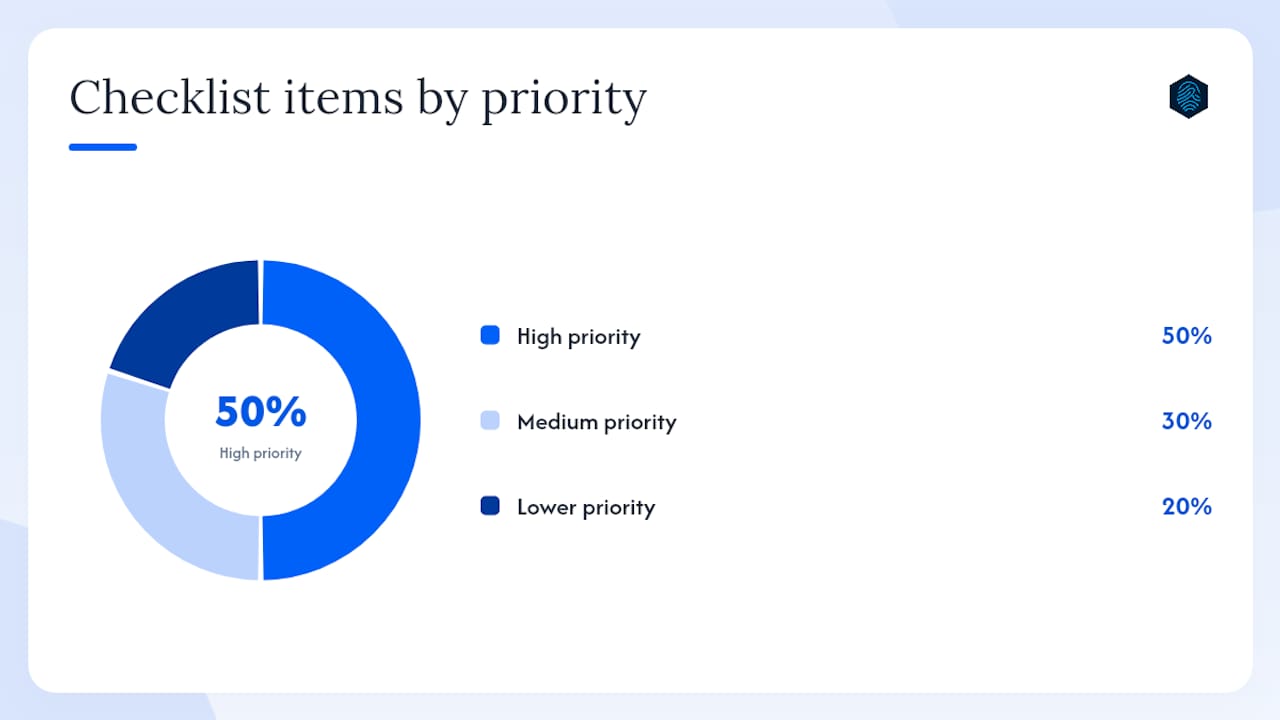
PCMag's independent testing evaluates hosting on support responsiveness, performance, and features, which is a useful framework for benchmarking vendor SLAs against industry norms. Here is a prioritized checklist built for marketing teams.
High priority (evaluate these first):
- Uptime SLA. Require 99.9% or better in writing. Ask what the compensation policy is for downtime below that threshold.
- Performance stack. Confirm LiteSpeed or Nginx, server-side caching (LSCache or similar), CDN integration, and PHP8 support. Ask for a benchmark or test environment.
- Staging environment. Non-negotiable for any team running A/B tests or deploying campaign updates. Ask how many staging sites are included and whether they are one-click.
- Backup and restore. Daily automated backups are table stakes. The real question: how long does a full restore take, and can you test it in staging before you need it?
- Support response time. Ask for the median first-response time on live chat and tickets. A vendor who cannot answer this question is a red flag.
Medium priority:
- CDN configuration. Is CDN included, or is it an add-on? Can you configure cache rules per URL or page type?
- Security. Managed WAF, malware scanning, and SSL are standard. Ask whether security updates are applied automatically or require your action.
- Scalability. How does the host handle a sudden traffic spike from a viral campaign or a big email send? Ask whether scaling is automatic or manual.
Lower priority (but worth confirming):
- Control panel. cPanel, Plesk, or a proprietary dashboard. Matters for team access and workflow, not performance.
- Domain and SSL management. Bundled or separate billing? Affects total cost of ownership.
Red flags to walk away from:
- No staging environment included at any plan level
- Backup restore time measured in days, not hours
- Support only via ticket with no live chat option
- No clear answer on how traffic spikes are handled
- Per-contact or per-seat billing for any included marketing tool
What features should you test before committing to a host?
Features on a sales page and features in production are two different things.
The table below maps the features that matter most to marketers to the specific use cases they support, plus what to verify during a trial.
| Feature | Marketing use case | What to test during trial |
|---|---|---|
| Staging environment | Campaign updates, A/B test deploys, plugin changes | Push a change to staging, verify it, push to live |
| One-click rollback | Recover from a bad deploy before a campaign goes live | Roll back a staging change and confirm the restore |
| LiteSpeed + LSCache | Page speed for SEO and paid landing pages | Run GTmetrix or PageSpeed Insights before and after enabling cache |
| CDN integration | Global audience reach, campaign landing page speed | Use a tool like Pingdom from multiple locations to confirm CDN is active |
| Automated daily backups | Data protection, fast recovery from errors | Request a test restore to staging and time it |
| WAF (Web Application Firewall) | Security for high-traffic campaign pages | Ask vendor for WAF rule set details and update frequency |
| Performance metrics / logs | Diagnosing slow pages, monitoring campaign traffic | Check whether server logs and performance dashboards are accessible without a support ticket |
| PHP8 + HTTP/2 | Compatibility with modern plugins, faster asset loading | Confirm PHP version in the control panel; run a browser waterfall test |
Use-case callouts:
- Lead-gen landing pages — CDN and LiteSpeed caching are the highest-leverage features. A page that loads in under 1.5 seconds on mobile converts measurably better than one that takes 3 seconds.
For teams using Elementor, caching compatibility is worth specific attention. Elementor's active development community means frequent updates, and some caching configurations for Elementor require specific exclusion rules to avoid breaking dynamic elements. Test this during your trial, not after launch.
Pro Tip: Never accept a vendor's backup claim at face value. During your trial, request a full restore to a staging environment and time it yourself. A backup that takes 18 hours to restore is not useful during a campaign crisis.
What does a realistic migration actually look like?
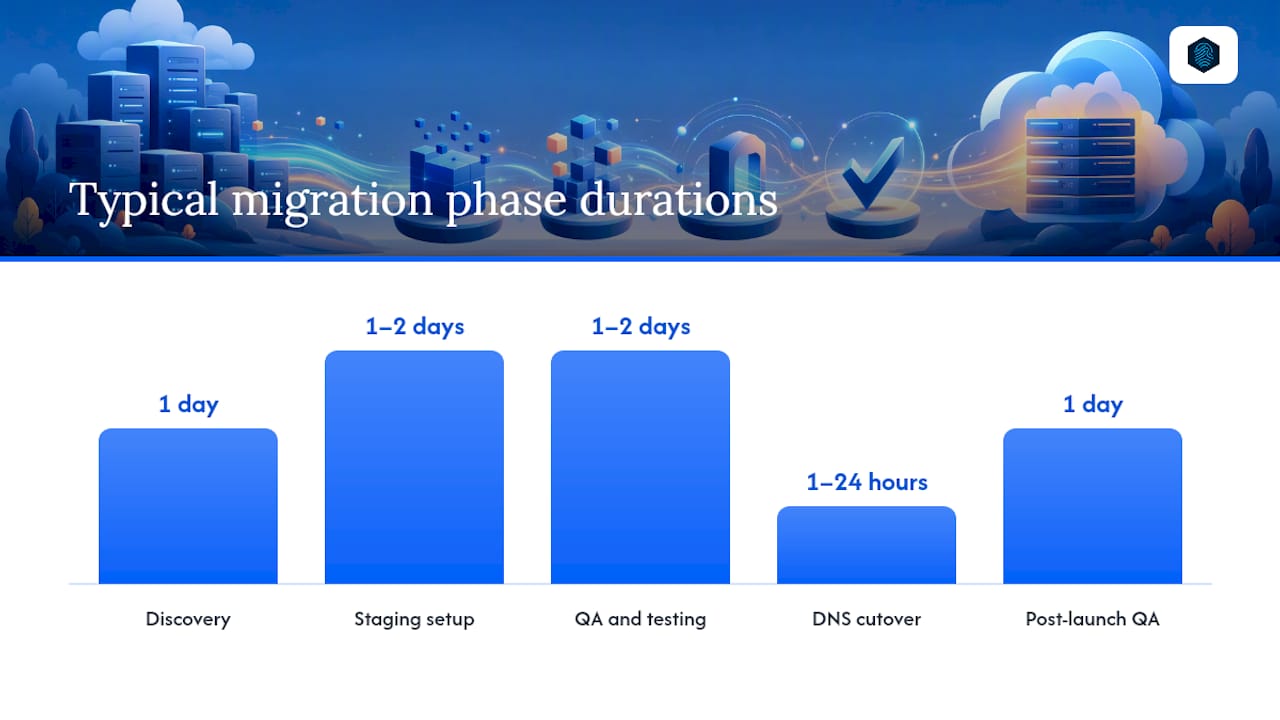
Most small agency migrations and single-site moves complete in 3–7 days with a standard checklist. Complex ecommerce migrations or multi-site moves can run 2–4 weeks. Here is what the timeline actually looks like:
| Phase | Tasks | Typical duration |
|---|---|---|
| Discovery | Audit current site, plugins, database size, custom integrations | 1 day |
| Staging setup | Migrate files and database to staging environment, test functionality | 1–2 days |
| QA and testing | Check forms, checkout, redirects, page speed, plugin compatibility | 1–2 days |
| DNS cutover | Update nameservers or A records, monitor propagation | 1–24 hours |
| Post-launch QA | Verify SSL, CDN, caching, analytics, and form tracking | 1 day |
inSave Hosting includes free migration as part of its plans, which removes the most common cost driver for straightforward WordPress moves.
Cost drivers that extend timelines or add fees:
- Custom database integrations or non-standard CMS setups
- Ecommerce stores with large product catalogs or payment gateway configurations
- Multiple sites migrating simultaneously
- Premium add-ons like wildcard SSL for multi-subdomain agency setups
- Domain transfers requiring registrar coordination
Pro Tip: Keep your old hosting account active for at least 72 hours after DNS cutover. Propagation is not instant, and some visitors will still hit the old server during that window. Canceling early risks serving a broken site to a portion of your audience.
For agencies managing multiple client migrations, the managed WordPress hosting for agencies guide covers parallel migration workflows and how to sequence DNS cutovers to minimize client-facing downtime.
Why inSave Hosting works for marketing teams
inSave Hosting is built for the use case this article describes: a marketing team or small agency that needs reliable, fast hosting without a dedicated sysadmin. The feature set maps directly to marketing priorities.
| inSave Hosting feature | Marketing need it solves |
|---|---|
| 99.9% uptime SLA | Campaign reliability, paid traffic protection |
| LiteSpeed + LSCache | Core Web Vitals, landing page conversion rate |
| Free CDN integration | Global campaign reach, consistent load times |
| Free migration | Zero-cost move from current host, no downtime risk |
| Staging environments | Safe campaign deploys, A/B test management |
| Managed security + WAF | Protection during high-traffic campaign periods |
| Daily automated backups | Fast recovery from errors, data protection |
| Free SSL | Trust signals, HTTPS requirement for paid campaigns |
| One-click WordPress install | Fast site setup for new campaigns or client sites |
The advanced hosting technology stack at inSave, including HTTP/2, PHP8, and MariaDB, means the server layer is not the bottleneck when you are trying to push a campaign live quickly.
What this looks like in practice: A digital marketing agency managing eight client WordPress sites migrated to inSave Hosting and used the staging environment to test a major theme update across all sites before pushing to production. The managed security layer flagged and blocked a brute-force attempt during a high-traffic product launch. Daily backups meant a plugin conflict that broke a client's checkout page was resolved with a single restore, not an emergency developer call. The agency's monthly hosting cost stayed flat regardless of traffic volume during the launch.
To start a migration or evaluate plans for your team, visit inSave Hosting's WordPress hosting page or contact the team directly.
Key Takeaways
Managed hosting is a marketing infrastructure decision: the right platform directly affects your conversion rates, campaign uptime, and SEO performance, and inSave Hosting delivers the feature set most marketing teams need at a predictable price.
| Point | Details |
|---|---|
| Hosting affects marketing KPIs | Page speed, uptime, and CDN coverage directly impact SEO rankings, paid campaign conversion, and A/B test validity. |
| Match hosting type to use case | Managed WordPress fits most agencies; managed cloud suits high-traffic or ecommerce; self-hosted martech fits data-ownership needs. |
| Test before you commit | Verify staging, backup restore speed, and CDN activation during your trial, not after launch. |
| Migration takes 3–7 days | Most single-site WordPress moves complete within a week; free migration from inSave Hosting removes the main cost driver. |
| inSave Hosting for marketers | Pairs LiteSpeed, CDN, staging, managed security, and 99.9% uptime with fixed pricing and free migration for marketing teams. |
Hosting decisions belong in the marketing conversation
Most marketing teams treat hosting as an IT line item, something to hand off and forget. That is the wrong frame, and it costs real money.
The teams I see make the best hosting decisions are the ones who treat uptime and page speed the same way they treat ad spend efficiency: as a variable they actively manage, not a fixed cost they accept. When you are running paid campaigns, every second of load time and every minute of downtime has a dollar value attached to it. A host that saves you $20 a month but adds 800 milliseconds to your landing page load time is not a bargain.
The per-contact SaaS pricing model deserves more scrutiny than it usually gets. Marketing automation platforms that charge by contact count create a perverse incentive: your hosting cost rises as your marketing succeeds. Fixed-cost managed hosting, especially for teams willing to self-host tools like Mautic or Matomo, breaks that dynamic entirely. You own the data, the price does not move, and you are not penalized for list growth.
On support quality: the right question is not "do they have 24/7 support?" It is "can their support team tell me why my cache is not invalidating after a plugin update?" Generic hosting support is fine for generic problems. Marketing teams hit specific, campaign-critical issues at the worst possible times. A support team that understands WordPress caching, CDN configuration, and staging workflows is worth paying for.
inSave Hosting plans built for marketing teams
inSave Hosting gives marketing teams and agencies a direct path from evaluation to production: WordPress-optimized hosting plans with LiteSpeed, LSCache, free CDN, staging environments, managed security, and 99.9% uptime, all included without per-contact pricing or surprise overage fees.

Free migration is included on qualifying plans, so moving from your current host does not require a budget line or a developer retainer. Plans cover everything from single-site marketing setups to multi-site agency portfolios, with shared hosting options for teams that want an affordable entry point and VPS or cloud servers for campaigns that need burst capacity.
The simplest next step: review the WordPress hosting plans to match your site count and traffic profile, or contact the inSave Hosting team to scope a free migration for your current setup.
Useful sources and further reading
The claims and recommendations in this article draw on the following sources. Each is worth bookmarking for ongoing reference.
- 10 Best Web Hosting Services of 2026 – Forbes Advisor
- The Best Web Hosting Services We've Tested for 2026 | PCMag
- Hosting for Marketing Teams | Self-hosted Martech | Elestio
- Free Web Hosting | Launch Your Website Today
- wordpress.org
- Web Hosting, Domain Names, WordPress & More - inSave Hosting
- How hosting fuels your digital marketing success
FAQ
What makes a managed hosting platform good for marketers?
The combination of fast server technology (LiteSpeed, CDN), staging environments, automated backups, and managed security lets marketing teams deploy and test campaigns without relying on a developer for every infrastructure task.
How does hosting speed affect paid advertising performance?
Slower page load times raise bounce rates on paid landing pages, which increases cost-per-acquisition and can lower Google Ads Quality Scores. A host with LiteSpeed caching and CDN integration reduces load time and protects paid campaign ROI.
Does inSave Hosting include free migration?
Yes, inSave Hosting includes free migration on qualifying plans, covering the transfer of files, databases, and WordPress configurations from your current host to inSave's infrastructure.
How long does a typical WordPress site migration take?
Most single-site WordPress migrations complete in 3–7 days, covering staging setup, QA, DNS cutover, and post-launch verification. Complex ecommerce or multi-site moves can take 2–4 weeks depending on custom integrations.
What is the difference between managed WordPress hosting and platform hosting?
Managed WordPress hosting gives you a portable WordPress installation on managed infrastructure with full data ownership. Platform hosting, like a hosted CMS ecosystem, bundles hosting with proprietary tools but creates vendor lock-in that makes future migrations significantly harder.