
TL;DR:
- LiteSpeed Cache is a server-integrated page caching engine that serves cached pages from memory, eliminating PHP and database queries for faster response times. It offers advanced features like smart purging, vary conditions, and ESI, optimizing dynamic website performance. Proper configuration and hosting on LiteSpeed servers ensure full-page caching, significantly improving site speed and SEO.
LiteSpeed Cache (LSCache) is a server-level page caching engine built directly into LiteSpeed Web Server that serves cached pages from memory without invoking PHP or database queries. That single architectural decision separates LSCache from every application-level cache on the market. Sites running on LiteSpeed with LSCache active respond in microseconds rather than the hundreds of milliseconds a dynamic PHP request typically requires. For web developers, digital marketers, and website owners who care about speed, SEO, and user retention, understanding what is LSCache is the first step toward a measurably faster site.
What is LSCache and how does it work at the server level?
LSCache is a full-page cache engine embedded inside the LiteSpeed Web Server process itself. When a visitor requests a page, LSCache checks whether a valid cached copy exists. If it does, the server returns that copy directly from memory. No PHP execution. No MySQL query. No waiting.

This is called a cache hit. A cache miss occurs when no cached copy exists, usually on the first request or after the cache expires. On a miss, LiteSpeed generates the page normally, stores the result in cache, and serves it. Every subsequent request for that page becomes a hit until the cache expires or gets purged.
Cache lifetime is controlled by a setting called TTL (time to live). A TTL of 3,600 seconds means the cached version of a page stays valid for one hour. After that, the next request triggers a fresh generation. You can set different TTL values for different content types, giving static pages a long TTL and frequently updated pages a shorter one.
LSCache also supports vary conditions, which tell the server to store separate cached versions of the same URL. You can vary by device type (desktop vs. mobile), geographic location, currency, or logged-in status. This means a visitor in Germany on a mobile phone can receive a different cached page than a desktop visitor in the United States, all served instantly from memory.
Mobile sites that take over 3 seconds to load lose more than 53% of visitors. That statistic makes a strong case for server-level caching as a baseline requirement, not a nice-to-have feature.
Pro Tip: Check your server's response headers in Chrome DevTools under the Network tab. Look for X-LiteSpeed-Cache: hit to confirm LSCache is actively serving cached pages.
LSCache engine vs. LSCache plugin: what's the difference?
LSCache is fundamentally a server engine, not merely a plugin. The plugins, including the LiteSpeed Cache plugin for WordPress, act as intelligent interfaces that communicate caching rules to the server engine. This distinction matters more than most tutorials acknowledge.
The LiteSpeed Cache WordPress plugin has over 5 million active installations as of 2026. That number reflects widespread adoption, but many of those sites may not be getting full-page caching if their host does not run LiteSpeed Web Server.
Here is why that matters:
- Full-page caching requires the LSCache server module or QUIC.cloud CDN. Without one of those, the plugin cannot cache entire pages.
- Optimization features like CSS minification, JavaScript deferral, image lazy loading, and WebP conversion work independently of the server engine.
- Smart purging is coordinated between the plugin and the server. When you publish a new post in WordPress, the plugin tells the server exactly which cached pages to invalidate.
- Header verification confirms whether caching is active. The X-LiteSpeed-Cache-Control header appears in server responses when the engine is running correctly.
The plugin without the server engine is still useful. It delivers real optimization gains through minification and image compression. But it is not LSCache in the full sense. Full-page caching, the feature that eliminates PHP and database load entirely, requires LiteSpeed on the server side.
Pro Tip: Ask your host directly whether their servers run LiteSpeed Web Server. If they do not, the LSCache plugin's full-page caching will not activate regardless of how you configure it.
Advanced LSCache features that set it apart
LSCache goes well beyond basic page caching. Its advanced features address the real-world complexity of dynamic websites where content changes constantly and different visitors need different versions of the same page.
Smart purge tagging
LSCache's tag-based purging system groups related cached pages so they can be invalidated together without clearing the entire cache. When you update a blog post, LSCache purges that post's page, its category archive, its tag pages, and the homepage feed, all in one targeted operation. The rest of your cache stays intact. This keeps content fresh without the performance penalty of a full cache flush.
ESI (Edge Side Includes)
ESI support lets LSCache serve private content within publicly cached pages. A shopping cart widget showing a logged-in user's item count can be injected dynamically into an otherwise fully cached product page. Without ESI, you would have to exclude the entire page from caching just because one small section is user-specific. With ESI, the page stays cached and only the private fragment is fetched dynamically.
Cache varies and object caching
| Feature | What it does | Best use case |
|---|---|---|
| Device vary | Stores separate cached versions per device type | Sites with distinct mobile layouts |
| Geo vary | Stores versions by visitor location | Multilingual or multi-currency sites |
| Cookie vary | Stores versions based on cookie values | Membership sites with tiered content |
| Object cache | Caches PHP objects and database query results | WooCommerce and data-heavy applications |
Multiple cache versions by device, location, and currency allow personalized delivery at cache speed. Object caching extends these gains to the database layer, reducing query load even when full-page cache misses occur.
Pro Tip: Enable object caching in the LSCache WordPress plugin settings under the "Cache" tab. Pair it with Redis or Memcached on your server for the best results on WooCommerce stores.
How to configure LSCache for WordPress and other CMS platforms
Getting LSCache working correctly takes more than installing the plugin. These steps cover the full configuration path for WordPress, though the logic applies to Joomla, Drupal, and other supported CMS platforms.
- Confirm LiteSpeed is running. Check your hosting control panel or ask your host. Without LiteSpeed Web Server, full-page caching will not activate.
- Install the LiteSpeed Cache plugin. Find it in the WordPress plugin directory. Activate it and open the settings panel.
- Enable full-page caching. Go to LiteSpeed Cache > Cache > Enable Cache. Set your default TTL. A value between 3,600 and 86,400 seconds works for most sites.
- Configure cache exclusions. Exclude checkout pages, account dashboards, and any URL that contains user-specific data. The plugin provides a field for exclusion rules using URL patterns.
- Set up smart purge rules. Enable "Purge All on Upgrade" and configure post-type-specific purge rules so cache clears automatically when content changes.
- Verify caching is active. Open Chrome DevTools, load a page, and check the response headers. The
X-LiteSpeed-Cache: hitvalue confirms the server is serving cached content. - Connect QUIC.cloud CDN. If your host supports it, linking QUIC.cloud extends LSCache to a global CDN layer, reducing latency for international visitors.
Faster page load times directly improve Google Core Web Vitals scores and lower bounce rates. That connection between caching and SEO makes proper LSCache configuration a ranking factor, not just a user experience improvement.
Pro Tip: Use the LSCache crawler feature to pre-warm your cache after a full purge. This prevents the first visitor after a cache clear from experiencing slow load times while the cache rebuilds.
Monitoring performance after configuration is as important as the setup itself. Tools like Page Speed Insights give you a clear picture of how LSCache changes your Core Web Vitals scores before and after configuration changes.
How does LSCache compare to traditional caching methods?
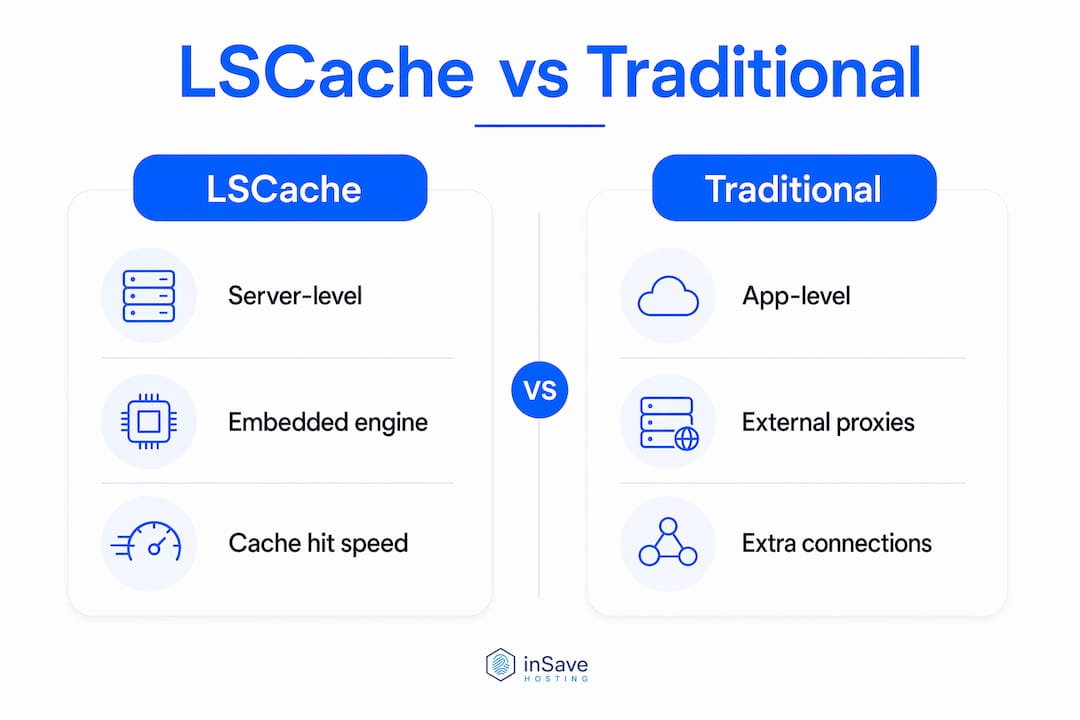
Traditional caching approaches fall into two categories: application-level caches and external reverse proxy caches. Both have real limitations that LSCache's architecture avoids.
Application-level caches, like PHP-based page caching plugins, generate and store HTML files on disk. When a request arrives, PHP still loads, checks for a cached file, and reads it from disk before responding. That process is faster than full dynamic generation, but it still invokes PHP and involves disk I/O.
External reverse proxy caches like Varnish sit in front of the web server and intercept requests before they reach it. This works well, but it adds an extra network hop and requires separate configuration and maintenance. Every request passes through two processes instead of one.
LSCache eliminates extra TCP connections by embedding the cache engine inside the LiteSpeed server process itself. There is no separate proxy layer. The server checks its cache and responds in a single step. This architectural advantage shows up as lower latency, reduced server load, and better performance under traffic spikes.
LSCache is particularly effective for WordPress sites, WooCommerce stores, and any CMS that generates pages dynamically from a database. Static sites benefit less because their pages are already pre-built. For dynamic sites with thousands of pages and frequent updates, LSCache's smart tagging and vary conditions make it the most practical high-performance caching solution available at the server level.
You can read more about how advanced hosting technologies interact with LSCache to compound these performance gains across your entire stack.
Key Takeaways
LSCache is a server-level cache engine built into LiteSpeed Web Server that eliminates PHP and database load by serving pages directly from memory, making it the most architecturally efficient caching solution for dynamic websites.
| Point | Details |
|---|---|
| Server-level architecture | LSCache bypasses PHP and MySQL entirely, serving responses from memory in microseconds. |
| Plugin vs. engine distinction | The LSCache plugin requires LiteSpeed Web Server or QUIC.cloud for full-page caching to activate. |
| Smart purge tagging | Tag-based purging clears only related pages, keeping the rest of the cache intact and fresh. |
| ESI for dynamic content | Edge Side Includes let private content load dynamically inside fully cached public pages. |
| Configuration verification | Check for the X-LiteSpeed-Cache: hit response header to confirm server-level caching is active. |
LSCache in practice: what I've learned after years of deployment
After working with LSCache across dozens of WordPress and WooCommerce sites, the single biggest mistake I see is treating the plugin as the product. Developers install the LiteSpeed Cache plugin, see some optimization scores improve, and assume full-page caching is running. It often is not. The plugin's minification and image features work anywhere, but the cache engine only activates on LiteSpeed-powered servers.
The second thing I have learned is that smart purge tagging is underused. Most site owners leave it at default settings and then complain that their cache is either stale or constantly being cleared. Spending 20 minutes mapping your content types to purge rules pays off immediately in both freshness and cache hit rates.
ESI is the feature I recommend most to WooCommerce developers. Excluding cart and account pages from caching is the standard advice, but ESI lets you cache those pages and inject the dynamic fragments. The performance difference on high-traffic stores is significant.
The future of LSCache points toward tighter integration with edge networks. QUIC.cloud already extends LSCache logic to a CDN layer, and that direction will only accelerate. For developers and marketers building sites in 2026, choosing a host that runs LiteSpeed is not a minor technical preference. It is a performance decision with direct SEO consequences. Pairing LSCache with site speed improvements at the hosting level gives you compounding gains that application-level tools simply cannot match.
— Ihor
inSave Hosting brings LSCache-powered speed to your site
inSave Hosting runs on LiteSpeed Web Server infrastructure with LSCache enabled across its hosting plans. That means full-page caching activates the moment you install the LiteSpeed Cache plugin, with no extra configuration required on the server side.

For WordPress sites, inSave Hosting's WordPress hosting plans include LiteSpeed, LSCache, MariaDB, HTTP/2, and PHP8 out of the box. You get the complete performance stack without managing server software yourself. If you are running a business site or an online store and want caching that actually works at the server level, inSave Hosting's shared hosting plans give you LSCache support at an affordable price point, with free SSL, free CDN integration, and 99.9% uptime included.
FAQ
What is LSCache in simple terms?
LSCache is a caching system built into LiteSpeed Web Server that stores copies of web pages in memory and serves them instantly to visitors without running PHP or querying the database each time.
Does the LSCache plugin work on any hosting?
The plugin's optimization features work on any host, but full-page caching requires LiteSpeed Web Server or QUIC.cloud CDN. Without one of those, the cache engine does not activate.
How do I know if LSCache is working?
Open your browser's developer tools, load a page, and check the response headers. A value of X-LiteSpeed-Cache: hit confirms the server is delivering a cached page.
What does LSCache do for SEO?
LSCache reduces page load times, which directly improves Google Core Web Vitals scores and lowers bounce rates. Faster sites rank better and retain more visitors, making caching a direct SEO factor.
What is the difference between LSCache and Varnish?
Varnish is an external reverse proxy that adds a separate network layer in front of your web server. LSCache is embedded inside LiteSpeed itself, eliminating extra TCP connections and reducing latency by handling caching in a single server process.