
TL;DR:
- Many small business owners misunderstand bandwidth, which directly impacts website speed, uptime, and user experience. Selecting the correct bandwidth, based on analytics and future growth, prevents costly downtime and improves search rankings. Regular monitoring and optimization strategies are essential for maintaining reliable site performance and controlling costs.
Most small business owners pick a hosting plan based on price and storage, then never think about bandwidth again until their site crashes during a product launch or their invoice doubles without warning. Bandwidth is one of the most misunderstood specs in web hosting, yet it directly controls whether your visitors get a fast, reliable experience or walk away frustrated. Choosing too little can tank your site under normal traffic. Choosing too much wastes money every single month. This guide breaks down exactly what bandwidth means, how it affects your business, and how to get it right.
Table of Contents
- Defining bandwidth in hosting: More than a buzzword
- How bandwidth impacts website speed, uptime, and user experience
- Choosing the right bandwidth: Factors, formulas, and myths
- Practical tips to optimize and monitor bandwidth usage
- Why most website owners misunderstand hosting bandwidth
- Ready to optimize your hosting bandwidth?
- Frequently asked questions
Key Takeaways
| Point | Details |
|---|---|
| Bandwidth is data transfer | In hosting, bandwidth is how much data your website can send or receive over a set period. |
| Impacts speed and uptime | Insufficient bandwidth leads to slow page loads and even downtime for your site. |
| Right balance saves money | Estimating your actual bandwidth needs prevents both wasted spending and customer issues. |
| Monitor and optimize | Regularly track usage and apply best practices to keep costs low and performance high. |
Defining bandwidth in hosting: More than a buzzword
With the confusion now clear, we can define what bandwidth in hosting really means and why it matters to your website.
In the simplest terms, bandwidth in web hosting refers to the total amount of data transferred between your website and your visitors over a set period, typically one month. Every time someone loads your homepage, views a product image, or watches a video on your site, data gets sent from your server to their browser. All of that data counts toward your monthly bandwidth allowance.
This is where many people mix things up. Bandwidth is often confused with speed, which describes how fast data moves. Think of it like a highway. Speed is how fast the cars travel. Bandwidth is how many lanes the highway has and how many vehicles can pass through in a day. A narrow, fast highway still jams up if too many cars try to use it at once.
Here is what actually drives your bandwidth consumption:
- Page size: A page heavy with large images or video embeds uses far more bandwidth per visit than a simple text page.
- Number of monthly visitors: More eyes on your site means more data being served.
- Pages viewed per visit: A visitor who browses five pages uses five times more bandwidth than one who reads a single post and leaves.
- File downloads: If visitors download PDFs, software, or media files from your site, each download is a large chunk of your monthly data.
- Media streaming: Embedded video or audio content is one of the fastest ways to burn through bandwidth.
"Getting your bandwidth estimate wrong in either direction costs you money. Too little crashes your site. Too much means you're paying for capacity you'll never use."
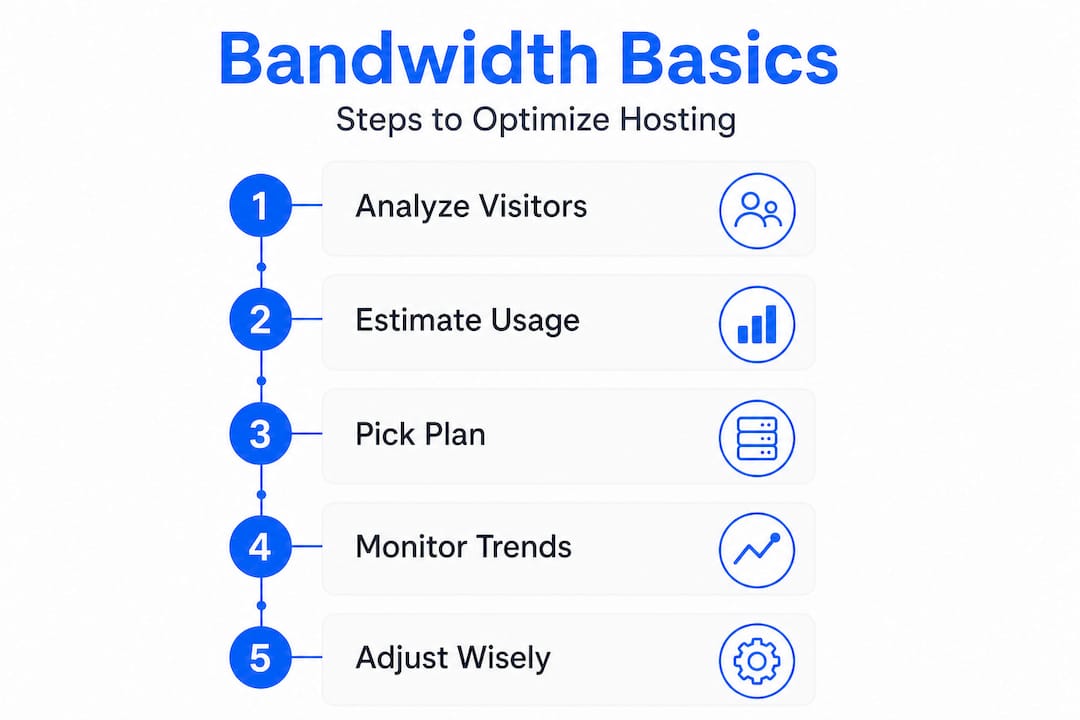
Pro Tip: Use your current web analytics to find your average monthly visitors and the average number of pages each person views. Even a rough estimate is better than guessing when selecting a hosting plan.
How bandwidth impacts website speed, uptime, and user experience
Now that you understand what bandwidth is, let's see how your choices impact your site's real-world performance.
Most people focus on storage when picking a plan, but bandwidth is actually the spec that has the most direct impact on day-to-day performance. The connection between website speed and hosting goes deeper than most business owners realize. When you approach your bandwidth ceiling, your server starts throttling responses or refusing connections entirely.
Here is what typically happens at each stage:
| Bandwidth usage level | What visitors experience | Business impact |
|---|---|---|
| Under 60% of limit | Fast, consistent load times | Positive user experience |
| 60% to 85% of limit | Occasional slowdowns | Minor bounce rate increase |
| 85% to 100% of limit | Noticeable lag, partial page loads | Significant drop in conversions |
| Over limit | Site goes offline or charges spike | Lost revenue and reputation damage |
The consequences of hitting your bandwidth ceiling stretch well beyond a slow load time. Hosting uptime explained is a topic that most guides cover in terms of server reliability, but bandwidth exhaustion is one of the hidden causes of unexpected downtime that almost nobody talks about.
The ripple effects on your business are real and measurable:
- SEO ranking drops: Google uses page speed as a ranking factor. A bandwidth-starved site that loads slowly will slide down the search results over time.
- Higher bounce rates: Visitors leave pages that take more than three seconds to load, meaning your ad spend and SEO work goes to waste if bandwidth is throttling the experience.
- Lower conversion rates: Every second of added delay can reduce conversions by a measurable percentage, making bandwidth directly tied to revenue.
- Damaged brand reputation: A site that goes down during a sale or peak season is hard to recover from in customers' minds.
On the flip side, overbuying bandwidth has its own cost. Many small businesses pay for enterprise-level bandwidth on a five-page brochure website. Those funds could go toward better content, marketing, or security features. Reviewing hosting optimization tips regularly helps you stay balanced and not overpay month after month.
Choosing the right bandwidth: Factors, formulas, and myths

After understanding how crucial the right bandwidth is, the next step is knowing how to calculate your needs and avoid common selection pitfalls.
You do not need a math degree to estimate your bandwidth needs. A basic formula works well as a starting point:
Monthly bandwidth needed = monthly visitors × average page size (MB) × average pages per visit
For example, if your site gets 5,000 visitors per month, your average page size is 2 MB, and visitors view 3 pages each, your estimate would be:
5,000 × 2 MB × 3 = 30,000 MB, or roughly 30 GB per month
That is a very manageable number for most small business sites. But add a popular blog post that gets shared widely, or run a limited-time sale, and that number can spike fast. A good rule is to add a 40% buffer on top of your estimate to account for growth and unexpected traffic surges.
How different hosting types handle bandwidth
Understanding dedicated vs shared hosting helps you see why bandwidth works differently across plan types.
- Shared hosting: You share server resources, including bandwidth, with dozens or hundreds of other sites. This works fine for most small sites but can create unpredictable slowdowns if a neighbor's site suddenly goes viral.
- VPS hosting (Virtual Private Server): You get a dedicated slice of bandwidth that is not shared. This gives you more consistency, especially under traffic spikes.
- Dedicated hosting: The entire server's bandwidth belongs to you. Ideal for high-traffic stores, media-heavy sites, or applications that cannot tolerate downtime.
- Cloud hosting: Bandwidth scales automatically with traffic, which removes the ceiling problem but can lead to surprise billing if traffic spikes unexpectedly.
When choosing web hosting, match the plan type to your actual use case, not what sounds most impressive on a spec sheet.
The "unlimited bandwidth" myth
This claim appears on countless hosting plans and is almost always misleading. Nearly every provider that advertises unlimited bandwidth enforces what is called a fair usage policy. If your site exceeds a certain threshold of data transfer, your provider may throttle your site, suspend your account, or charge overage fees.
Pro Tip: Before signing any hosting contract, look for the fair usage policy buried in the terms of service. Ask the provider directly: "What happens if I transfer 500 GB in a month?" Their answer tells you everything about how they actually handle bandwidth.
Predictable, capped plans are often a better choice for businesses because they come with guaranteed allocations and clear terms. Pair this with a scalable hosting guide strategy, and you can grow without nasty surprises.
Practical tips to optimize and monitor bandwidth usage
Once you know what plan fits your needs, it is time to keep your site running smoothly and costs under control with smart management strategies.
Monitoring and optimization are not one-time tasks. They are ongoing habits that protect your site and your budget.
Monitoring your bandwidth:
- Log into your hosting control panel (cPanel, Plesk, or custom dashboards) regularly to check your monthly data transfer usage. Most providers show this as a usage graph.
- Use Google Analytics or a similar tool to track page views, bounce rates, and traffic sources. Sudden spikes in traffic are useful but can overwhelm a small plan.
- Set up usage alerts if your host supports them. Getting a warning at 75% of your limit gives you time to react before anything breaks.
- Review traffic from unusual geographic regions. Bot traffic and scrapers can silently eat through your bandwidth without generating any real business value.
Bandwidth-saving best practices:
- Compress images before uploading. Tools like TinyPNG reduce file sizes by up to 80% without visible quality loss. This is the single highest-impact change most sites can make.
- Enable browser caching so that returning visitors load your pages from their local storage instead of pulling fresh data from your server every time.
- Use a content delivery network (CDN). A CDN stores copies of your site assets on servers around the world. When a visitor in a distant location loads your site, the CDN serves the files from the nearest server, reducing the data your main server has to transfer.
- Minify CSS, JavaScript, and HTML files. Removing unnecessary spaces and characters from your code reduces file sizes, which adds up quickly across thousands of page loads.
- Lazy load images and videos. This means content only loads when a visitor scrolls to it, reducing initial page weight.
Technologies like those used in advanced hosting platforms, including LiteSpeed, LSCache, and HTTP/2, handle many of these optimizations automatically at the server level, which is a major advantage for non-technical business owners.
Identifying and handling spikes:
Bandwidth spikes are not always bad. A viral post or a successful ad campaign can send a wave of visitors. But malicious traffic, like a DDoS attack or a scraper bot, can also cause spikes. If you notice unusual bandwidth consumption without a corresponding increase in legitimate conversions, investigate your traffic logs. Many reliable hosting providers include malware scanning and bot protection that helps filter out bad traffic before it consumes your bandwidth.
Pro Tip: When evaluating a plan upgrade, look at your bandwidth trends over three to six months rather than reacting to a single spike. Consistent growth approaching your limit is a far more reliable signal that it is time to scale up.
Why most website owners misunderstand hosting bandwidth
Here is the uncomfortable truth: hosting providers benefit from bandwidth confusion. "Unlimited" plans generate sign-ups because they sound worry-free. Overage charges generate revenue from customers who did not read the fine print. And because most small business owners never hit a bandwidth problem during the first year on a low-traffic site, they assume bandwidth is not something they need to actively manage.
Then their site grows. Or they run a promotion. Or a blog post gets picked up by a major publication. And suddenly, the plan that worked fine starts failing at the worst possible moment.
We have seen this pattern repeatedly. A small e-commerce store runs a Black Friday deal, sends an email to their list of 20,000 subscribers, and their site collapses within an hour because their shared plan never anticipated that level of simultaneous traffic. The lost sales and the customer emails that followed cost far more than a proper hosting upgrade would have.
The smarter approach is to base your bandwidth decisions on data, not marketing claims. Look at your analytics, apply the formula covered earlier, add a growth buffer, and pick a plan that gives you predictable, guaranteed capacity. Focus on website reliability as a business investment, not a technical checkbox.
Small businesses often operate on thin margins where every visitor matters. Treating bandwidth as a core part of your website strategy, not an afterthought, is one of the clearest ways to protect both your customer experience and your bottom line.
Ready to optimize your hosting bandwidth?
Bandwidth affects every single visitor interaction on your website. Now that you understand how it works, you are far better equipped to pick a plan that protects your site and your revenue.

At InSave Hosting, our plans are built around what real SMBs actually need, with transparent bandwidth allocations, LiteSpeed servers, free CDN integration, and no hidden overage surprises. Whether you are starting fresh with affordable shared hosting or need performance-focused WordPress hosting, our team can help you match the right plan to your actual traffic and goals. Explore your options today and stop leaving your site's performance to chance.
Frequently asked questions
How is hosting bandwidth measured?
Hosting bandwidth is measured in gigabytes (GB) or terabytes (TB) per month, representing the total data transferred between your server and your visitors during that billing period.
What happens if I exceed my hosting bandwidth limit?
Depending on your provider's policy, exceeding your limit may cause your site to go offline, experience severe slowdowns, or trigger additional charges on your next bill.
Is unlimited bandwidth truly unlimited?
Almost no "unlimited bandwidth" plan is genuinely unlimited. Most providers enforce fair usage policies that throttle or suspend sites that consume excessively high amounts of data.
Can bandwidth affect my site's ranking on Google?
Bandwidth alone is not a direct Google ranking factor, but when bandwidth shortages cause slow load times or downtime, those performance issues directly hurt your search rankings and user engagement metrics.