
TL;DR:
- Proper scalability requires deliberate infrastructure design, not just cloud service claims.
- Vertical scaling suits small predictably trafficked sites, while horizontal scaling supports high, unpredictable loads.
- Database bottlenecks are the most common limiting factor in scaling efforts.
Most business owners assume that signing up for cloud hosting means their website can handle any traffic surge automatically. That assumption is wrong, and it can cost you customers. Scalability in hosting is the ability of your infrastructure to handle increased traffic, data, and workloads by dynamically adjusting resources while maintaining performance and cost-efficiency. But "dynamic" does not mean "automatic by default." Real scalability is built, not assumed. This article walks you through what scalability actually means, the methodologies behind it, the technologies that make it work, and the pitfalls that catch businesses off guard.
Table of Contents
- Understanding web hosting scalability: What it means and why it matters
- Core methodologies: Vertical vs. horizontal scaling explained
- Key components and technologies for scalable hosting
- Common pitfalls and real-world case studies
- The uncomfortable truth about web hosting scalability
- Scalable web hosting solutions from inSave
- Frequently asked questions
Key Takeaways
| Point | Details |
|---|---|
| Scalability is essential | Scalable hosting protects your site as traffic grows and ensures consistent performance. |
| Choose the right approach | Vertical for small, horizontal for large or unpredictable loads; hybrid is often best. |
| Spot common pitfalls | Watch for database bottlenecks and misconfigured triggers that can slow your growth. |
| Technology drives scalability | Key tools include load balancers, caching, autoscaling, and database read replicas. |
| Case studies prove savings | Brands like Mailchimp and Reco improved performance and cut costs with scalable hosting. |
Understanding web hosting scalability: What it means and why it matters
Scalability is one of those words that gets thrown around in hosting sales pages without much explanation. Strip away the marketing language, and it comes down to one question: can your hosting keep up when your business grows?
A fixed hosting environment gives you a set amount of CPU, RAM, and storage. When traffic spikes, those resources hit a ceiling and your site slows down or crashes. A scalable environment adjusts those resources up or down based on demand. That flexibility is what separates a hosting setup that supports growth from one that fights it.
Why does this matter for your business? Consider what happens during a product launch, a viral social media post, or a seasonal sale. Traffic can multiply in minutes. Without scalable infrastructure, that moment of opportunity becomes a moment of failure. Visitors bounce, conversions drop, and your brand takes a hit that takes weeks to recover from.
Here is what scalable hosting actually supports:
- Traffic spikes without downtime or slowdowns
- Resource efficiency so you only pay for what you use
- Business continuity during unexpected demand surges
- Long-term growth without migrating to a new host every year
- Consistent user experience regardless of how many visitors arrive at once
The distinction between flexible and fixed hosting is not just technical. It is a business decision. A fixed plan might be cheaper today, but if your site goes down during your biggest sales event, that savings evaporates fast.
For small and medium-sized businesses, hosting optimization is often the fastest path to better performance without a full infrastructure overhaul. And if you are looking at real-world examples, understanding reliable hosting for small business setups shows you what scalable solutions look like in practice, not just in theory.
The bottom line: scalability is not a luxury feature. It is the foundation of a hosting environment that can actually support your growth without requiring you to rebuild from scratch every time your audience expands.
Core methodologies: Vertical vs. horizontal scaling explained
Once you understand what scalability means, the next step is knowing how it works. There are two core approaches, and choosing the right one depends on your business size, budget, and traffic patterns.
Vertical and horizontal scaling are the two primary methodologies. Vertical scaling means upgrading the resources on a single server, more CPU, more RAM, faster storage. Horizontal scaling means adding more servers or instances to distribute the load.
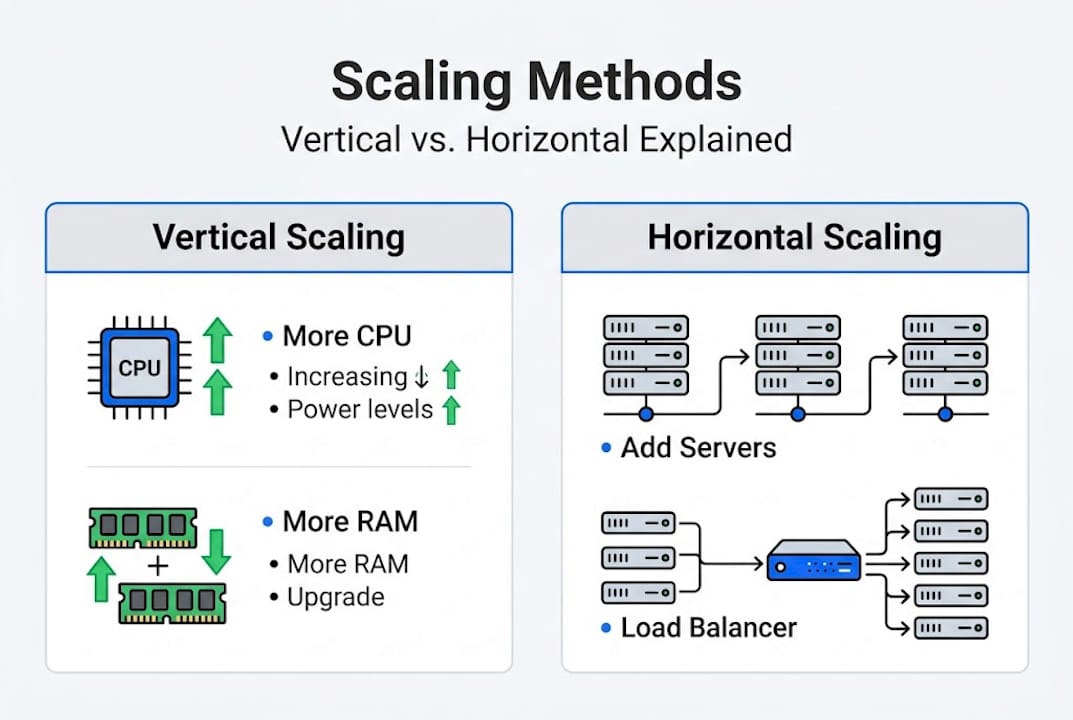
| Feature | Vertical scaling | Horizontal scaling |
|---|---|---|
| How it works | Upgrade one server | Add more servers |
| Complexity | Low | Higher |
| Cost to start | Lower | Higher |
| Ceiling | Physical hardware limit | Nearly unlimited |
| Resilience | Single point of failure | Redundant by design |
| Best for | Early-stage growth | High-traffic, enterprise |
Here is how to think about which approach fits your situation:
- Start with vertical scaling if you are a small business with predictable traffic. It is simpler, cheaper to set up, and requires no changes to your application architecture.
- Move to horizontal scaling when you hit the ceiling of your server's hardware or when uptime becomes non-negotiable.
- Use a hybrid approach where you scale vertically first, then distribute horizontally as demand grows. Most successful businesses follow this path.
- Evaluate your traffic patterns before committing. Steady traffic favors vertical; unpredictable spikes favor horizontal with autoscaling.
- Factor in resilience needs. Horizontal scaling eliminates single points of failure, which matters more as your revenue depends on uptime.
One thing most articles skip: cloud is not automatically scalable. Cloud providers impose quotas, cold starts delay new instances, and some companies have actually moved workloads back on-premises for stable loads, saving millions in the process. The cloud is a tool, not a guarantee.
Pro Tip: If your traffic is consistent and predictable, vertical scaling on a well-optimized server can outperform a poorly configured cloud setup at a fraction of the cost. Complexity is not always better.
Understanding cloud hosting benefits helps you weigh these trade-offs with real numbers, not assumptions.
Key components and technologies for scalable hosting
Scaling methodology tells you the strategy. Technology tells you the tools. Here are the building blocks that make scalable hosting actually function.
Load balancing is the traffic director. It distributes incoming requests across multiple servers so no single machine gets overwhelmed. The two most common strategies are round-robin (requests rotate evenly across servers) and least connections (requests go to the server with the fewest active connections). Least connections is smarter for uneven workloads.

Caching is your speed multiplier. Tools like Redis store frequently accessed data in memory so your server does not have to regenerate it on every request. CDN caching and Redis together can dramatically reduce server load and cut page load times. InSave Hosting includes free CDN integration and LiteSpeed with LSCache, which handles this at the server level without extra configuration.
Database scaling is where most businesses underestimate the challenge. Your application might autoscale perfectly, but if your database cannot keep up, everything stalls. Database bottlenecks are the most common hidden constraint in scaling. Plan for read replicas (copies of your database that handle read requests) and sharding (splitting data across multiple databases) before you need them, not after.
Autoscaling uses metrics to trigger resource adjustments automatically. Common triggers include:
- CPU usage above a threshold
- Response latency exceeding a target
- Queue depth growing beyond a limit
- Memory consumption hitting a ceiling
Here is a quick SCALE checklist for evaluating your hosting setup:
| Component | What to check |
|---|---|
| Servers | Can resources be added without downtime? |
| Caching | Is Redis or CDN caching active? |
| Autoscaling | Are triggers set for CPU, latency, and queues? |
| Load balancing | Is traffic distributed across multiple nodes? |
| Expandable DB | Are read replicas or sharding planned? |
Pro Tip: Do not rely on CPU usage alone as your autoscaling trigger. I/O-heavy workloads can saturate your database long before CPU metrics spike. Add latency and queue depth to your trigger rules.
For a full breakdown of what to look for in a hosting plan, the hosting features list covers what actually matters for WordPress and SMB sites in 2026.
Common pitfalls and real-world case studies
Knowing the theory is one thing. Seeing where it breaks down in practice is where the real education happens.
Here are the most common scalability pitfalls businesses run into:
- Cold starts: When autoscaling spins up a new server instance, there is a delay before it is ready to serve traffic. During a sudden spike, those seconds of delay translate to failed requests and frustrated users.
- Database bottlenecks: Your app servers scale, but your database does not. Suddenly, all those extra servers are waiting on a single overloaded database. This is the most common failure mode.
- Poor trigger configuration: CPU-only triggers miss I/O-bound problems entirely. A site can be crawling under database load while CPU metrics look perfectly healthy.
- Session stickiness issues: In horizontal scaling, users can get routed to different servers on each request, breaking sessions unless your setup handles this correctly.
Real-world results show what good scaling architecture delivers:
"Mailchimp achieved a 60% performance increase and 40% cost reduction after migrating to a properly architected cloud environment. Reco cut GCP costs by 21% using KEDA-based autoscaling tied to real workload metrics."
These results did not happen by accident. They came from deliberate architecture decisions, the right triggers, proper database planning, and a willingness to test under real load rather than synthetic benchmarks.
For context on how cloud hosting performance affects your bottom line, the numbers are clear: performance and cost are directly linked when your infrastructure is properly configured. And if you want to understand how hosting impacts website speed at the infrastructure level, the connection between server response time and conversion rate is well documented.
The uncomfortable truth about web hosting scalability
Here is what most hosting articles will not tell you: infinite scalability is a sales pitch, not a technical reality.
Every cloud provider imposes quotas and throttling limits. Autoscaling does not activate instantly. Cold starts introduce latency. And the database, almost always, becomes the constraint that no amount of horizontal scaling can fix on its own.
We have seen businesses invest heavily in cloud infrastructure, configure autoscaling, and still crash during traffic spikes because nobody tested with real workloads. Synthetic benchmarks look great in a sales demo. Real traffic is messier, more unpredictable, and exposes every weak point in your architecture.
The businesses that scale successfully treat it as an ongoing practice, not a one-time setup. They test regularly, monitor database performance separately from app performance, and use hybrid approaches that match their actual traffic patterns rather than chasing the most sophisticated solution.
If you are choosing web hosting for a growing business, the right question is not "does this host offer scalability?" It is "what does scaling actually look like on this platform, and what are the limits?"
Scalable web hosting solutions from inSave
Now that you have a clear picture of what scalability requires, the next step is finding a hosting partner that supports your growth without overcomplicating the process.

InSave Hosting is built for small and medium-sized businesses that need reliable, performance-optimized hosting with room to grow. With LiteSpeed servers, free CDN integration, LSCache, and 99.9% uptime, the infrastructure is already optimized for speed and reliability. Whether you are starting with shared hosting or need the flexibility of WordPress hosting, InSave makes it straightforward to scale your site as your audience grows, without the complexity of managing it all yourself.
Frequently asked questions
How do I know if my current hosting is scalable?
Check if your hosting plan supports autoscaling, resource adjustment, and load balancing. A scalable hosting setup handles increased traffic and workloads by dynamically adjusting resources without manual intervention.
Is cloud hosting always scalable automatically?
No. Cloud hosting can face hard limits including quotas, throttling, and cold start delays. Real scalability requires correct configuration, tested triggers, and workload-specific planning.
What's the biggest scalability bottleneck for most websites?
Databases are almost always the constraint. Even when app servers scale perfectly, a single overloaded database stalls everything. Planning read replicas and sharding early prevents this from becoming a crisis.
Can scaling improve website speed and reliability?
Yes, significantly. With proper load balancing and caching in place, scaling distributes traffic efficiently, prevents bottlenecks, and keeps your site responsive even during high-demand periods.