
TL;DR:
- Website scalability is the capacity of a website to grow traffic, data, and features without compromising performance or reliability. Many businesses only realize its importance after experiencing site crashes during peak traffic, risking revenue loss and brand damage. Early planning with scalable architecture, caching strategies, and elastic hosting prevents costly rebuilds and ensures seamless growth.
Website scalability is the capacity of your website to handle increasing traffic, data, and feature demands without losing speed, reliability, or functionality. Most business owners only think about this after their site crashes during a product launch or a viral moment. By then, the damage to revenue and brand trust is already done. Understanding website scalability before you need it is the difference between a site that grows with your business and one that collapses under its own success.
What is website scalability and why does it matter?
Website scalability is defined as the ability to grow traffic, data, and features without degrading performance or reliability. A site that lacks scalability will show its limits fast: pages slow to a crawl, checkout processes time out, and users leave. Those aren't just technical failures. They're revenue failures.
The importance of website scalability becomes clear when you consider real-world traffic patterns. A retail site might handle 500 visitors per day on a normal Tuesday, then face 50,000 visitors during a Black Friday sale. A blog that lands on the front page of Reddit can go from 200 readers to 200,000 in under an hour. Without a scalable foundation, both scenarios end the same way: downtime.
Scalability also covers feature growth, not just traffic. As your business adds payment integrations, user accounts, product catalogs, or API connections, each addition puts new demands on your infrastructure. Planning for scalability from early development avoids expensive rebuilds and bottlenecks that compound over time. The websites that scale well are built with growth in mind from day one, not retrofitted after the fact.
What are the main methods of scaling a website?
Two foundational approaches exist: vertical scaling and horizontal scaling. Vertical scaling adds resources to a single machine, such as upgrading CPU, RAM, or storage. Horizontal scaling adds more machines to distribute the load across multiple servers or nodes. Both have real trade-offs, and most production websites eventually use a combination of both.

Vertical scaling: simple but limited
Vertical scaling is the easier path. You upgrade your existing server, and your application keeps running without architectural changes. For small and medium-sized websites, this works well up to a point. The problem is that physical hardware has a ceiling. You can only add so much RAM or processing power to one machine before you hit the limit, and that machine becomes a single point of failure. If it goes down, your entire site goes down.
Horizontal scaling: flexible but complex
Horizontal scaling distributes traffic across multiple servers, which removes the single point of failure and allows theoretically unlimited growth. The trade-off is architectural complexity. Your application must be designed to run across multiple instances simultaneously, which requires stateless services, shared session storage, and load balancers to route traffic intelligently. This is the model used by companies like Amazon and Netflix, but it requires deliberate design decisions from the start.
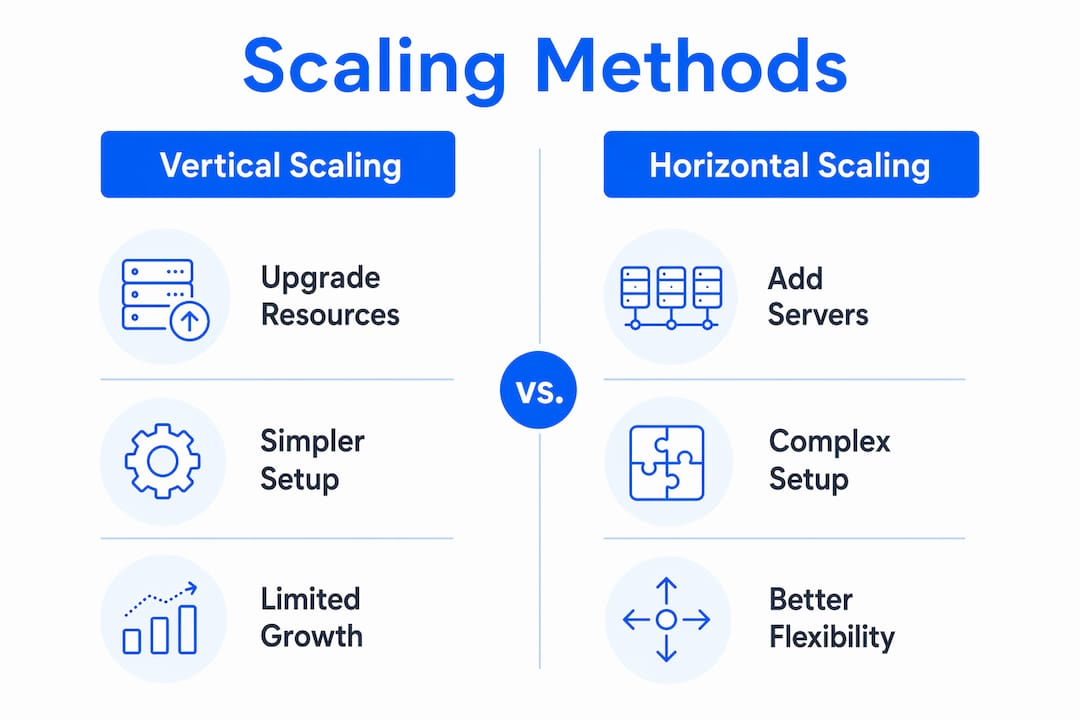
| Factor | Vertical scaling | Horizontal scaling |
|---|---|---|
| Setup complexity | Low | High |
| Cost at small scale | Lower | Higher |
| Upper growth limit | Hard ceiling | Effectively unlimited |
| Failure risk | Single point of failure | Distributed, more resilient |
| Best for | Early-stage or low-traffic sites | High-traffic or rapidly growing sites |
Pro Tip: Exhaust vertical scaling and code-level optimizations before moving to horizontal scaling. Adding servers to a poorly optimized application just distributes the inefficiency across more machines.
How does website architecture enable scalability?
Scalable website architecture is not a single technology. It is a set of design principles that work together to let your site grow without breaking. The most critical principle is stateless service design.
Stateless services allow any server instance to handle any incoming request, because no session data is stored locally on the server. When a user's session data lives on one specific server, that server must handle every subsequent request from that user. This is called a "sticky session," and it kills horizontal scaling flexibility. The fix is to store session state in a shared backing store like Redis or Memcached, so any instance can pick up the request.
Microservices architecture takes this further by breaking your application into independent components that can be scaled separately. If your product search function is under heavy load, you scale that service without touching your checkout or user authentication systems. Microservices allow independent scalability of components, which improves fault isolation and overall flexibility. This is overkill for a small business site, but it becomes valuable as complexity grows.
Caching is where many sites find their biggest performance gains without adding infrastructure. A well-configured caching strategy includes:
- Browser cache: Stores static assets like images, CSS, and JavaScript locally in the user's browser
- CDN (Content Delivery Network): Serves content from edge servers geographically close to the user, cutting latency dramatically
- Reverse proxy cache: Tools like Varnish or Nginx cache full page responses before they reach your application
- Application cache: Redis or Memcached store frequently accessed database query results in memory
- Database query cache: Reduces repeated identical queries hitting your database
Multi-layer caching can reduce backend database load by up to 90 to 99 percent, with latency under 5ms for hot data. That is not a marginal improvement. It means your database handles a fraction of the requests it would otherwise process. For more on how caching integrates with hosting performance, the inSave Hosting guide on caching strategies covers the practical setup in detail.
Database scaling deserves its own attention because it is where most sites eventually hit their hardest limits. Read scaling through replication and caching can grow linearly, but write scaling requires sharding or batching, which is architecturally complex. Adding read replicas handles the majority of database traffic for content-heavy sites. Sharding, which splits data across multiple databases by a partition key, is reserved for sites with extreme write volumes.
Pro Tip: Cache stampedes happen when many cached items expire simultaneously and every request hits the database at once. Strategies like stale-while-revalidate and request coalescing prevent this by serving slightly stale data while the cache refreshes in the background.
What practical steps can business owners take to prepare for scalability?
You do not need to build like Netflix from day one. You do need to make decisions early that avoid locking yourself into an architecture that cannot grow. Here is a practical sequence:
-
Start with scalability in mind during development. Choose frameworks and database designs that support horizontal growth. Avoid storing session state in local memory. Separate your frontend from your backend through a clean API layer.
-
Choose cloud hosting with elastic infrastructure. Providers that offer auto-scaling and load balancing let your site expand capacity automatically during traffic spikes and contract when demand drops. This keeps costs proportional to actual usage.
-
Implement caching at multiple layers. Start with a CDN for static assets, then add Redis or Memcached for database query results. Free CDN integration, as offered by inSave Hosting, gives even small sites the geographic distribution that reduces latency for global visitors.
-
Optimize your database queries before scaling hardware. Missing indexes and inefficient algorithms cause slowdowns that adding more servers cannot fix. A query that scans a full table of one million rows is a code problem, not an infrastructure problem.
-
Automate scaling and provisioning. Manual provisioning causes configuration drift and delays that hurt reliability during traffic spikes. Tools like AWS Auto Scaling, Google Cloud's managed instance groups, or Kubernetes handle this automatically.
-
Monitor performance metrics continuously. Track response times, error rates, database query times, and server CPU and memory usage. Set alerts before problems become outages. Tools like Datadog, New Relic, or even Google PageSpeed Insights give you visibility into where bottlenecks are forming.
For small business owners who want practical performance guidance without deep technical overhead, the inSave Hosting resource on website performance tips covers the most impactful optimizations for SMB sites in 2026.
What are the key challenges when scaling a website?
Scaling introduces complexity that can create new problems if you are not prepared. The most common challenges fall into predictable categories.
- Distributed state management: When your application runs across multiple servers, coordinating shared state becomes difficult. Shopping carts, user sessions, and real-time features all require careful design to work correctly across instances.
- Database write bottlenecks: Read traffic scales relatively easily through replication. Write traffic is harder. A single primary database handling all writes becomes a bottleneck at high volume, and sharding to solve this requires significant architectural changes.
- Cache invalidation errors: Stale cached data can serve incorrect information to users. Designing a clear invalidation strategy from the start prevents hard-to-debug consistency issues later.
- Warning signs of poor scalability: Slowdowns that appear only under load, frequent downtime during traffic spikes, and a pattern of solving performance problems only by upgrading to bigger servers are all signals that your architecture needs attention.
- Premature over-engineering: Building a microservices architecture for a site with 1,000 monthly visitors adds cost and complexity with no benefit. Match your architecture to your actual scale, with a clear path to grow when needed.
Effective scalability requires balancing infrastructure upgrades with software optimizations. The sites that scale most efficiently are the ones that fix code problems first and add hardware second. For a deeper look at how hosting infrastructure supports these decisions, the inSave Hosting article on web hosting scalability explains the server-side mechanics in practical terms.
Key takeaways
Website scalability requires architectural decisions made early, not emergency fixes made under pressure.
| Point | Details |
|---|---|
| Define scalability correctly | Scalability means handling more traffic, data, and features without performance loss, not just buying bigger servers. |
| Vertical before horizontal | Exhaust vertical scaling and code optimization before adding the complexity of horizontal scaling. |
| Caching is your highest-leverage tool | Multi-layer caching with CDN, Redis, and reverse proxies can cut database load by up to 99 percent. |
| Database writes are the hardest limit | Read scaling is straightforward; write scaling requires sharding or batching and must be planned early. |
| Automate and monitor from the start | Auto-scaling and continuous performance monitoring prevent outages before they happen. |
Why I think most businesses get scalability backwards
Most business owners treat scalability as a future problem. They build a site, it works fine for a year, and then traffic grows or a campaign goes viral and everything breaks. The instinct is to throw money at bigger servers. Sometimes that works temporarily. More often, it masks the real problem: the application was never designed to scale.
The businesses I see handle growth well share one habit. They treat scalability as a strategic decision, not a technical afterthought. They ask "how will this work at ten times the load?" before they write the first line of code, not after the first outage.
My honest recommendation for small and medium-sized business owners: do not try to build a distributed microservices system from day one. That is over-engineering for a problem you do not have yet. Instead, focus on three things early. Choose a hosting provider with auto-scaling built in. Store session state externally from day one. And add a CDN before you think you need one. Those three decisions cost almost nothing to implement early and cost a great deal to retrofit later.
The other mistake I see constantly is scaling hardware to fix code problems. If your database queries are slow because you are missing indexes, adding more servers just means more servers running slow queries. Fix the code first. The scalable apps that grow sustainably are the ones built on clean fundamentals, not the ones with the most expensive infrastructure.
Scalability is not a destination. It is a discipline you practice from the first day of a project.
— Ihor
How inSave Hosting helps your site scale with confidence

Growing websites need hosting infrastructure that grows with them, not hosting that forces a painful migration when traffic spikes. inSave Hosting provides cloud infrastructure with auto-scaling, load balancing, and free CDN integration built into its plans, so your site handles traffic surges without manual intervention. Technologies like LiteSpeed, LSCache, and MariaDB are configured to deliver the performance that scalable architecture demands. Whether you are running a content site, a WooCommerce store, or a growing WordPress business, inSave Hosting plans give you the foundation to scale without rebuilding from scratch. For WordPress-specific scalability, the dedicated WordPress hosting plans include staging tools, managed security, and performance optimization out of the box.
FAQ
What is the website scalability definition in simple terms?
Website scalability is the ability of a site to handle more traffic, data, and features without slowing down or crashing. A scalable site performs consistently whether it has 100 or 100,000 simultaneous visitors.
What is the difference between vertical and horizontal scaling?
Vertical scaling upgrades the resources on a single server, such as adding more RAM or CPU. Horizontal scaling adds more servers to distribute the load, which removes the single point of failure but requires stateless application design.
Why does website scalability matter for small businesses?
Traffic spikes from marketing campaigns, seasonal demand, or viral content can overwhelm an unscaled site in minutes. Poor scalability leads to downtime, lost sales, and damaged brand trust at exactly the moment when visibility is highest.
How does caching improve website scalability?
Caching stores frequently requested data in fast-access memory layers, including CDN edge servers and tools like Redis, so the database handles far fewer requests. Multi-layer caching can reduce backend load by up to 99 percent, which dramatically extends how much traffic your existing infrastructure can handle.
When should a business owner start thinking about scalability?
Scalability planning should begin during the initial development phase, not after performance problems appear. Choosing cloud hosting with auto-scaling, designing stateless services, and adding a CDN early are decisions that cost little upfront and prevent expensive rebuilds later.