
TL;DR:
- Modern website builders allow non-coders to create professional sites easily and affordably.
- They save time and money compared to hiring developers, with quick setup and low ongoing costs.
- Platform choice impacts long-term growth, scalability, and site portability, requiring careful evaluation.
Most small business owners assume building a professional website means hiring a developer, waiting weeks, and spending thousands of dollars. That assumption stops a lot of great businesses from getting online. The truth is, modern website builders flip that entire experience on its head. They let you drag, drop, click, and publish without writing a single line of code. This guide breaks down exactly what a website builder does, what to look for when comparing your options, and what pitfalls to avoid before you commit to a platform.
Table of Contents
- What is a website builder?
- How website builders make launching a site easy and affordable
- Comparing website builders: Features, SEO, and ecommerce
- Limitations and risks: Portability, scaling, and platform lock-in
- Our perspective: Why website builder choice matters more than ever
- Get started with the right foundation for your business website
- Frequently asked questions
Key Takeaways
| Point | Details |
|---|---|
| Website builders are user-friendly | You can build a professional website with no coding experience using simple drag-and-drop interfaces. |
| Fast and affordable launch | Most website builders make it possible to launch a site quickly and cost-effectively compared to hiring developers. |
| Features vary by platform | Some builders focus on SEO or ecommerce, so pick one that matches your specific business goals. |
| Consider long-term flexibility | Understand migration and lock-in risks before picking your website builder so you can adapt as your business grows. |
| Test before you commit | Take advantage of free trials or demos to ensure the builder meets your needs before investing. |
What is a website builder?
A website builder is a software tool that lets anyone create and publish a website without knowing how to code. Think of it like building with digital Lego blocks. You pick a layout, drop in your text and images, choose colors that match your brand, and hit publish. No developer required.
There are a few different types to understand before you start shopping:
- Drag-and-drop builders: You visually move page elements around on screen. What you see is what your visitors will see.
- WYSIWYG editors (What You See Is What You Get): Similar to drag-and-drop, but often embedded in content management systems like WordPress.
- Template-based builders: You start from a pre-designed layout and swap in your own content. Faster to launch, but less flexibility.
- AI-assisted builders: You answer a few questions, and the tool generates a starter site for you automatically.
Most modern builders combine all of these approaches. You get a template to start, drag-and-drop editing to customize it, and sometimes an AI wizard to guide your first steps.
Common features you'll find across most site builder options include built-in hosting, a library of design themes, SEO settings, contact forms, social media integrations, and customer support. Many also include basic ecommerce tools, appointment scheduling, and blog functionality right out of the box.
"For small businesses, website builders are typically positioned as faster and more affordable than hiring developers because they provide graphical (often drag-and-drop) interfaces with little or no coding required."
The misconception that you need design or technical experience is one of the biggest barriers holding small businesses back. Modern website builders are built specifically for people who have never touched a line of code in their lives. If you can use Google Docs or send an email, you have more than enough skill to build a functional business website.
How website builders make launching a site easy and affordable
Understanding the basics, let's see how these tools make running a website within reach for any business.
Building a site with a website builder typically follows a simple process:
- Choose your platform: Pick a builder that fits your goals. Wix, Squarespace, Weebly, and WordPress.com are popular starting points.
- Select a template: Browse industry-specific layouts. A restaurant template looks very different from a law firm template, and that's the point.
- Customize your design: Swap in your logo, adjust fonts and colors, and rearrange sections to match your brand.
- Add your content: Write your service descriptions, upload product photos, embed a contact form, and fill in your business details.
- Set up your domain: Connect a custom domain like yourbusinessname.com so visitors can find you easily.
- Preview and publish: Check how your site looks on mobile and desktop, then go live.
Most business owners complete this process in one to three days. That's compared to four to twelve weeks for a custom developer build.
The cost difference is equally dramatic. Hiring a freelance web developer for a basic business site typically runs between $1,500 and $5,000. An ongoing website builder subscription, by contrast, costs between $10 and $50 per month, and many platforms offer free tiers to get started. For a business watching its budget, that gap is significant. You can read more about affordable website setup strategies that combine a builder with quality hosting for maximum value.
A critical factor that often gets overlooked: website builders also reduce your ongoing maintenance costs. With a custom-built site, every update often requires a developer's time. With a builder, you make changes yourself in minutes.
Pro Tip: Before you pay for any subscription, take advantage of free trials. Most major builders offer 14 to 30 days of free access. Use that window to test the editor, explore templates, and even try publishing a draft version of your site. You'll learn more in two hours of hands-on testing than in hours of reading reviews.
Comparing website builders: Features, SEO, and ecommerce
Knowing the advantages, it's important to recognize that not all website builders perform the same, and your business goals should drive your choice.
Website builders are not all optimized for the same priorities. Some excel at visual design. Others are built with SEO as the foundation. Some make ecommerce easy. Picking the wrong tool for your primary goal can cost you months of frustration later.
Here's a breakdown of key features to compare when evaluating builders:
| Feature | What to look for | Why it matters |
|---|---|---|
| SEO tools | Meta tags, sitemaps, structured data | Helps Google find and rank your site |
| Ecommerce | Payment gateways, inventory, shipping | Needed for selling products online |
| Templates | Industry-specific, mobile-responsive | Speeds up design and looks professional |
| Support | Live chat, phone, knowledge base | Saves time when things go wrong |
| Analytics | Traffic reports, conversion tracking | Helps you understand what's working |
| Scalability | Plan upgrades, added features | Lets you grow without switching platforms |
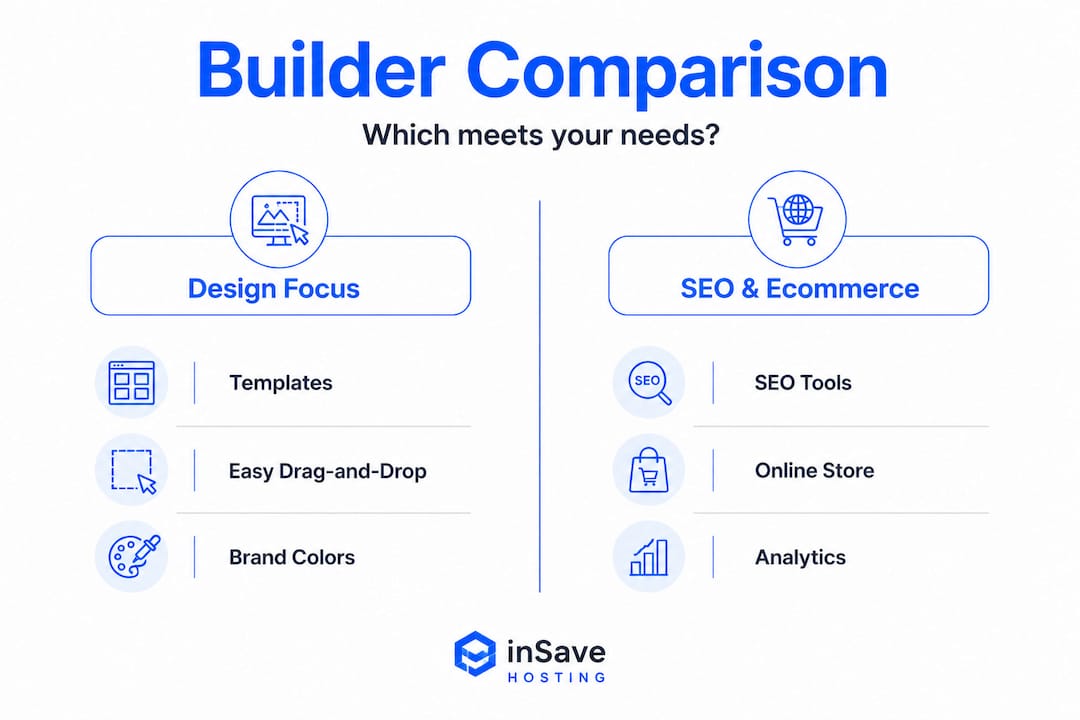
SEO features are especially important for small businesses trying to get found on Google. Wix has built-in SEO tools including a setup checklist, structured data support, meta tag editing, sitemap generation, and newer AI-driven optimization features. These tools guide even complete beginners through the most important steps for search visibility.
Built-in website SEO tools save time and reduce the need to hire an SEO consultant just to get the basics right. Look for builders that let you customize page titles and descriptions, add alt text to images, set canonical URLs, and connect to Google Search Console without needing a plugin or workaround.
Ecommerce capabilities vary widely. Basic builders let you list products and accept payments through Stripe or PayPal. More advanced platforms include abandoned cart recovery, discount codes, inventory tracking across multiple variants, and integration with shipping carriers. If selling online is central to your business model, ecommerce strength should be your top filter, not an afterthought.
You can also pair a great builder with advanced analytics to track how visitors move through your site and where they're dropping off. This kind of data becomes invaluable once you're ready to optimize for conversions.
- Squarespace is known for beautiful, design-forward templates. Great for photographers, creatives, and service businesses.
- Wix offers the most flexibility and one of the largest template libraries, plus strong SEO tools.
- Shopify is the gold standard for ecommerce, though it's less suited to purely content-based sites.
- WordPress.com sits between a builder and a full CMS, offering more power but with a steeper learning curve.
Pro Tip: Write down your top three website goals before you evaluate any builder. If local search traffic is goal number one, prioritize SEO features. If you're planning to sell 50+ products, ecommerce infrastructure should dominate your checklist. Matching the tool to your actual priorities prevents you from being swayed by flashy templates that don't serve your core needs.
Limitations and risks: Portability, scaling, and platform lock-in
While website builders are great for speed and simplicity, it's smart to understand their drawbacks before committing.
The single biggest risk most small business owners don't think about upfront is platform lock-in. When you build a site using a proprietary website builder, your design, layout, and sometimes even your content exist inside that platform's closed system. If you want to move to a different host or builder later, you can't simply export your site and import it elsewhere the way you'd move a Word document between computers.
Here's what lock-in actually looks like in practice:
- Your custom template stays behind. You'd need to rebuild your design from scratch on the new platform.
- Blog posts and product listings may not export cleanly to another system.
- Some builders only allow content export in basic formats like CSV or XML, which require significant manual reformatting.
- Custom domain connections need to be carefully transferred to avoid downtime.
- Any integrations or apps you've added may not have equivalents on the new platform.
For SMB owners, the best choice often depends on trade-offs among speed-to-launch, design flexibility, SEO and ecommerce needs, and long-term portability. The platform that gets you online fastest isn't always the one that serves you best three years from now.
Scaling is the second major consideration. Many website builders are excellent for small sites with a dozen pages and a handful of products. As your business grows and your site demands more, some platforms start to show their limits. Page load speeds can suffer. Advanced features may require expensive plan upgrades. Custom functionality that your business needs may simply not be possible within the builder's ecosystem.
If you anticipate significant growth, think about this before you build, not after. Ask yourself whether the platform you're choosing has a natural upgrade path or whether you're likely to outgrow it in two years.
For businesses that do eventually outgrow a builder, migrating your website to a more flexible hosting environment is absolutely possible. It just takes planning.
Pro Tip: Before choosing any website builder, look for an export function in the settings menu. Try to export a sample page or post and see what format you get. A builder that provides clean HTML or a standard CMS export gives you far more flexibility in the future than one that locks your content in a proprietary format.
Our perspective: Why website builder choice matters more than ever
We've worked with hundreds of small business websites, and if there's one pattern we see consistently, it's this: the biggest regrets come from choosing a platform based on short-term convenience rather than long-term fit.
A business owner picks the cheapest plan available, gets excited about a pretty template, and launches in a weekend. That's genuinely great. But two years later, when they want to add a booking system, expand their product catalog, or switch hosting for better performance, they realize the platform they chose can't grow with them. Starting over is painful and expensive.
The conventional wisdom says "just pick one and get started." We'd add a layer to that: pick one that you've genuinely tested against your five-year goals, not just your week-one goals. Spend an afternoon mapping out what your website might need to do as your business scales. Will you need multilingual pages? A members area? Advanced email marketing integration? The best time to check for those features is before you build, not after you're already three pages deep.
We also encourage every business owner to revisit their website platform decision every two to three years. The landscape shifts fast. Tools that felt limited a few years ago have matured significantly. New builders have emerged with capabilities that didn't exist when you made your original choice. Staying curious and periodically re-evaluating keeps you from being stuck on a platform that's quietly holding you back.
The foundation matters. Choosing web hosting is just as important as choosing the builder itself. A beautiful website running on slow, unreliable hosting delivers a poor experience regardless of how good the builder is. Platform plus hosting is the combination that wins.
Get started with the right foundation for your business website
You now understand how website builders work, what separates a good choice from a frustrating one, and what risks to plan around. The next step is getting the actual foundation in place before you start building.

At InSave Hosting, we make that foundation affordable and rock solid. Our plans include a free domain for your first year, free SSL certificates, 99.9% uptime, and blazing-fast performance powered by LiteSpeed and free CDN. Whether you're pairing our hosting with WordPress or another builder platform, you get web hosting and domain options built specifically for small businesses that want professional results without enterprise-level costs. Check out our affordable shared hosting plans for a budget-friendly starting point, or secure your domain today and take the first step toward a professional online presence.
Frequently asked questions
Do I need coding skills to use a website builder?
No, most website builders are designed for users with no coding or design experience. They use visual drag-and-drop interfaces so anyone can build and edit a site.
Which website builder is best for SEO?
Wix is frequently cited for its strong built-in SEO tools including structured data support, meta tag editing, sitemap generation, and AI-driven optimization features. The best choice still depends on your overall business goals.
Can I move my website to another platform later?
Migration is possible but can be complex, since many builders use proprietary systems that limit portability. Always check export options before committing to a platform.
What are common features included in website builders?
Most website builders include drag-and-drop editing, mobile-responsive templates, built-in hosting, contact forms, social media integrations, and basic SEO settings. Support resources like live chat or a knowledge base are also standard on most paid plans.
Are website builders suitable for ecommerce?
Many website builders offer solid ecommerce tools including product listings, payment gateway integration, and basic inventory management. For high-volume stores, a dedicated platform like Shopify tends to offer stronger ecommerce infrastructure than general-purpose builders.