
TL;DR:
- Proper planning and execution are essential to avoid permanent traffic and ranking loss during website migration.
- Key steps include pre-migration audits, direct 301 redirects, staging testing, and post-launch monitoring.
- Involving cross-team collaboration and professional help enhances migration success and growth opportunities.
Most small business owners assume migrating a website is roughly like moving files from one folder to another. It's not. Even well-intentioned changes to your domain, hosting, or URL structure can trigger a significant drop in search rankings if not executed carefully. Significant changes during migration can impact how search engines crawl, index, and rank your site, which means your visibility and revenue are directly on the line. This guide breaks down what website migration actually is, what risks come with it, and the concrete steps you can take to protect your rankings and come out ahead.
Table of Contents
- What is website migration? Core concepts explained
- Why proper planning is essential: Risks and rewards
- The essential steps of a smooth website migration
- Expert tips, common pitfalls, and SMB-specific advice
- Our take: Why strategic migrations are vital for scaling SMBs
- Plan your migration with confidence—partner with inSave Hosting
- Frequently asked questions
Key Takeaways
| Point | Details |
|---|---|
| Migration is high-impact | Major website changes affect search engine ranking, traffic, and revenue. |
| Strategic planning prevents loss | Proactive planning, including audits and redirects, reduces risks and speeds recovery. |
| Monitor post-launch closely | Daily Google Search Console checks are essential for at least two weeks after launch. |
| Address technical edge cases | Prioritize issues like redirect chains and staging errors to avoid ranking drops. |
What is website migration? Core concepts explained
At its simplest, a website migration is any major change to your site that affects how search engines see and interact with it. That's a much broader definition than most people expect. Swapping hosting providers, moving to a new CMS, restructuring your URLs, or even launching a full redesign can all qualify. According to the SEO community's most widely referenced framework, website migration is the process of making significant changes to a website that impact how search engines crawl, index, and rank it, such as changing domains, CMS platforms, URL structures, hosting, or redesigns.
Why does that matter for your business? Because every one of those changes carries the potential to break the signals search engines use to rank your pages. Think of it like changing your store's address without updating your Google Business Profile or your signage. Customers and search engines alike can lose track of where you are.
Here's a quick comparison of the most common migration types:
| Migration type | Key change | Primary challenge |
|---|---|---|
| Domain change | New URL or brand name | 301 redirects, link equity transfer |
| Platform or CMS shift | Moving from one system to another | URL structure, plugin compatibility |
| Hosting migration | New server or provider | Downtime risk, DNS propagation |
| URL restructure | New folder or page path format | Broken internal links, lost backlinks |
| Full redesign | Visual and structural overhaul | Combined risks from above |
Not every update rises to migration level. Here are red flags that mean you're doing a migration, not a basic update:
- Your site's primary domain or subdomain is changing
- You're switching CMS platforms (for example, from Wix to WordPress)
- More than 20% of your URLs will change
- Your entire hosting environment is moving to a new server or provider
- You're adding HTTPS for the first time
For SMBs, a web hosting migration guide can make the difference between a smooth transition and weeks of lost traffic. Knowing whether your planned change qualifies as a migration is the very first step.
Why proper planning is essential: Risks and rewards
Understanding the definition sets the stage, but what's truly at stake when you migrate? Here's what you need to know about the risks and the gains you can achieve.

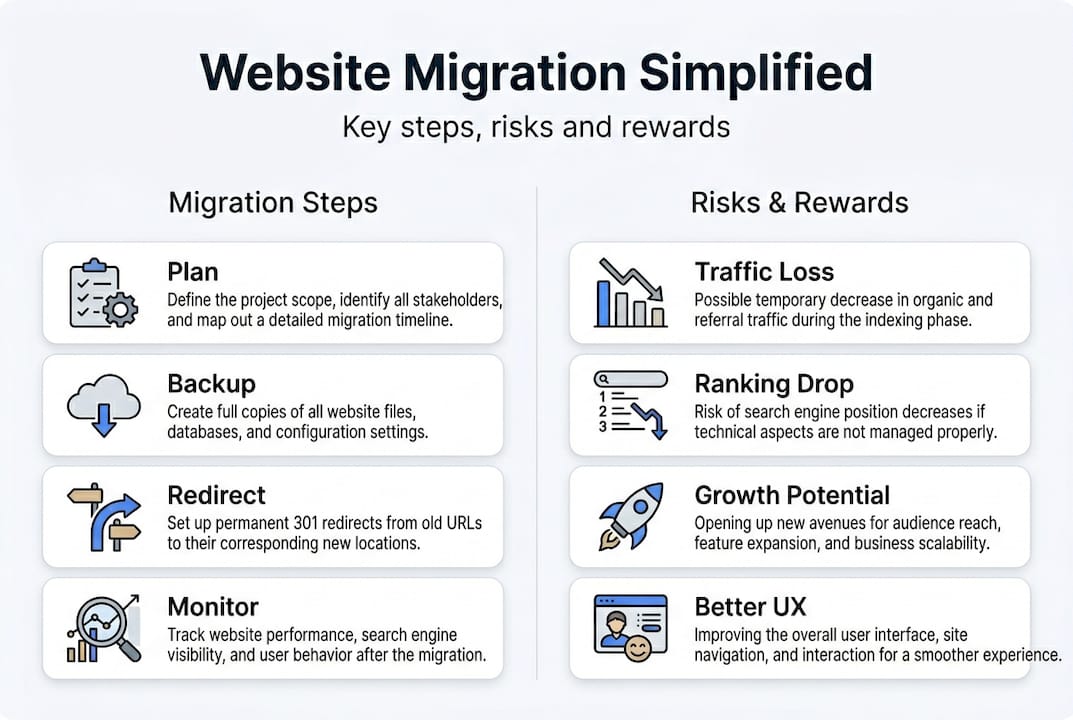
The data is blunt. Well-executed migrations recover in 2 to 12 weeks. Failed ones can result in 17% permanent traffic loss. That's not a temporary dip you'll bounce back from. It's real revenue gone for good.
On the flip side, migration done right can be transformative. Case study evidence shows post-migration results that are genuinely exciting:
"Sites that migrate with proper 301 mapping, clean URL structures, and pre-migration traffic baselines have seen organic traffic grow by more than 65% within six months of launch."
That kind of gain doesn't happen by accident. It takes preparation. Here's a realistic look at what's at stake:
| Factor | Short-term impact | Long-term outcome |
|---|---|---|
| Strong 301 redirects | Small crawl lag | Full link equity retained |
| Skipped redirects | Immediate 404 errors | Permanent ranking drops |
| Staging site testing | Launch delay of days | Zero critical bugs on go-live |
| No pre-migration audit | No baseline to measure | Can't diagnose post-launch issues |
| Post-launch monitoring | Extra team time | Fast issue detection and recovery |
Pro Tip: Before you touch a single file, document your current traffic and keyword rankings using Google Search Console. This baseline is your comparison point after launch and your early warning system if something goes wrong.
Speaking of monitoring, Google Search Console is non-negotiable during and after a migration. Check it daily for crawl errors, coverage drops, and sitemap issues. Pair it with a solid hosting optimization guide to address any server-side factors that affect load speed, which directly influences post-migration rankings. If you want real-time performance visibility, tools that let you monitor site health around the clock will catch issues before they compound.
The essential steps of a smooth website migration
With the stakes clear, let's walk through the actionable steps you can follow to make your migration as smooth, safe, and effective as possible.
Following a structured process is what separates successful migrations from disasters. The key steps for website migration are pre-migration audit, URL mapping with 301 redirects, staging testing, content integrity checks, sitemap updates, and post-launch monitoring. Here's what each step means in practice:
- Pre-migration audit. Crawl your existing site to document all live URLs, inbound links, and meta data. This is your master reference document for everything that needs to be preserved or improved.
- URL mapping and 301 redirects. Create a spreadsheet matching every old URL to its new destination. Set up 301 redirects before you go live, not after. This preserves your link equity and prevents 404 errors.
- Staging site testing. Build and test your new site in a private staging environment first. Check every page, form, and function before any visitor or search engine sees it. A good building a secure site process always starts in staging.
- Content and media checklist. Verify that all blog posts, product pages, images, and downloadable files transferred correctly. Missing content is a silent traffic killer.
- Update sitemaps and robots.txt. Submit a fresh XML sitemap to Google Search Console immediately after launch. Make sure your robots.txt file is not accidentally blocking search engine crawlers.
- Post-launch monitoring. Watch Google Search Console daily for at least two weeks. Track keyword rankings, crawl coverage, and server error rates.
Pro Tip: Never use redirect chains, where URL A redirects to URL B which redirects to URL C. Each hop loses ranking signal. Map every old URL directly to its final destination in one clean step. Also, make absolutely sure your staging site uses a noindex tag so Google doesn't index your test environment before you're ready to launch.
Migration is not a solo project. Loop in your SEO lead, your developer, and your marketing team before the first step, not the last. You'll catch issues faster and avoid last-minute scrambles that lead to costly mistakes. If you're investing in advanced hosting technologies like LiteSpeed or HTTP/2, your migration is also a great time to activate those performance features from day one.
Expert tips, common pitfalls, and SMB-specific advice
Even with careful planning, SMBs often trip up on less obvious hazards. Here's how to avoid common mistakes and navigate the nuances that separate average migrations from lasting success.
Start planning 4 to 8 weeks before your target launch date. That timeline sounds generous until you factor in content audits, redirect mapping, developer back-and-forth, and stakeholder approvals. Tight timelines are where migrations fail.
For the first two weeks post-launch, check your rankings and Search Console data daily. Issues that surface in week one are almost always fixable. Issues you don't catch until week four can set you back months.
Here are the most overlooked pitfalls that even experienced teams miss, with technical SEO migration edge cases including chain redirects, multilingual issues, Core Web Vitals risk, and homepage dumps:
- Staging noindex left on the live site. This single mistake can cause your entire site to vanish from search results overnight.
- Redirect chains. Every extra hop in a redirect sequence dilutes the ranking signal passed along. Clean, direct redirects only.
- Unoptimized Core Web Vitals at launch. Google measures page experience at launch. Going live with slow Largest Contentful Paint or high Cumulative Layout Shift hurts your recovery window.
- Forgetting structured data. If you've built rich snippets or schema markup, verify that all structured data transferred and validates correctly on the new environment.
- Homepage dumping. Redirecting hundreds of old URLs to the homepage instead of relevant pages is a red flag for search engines and ruins user experience.
Looking ahead to 2026 and beyond, AI-powered search features like Google's AI Overviews increasingly pull from structured data. If your schema doesn't survive the migration, you're invisible to those placements. Preserve it carefully.
"Monitor GSC daily for two weeks post-migration for best recovery."
For sites with hundreds of pages, a phased migration by section can reduce risk significantly. Migrate your blog first, validate it, then move to product or service pages. If at any point you're unsure, bring in a technical SEO professional. For complex platforms, the cost of expert help is a fraction of the cost of lost traffic. Your WordPress hosting features can also influence migration complexity, so factor your platform's capabilities in early.
Our take: Why strategic migrations are vital for scaling SMBs
With expert strategies and pitfalls covered, here's our unique angle on why migrations should be viewed as a turning point for your business, not just a technical hurdle.
Most SMBs rush migrations because they're chasing a deadline: a rebrand, a product launch, or a new hosting deal that expires. The pressure is real, but urgency is exactly when the most expensive mistakes happen. We've seen businesses lose months of SEO momentum because no one paused to ask whether the staging environment was noindexed or whether every redirect pointed directly to a live destination.
Here's what those experiences consistently teach: migration is the single best opportunity to fix everything you've been meaning to fix. Slow page speed, messy URL structures, outdated content, missing structured data. Done strategically, a migration is not a risk to manage. It's a growth lever to activate.
The businesses that thrive after migration are those that treat it as a cross-team project with clear ownership, not an IT task that gets handed off on a Friday afternoon. Open communication between your SEO, dev, and marketing teams before, during, and after launch is what turns a risky move into a competitive advantage. For practical guidance that bridges technical detail with real business outcomes, practical web hosting migration advice is where we'd point you to continue the conversation.
Plan your migration with confidence—partner with inSave Hosting
If you're ready to act with confidence on your migration project, our team and platform are built to help you succeed every step of the way.
At inSave Hosting, we built our platform specifically for SMBs who can't afford weeks of downtime or ranking losses. Our hosting infrastructure includes free migration assistance, staging environments, 99.9% uptime, and advanced technologies like LiteSpeed and free CDN to give your migrated site the performance foundation it needs from day one.

Whether you're moving to WordPress hosting for the first time or scaling up your current setup, our plans are designed to make the transition straightforward and secure. Browse our website hosting plans to find the right fit, or explore our shared hosting options for a cost-effective starting point. Our support team is ready to walk you through every stage of your migration.
Frequently asked questions
What are the most common types of website migration?
The most common types are domain changes, platform or CMS shifts, hosting migrations, and URL restructures. Each carries distinct risks, but all of them impact how search engines crawl and rank your site.
Is a drop in search traffic after migration normal?
Yes, a temporary decrease is expected, but it should be modest and short-lived with good planning. Proper execution helps you regain traffic within weeks rather than experiencing a lasting decline.
How long does it take to recover search rankings after migration?
For well-planned migrations, recovery typically takes 2 to 12 weeks. Sites with well-executed migration processes and clean redirect structures tend to recover at the faster end of that range.
What tools help monitor a website migration's success?
Google Search Console is the primary tool for tracking indexing and coverage issues. Pair it with Screaming Frog for crawls to catch broken links, redirect errors, and missing meta data quickly.
What's a common mistake small businesses make?
The most frequent errors are leaving the noindex tag on the live site after launch and using chain redirects instead of direct ones. Both of these edge cases silently destroy rankings and are easy to prevent with a pre-launch checklist.
Recommended
- Web hosting migration: A practical guide for small businesses
- How to create a business website: secure, affordable steps
- Boost website speed and reliability: hosting optimization guide
- How to secure your WordPress site: proven steps for SMBs
- The ultimate website redesign checklist for SMBs | Kickass Online
- Easy Website Updates NZ: Boost Efficiency for Service Firms