
TL;DR:
- One-click install automates the entire website deployment process, saving time and reducing errors.
- It allows users with no technical skills to launch applications quickly and confidently.
One-click install is defined as an automated software installation process that deploys web applications to your hosting account with a single user action. Instead of manually creating databases, copying files, and editing configuration files, the installer handles every backend step for you. Tools like Softaculous and Installatron, integrated into control panels like cPanel and Plesk, make this possible. The result: a fully functional WordPress, Joomla, or Magento site running in minutes, with no coding required. For small business owners and individuals launching websites, this technology removes the single biggest barrier to getting online fast.
What is one click install and how does it work behind the scenes?
One-click install is an automated installation process that replaces a complex series of manual server tasks with a single button click in your hosting dashboard. The term "one-click installer" is the recognized industry name for this technology, though you will also see it called an auto-installer or app installer depending on the hosting provider.

The process runs through several distinct backend steps the moment you click install. Each step would take a technically skilled developer 30 minutes or more to complete manually. The installer finishes all of them in under two minutes.
Here is what happens automatically during a typical one-click installation process:
- Database creation: The installer creates a MySQL or PostgreSQL database and links it to your application. This step alone requires server-level access that most beginners do not have.
- File extraction and copying: Application files are unpacked from a pre-tested archive and placed in the correct server directory for your chosen domain.
- Permission setting: The installer configures file permissions silently, a step that is frequently misconfigured in manual setups and causes security vulnerabilities.
- Configuration file generation: A config file is written automatically using the details you entered, such as your domain name and database credentials.
- Admin account setup: Your initial admin username and password are registered, and default application settings are applied so the site is ready to use immediately.
Pro Tip: Before clicking install, write down the admin credentials you enter. The installer will not remind you of them after setup completes, and a lost admin password means a manual database reset.
Every one of these steps is error-prone when done by hand. Automated installers eliminate that risk by running the same vetted script every time.
What are the key benefits of one-click install for small business owners?
One-click installers reduce installation time from hours to minutes, which is the most immediate and measurable benefit for anyone launching a website. For a small business owner, that time savings translates directly into a faster launch date and lower setup costs.
The benefits go beyond speed. Manual installation requires you to understand server file structures, database management tools like phpMyAdmin, and application-specific configuration syntax. One-click install removes all of that. You provide a domain name, a site title, and an admin password. The installer handles the rest.
| Feature | One-click install | Manual installation |
|---|---|---|
| Time to complete | Minutes | 1–3 hours |
| Technical knowledge needed | None | Intermediate to advanced |
| Risk of misconfiguration | Very low | High |
| Database setup | Automatic | Manual via phpMyAdmin |
| File permissions | Set automatically | Must be set manually |
| Suitable for beginners | Yes | No |
Automated installers also lower error rates by removing manual steps, which directly improves the stability of your website from day one. A misconfigured permission setting or a typo in a database connection string can take a site offline entirely. The installer eliminates both risks.
One-click install also supports growth. Once you understand how to deploy one application, you can launch a second site, a staging environment, or a client project using the exact same process. That repeatability is valuable for small business owners managing multiple web properties.
Pro Tip: When evaluating hosting providers, check which installer suite they include. Softaculous supports over 400 applications. A host offering only a basic QuickInstall module gives you far fewer options.
Which platforms and hosting providers support one-click install?
One-click install tools are integrated into control panels like cPanel, Plesk, and aaPanel through dedicated installer modules. The control panel is the dashboard you use to manage your hosting account. The installer module sits inside it as a dedicated section, usually labeled "Software" or "Apps."
The three most widely used installer modules are:
- Softaculous: The most common module, available in cPanel and Plesk. It supports WordPress, Joomla, Drupal, Magento, PrestaShop, and hundreds of other applications. Softaculous and Installatron both provide pre-packaged, vetted application archives that guarantee compatibility with your server environment.
- Installatron: A strong alternative to Softaculous, with built-in backup and cloning features that make it popular for developers managing multiple sites.
- QuickInstall: A lighter module found in some budget hosting environments. It covers the most popular applications but has a smaller catalog than Softaculous.
The applications you can install through these modules cover every major website category. WordPress powers the largest share of websites globally, and it is the most commonly installed application through one-click tools. Joomla and Drupal serve users who need more structured content management. Magento and PrestaShop handle e-commerce. phpBB and MyBB cover community forums.
Hosting providers that include a full installer suite give you a significant practical advantage. You can deploy a WordPress site in the same time it takes to make a cup of coffee, then install a separate staging copy of that site with two more clicks.
How to use one-click install step by step
Using a one-click installer requires minimal information from you. The process is the same whether you are using Softaculous in cPanel or a built-in installer in a custom hosting dashboard.
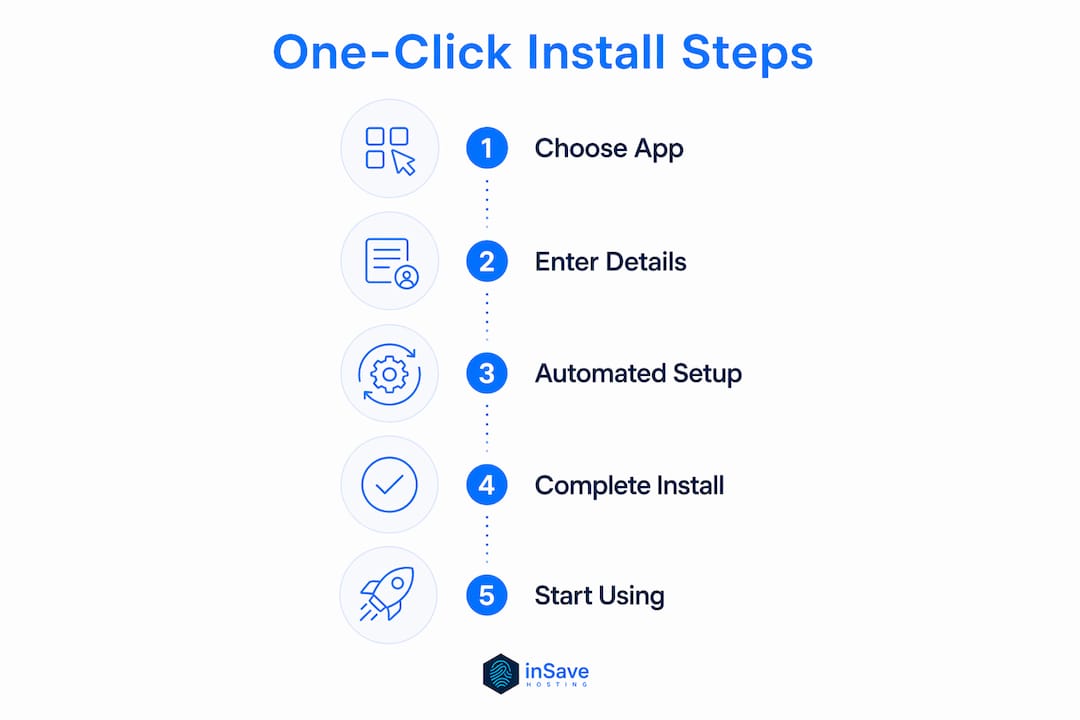
- Log in to your hosting control panel. Navigate to the "Software" or "Apps" section. You will see the installer module listed there.
- Select your application. Click on WordPress, Joomla, or whichever platform you want to install. The installer will show you a brief description and a version number.
- Choose your domain. Select the domain where you want the application installed. If you want it in a subfolder (for example, yourdomain.com/blog), enter the folder name in the directory field.
- Enter your site details. Fill in the site title, your admin username, your admin password, and your admin email address. These are the only fields you must complete.
- Click install. The installer runs through all backend steps automatically. A progress bar shows you where it is in the process.
- Access your new site. When the installation finishes, the installer displays your site URL and your admin login URL. Bookmark both immediately.
If the installation fails, the most common causes are a domain that is not yet pointed to your hosting server, or a database limit reached on your hosting plan. Both are fixable in under five minutes through your hosting dashboard.
Pro Tip: Use a password manager like Bitwarden or 1Password to store your admin credentials the moment the installer displays them. Copying them into a notes app is a security risk.
For a deeper look at what happens after installation, the website deployment process covers how your new site goes from installed files to a live, publicly accessible URL.
One area worth attention is security after installation. Unmanaged tech deployments carry real risks even when the initial setup is automated. Changing the default admin username, installing an SSL certificate, and keeping the application updated are steps you own after the installer finishes its job.
Key Takeaways
One-click install is the fastest and most reliable way for non-technical users to deploy professional web applications, because it automates every error-prone backend step from database creation to file permissions.
| Point | Details |
|---|---|
| Core definition | One-click install automates database setup, file copying, permissions, and config creation with a single action. |
| Time savings | Installation time drops from hours to minutes compared to manual methods. |
| Error reduction | Automated steps eliminate the misconfiguration risks that cause site instability. |
| Key tools | Softaculous, Installatron, and QuickInstall are the main installer modules used in cPanel, Plesk, and aaPanel. |
| What you provide | You only need to enter a domain, site title, and admin credentials. The installer handles everything else. |
Why one-click install changed how I think about website ownership
I have watched small business owners spend entire weekends trying to manually install WordPress, only to end up with a broken database connection or a white screen of death. That experience used to be the norm. One-click install technology ended it.
What strikes me most is not the speed. It is the confidence shift. When a bakery owner or a freelance photographer can launch a professional website without calling a developer, they stop thinking of their website as someone else's problem. They own it. That ownership changes how they manage it, update it, and grow it.
The digital assistant role that one-click installers play is genuinely underappreciated. These tools do not just save time. They transfer capability from specialists to generalists, which is exactly what small businesses need.
My one honest caution: do not treat the installer as the finish line. The automated setup is the starting point. Security hardening, regular updates, and a backup schedule are the work that actually keeps your site running. The installer gets you to the starting line in minutes. What you do next determines whether you stay in the race.
The future of this technology points toward tighter integration with low-code platforms and AI-assisted configuration. Within a few years, the installer will likely pre-select settings based on your business type and traffic expectations. The one-click experience will get even closer to zero-effort deployment. For small business owners, that is a significant advantage worth paying attention to now.
— Ihor
inSave Hosting makes one-click install part of every plan
Getting your website live should not require a technical background or a developer on speed dial. inSave Hosting includes built-in one-click installation tools across its shared hosting plans, so you can deploy WordPress, Joomla, or any major CMS in minutes from your hosting dashboard.

Every inSave Hosting plan comes with a free SSL certificate, 99.9% uptime, and LiteSpeed-powered performance. The WordPress hosting plans are built specifically for fast, secure WordPress deployments with one-click setup included. If you are ready to launch your site without the technical headaches, view current hosting plans and pick the one that fits your needs.
FAQ
What does one-click install mean?
One-click install means an automated process that deploys a web application to your hosting account by completing all backend setup steps with a single user action. It handles database creation, file setup, and configuration automatically.
Which applications can I install with one-click tools?
Softaculous and Installatron support hundreds of applications, including WordPress, Joomla, Drupal, Magento, and PrestaShop. The exact catalog depends on which installer module your hosting provider includes.
Do I need coding skills to use one-click install?
No coding skills are required. You only need to provide a domain name, a site title, and admin login credentials. The installer completes every technical step without any input from you.
Is one-click install secure?
The installation itself is secure because the installer uses pre-tested, vetted application files and sets correct file permissions automatically. Post-installation security, including updates and SSL setup, remains your responsibility.
How long does a one-click installation take?
Installation time ranges from seconds for simple applications to a few minutes for complex systems like full e-commerce platforms. Both are significantly faster than manual installation methods.