
TL;DR:
- Hosting in the UK is advisable primarily for businesses with UK residents' data or a predominantly UK audience.
- A US-based host with a CDN can often provide comparable performance for non-UK traffic, reducing complexity.
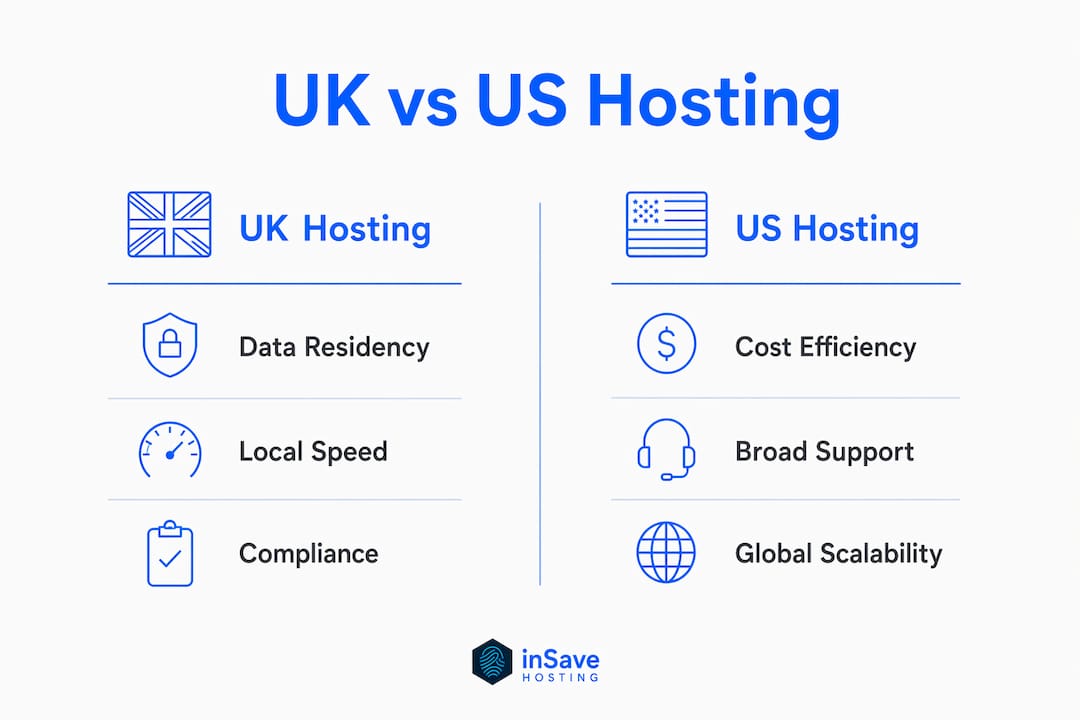
If your site serves a primarily UK audience or you store personal data belonging to UK residents, hosting in the UK is worth doing. If your audience is mostly in the US and you have no data-residency obligations, a US-based host paired with a global CDN gets you most of the same performance at lower complexity.
Three triggers that point to UK hosting:
- You process or store personal data of UK or EU residents and want to simplify GDPR/UK-GDPR compliance.
- The majority of your traffic, customers, or members are based in the UK.
- A client contract or procurement requirement explicitly mandates UK-hosted data.
Pro Tip: Before committing to a migration, pull an audience segment in Google Analytics 4 or check your CDN logs. If a minority of sessions originate from the UK, a US origin with edge caching may serve you just as well.
Jump to the evaluation checklist to move quickly through vendor selection.
Table of Contents
- When does UK hosting actually make sense for your business?
- How hosting location affects speed, and when a CDN changes the math
- What US businesses need to know about UK data compliance
- Technical features to require from a UK host
- How to evaluate a UK web host before you commit
- Migration checklist and realistic timeline
- When you do not need UK hosting
- Key Takeaways
- The case for clarity over complexity in UK hosting decisions
- inSave Hosting is a straightforward option for US businesses targeting UK users
- Useful sources and further reading
- FAQ
When does UK hosting actually make sense for your business?
The clearest case is legal. Data sovereignty and latency are the primary reasons analysts recommend regional hosting, not brand preference. If you collect names, emails, or payment details from UK residents, the UK-GDPR applies to you regardless of where your company is incorporated. Hosting data locally removes the need to rely on cross-border transfer mechanisms like Standard Contractual Clauses.
Beyond compliance, audience location drives the decision:
- Majority UK traffic: A membership site, a UK-targeted e-commerce store, or a localized service directory benefits from lower origin-to-browser latency for its core users.
- Operational requirements: Some UK enterprise clients and public-sector procurement contracts require data to remain on UK soil. Check your contracts before assuming flexibility.
- Planned UK expansion: If you are launching UK-specific pricing, a local payment processor, or regional shipping, starting with UK hosting avoids a mid-growth migration.
Pro Tip: Google Analytics 4's "User > Geo > Country" report gives you a clean breakdown in under two minutes. Sort by sessions, not pageviews, for a truer picture of where your real audience lives.

How hosting location affects speed, and when a CDN changes the math
Hosting closer to your users reduces origin-to-browser latency. That much is straightforward. What changes specifically when you move origin servers:
- Time to First Byte (TTFB): The single metric most sensitive to physical server distance. A UK origin cuts TTFB for London users by tens to low hundreds of milliseconds compared to a US East Coast origin, depending on routing.
- Dynamic content and database queries: Cached static files travel fine over a CDN. Personalized pages, logged-in dashboards, and checkout flows hit the origin every time.
- Third-party API calls: If your site calls a UK-based payment gateway or CRM, a UK origin reduces round-trip time on those server-to-server requests.
A CDN mitigates most user-visible delay for static assets, but it cannot cache a logged-in cart page or a real-time inventory check. For hosting impacts on website speed, the origin location still matters when dynamic content is involved.
To test whether a move would actually help your site:
- Run a synthetic test from a UK node using a tool like WebPageTest (select a London test agent).
- Compare TTFB against your current US-origin result.
- Enable Real User Monitoring (RUM) for two weeks to capture actual visitor experience by geography.
- Run an A/B origin test: serve half your UK traffic from a UK edge node and measure conversion rate alongside load time.
Review testing confirms that server locations across Europe are a key factor in achieving fast speeds for regionally targeted sites. If your synthetic test shows notably high TTFB for UK users, a UK origin is worth the switch.
What US businesses need to know about UK data compliance
If you store or process personal data belonging to UK or EU residents, local hosting can simplify GDPR/UK-GDPR compliance and reduce cross-border transfer risk. That said, hosting location alone does not make you compliant. It removes one layer of complexity.
Compliance documents to request from any UK host:
- Data Processing Agreement (DPA): Required under UK-GDPR Article 28. No DPA means no compliant processing relationship.
- Data center addresses: Confirm servers are physically in the UK, not just marketed as "UK hosting" from a European facility.
- Standard Contractual Clauses (SCCs): Relevant if data flows between the UK and EU or between the UK and the US.
- Security certifications: ISO 27001, SOC 2, or equivalent documentation of access controls and incident response.
Pro Tip: Ask your legal advisor to review the DPA before you sign a hosting contract. The host supplies the document; your attorney confirms it covers your specific data types and processing activities. These are two separate conversations.
Technical features to require from a UK host
Require secure defaults and clear SLAs before anything else. A 99.9% uptime SLA is the minimum for any SMB site that generates revenue or handles customer data. Below that threshold, you are accepting more than 8 hours of potential downtime per year.
Non-negotiable technical features:
- Free SSL certificate with auto-renewal (check that it covers your domain and any subdomains you use)
- PHP 8+ support with the ability to switch versions per site
- Staging environment for testing updates before pushing live
- Daily automated backups with at least 7-day retention
- Server-side caching (LiteSpeed/LSCache or equivalent) for WordPress sites
- HTTP/2 or HTTP/3 enabled by default
Service-level expectations:
- 24/7 human support via live chat or phone, not just a ticket queue. For SMBs, human-based support and managed features consistently outperform raw speed benchmarks in practical value.
- Transparent data center location disclosure (city and country, not just "UK servers").
- Documented incident response: how quickly does the host communicate outages, and what is their escalation path?
Quick RFP checklist:
- Where are your data centers physically located?
- What is your uptime SLA and how is downtime credited?
- Do you provide a signed DPA?
- What PHP versions do you support and how do I switch?
- Is staging included or an add-on?
- What is your backup frequency and retention window?
How to evaluate a UK web host before you commit
Speed-read these questions in a sales call or during a trial period. They surface the issues that matter before you are locked in.
Evaluation questions by category:
- Data residency: "Can you confirm in writing that my data stays in UK data centers?"
- SLA: "What is your uptime guarantee and what credits apply if you miss it?"
- Support: "Is 24/7 support human or automated? What is the average first-response time?"
- Backups: "How often are backups taken, where are they stored, and how do I restore one?"
- Migration: "Do you offer free migration assistance, and do you provide a staging environment?"
- Pricing: "What does renewal cost after the promotional period, and are there contract lock-ins?"
Red flags to walk away from:
- Vague answers about data center location ("somewhere in Europe" is not UK hosting).
- No DPA available or a refusal to sign one.
- Shared IP addresses with a poor spam or blacklist reputation (check via MXToolbox).
- No mention of backups in the plan, or backups sold as a paid add-on at the base tier.
- Support that routes to a ticket system with no live option.
Migration checklist and realistic timeline
A small WordPress site typically moves in 1–3 days. A larger site with custom databases, multiple subdomains, or complex integrations should budget 1–3 weeks.
Step-by-step migration tasks:
- Full backup of files and database at the origin host.
- Restore backup to a staging environment at the new UK host.
- Lower DNS TTL to 300 seconds at least 48 hours before cutover.
- Provision and verify SSL at the new host before going live.
- Test all dynamic flows: forms, checkout, login, and email delivery.
- Run a performance test from a UK node to confirm TTFB improvement.
- Cut over DNS and monitor for 24 hours with a rollback plan ready.
| Task | Owner | Duration estimate |
|---|---|---|
| Full backup | Site owner | 1–2 hours |
| Staging restore and test | Host or developer | 4–8 hours |
| DNS TTL reduction | Site owner | Set 48 hours before cutover |
| SSL provisioning | Host | 1–3 days |
| Dynamic flow testing | Site owner | 2–4 hours |
| Performance test (UK node) | Site owner | 1 hour |
| DNS cutover and monitoring | Site owner | 1–24 hours |
Final pre-launch checks:
- Contact forms submit and deliver to the correct inbox.
- Checkout completes end-to-end (use a test transaction).
- Third-party API calls (payment gateways, CRMs) return expected responses.
- Email deliverability: send a test from the new server and verify SPF/DKIM pass.
- Check for mixed-content warnings in the browser console after SSL goes live.
When you do not need UK hosting
If your audience and regulated data are primarily in the US, you almost certainly do not need a UK origin server. The performance gain for your actual users would be negligible, and the compliance overhead is unnecessary.
Practical alternatives:
- US origin + global CDN: Cloudflare or a similar CDN caches static assets at edge nodes close to UK visitors. For content-heavy sites, this closes most of the latency gap.
- Edge compute for dynamic personalization: Services like Cloudflare Workers let you run lightweight personalization logic at the edge without moving your origin.
- Selective regional placement: If only one service (say, a UK-facing API) needs local latency, host that component in the UK while keeping your main site in the US.
Pro Tip: Run a free web performance audit before making any hosting decision. If your UK TTFB is already under 400ms with your current CDN, a full migration is unlikely to produce a user-visible difference.
Key Takeaways
UK hosting is the right call when data residency obligations or a predominantly UK audience make it necessary — otherwise, a US origin with a CDN is the simpler path.
| Point | Details |
|---|---|
| Pick UK hosting when it's required | Data residency obligations or a majority UK audience justify the switch; US audience does not. |
| CDN covers most static latency | A global CDN closes the gap for static assets; dynamic content still benefits from a UK origin. |
| Three technical must-haves | Require free SSL, PHP 8+, and a staging environment from any UK host before signing. |
| Uptime SLA minimum | A 99.9% uptime guarantee is the minimum for any revenue-generating SMB site. |
| inSave Hosting as a practical option | inSave Hosting offers 99.9% uptime, LiteSpeed/LSCache, PHP8, free SSL, staging, and migration support for US SMBs targeting UK users. |
Pro Tip: Run a synthetic test from a London node before migrating. If TTFB is already under 400ms, your CDN is doing its job and a full move may not be worth the effort.
The case for clarity over complexity in UK hosting decisions
Most US businesses overthink this decision. They read about GDPR, assume they need a UK server, and start pricing migrations before checking whether their UK traffic even justifies the cost. The honest answer is that data residency is the only hard reason to move. Latency is a soft reason that a CDN usually handles well enough.
What the hosting industry underplays is how much the quality of support matters once you are live. A host with a 99.9% SLA and 24/7 human support is worth more to a small business than a host with marginally faster benchmarks and a ticket-only support queue. You will not notice a 30ms TTFB difference. You will absolutely notice a four-hour support response when your checkout is down on a Saturday.
The other thing worth saying plainly: cheap introductory pricing is not the same as affordable hosting. Promotional entry prices for shared plans often start below $3/month, but renewal rates can double or triple that figure. Ask about renewal pricing before you sign anything.
inSave Hosting is a straightforward option for US businesses targeting UK users
US small businesses that need UK-based hosting without the enterprise price tag have a clear option in inSave Hosting. The platform is built around the features that matter most to SMBs: data-center transparency, predictable pricing, and hands-on migration support so you are not figuring out DNS cutover alone at midnight.

Key features that match the requirements covered in this article:
- 99.9% uptime SLA with LiteSpeed and LSCache for fast page delivery
- Free SSL certificates and PHP 8 support included at every plan level
- Staging environments and free migration assistance for site moves
- 24/7 human support and managed security features
Shared hosting plans are available month-to-month or annually, with no hidden renewal surprises. If you are running WordPress, the WordPress hosting plan adds optimized configurations out of the box. Check current plan pricing and start your migration at insave.hosting.
Useful sources and further reading
Use these sources when asking a potential host specific questions about compliance, performance, and feature sets.
Research and review sources:
- Best Europe Web Hosting 2026 – Speed, GDPR & EU Servers Tested — Cybernews review covering EU/UK server locations, GDPR readiness, and performance testing methodology.
- The Best Web Hosting Services for 2026 — PCMag buying guide covering uptime, support, and SMB evaluation criteria.
- Web performance testing methodology — Third-party resource on performance auditing and speed optimization.
inSave Hosting documentation to request or review:
- inSave Hosting platform overview — Uptime SLA, technology stack, and plan features.
- Shared hosting plans and pricing — Plan tiers, feature lists, and contract terms.
- SSL certificate options — Certificate types, provisioning process, and coverage details.
When evaluating any host, bring the compliance checklist from the data-sovereignty section above and ask for written confirmation of data center location and a signed DPA before you commit.
FAQ
Does UK hosting automatically make my site GDPR compliant?
No. Hosting in the UK removes cross-border transfer complexity, but compliance also requires a signed Data Processing Agreement, proper consent mechanisms, and documented data handling practices.
How much does UK web hosting typically cost?
Promotional shared plans often start below $3/month, but renewal rates vary significantly. Always confirm the renewal price before signing up.
Does inSave Hosting offer free migration assistance?
Yes. inSave Hosting includes free migration support along with staging environments, making it practical for US businesses moving an existing site to a UK-focused setup.
Can a CDN replace the need for UK hosting?
For static content, yes. A global CDN handles most of the latency gap for images, scripts, and cached pages. Dynamic content like logged-in dashboards and checkout flows still benefits from a UK origin server.
What uptime SLA should I require from a UK host?
A 99.9% uptime guarantee is the minimum for any revenue-generating site. Below that, you are accepting more than 8 hours of potential downtime per year.