
TL;DR:
- Most website owners mistakenly believe a CDN only caches images near users, but its full role includes TLS termination, traffic failover, DDoS absorption, SEO enhancement, and ensuring reliable global performance. Proper CDN configuration reduces server load, accelerates load times, and enhances security, all of which positively impact user engagement, search rankings, and scalability. Implementing and monitoring CDNs effectively is crucial for websites aiming for consistent, fast, and secure global performance.
Most website owners think a CDN just caches images closer to users. That's a fraction of the story. The full role of CDN in hosting covers TLS termination, traffic failover, DDoS absorption, SEO performance, and the kind of reliability that keeps visitors from bouncing before your page finishes loading. If you run a website or manage digital marketing for one, understanding how CDNs fit into your hosting infrastructure is not optional. It's the difference between a site that performs globally and one that struggles past its own zip code.
Table of Contents
- Key takeaways
- How CDNs actually work inside hosting infrastructure
- The performance numbers that make CDN non-negotiable
- Cost, scalability, and reliability
- Best practices for configuring CDN in your hosting setup
- CDN impact on marketing outcomes and website owner decisions
- My honest take on CDNs after years of working with them
- Get CDN-backed hosting that works from day one
- FAQ
Key takeaways
| Point | Details |
|---|---|
| CDNs reduce origin server load | CDNs can offload up to 95% of static requests, cutting bandwidth costs significantly. |
| Speed directly affects revenue | A 100ms delay can drop conversion rates by 7%, making CDN speed gains measurable. |
| Reliability requires proper configuration | Cache headers and TTL settings must be tuned carefully to avoid stale content issues. |
| CDNs support marketing and SEO goals | Faster load times improve search rankings, session length, and geographically distributed reach. |
| Free CDN integration changes the math | Hosting providers like Insave bundle CDN with plans, removing cost as a barrier to entry. |
How CDNs actually work inside hosting infrastructure
A CDN, or Content Delivery Network, is a geographically distributed network of servers called edge nodes or Points of Presence (PoPs). When someone visits your site, a traditional hosting setup sends every request back to your origin server. That works fine if your visitor is next door. It falls apart when they're on another continent.
With a CDN in place, the edge node closest to the visitor handles the request instead. It serves cached content directly and only contacts your origin server when it needs fresh data. This relationship between the edge network and your origin server is the foundation of how CDN integrates with hosting performance.
A few technical concepts worth knowing:
- Cache hit happens when the edge node already has the requested file. Fast, cheap, no origin contact required.
- Cache miss happens when the edge node doesn't have the file yet. It fetches from origin, caches the result, and serves future requests locally.
- TTL (Time to Live) determines how long cached content stays valid before the edge node checks for updates.
CDNs use Anycast routing to direct users to the nearest available PoP automatically. If one PoP goes offline, traffic shifts to the next closest node without the user noticing. This is meaningfully faster than traditional DNS failover because edge-level failover doesn't wait for DNS propagation delays.
Modern CDNs also handle TLS termination at the edge. That means encrypted connections are established at the closest server rather than routing encrypted traffic all the way to your origin. Combined with HTTP/2 and HTTP/3 support, CDNs accelerate not just static files but also API responses and dynamically generated content.
Pro Tip: Even if your hosting plan already includes CDN, check whether it applies to dynamic content and API calls, not just images and CSS. Many default configurations only cache static files.
The performance numbers that make CDN non-negotiable
Speed is the most visible CDN benefit, but the data behind it shows something more serious than a performance preference.

Bounce rates increase by 32% when load times go from one second to three seconds. A 100ms load time delay can reduce conversion rates by 7%. For an e-commerce store generating $50,000 per month, that 100ms difference is $3,500 in lost revenue every month. These are not edge cases. They reflect real user behavior.
The network itself is often the weakest link in web performance. Network latency is the slowest dependency in most page loads, and CDNs address this directly by shortening the physical distance between the server and the browser. With proper CDN configuration, teams can reduce latency by 50 to 80% for users spread across multiple geographic regions.
What makes this measurable and manageable is the cache hit ratio, the percentage of requests served from cache rather than origin. A cache hit ratio above 80% is the baseline for a well-configured CDN serving static content. Below that, you're losing most of the latency gains you're paying for.
The SEO angle matters here too. Google uses Core Web Vitals, including Largest Contentful Paint and First Input Delay, as direct ranking signals. A CDN improves both by serving assets faster. You can read more about CDN's effect on SEO rankings and why your hosting infrastructure choices feed directly into your search visibility.
Cost, scalability, and reliability
CDNs change the financial math of hosting in a way most site owners don't fully appreciate. When edge nodes serve cached content, those requests never touch your origin server. CDNs can offload 80 to 95% of static asset requests. That means your origin server handles a fraction of its usual load, which translates directly into lower bandwidth consumption and smaller infrastructure costs.
| Factor | Origin-only hosting | Hosting with CDN |
|---|---|---|
| Static file delivery | Served from single origin | Served from nearest edge node |
| Bandwidth cost | Full traffic hits origin | 80 to 95% offloaded to CDN |
| Traffic spike handling | Risk of overload or downtime | Distributed load across global PoPs |
| DDoS exposure | Origin directly exposed | Attacks absorbed at edge layer |
| Failover speed | Dependent on DNS propagation | Instant edge-level rerouting |
| Geographic performance | Degrades with distance | Consistent worldwide |
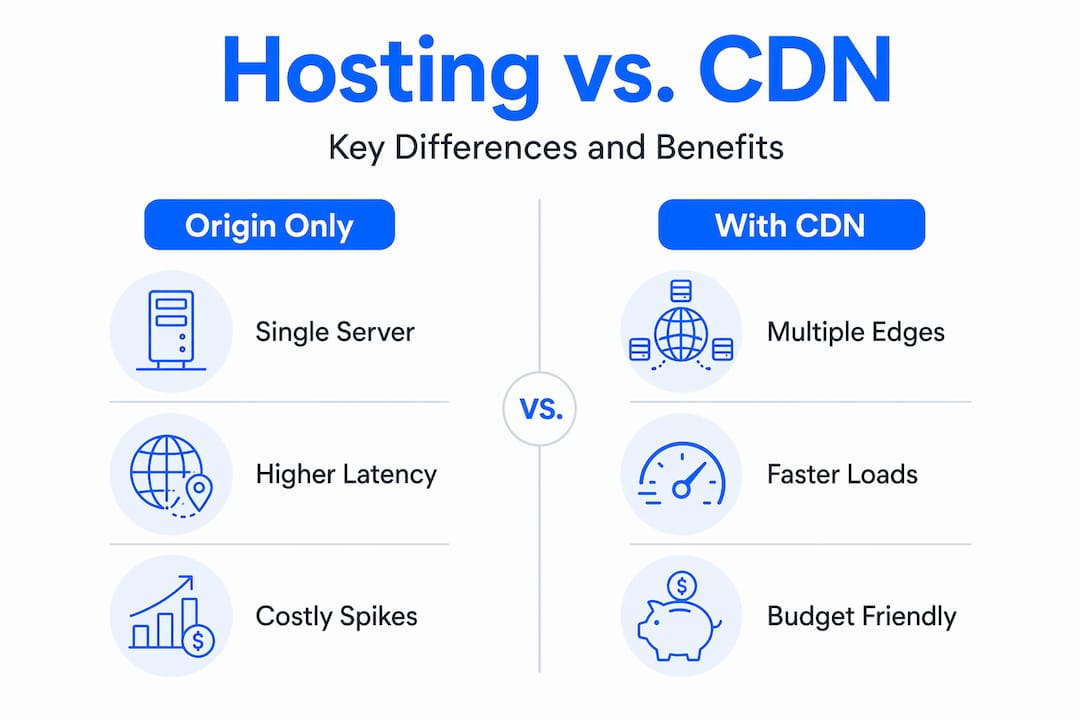
Traffic spikes are where CDNs genuinely earn their place. A viral product launch, a mention from a large media outlet, or a flash sale can multiply your normal traffic within minutes. Without CDN, that spike hits your origin server directly. With CDN, most of those requests are served from cache across distributed PoPs, and your origin handles only a small fraction of the surge.
Security is part of the reliability picture. CDNs act as a shield between the public internet and your origin server. Large-scale DDoS attacks are absorbed and distributed across the CDN's global infrastructure rather than crashing your site. Understanding how bandwidth and hosting costs interact with CDN use helps you budget more accurately for growth.
Pro Tip: When evaluating hosting plans, ask whether CDN traffic is counted against your bandwidth allowance. Many quality providers, including Insave, bundle CDN without billing it as separate bandwidth.
Best practices for configuring CDN in your hosting setup
Getting CDN infrastructure in place is only half the job. Configuration is where most sites leave real performance gains on the table.
-
Set explicit cache headers. Your server must send correct "Cache-Control
andExpires` headers for every asset type. Improper cache header configuration causes stale content, broken pages, or bypassed caching entirely. Never rely on CDN defaults for critical pages. -
Tune your TTL by content type. Images, fonts, and CSS files change infrequently. Set long TTLs for these. HTML pages, API responses, and user-specific content need short TTLs or cache-bypass rules so users always see current data.
-
Use cache priming after deployments. After a cache expires or a new deploy pushes updates, the first users after expiry experience a cold-start delay while the edge refills. Proactive cache warming strategies send requests to edge nodes before real users arrive, keeping the experience consistent.
-
Monitor your cache hit ratio weekly. Monitoring cache hit ratio regularly reveals misconfigurations before they compound into real performance problems. If your ratio drops below 80% without a clear reason, check for cache invalidation rules that are too aggressive.
-
Prioritize protocol upgrades first. Before exploring edge compute or complex routing logic, prioritize HTTP/2 or HTTP/3 and TLS 1.3. These deliver reliable performance gains with lower configuration overhead than custom edge logic.
-
Match your CDN provider to your audience geography. A CDN with strong PoP coverage in North America and Europe performs poorly for Southeast Asian audiences. Know where your traffic comes from before choosing a provider.
Pro Tip: Add a query parameter or version number to asset URLs when pushing updates (e.g., style.css?v=2). This forces cache misses on changed files without invalidating your entire CDN cache.
CDN impact on marketing outcomes and website owner decisions
For digital marketers, the role of CDN in web hosting is ultimately about what happens to your numbers. Faster sites keep visitors engaged longer. Hosting infrastructure choices feed directly into session duration, pages per visit, and conversion rates, all of which determine whether your ad spend generates returns.
A few areas where CDN benefits show up in marketing metrics:
- Geographic reach without geographic penalty. A business based in Chicago can deliver the same fast experience to a user in Singapore as to someone in Cincinnati. That matters enormously for global campaigns.
- Improved ad quality scores. Google Ads factors in landing page experience, which includes load speed. A CDN-backed landing page loads faster and earns better quality scores, reducing cost per click.
- SSL and security as trust signals. CDNs handle SSL termination at the edge, which means HTTPS delivery is faster. Visitors see the padlock icon. They trust the site more. That trust converts.
- Resilience during campaigns. The worst time for a site to go down is during a paid campaign. CDN distribution reduces that risk substantially.
- Better mobile performance. Mobile networks introduce higher and less predictable latency. Serving assets from a nearby edge node shrinks that gap considerably.
The security layer CDNs add also protects customer data in transit, which matters for compliance and brand reputation alike.
My honest take on CDNs after years of working with them
I've seen website owners add a CDN, set it to defaults, and then wonder why their performance numbers didn't move the needle. The technology works. The configuration is what fails.
In my experience, cache hit ratio is the single most overlooked metric in CDN management. Teams set it up, forget it for months, and then blame hosting when their site slows down. Weekly monitoring would have caught the misconfiguration in week two. Instead it runs silently broken for a quarter.
What I've learned from working with CDNs on real projects is that edge computing is not a future concept. It's available now on most major CDN platforms, and using it to run authentication checks or A/B test logic at the edge cuts meaningful latency from user interactions. Most website owners aren't touching this yet, which means there's real competitive advantage in learning it early.
My advice to any digital marketer choosing a hosting and CDN setup in 2026: stop treating them as separate decisions. Your hosting provider should bundle CDN natively, not as an add-on you configure yourself from a third-party console. The network is your foundation. Get it right at the infrastructure level so your content strategy doesn't have to fight against slow load times.
— Ihor
Get CDN-backed hosting that works from day one
If the gap between understanding CDN benefits and actually having them feels frustrating, Insave closes it without complexity.

Insave hosting plans come with free CDN integration built in, alongside LiteSpeed servers, LSCache, and free SSL certificates for encrypted edge delivery. You don't need to stitch together a CDN provider, a hosting account, and an SSL vendor separately. Whether you need shared hosting for a growing business site or WordPress hosting with CDN and staging tools already configured, Insave packages everything into one platform. Explore the full range of hosting and domain services and see how quickly a properly configured, CDN-backed site can go live.
FAQ
What is the role of CDN in hosting?
A CDN distributes your website's content across multiple global edge servers so users load it from the closest location. In hosting, it reduces origin server load, improves speed, and adds a resilience layer against traffic surges and outages.
How does CDN improve website speed?
CDNs reduce physical distance between your server and the user, terminate SSL connections at the edge, and serve cached static files without contacting the origin server. Properly configured CDNs can reduce latency by 50 to 80% for geographically distributed visitors.
Does using a CDN reduce hosting costs?
Yes. CDNs can offload 80 to 95% of static asset requests from your origin server, which cuts bandwidth consumption and reduces the processing load on your hosting infrastructure, lowering costs at scale.
What is a good cache hit ratio for a CDN?
A cache hit ratio above 80% for static content is the standard benchmark for a well-configured CDN. Ratios below that suggest misconfigured cache headers or TTL settings that are too short.
Is CDN important for SEO?
CDN directly supports SEO by improving Core Web Vitals scores including Largest Contentful Paint and load speed, which Google uses as ranking signals. Faster sites rank higher and retain visitors longer, reducing bounce rates that also factor into search performance.