
TL;DR:
- Your web hosting influences page speed, uptime, security, and crawling efficiency, directly affecting SEO.
- Fast, reliable hosting with features like SSD, CDN, and HTTP/3 improves Core Web Vitals.
- Choosing affordable, optimized hosting is a critical investment to enhance search rankings and user experience.
Most small business owners spend weeks obsessing over keywords, meta tags, and backlinks while barely giving a thought to where their website actually lives. But your hosting provider is doing quiet work in the background that Google notices every single day. Web hosting shapes your page speed, uptime reliability, and site security, three pillars that modern search algorithms weigh heavily. If your host underperforms, no amount of perfectly crafted content will save your rankings. This guide breaks down exactly how hosting choices affect your SEO and what you need to look for when choosing a provider.
Table of Contents
- Why hosting is the foundation of SEO
- How hosting influences speed and Core Web Vitals
- Comparing hosting types and their SEO impact
- Essential hosting features for SEO: security, protocol, CDN, and more
- Why SMBs often underestimate hosting's SEO impact (and how to fix it)
- Ready to upgrade your hosting for better SEO?
- Frequently asked questions
Key Takeaways
| Point | Details |
|---|---|
| Hosting drives SEO success | The speed, reliability, and security of your hosting provider directly impact how well your site ranks on search engines. |
| Choose infrastructure wisely | Optimized or VPS hosting delivers better SEO outcomes than basic shared solutions, especially for growing SMBs. |
| Security features are essential | SSL, HTTP/3, and uptime guarantees are critical hosting features that boost search rankings and user trust. |
| Location and resources matter | Geographic server location and adequate resources help your site load quickly for all users, improving both SEO and user experience. |
Why hosting is the foundation of SEO
Think of your website as a restaurant. You can have the best menu in the city, but if the building is constantly closed for repairs, the service is painfully slow, and the front door looks sketchy, customers will walk next door. Hosting is that building. It controls whether your site is open, fast, and safe enough for both visitors and search engines to trust it.
Google's crawlers, the bots that scan and index your site, operate on a schedule. They visit your pages to discover new content, check for updates, and assess quality signals. If your server is sluggish or goes offline during a crawl, Google wastes its allocated time on your site and may crawl fewer pages. This matters enormously for sites with large catalogs, service pages, or frequent blog updates. Missed crawls mean delayed indexing and lost ranking opportunities.
Here's what hosting directly controls for your SEO:
- Page speed: Slow servers push your Time to First Byte (TTFB, meaning how fast the server starts responding to a browser request) into dangerous territory, tanking your Core Web Vitals scores.
- Uptime: Even short periods of downtime chip away at your crawl budget and erode visitor trust.
- Security: Hosting providers that don't include SSL certificates, or that share servers with malicious sites, put your HTTPS status and domain reputation at risk.
- Server location: Physical distance between your server and your visitors adds measurable latency, slowing down every page load.
- IP neighborhood: Shared hosting can place your site on an IP address shared with spammy websites, which can create indirect SEO problems.
"Poor hosting undermines SEO efforts by causing slow loads, downtime, and crawl issues." Per Search Engine Journal, hosting's influence on page speed, uptime, and security makes it arguably the most critical technical SEO factor for any site.
Pro Tip: Before signing up with any host, run their demo or main site through Google PageSpeed Insights. If their own website is slow, expect the same for yours.
Understanding the key hosting features that correlate with SEO performance helps you avoid spending months trying to fix problems that originate at the server level. Let's now look more closely at the speed-related metrics that Google uses to score your site's experience.
How hosting influences speed and Core Web Vitals
Google's Core Web Vitals are a set of specific, measurable signals that evaluate how real users experience your pages. They aren't abstract scores. They represent actual frustration: a page that loads too slowly, a button that doesn't respond right away, or content that jumps around while loading. And your hosting provider controls the starting point for all three.
The most hosting-sensitive metric is LCP, or Largest Contentful Paint. It measures how long it takes for the biggest visible element on your page (often a hero image or headline) to fully load. If your server is slow to respond, LCP suffers immediately. Google wants LCP under 2.5 seconds. INP, or Interaction to Next Paint, measures how quickly your page reacts to a user clicking a button or tapping a link, and it needs to stay under 200 milliseconds to pass Google's benchmark. Core Web Vitals set those thresholds (LCP under 2.5s, INP under 200ms) precisely because optimized hosting can meet them while outdated or overloaded shared hosting often cannot.
Here's a quick reference for the Core Web Vitals benchmarks and how hosting types typically perform:
| Metric | Good score | Typical shared hosting | Optimized hosting |
|---|---|---|---|
| LCP (Largest Contentful Paint) | Under 2.5s | 3s to 6s+ | Under 2.0s |
| INP (Interaction to Next Paint) | Under 200ms | 300ms to 600ms | Under 150ms |
| CLS (Cumulative Layout Shift) | Under 0.1 | Often 0.1 to 0.25 | Under 0.1 |
| TTFB (Time to First Byte) | Under 600ms | 800ms to 2,000ms | Under 300ms |
The hosting and website speed relationship is essentially a chain reaction. A faster server produces a lower TTFB, which gives the browser a head start on rendering your page, which drives down LCP. Every link in that chain starts with your hosting infrastructure.
Here's how to check and monitor your Core Web Vitals without needing a developer:
- Go to Google PageSpeed Insights and enter your homepage URL.
- Scroll to the "Core Web Vitals Assessment" section and look for green (passing) or red (failing) labels.
- Open Google Search Console, navigate to "Experience" and then "Core Web Vitals" to see which URLs fail on mobile and desktop.
- Run a test using GTmetrix or WebPageTest to see your server response time (TTFB) specifically.
- Retest after making hosting changes to track improvement over time.
Pro Tip: Google measures Core Web Vitals from real user data collected over 28 days. If you switch to a faster host, allow at least a month before evaluating the SEO impact in Search Console.
Applying hosting optimization tips such as enabling server-level caching and using a content delivery network can shave hundreds of milliseconds off your page load times, often without touching a single line of code.
Comparing hosting types and their SEO impact
Not all hosting is created equal, and the differences between hosting types carry real, measurable SEO consequences. For small and medium-sized businesses choosing where to host, understanding those differences is essential.
Shared hosting places your website on a server alongside potentially hundreds or thousands of other websites. You all share the same processing power, memory, and bandwidth. When another site on your server gets a traffic spike, your site slows down too. This resource contention problem is well documented: shared hosting TTFB can spike to 500 milliseconds to 2 seconds when the server is under load and caching isn't active. That's more than enough to fail multiple Core Web Vitals thresholds at once.

VPS hosting (Virtual Private Server) gives you a dedicated slice of a server's resources. Even though you're still sharing physical hardware, your allocation is protected. Your TTFB stays consistent even when neighbors are busy. VPS hosting hits a sweet spot for growing SMBs that need reliability without paying for a full dedicated server.
Optimized or managed hosting goes further. Providers that pair VPS-level resources with performance-tuned software stacks like LiteSpeed web server, NVMe SSD storage, and built-in CDN integration can serve pages dramatically faster than generic VPS setups.
| Hosting type | Typical monthly cost | TTFB consistency | Best for |
|---|---|---|---|
| Shared hosting | $2 to $8 | Unpredictable | New or low-traffic sites |
| VPS hosting | $20 to $80 | Consistent | Growing SMBs |
| Optimized/managed | $10 to $50 | Excellent | Performance-focused SMBs |
| Dedicated server | $80 to $300+ | Excellent | High-traffic enterprise sites |
Beyond resource allocation, server location is a critical and often overlooked factor. Geographic distance adds latency affecting your Core Web Vitals scores, particularly for visitors far from your server. If your customers are mostly in the United States and your server is in Europe, every page load carries an extra penalty measured in latency. This directly harms the "field data" Google collects from real users, which feeds into your Core Web Vitals assessment.
Key considerations when comparing hosting for SEO:
- Choose a server location closest to your primary audience, not just the cheapest data center.
- Look for reliable hosting examples that publish uptime track records and performance benchmarks.
- Verify that caching (at the server level) is included or available, not just an afterthought plugin.
- Check whether CDN integration is built in or requires a separate paid service.
For a detailed breakdown of how hosting types stack up, the hosting type comparison resource walks through real-world scenarios and helps match hosting to your site's actual growth stage.
Essential hosting features for SEO: security, protocol, CDN, and more
Choosing the right hosting type gets you most of the way there, but the specific features your host provides can mean the difference between passing and failing Google's requirements. Let's look at what actually moves the needle.
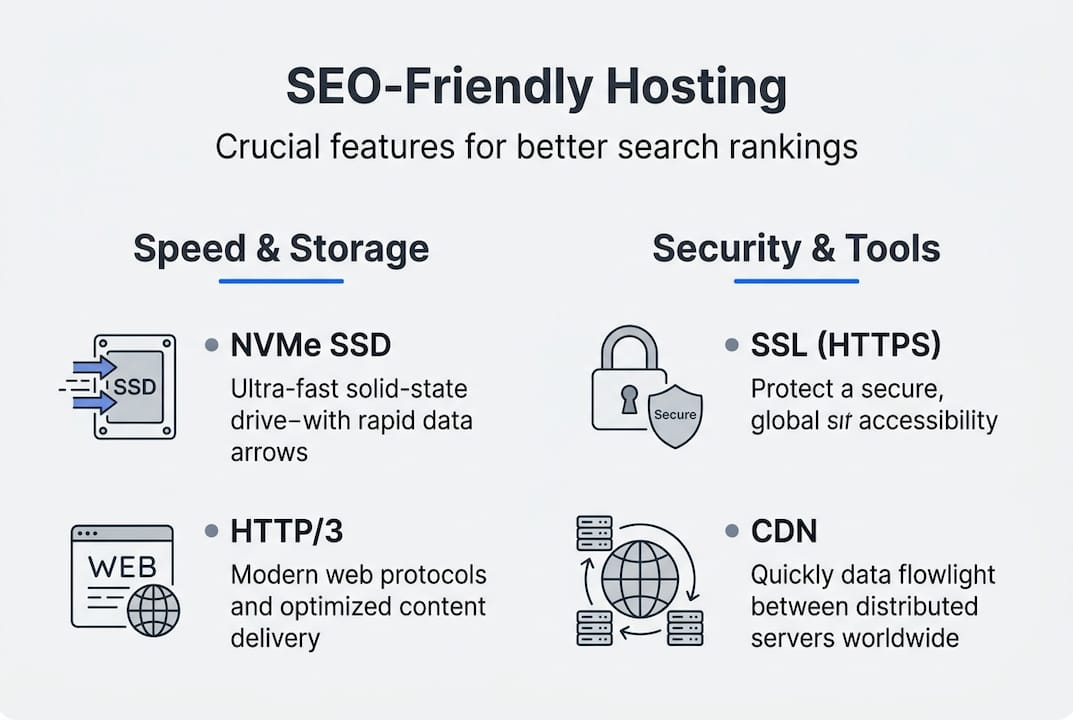
SSL certificates and HTTPS are non-negotiable. Google confirmed HTTPS as a ranking signal years ago, and Chrome now labels non-HTTPS sites as "Not Secure" in the address bar, which causes visitors to leave immediately. Every visitor who bounces due to a security warning hurts your user experience signals. Hosting that includes a free SSL certificate removes this risk entirely and ensures your site builds trust from the first click.
HTTP/3 support is the next frontier in protocol-level speed. While HTTP/2 was a massive improvement over HTTP/1.1, HTTP/3 reduces load times by an additional 3 to 7 percent compared to HTTP/2, with the biggest gains on mobile connections and high-latency networks. HTTP/3 advantages are particularly impactful for mobile Core Web Vitals, which Google increasingly prioritizes through its mobile-first indexing approach. If your host hasn't adopted HTTP/3, you're leaving speed on the table.
NVMe SSD storage is another feature that separates performance hosting from bargain basement options. NVMe (Non-Volatile Memory Express) drives read and write data several times faster than traditional hard disk drives or even older solid-state drives. For your website, this means files are retrieved and served to browsers faster, contributing to a lower TTFB and faster LCP.
CDN integration (Content Delivery Network) copies your site's static assets, images, CSS files, JavaScript, to servers distributed around the world. When a visitor in Texas opens your site, they receive content from a nearby CDN node rather than waiting for it to travel from a server in Germany. The result is dramatically lower latency for visitors everywhere, which improves your real-user Core Web Vitals data globally.
Here's a checklist of must-have hosting features for SMB SEO performance:
- Free SSL certificate included (not sold as an add-on)
- LiteSpeed or Nginx web server (faster than Apache for WordPress)
- NVMe SSD storage on all plans
- HTTP/2 or HTTP/3 support enabled by default
- Built-in CDN or easy CDN integration
- Server-level caching (like LiteSpeed Cache)
- 99.9% uptime guarantee with a transparent track record
- Malware scanning and firewall to protect domain reputation
"Security lapses don't just put your visitors at risk. They can trigger browser warnings, get your domain blacklisted by Google, and shut down crawl access entirely, wiping months of SEO progress in days."
Pro Tip: Ask your host whether their CDN is truly global or regionally limited. A CDN with only a handful of nodes won't help visitors outside those regions.
Investing in secure hosting isn't just about protecting data. It's about keeping your search visibility intact. And if you want to understand how advanced hosting tech like LiteSpeed, LSCache, and MariaDB work together to accelerate performance, the differences are more significant than most guides acknowledge.
Why SMBs often underestimate hosting's SEO impact (and how to fix it)
Here's the uncomfortable truth most SEO guides won't tell you: for a small business owner, picking the cheapest hosting plan often costs more in lost revenue than a full year's worth of a better plan would have.
We see this pattern regularly. A business invests hundreds of dollars in content writing, pays for keyword research tools, and hires someone to build links. Then they host everything on a $3/month shared plan because "hosting is just hosting." Months later, they wonder why their rankings plateaued or declined. The culprit is almost always the foundation: slow server response, intermittent downtime, no SSL, no CDN.
The insidious part is the delay. You don't see hosting-related SEO damage immediately. Google's ranking signals are collected over weeks and months. By the time you notice a traffic drop in Search Console, you've already lost significant ground to competitors whose sites loaded two seconds faster. Rebuilding that lost ranking momentum takes time, and time in SEO equals real money.
The fix isn't always expensive. A modestly priced hosting plan that includes LiteSpeed caching, NVMe storage, a CDN, and a free SSL certificate can outperform a premium shared plan from a big-name host that lacks those features. The hosting case studies consistently show that the technology stack matters more than the brand name on the invoice.
Our recommendation: treat your hosting budget as an SEO investment, not an operating cost to minimize. Even moving from a basic shared plan to an optimized plan with proper caching and CDN support can produce a measurable improvement in Core Web Vitals within 30 days.
Ready to upgrade your hosting for better SEO?
Now that you understand what great hosting does for your search rankings, the next step is making sure your website actually benefits from it.

At inSave Hosting, we built our plans around exactly the features that matter for SEO: LiteSpeed servers, NVMe SSD storage, free CDN integration, HTTP/2 support, and 99.9% uptime. Every plan includes a free SSL certificate, so your HTTPS status is covered from day one. If you're ready to stop letting slow hosting hold back your rankings, explore our affordable shared hosting options or add an SSL certificate to your existing setup. Faster pages, better security, and stronger rankings start with the right foundation.
Frequently asked questions
Does cheap shared hosting hurt my SEO?
Yes, cheap shared hosting can cause slow page speeds and downtime because resource contention on crowded servers pushes TTFB well above 500 milliseconds, which directly tanks Core Web Vitals scores and search rankings.
How does server location affect search rankings?
A server farther from your visitors adds measurable latency to every page load, and geographic distance accumulates across Core Web Vitals metrics, ultimately feeding worse real-user data into Google's ranking assessment.
What is the minimum hosting requirement for good SEO?
Your hosting should deliver a TTFB under 600 milliseconds and meet Core Web Vitals benchmarks of LCP under 2.5 seconds and INP under 200 milliseconds as a baseline for competitive search performance.
Does having HTTPS (SSL) really improve search rankings?
Yes, Google explicitly uses HTTPS as a ranking signal, and sites without SSL face browser warnings that increase bounce rates, compounding the ranking damage beyond just the direct signal penalty.