
TL;DR:
- Most websites use TLS protocols today, but many owners still refer to it as SSL, which is outdated terminology. SSL/TLS encrypts data in transit, authenticates servers, and ensures data integrity, safeguarding user information and search rankings. Regularly managing certificates, enabling the latest protocols, and automating renewals are essential practices for secure, compliant, and trustworthy websites.
Most people running websites have heard the term "SSL" hundreds of times. Fewer actually understand what SSL encryption does, why it matters, or why they're technically running something called TLS in 2026. That distinction is not just academic trivia. Understanding how this technology protects your visitors, your data, and your search rankings gives you a real advantage over site owners who treat SSL as a checkbox. This article will explain ssl encryption from the ground up, covering how it works, what TLS has to do with it, and what you actually need to do to keep your site secure.
Table of Contents
- Key Takeaways
- What SSL encryption actually does for your site
- How the SSL/TLS handshake works step by step
- SSL vs TLS encryption: what you should call it in 2026
- Managing SSL certificates: errors, renewal, and SEO
- Putting it all together: securing your site with SSL/TLS
- My take on SSL after years of watching sites get it wrong
- Secure your site with Insave SSL certificates
- FAQ
Key Takeaways
| Point | Details |
|---|---|
| SSL is now TLS | Modern secure connections run on TLS 1.2 or 1.3; the term "SSL" persists largely out of habit. |
| Encryption protects data in transit | SSL/TLS scrambles data between browser and server so interceptors cannot read it. |
| Certificate management is critical | Expired or misconfigured certificates trigger browser warnings and kill user trust immediately. |
| HTTPS is a Google ranking signal | Sites without HTTPS face higher bounce rates and a ranking disadvantage in search results. |
| TLS 1.3 is the current gold standard | It completes the handshake in one round trip, cutting latency while improving security. |
What SSL encryption actually does for your site
The phrase "what is SSL encryption" gets searched thousands of times each month by people who know they need it but are fuzzy on the specifics. Here is the direct answer: SSL (Secure Sockets Layer) encryption is a protocol that creates an encrypted connection between a web server and a browser. Everything sent across that connection, including passwords, credit card numbers, and form submissions, is scrambled so that anyone who intercepts the traffic sees only meaningless data.
SSL does three distinct jobs, and it is worth separating them clearly:
- Encryption: Converts data into an unreadable format during transmission. Only the intended recipient can decrypt it.
- Authentication: Confirms the server is who it claims to be, preventing attackers from impersonating your site.
- Data integrity: Verifies that data was not altered in transit. If someone tampers with a packet, the connection fails rather than delivering corrupted data.
These three functions together explain why HTTPS prevents data interception and is now the baseline standard for any website that handles user data. A site without SSL is essentially sending letters on open postcards.
Pro Tip: Even if your site does not take payments, SSL still protects login credentials, contact form submissions, and any cookie data your visitors generate. There is no such thing as a site too small to need encryption.
How the SSL/TLS handshake works step by step
This is where most explanations stop too early. Understanding the actual mechanism gives you real clarity on why SSL configuration matters and what goes wrong when it breaks.
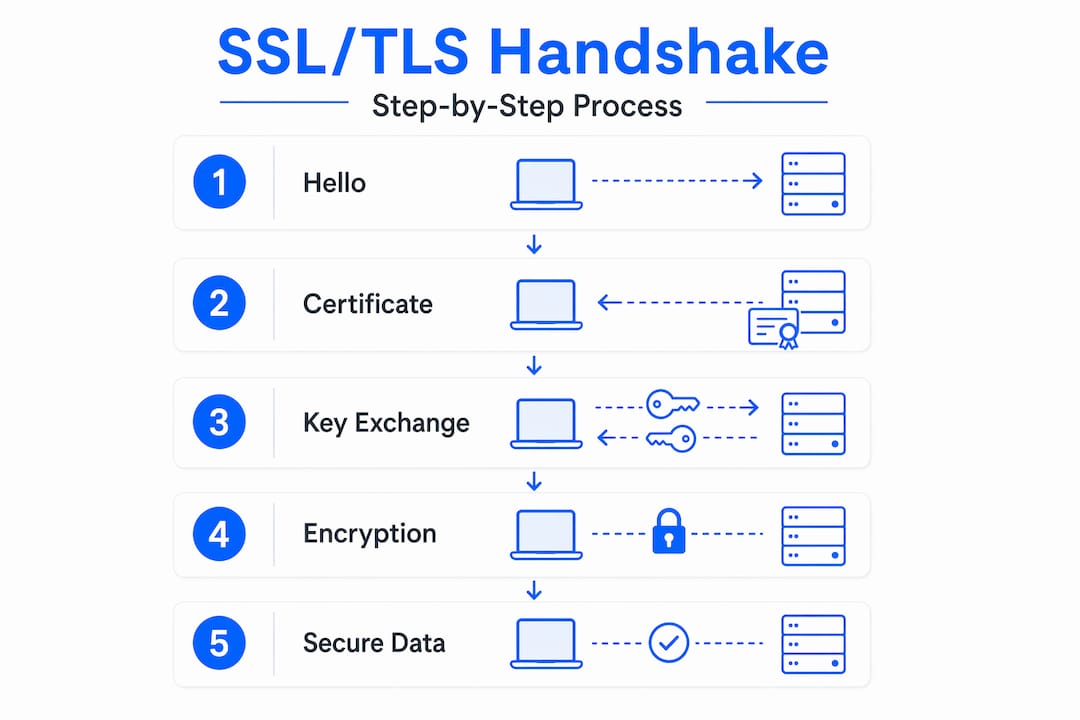
When your browser connects to an HTTPS site, it performs a TLS handshake before any data is exchanged. Here is how it plays out:
- Client Hello. Your browser sends a message announcing which TLS versions and cipher suites it supports.
- Server Hello. The server responds with its chosen cipher suite and sends its digital certificate.
- Certificate verification. The browser checks the certificate against a list of trusted Certificate Authorities (CAs) stored in the operating system.
- Key exchange. Using asymmetric encryption (typically RSA or ECDH), browser and server agree on a shared session key without ever transmitting it directly.
- Session encryption begins. From this point on, all traffic uses fast symmetric encryption (AES) with that shared session key.
The reason for switching encryption methods mid-process is performance. Asymmetric encryption handles the initial key exchange because it is secure without a pre-shared secret, but it is computationally expensive. Symmetric AES is far faster and handles the bulk of data transfer efficiently.
The certificate chain also matters more than most people realize. A certificate issued to your domain is a "leaf" certificate. It is signed by an intermediate CA, which is in turn signed by a root CA that browsers already trust. Incomplete certificate chains on servers cause handshake failures even when the domain certificate itself is perfectly valid.
| Encryption type | When it is used | Why |
|---|---|---|
| Asymmetric (RSA/ECDH) | During key exchange | Secure without pre-shared secret |
| Symmetric (AES) | During data transfer | Fast for large data volumes |
| Hashing (SHA-256) | Throughout session | Verifies data integrity |
One feature worth knowing: TLS 1.3 uses Perfect Forward Secrecy, which means each session generates fresh encryption keys. Even if a server's private key is compromised later, past sessions cannot be decrypted.
Pro Tip: Use a tool like SSL Labs' server test (ssllabs.com/ssltest) to check whether your server sends the complete certificate chain. A missing intermediate certificate is the single most common cause of "untrusted certificate" errors on mobile browsers.
SSL vs TLS encryption: what you should call it in 2026
Here is where terminology gets messy and it genuinely matters. SSL 3.0 was officially deprecated in 2015 after a critical vulnerability called POODLE made it impossible to use safely. Modern secure connections run exclusively on TLS 1.2 and 1.3. When your hosting provider says "free SSL," they mean a TLS certificate. When your browser shows a padlock, that is TLS doing the work.
So why does everyone still say "SSL"? Habit, mostly. The industry kept the shorthand even after the protocol changed underneath it. This creates real confusion when troubleshooting:
- Servers configured to support legacy SSL 3.0 or TLS 1.0 for "compatibility" are actively vulnerable to known attacks.
- Compliance frameworks like PCI DSS explicitly forbid SSL and TLS 1.0 for payment environments.
- TLS 1.3 completes the handshake in a single round trip, which is faster and more secure than TLS 1.2's two-round process.
- TLS 1.2 remains acceptable when configured correctly, but TLS 1.3 should be your default.
The practical takeaway: when your server control panel or hosting support mentions "SSL configuration," they mean TLS. Ask specifically which versions are enabled and disable anything below TLS 1.2.
Managing SSL certificates: errors, renewal, and SEO
This section covers the operational reality of living with SSL certificates, because understanding the theory is only half the job.

Certificate types and what they actually validate
Three validation levels exist for SSL certificates:
- Domain Validation (DV): Confirms you control the domain. Automated, usually issued in minutes. Suitable for blogs and small business sites.
- Organization Validation (OV): Confirms your organization exists and controls the domain. Requires manual review. Better for businesses that want a trust signal beyond the padlock. Insave offers OV certificates for exactly this use case.
- Extended Validation (EV): The highest level. Browser used to show a green bar; now it just confirms the cert type in certificate details.
Common SSL errors and what causes them
The three errors you will encounter most often come down to predictable causes. Certificates typically carry 90-day validity for automated services (like Let's Encrypt) and up to 398 days for paid certificates. When they expire, browsers display hard "Not Secure" warnings that push most visitors away immediately.
Hostname mismatches happen when the certificate covers one domain but the site loads from a different one. Wildcard certificates cover one subdomain level (like *.yourdomain.com) but not nested subdomains (like shop.blog.yourdomain.com). If you run multiple subdomains, a wildcard SSL certificate covers them all under a single certificate.
| Error type | Common cause | Fix |
|---|---|---|
| ERR_CERT_DATE_INVALID | Expired certificate | Renew immediately; automate renewals |
| SSL_ERROR_RX_RECORD_TOO_LONG | HTTP loaded on HTTPS port | Check server config, force HTTPS redirect |
| NET::ERR_CERT_AUTHORITY_INVALID | Incomplete certificate chain | Install intermediate CA bundle on server |
| Hostname mismatch | Wrong cert for the domain | Check cert covers all hostnames in use |
SSL, SEO, and compliance
Google uses HTTPS as a ranking signal. It is not the heaviest ranking factor, but in competitive niches it pushes you over sites that have not made the switch. More directly, sites without HTTPS see higher bounce rates because Chrome and Firefox prominently label unencrypted pages as "Not Secure." That warning alone tanks conversions. Pairing your certificate with strong hosting choices also matters. Read more about how your hosting affects search rankings to get the full picture.
Pro Tip: Automate your certificate renewal using your hosting control panel or a tool like Certbot. A certificate that expires over a weekend when your team is offline will cost you more in lost traffic and trust than any renewal fee.
Putting it all together: securing your site with SSL/TLS
Knowing the theory is useful. Applying it correctly is what actually protects your visitors. Here is a practical sequence for webmasters and small business owners:
- Choose the right certificate type. DV works for most informational sites. Use OV or EV if you handle transactions or want visible organizational credibility. Check the full SSL certificate options at Insave to match your needs.
- Install the complete certificate chain. Request your certificate, your intermediate CA bundle, and your root CA and install all three on your server. Skipping the intermediate is the most common setup error.
- Force HTTPS across your entire site. Set up a server-level 301 redirect from HTTP to HTTPS. Update your canonical tags and internal links to use HTTPS URLs.
- Test your configuration. Run your domain through SSL Labs. Look for an "A" or "A+" grade. Anything lower points to a specific misconfiguration you can address.
- Automate renewals. A 90-day certificate that auto-renews is safer than a 1-year certificate you might forget to renew. Set calendar reminders as a backup regardless.
- Review regularly. TLS best practices evolve. Disable TLS 1.0 and 1.1 if they are still enabled on your server. Enable TLS 1.3 wherever your server supports it.
Following this process from the SSL setup guide for small businesses will get you from zero to properly configured faster than working through documentation alone.
Pro Tip: After installing SSL, check your site for mixed content — HTTP resources (images, scripts, stylesheets) loading on an HTTPS page. Mixed content breaks the padlock and can downgrade security. Browser dev tools flag these instantly.
My take on SSL after years of watching sites get it wrong
I have watched a lot of small business owners treat SSL as a one-time setup task. They get the certificate, install it, and never think about it again until their site goes down on a Saturday because the cert expired. I have seen this cost businesses real money in lost sales and emergency support fees.
What I find even more common is the confusion between SSL and TLS. When a client tells me their "SSL is broken," the first thing I check is whether they are running an outdated TLS configuration, not whether the certificate itself is the problem. Half the time, the certificate is fine but the server is still advertising support for TLS 1.0, which modern browsers reject.
My honest advice: stop thinking of SSL as a product you buy once and forget. Think of it as an ongoing configuration that needs attention. The importance of SSL certificates goes beyond the padlock icon. It is the foundation of user trust, regulatory compliance, and your site's baseline credibility. Sites that manage it well convert better. Sites that ignore it eventually pay for it.
Simplifying certificate management does not require expertise. It requires choosing a hosting provider that automates the tedious parts and gives you visibility when something needs attention.
— Ihor
Secure your site with Insave SSL certificates

Insave includes free SSL certificates with all hosting plans, handling the installation and renewal process for you automatically. If your site needs more than a basic DV certificate, Insave offers wildcard SSL for multi-subdomain coverage and Organization Validation SSL for businesses that need higher trust signals. Every plan on the shared hosting and WordPress hosting tiers comes with SSL integration built in. No manual configuration, no renewal surprises. Visit Insave Hosting to explore plans that make website security straightforward, affordable, and one less thing you have to worry about.
FAQ
What does SSL mean in simple terms?
SSL stands for Secure Sockets Layer and refers to the technology that encrypts data traveling between a browser and a web server. In practice, modern sites use its successor protocol, TLS, though the term "SSL" remains in common use.
How does SSL actually protect my website visitors?
SSL encryption scrambles all data in transit so that anyone intercepting the connection sees only unreadable code. TLS confirms server identity and ensures data is not altered between the server and browser.
What is the difference between SSL and TLS encryption?
SSL 3.0 was deprecated in 2015 due to security vulnerabilities. TLS (Transport Layer Security) is the modern replacement, with TLS 1.2 and TLS 1.3 being the only versions considered secure today.
Does having an SSL certificate help my Google rankings?
Yes. Google officially uses HTTPS as a ranking signal, and sites without it display "Not Secure" warnings that increase bounce rates and reduce conversions. Pairing HTTPS with solid hosting improves both security and SEO performance overall.
How often do SSL certificates need to be renewed?
Certificates issued by automated services like Let's Encrypt are valid for 90 days. Paid certificates can be valid for up to 398 days. Automating renewal through your hosting control panel prevents the most common cause of SSL errors, which is expiration.