
TL;DR:
- Website uptime measures the percentage of time a website is accessible and fully operational, directly impacting revenue, SEO, and user trust. External uptime monitoring from multiple locations provides real-time detection of outages, enabling quicker response and minimizing downtime. Setting clear uptime targets, tracking MTTR, and choosing reliable hosting with proactive monitoring are essential for maintaining a resilient online presence.
Website uptime is defined as the percentage of time a website is accessible and functioning correctly for users during a specified measurement period. For any website owner, this single metric determines whether your visitors can reach you, whether Google can crawl your pages, and whether your business earns revenue or loses it. Tools like UptimeRobot and Site24x7 track this figure continuously, and hosting providers like inSave Hosting publish it as a core commitment in their service agreements. Understanding what website uptime means, how it is calculated, and what it costs when it drops is the foundation of running a reliable online presence.
What is website uptime and how is it calculated?
Website uptime is the percentage of time a website is available and functioning correctly, calculated by dividing the total operational time by the total measured time. The formula is straightforward: uptime equals total time minus downtime, divided by total time, multiplied by 100. For example, four hours of downtime in a 30-day month produces 99.44% uptime. That sounds high, but it represents real lost access for real users.

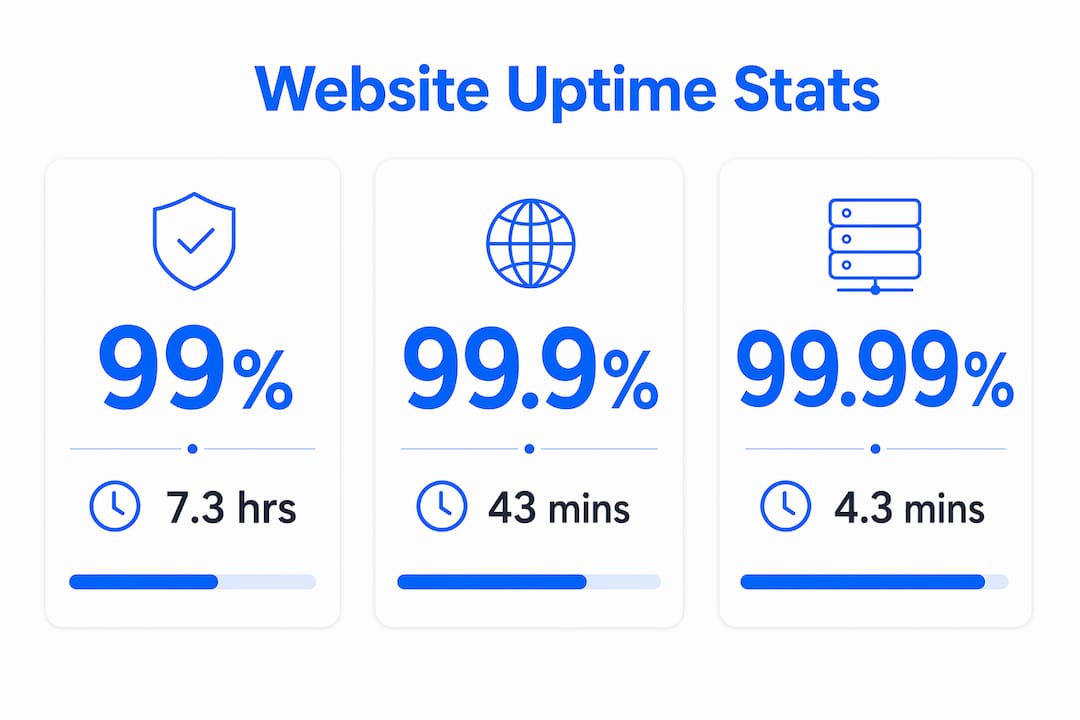
The industry shorthand for uptime targets is "nines." Three nines means 99.9%, four nines means 99.99%, and five nines means 99.999%. Each additional nine is not a small improvement. It is an order-of-magnitude reduction in allowed downtime. Downtime allowances per month change dramatically across these tiers, as shown in the table below.
| Uptime percentage | Downtime per month | Downtime per year |
|---|---|---|
| 99% | ~7.3 hours | ~3.65 days |
| 99.9% | ~43.2 minutes | ~8.76 hours |
| 99.99% | ~4.32 minutes | ~52.6 minutes |
| 99.999% | ~26 seconds | ~5.26 minutes |
The difference between 99.9% and 99.99% is operationally significant, changing your monthly downtime budget from 43 minutes to just over four minutes. For a transactional website or a SaaS product, that gap can mean the difference between a minor inconvenience and a contractual breach.
Pro Tip: When comparing hosting plans, always check whether the uptime percentage in the SLA is measured monthly or annually. Monthly measurement is stricter and more meaningful for day-to-day reliability.
Why website uptime matters for your business
Downtime is not just a technical inconvenience. Lost revenue from downtime averages $5,600 per minute across industries, with an e-commerce site generating $100,000 per hour losing roughly $1,600 every minute the site is unreachable. That figure makes uptime one of the highest-ROI metrics you can track.
The business impact extends well beyond direct revenue loss. Consider these four areas where downtime creates lasting damage:
- User trust. Visitors who encounter a down site rarely return. A single bad experience is enough to send them to a competitor, and they often do not tell you why they left.
- SEO rankings. Googlebot crawls your site on a schedule. If your pages return errors during a crawl window, Google may deindex content or lower your rankings. Hosting and SEO are directly connected through crawl success rates and page availability signals.
- SLA obligations. If you sell services to clients or operate a platform, your uptime commitment is likely written into contracts. Missing it exposes you to penalties or churn.
- Operational costs. Every outage triggers incident response: engineers pulled from other work, customer support tickets, and post-mortem analysis. These costs are real even when the outage is short.
"Uptime data can serve as defensible evidence in contractual or customer trust contexts, not just internal performance indicators." — Xitoring Blog
The importance of website uptime scales with your business model. A personal blog can survive a 30-minute outage with minimal consequence. An online store running a flash sale cannot.
What is uptime monitoring and why does it matter?
Uptime monitoring is the practice of automated, continuous checks of your website's availability from external vantage points, with alerts triggered when failures are detected. Monitoring cycles typically run every 30 seconds to 5 minutes, meaning most outages are detected within minutes rather than hours. Without monitoring, you often learn about downtime from an angry customer, not from your own systems.
Here is how a production-grade uptime monitoring setup works:
- External probes send HTTP requests to your site from multiple geographic locations every few minutes.
- The monitor checks the response code (a 200 OK means the page loaded; a 500 or 503 signals a server error).
- Content validation confirms the expected page content is present, not just that the server responded. This catches cases where a server returns a 200 but serves an error page.
- SSL certificate expiry is tracked separately, since an expired certificate takes your site offline just as effectively as a server crash.
- Alerts fire immediately via email, SMS, or Slack when any check fails, giving your team the fastest possible response window.
The critical distinction here is between internal health checks and external synthetic monitoring. Your server can report itself as healthy while being completely unreachable from the public internet due to a DNS failure, a network routing issue, or a firewall misconfiguration. External monitoring replicates what your actual users experience, which is the only measurement that matters.
Pro Tip: Use monitors placed in at least two geographic regions. A regional network outage can take down your site for users in one country while your server reports normal operation.
How to interpret uptime SLAs, SLOs, and availability goals
Three terms appear constantly in uptime discussions, and they are not interchangeable. A Service Level Indicator (SLI) is the raw measurement, such as the percentage of successful HTTP requests. A Service Level Objective (SLO) is your internal target, such as 99.9% availability. A Service Level Agreement (SLA) is the contractual commitment you make to customers, with penalties attached if you miss it.
SLA availability percentages define the maximum allowed downtime in a measurement window and tie uptime numbers directly to contractual obligations. Setting an SLA requires you to define exactly what counts as downtime, which is harder than it sounds.
Partial outages complicate the picture significantly. If your checkout page is down but your homepage loads, is that a full outage? If your site is slow but technically responding, does that count against your uptime budget? Defining downtime criteria must consider partial outages, maintenance windows, and user journey impact to produce meaningful metrics.
Here is how uptime targets typically map to different service types:
| Service type | Typical uptime target | Rationale |
|---|---|---|
| Personal blog or portfolio | 99% to 99.9% | Low revenue impact; occasional downtime acceptable |
| Small business website | 99.9% | Reputation and lead generation at stake |
| E-commerce storefront | 99.95% to 99.99% | Direct revenue loss per minute of downtime |
| SaaS application or API | 99.99% | Customer contracts and platform dependencies |
One concept that changes how you think about availability goals is the error budget. A single 45-minute outage consumes an entire monthly downtime budget at 99.9% uptime. This means one bad deployment or one infrastructure failure wipes out your entire monthly allowance in a single incident. Error budgets make abstract percentages concrete and force teams to treat every outage as a budget expenditure, not just a technical problem to fix.
Practical steps to improve and maintain website uptime
Improving uptime is not a single action. It is a set of layered practices that reduce the probability and duration of outages. These steps apply whether you run a WordPress blog or a multi-page business site.
- Choose a hosting provider with a published uptime SLA. A provider that commits to 99.9% or higher in writing has financial skin in the game. inSave Hosting's shared hosting plans include uptime guarantees backed by LiteSpeed servers and redundant infrastructure.
- Set up external uptime monitoring immediately. Tools like UptimeRobot, Site24x7, and inSave Hosting's 360 Monitoring service send alerts the moment your site goes down, cutting detection time from hours to minutes.
- Monitor your SSL certificate expiry. An expired SSL certificate triggers browser security warnings that block visitors just as effectively as a server outage. Set renewal reminders at least 30 days before expiry.
- Keep DNS records under active monitoring. DNS failures are invisible from inside your server but catastrophic for users. External monitoring catches DNS propagation failures and misconfigurations that internal checks miss.
- Plan maintenance windows and communicate them. Scheduled downtime during low-traffic hours, announced in advance, preserves user trust far better than unexpected outages at peak times.
- Maintain tested backups. A backup that has never been restored is not a backup. Test your restore process quarterly so that when you need it, you know it works.
Web hosting uptime reliability starts at the infrastructure level, but your monitoring and response practices determine how quickly you recover when something goes wrong.
Pro Tip: Track your MTTR (mean time to restore) alongside your uptime percentage. Two sites can have identical uptime numbers but very different recovery speeds. Faster restoration means less customer impact even when outages occur.
Key takeaways
Website uptime is the single most foundational metric for online reliability, and every percentage point represents a concrete amount of time your site is either serving users or failing them.
| Point | Details |
|---|---|
| Uptime definition | Uptime is the percentage of time your site is accessible, calculated from total time minus downtime. |
| The cost of downtime | Downtime costs an average of $5,600 per minute, making uptime one of the highest-ROI metrics to track. |
| Nines matter enormously | Moving from 99.9% to 99.99% cuts monthly downtime from 43 minutes to just over 4 minutes. |
| External monitoring is non-negotiable | Internal server checks miss DNS and network failures that external monitors catch immediately. |
| Error budgets make goals real | A single 45-minute outage wipes out an entire monthly downtime budget at 99.9% uptime. |
Uptime is the metric I wish more site owners took seriously from day one
Most website owners I talk to treat uptime as a hosting provider's problem. They pick a plan, assume the servers stay on, and move on. That mindset works until the first real outage, and then it costs them far more than a better hosting decision ever would have.
The insight that changed how I think about this: uptime percentage alone is a lagging indicator. By the time your monthly report shows 99.7%, the damage is already done. The metric that actually protects your business is MTTR, mean time to restore. A site that goes down for two minutes and recovers fast is far less damaging than one that goes down for 40 minutes because nobody noticed for 38 of them.
The other thing most guides skip: not all downtime is equal. A checkout page failing during a Black Friday sale is categorically different from a contact form error at 3 AM on a Tuesday. When you define your uptime goals, define them in terms of which user journeys matter most, not just which servers are running.
I also think the external monitoring gap is genuinely underappreciated. Your hosting provider's internal health checks tell you whether their servers are running. They do not tell you whether a user in Chicago can reach your site right now. Those are different questions, and only external monitoring answers the one that actually matters.
Set realistic targets based on your business model, monitor from outside your own network, and track how fast you recover, not just how rarely you fail.
— Ihor
Reliable uptime starts with the right hosting and monitoring

Choosing a hosting provider that treats uptime as a core commitment rather than a marketing claim is the single most effective step you can take for your site's reliability. inSave Hosting's shared hosting plans are built on LiteSpeed servers with redundant infrastructure and a published uptime SLA, so your site stays accessible when it matters most. Pair that with 360 Monitoring, inSave Hosting's proactive uptime monitoring service that alerts you the moment something goes wrong, and you have both the infrastructure and the visibility to protect your online presence. Explore inSave Hosting's plans and find the right fit for your site's availability needs.
FAQ
What is the website uptime definition in simple terms?
Website uptime is the percentage of time your site is online and accessible to visitors during a given period. A site with 99.9% uptime is unavailable for roughly 43 minutes per month.
Why does uptime matter for SEO?
Search engines like Google crawl your site on a schedule, and pages that return errors during a crawl may lose rankings or get deindexed. Consistent uptime and SEO performance are directly linked through crawl success rates.
How do I measure uptime for my website?
Use an external monitoring tool like UptimeRobot or inSave Hosting's 360 Monitoring service, which sends HTTP checks from outside your network every 30 seconds to 5 minutes and alerts you when your site goes down.
What counts as good uptime for a small business website?
99.9% uptime is the standard minimum for a small business site, allowing about 43 minutes of downtime per month. E-commerce sites should target 99.99% or higher given the direct revenue impact of every minute offline.
What is the difference between an SLA and an SLO for uptime?
An SLA (Service Level Agreement) is a contractual commitment to customers with penalties for missing targets. An SLO (Service Level Objective) is your internal availability goal. Your SLO should always be stricter than your SLA to give you a safety buffer.