
TL;DR:
- Website downtime costs businesses thousands of dollars per minute and damages reputation if unnoticed.
- Effective website monitoring continuously tests site availability, speed, security, and functionality from multiple locations.
- Starting with simple, low-cost, multi-region synthetic checks helps SMBs detect real issues early and avoid false alarms.
Every minute your website is down, you're losing more than just visitors. Downtime costs businesses between $5,600 and $9,000 per minute, and that figure applies whether you run a major corporation or a local service business. For small and medium-sized businesses, even a few hours of unexpected downtime can wipe out a week's revenue, damage your reputation, and send potential customers straight to a competitor. Website monitoring is the automated safety net that catches problems before your customers do, and this guide will walk you through exactly how it works, what it costs, and how to set it up without overcomplicating your tech stack.
Table of Contents
- What is website monitoring and why does it matter?
- How website monitoring works: core mechanics SMBs need
- Uptime, synthetic vs. real user monitoring: which is right for you?
- Choosing affordable tools: what SMBs should look for
- Avoiding alert overload: false positives and smart configuration tips
- The expert's angle: what most SMBs get wrong about website monitoring
- Ready to protect your site? Affordable monitoring and hosting solutions
- Frequently asked questions
Key Takeaways
| Point | Details |
|---|---|
| Downtime is costly | Unplanned website outages can cost thousands per minute, making proactive monitoring essential. |
| Monitoring covers more than uptime | Checks for performance, security, and content ensure your site truly serves visitors—not just that it loads. |
| Start simple and grow | Begin with basic synthetic monitoring; add complexity only as your business needs expand. |
| Tune alerts carefully | Reduce false alarms by using multi-region checks and retries before sending notifications. |
| Affordable tools are available | SMBs can access quality website monitoring for little or no cost with the right solutions. |
What is website monitoring and why does it matter?
Website monitoring is not just a fancy way of saying "someone checks if your site is up." It's a continuous, automated process that tracks your site's availability, speed, security, and critical functionality around the clock. Think of it like a smoke detector for your business's online presence. You don't wait for the fire to start before acting.
According to website monitoring best practices, effective monitoring continuously tests websites for availability, performance, functionality, and security using automated checks from multiple locations worldwide. That global perspective matters because your site might be accessible in Texas but completely unreachable in London, and without multi-location checks, you'd never know.
Here's what solid website monitoring covers:
- Uptime tracking: Is your site actually reachable right now?
- Page speed: Are pages loading within acceptable time limits?
- SSL certificate status: Is your secure connection (the padlock icon) still valid?
- Content integrity: Are the right words, images, and forms still displaying correctly?
- Transaction testing: Can users actually complete purchases or sign-up forms?
"Your monitoring setup is only as useful as its ability to catch real problems quickly and alert you before your customers notice anything wrong."
Understanding web hosting uptime basics is a great starting point, but monitoring goes beyond what your hosting provider reports. It gives you an independent view of what real users experience when they visit your site. You can also pair this knowledge with monitoring for site reliability to get a full picture of your uptime health.
How website monitoring works: core mechanics SMBs need
Behind the scenes, website monitoring tools are quietly running tests on your site every few minutes. The process is more structured than most people realize, and understanding it helps you configure your alerts intelligently.
Here's the step-by-step sequence of what a typical monitoring check looks like:
- The tool sends a request to your website's URL, just like a browser would.
- It reads the HTTP status code returned by your server. A "200 OK" means everything is fine. A "404" means the page is missing. A "500" means something crashed on the server.
- It measures response time, specifically Time to First Byte (TTFB), which is how long it takes for your server to start responding.
- It checks your SSL certificate to confirm it hasn't expired or been compromised.
- It scans for keywords or content on the page to confirm the right page actually loaded, not an error page.
- It logs the results and triggers an alert if anything falls outside your defined thresholds.
Core mechanics data confirm that best-practice monitoring runs HTTP/HTTPS pings every 1 to 5 minutes, checking status codes, response times where TTFB should stay under 200 to 600ms, SSL certificates, keyword content, and even multi-step transactions like shopping carts.

| Check type | What it tests | Ideal threshold |
|---|---|---|
| HTTP status | Is the site responding? | 200 OK |
| TTFB (response time) | How fast is the server? | Under 600ms |
| SSL certificate | Is the connection secure? | Valid, not expiring soon |
| Keyword check | Is the right content loading? | Exact match found |
| Transaction test | Can users complete key actions? | Zero errors |
Synthetic checks run on autopilot without needing real visitors to trigger them, which is why they're so effective at catching issues at 3 a.m. Protecting your SSL certificate is especially important because an expired SSL causes browsers to block users with a scary security warning, and most people won't push through it. You can also cross-reference your monitoring findings against a solid website security checklist to make sure you're covering all your bases.
Pro Tip: Set your SSL alert to trigger at least 30 days before expiration. That gives you plenty of time to renew without any service disruption.
Uptime, synthetic vs. real user monitoring: which is right for you?
Many SMB owners hear the term "Real User Monitoring" (RUM) and assume it's automatically better than synthetic checks because it involves actual humans. That's not necessarily true. Both methods serve different purposes, and choosing the right one depends on your current stage of growth.
Synthetic monitoring uses scripted bots that simulate traffic, running proactive 24/7 tests from fixed locations, while Real User Monitoring (RUM) tracks actual visitor data, capturing device types, browser versions, and geographic performance differences. For SMBs, the recommended path is to start with synthetic for uptime visibility, then add RUM as traffic grows.
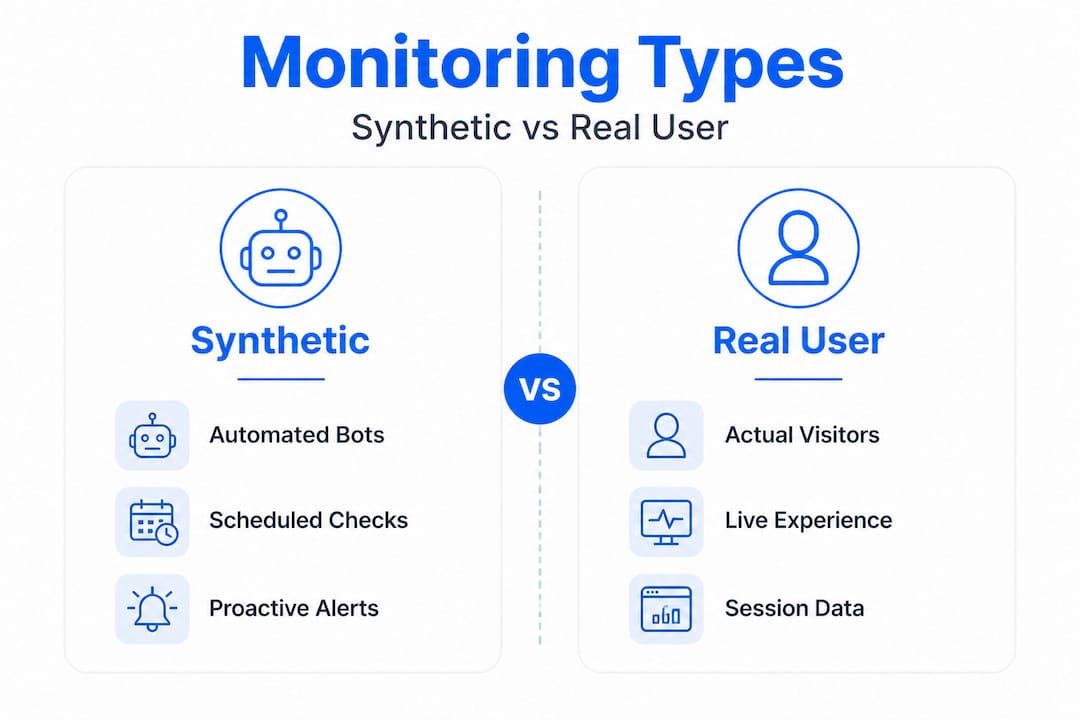
Here's a quick comparison:
| Feature | Synthetic monitoring | Real user monitoring (RUM) |
|---|---|---|
| Who generates the test? | Automated bots | Real website visitors |
| When does it run? | Any time, even zero traffic | Only when visitors are present |
| What does it detect? | Outages, slow pages, broken SSL | User experience, device/browser issues |
| Setup complexity | Low | Medium to high |
| Cost | Free to low | Moderate to high |
| Best for | Early-stage SMBs | Growing sites with real traffic |
Synthetic monitoring is perfect for SMBs because it protects you 24/7 without needing a stream of visitors to trigger checks. If your site goes down at midnight and traffic resumes in the morning, synthetic monitoring will have already alerted you hours earlier.
Here's where RUM adds unique value:
- Catching slow load times that only affect mobile users on cellular connections
- Identifying pages that work in Chrome but break in Safari
- Spotting regional performance issues in specific countries or cities
- Understanding actual visitor abandonment points
For most SMBs just getting started, skip RUM for now. It adds complexity that isn't necessary until you have consistent traffic and have already nailed the basics. Investing in advanced hosting performance technologies often addresses most real user performance problems before you even need RUM tools.
Choosing affordable tools: what SMBs should look for
The good news is that you don't need an enterprise budget to monitor your website effectively. There are excellent free and low-cost tools that cover everything most SMBs need.
Affordable monitoring tools for SMBs include UptimeRobot's free plan offering 50 monitors with 5-minute check intervals, Hyperping at $24 per month with 30-second checks across 19 global regions, and Notifier or Dotcom-Monitor ranging from $0 to $20 per month.
| Tool | Price | Check interval | Monitors | Key features |
|---|---|---|---|---|
| UptimeRobot | Free | 5 minutes | 50 | HTTP, keyword, SSL alerts |
| Hyperping | $24/mo | 30 seconds | Custom | 19 regions, fast checks |
| Notifier | $0 to $9/mo | 1 to 5 minutes | Multiple | SSL, domain, status pages |
| Dotcom-Monitor | From $20/mo | 1 minute | Custom | Multi-step, full transactions |
When evaluating any tool, look for these non-negotiable features:
- Multi-location checks: A single-location check can give you false positives. Global coverage gives you accurate, trustworthy data.
- Alert customization: You need to control how and when you receive notifications. Email is fine, but SMS is faster in a real crisis.
- SSL monitoring: This should be a built-in feature, not an add-on.
- Status page support: A public page showing your uptime history builds customer trust and reduces support tickets.
- Integration with tools you already use: Slack, email, PagerDuty, or whatever your team already monitors.
Pro Tip: Start with UptimeRobot's free tier. If you find yourself needing sub-1-minute check intervals or faster SMS alerts, that's a signal your business has grown enough to justify a paid plan.
Pairing your monitoring tool with a solid hosting environment is equally important. Checking out hosting features for SMBs helps you make sure your server infrastructure supports fast recovery when issues do arise. And while monitoring tells you when something breaks, having website backups in place ensures you can restore your site quickly without starting from scratch.
Avoiding alert overload: false positives and smart configuration tips
Here's something no one tells you when you first set up website monitoring: your biggest early headache won't be actual downtime. It will be false alarms. A false positive happens when your monitoring tool reports an outage that wasn't really one, usually triggered by a momentary internet hiccup, a firewall blocking the check, a redirect that confused the bot, or a page that partially loaded but flagged as a failure.
Common false positive triggers include network latency spikes, WAF (web application firewall) blocks, redirects, and partial page loads. The recommended mitigation strategies are using retry logic after 2 to 3 consecutive failures, multi-region quorum requiring 2 out of 3 locations to confirm the issue, timeout thresholds set above your p99 response time, and keyword checks to validate actual content delivery.
Here's how to tighten your alert configuration:
- Enable retry logic: Don't let one failed ping trigger an alert. Require 2 to 3 consecutive failures before any notification fires.
- Use multi-region confirmation: If only one monitoring node reports an issue but all others say the site is fine, it's almost certainly a false positive.
- Add keyword checks: Instead of just checking if the server responds, verify that a specific word on your homepage is actually present. This catches situations where your server is up but serving an error page instead of real content.
- Adjust timeout thresholds: If your site normally loads in 400ms, don't set a timeout at 200ms. Set it above your typical p99 response time (the slowest 1% of your requests).
- Use status pages proactively: When maintenance is scheduled, mark it in your monitoring tool to suppress alerts and update your public status page.
The result of smart configuration is fewer interruptions and more trust in the alerts you do receive. When your monitoring tool fires a genuine alert, you'll know it's real and act immediately instead of assuming it's another false alarm.
These configuration habits also connect directly to your broader security tips for SMBs, since many monitoring gaps are also security gaps waiting to be exploited.
The expert's angle: what most SMBs get wrong about website monitoring
Here's the real-world truth most monitoring guides skip over: the biggest mistake SMBs make isn't failing to set up monitoring. It's setting up monitoring in a way they never actually trust.
We see this pattern repeatedly. A business owner gets excited, signs up for a monitoring tool, adds 20 different checks, enables every possible alert type, and within a week they're getting a dozen notifications a day. Most of those notifications are false alarms, so they start ignoring them. Then a real outage happens and the alert gets buried in the noise.
For SMBs specifically, the priority should be simple synthetic uptime, SSL, and performance checks over complex RUM setups initially. Free tiers are sufficient for the basics, with upgrades justified when you need faster check intervals or SMS alerts. Multi-location checks and retry logic are essential to prevent alert fatigue from day one.
The monitoring setup that actually protects your business is the one you'll check, act on, and trust when something real goes wrong. That means starting lean. Add one or two monitors, configure retry logic, enable multi-region checks, and test your alerts by deliberately taking a page offline to see how the system responds.
There's also a mindset shift worth making. Website monitoring is not just a technical task. It's a business continuity practice. It tells you when revenue is at risk, when customers are having a bad experience, and when your hosting environment needs attention. Treating it as a set-it-and-forget-it task is as risky as having no monitoring at all.
The 360 Monitoring features available today are designed with exactly this balance in mind, giving SMBs meaningful visibility without burying them in configuration complexity. Start simple, validate your setup, and then expand coverage as your business and confidence grow.
Ready to protect your site? Affordable monitoring and hosting solutions
If the last few sections made you realize your site needs better protection, you're in the right place. At InSave Hosting, we built our platform specifically for businesses that need professional-grade reliability without enterprise pricing.

Our 360 Monitoring service gives you real-time uptime alerts, SSL tracking, and performance checks from multiple locations so you stay informed and in control. Pair that with our shared hosting plans, which are powered by LiteSpeed, free CDN, and guaranteed 99.9% uptime, and you've got a foundation that supports your monitoring setup rather than undermining it. Every plan also includes affordable SSL certificates to keep your connection secure and your visitors confident. The best time to protect your business online is before something goes wrong.
Frequently asked questions
How often should I check my website for uptime?
Automatic checks every 1 to 5 minutes are the standard for effective website monitoring. More frequent checks, such as every 30 seconds, are available on paid plans and are worth it for high-traffic or revenue-critical sites.
What's the difference between synthetic monitoring and real user monitoring?
Synthetic monitoring uses scripted bots to simulate traffic proactively, while real user monitoring captures live data from actual visitors, including their devices and browsers. Most SMBs should start with synthetic monitoring and add RUM later as traffic grows.
Can I get reliable monitoring without spending a lot?
Absolutely. Free tools like UptimeRobot offer 50 monitors with 5-minute check intervals at no cost, covering the core uptime, SSL, and keyword checks that most SMBs need to get started effectively.
What causes false downtime alerts?
False positives typically come from network latency, WAF blocks, page redirects, or partial loads. Configuring retry logic and multi-region confirmation before sending alerts eliminates most of these.
What is a status page and should my SMB use one?
A status page is a public-facing web page that shows your site's current operational status and historical uptime data, helping customers know when issues occur and reducing inbound support questions. Even small businesses benefit from the transparency and professionalism a status page provides.