
TL;DR:
- Most SMB website breaches result from simple vulnerabilities like outdated plugins and weak passwords.
- A layered security approach, including secure hosting, SSL, 2FA, backups, and regular testing, is effective.
- Consistent maintenance and choosing hosting providers with built-in security features provide strong protection on a budget.
Nearly 87.8% of web exploits bypass the very plugins and firewalls most small businesses rely on. If you run a WordPress site on a budget hosting plan, you've probably installed a security plugin and called it a day. That false sense of protection is exactly what attackers count on. This guide breaks down what website security actually means for small and medium-sized businesses, which threats matter most in 2026, and how to build a real defense without burning through your budget or your weekend.
Table of Contents
- What is website security?
- Top threats facing SMB websites in 2026
- The myths and realities of securing WordPress and budget hosting
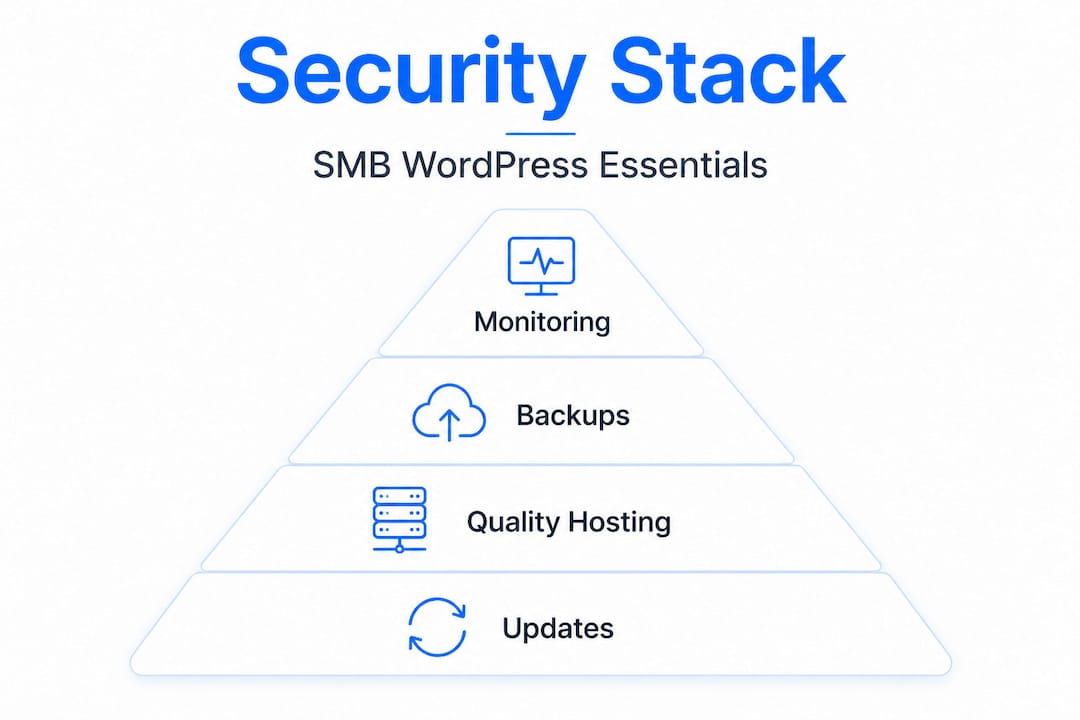
- Building an affordable, multi-layered security stack
- Why website security for SMBs is harder—and simpler—than the experts claim
- Affordable hosting solutions that prioritize your SMB's security
- Frequently asked questions
Key Takeaways
| Point | Details |
|---|---|
| Defense in depth | Rely on multiple layers of protection, not just a single security plugin or feature. |
| Update and backup | Regular software updates and tested backups prevent most disasters for SMB sites. |
| Managed hosting matters | Using a quality managed host simplifies security for WordPress and affordable sites. |
| SSL and TLS essentials | HSTS and TLS 1.3 with free SSL certificates provide strong encryption for all sites. |
| Test, don’t assume | Test your backups and restores quarterly; untested backups often fail. |
What is website security?
Website security isn't a product you buy or a single checkbox you tick. It's a layered set of ongoing measures that protect your site from unauthorized access, stolen data, downtime, and reputational damage. Think of it less like a lock on a door and more like a neighborhood watch program paired with deadbolts, cameras, and a fire alarm.
For WordPress site owners on affordable hosting, understanding the core risk categories is the first step. Here's what you're actually defending against:
- Malware injections: Malicious code that silently redirects your visitors or harvests their data
- Data breaches: Unauthorized access to customer emails, passwords, or payment details
- XSS (Cross-Site Scripting): Attackers inject scripts into your web pages through form fields, URL parameters, or error messages, and those scripts run in your visitors' browsers
- CSRF (Cross-Site Request Forgery): A trick that forces a logged-in user to perform unintended actions, sometimes bypassing modern browser protections like SameSite cookies
- Plugin vulnerabilities: Outdated or poorly coded plugins that open backdoors into your site
What makes SMB WordPress sites uniquely vulnerable? First, WordPress powers over 40% of the web, which makes it a massive, attractive target. Second, budget shared hosting environments often mean your site literally lives on the same server as hundreds of other sites. If one of those gets infected, you face real cross-contamination risk.
The visible outcomes of a breach aren't just technical headaches. You lose customer trust the moment Google flags your site with a "This site may be hacked" warning. You face SEO penalties that can take months to recover from. And depending on your location and the data you collect, you could face legal liability under regulations like GDPR or CCPA.
Premium plugins are implicated in zero-day vulnerabilities at three times the rate of free ones. That's a surprising finding for many SMBs who assume paid means protected. Combining solid web hosting security basics with a written policy for your team is a smart starting point. For reference on what a basic policy looks like, this sample information security policy from Cleverbit gives you a practical template.
| Risk type | Entry point | Potential damage |
|---|---|---|
| Malware injection | Outdated plugins or themes | Site blacklisting, data theft |
| Data breach | Weak passwords, no 2FA | Legal exposure, lost customers |
| XSS | URL parameters, form fields | Session hijacking, defacement |
| CSRF | Authenticated user sessions | Unauthorized transactions |
| Plugin zero-days | Unpatched premium plugins | Full site compromise |
Top threats facing SMB websites in 2026
With a clear definition in place, let's look at the real-world threats you're most likely to face now and heading into next year.
The attack landscape has matured. Attackers aren't just running simple automated scans anymore. They're using AI to craft malware faster and smarter than before. AI-generated malware is actively infecting outdated WordPress installations in 2026, adapting its code to evade traditional pattern-based scanners. That changes the game considerably.
Here are the five threats SMBs need to prioritize:
- Plugin zero-days: Attackers find and exploit vulnerabilities before developers patch them. Premium plugins see 3x more zero-day exploits than free alternatives, likely because they're installed across more high-value sites.
- AI-powered malware: Adaptive malicious code that modifies itself to bypass signature-based detection.
- Reflected XSS via URL parameters: Attackers craft malicious links and trick your users into clicking them. The script executes in your visitor's browser with no server-side warning.
- CSRF attacks bypassing SameSite cookies: Newer browser protections help, but misconfigured forms still leave gaps.
- Shared hosting cross-contamination: On crowded shared servers, one infected neighbor can spread malware to your files.
Following solid WordPress security steps addresses most of these directly. And understanding why secure hosting matters helps you make smarter decisions when choosing where your site actually lives.
| Threat | Ease of attack | Business impact | SMB priority |
|---|---|---|---|
| Plugin zero-days | Medium | Critical | Very high |
| AI-generated malware | Low (for attacker) | Critical | Very high |
| Reflected XSS | Easy | High | High |
| CSRF | Medium | Medium | Medium |
| Shared hosting contamination | Passive | High | High |
Key insight: The threats that do the most damage to SMBs aren't the sophisticated nation-state hacks you read about in tech news. They're the boring, predictable ones: an unpatched plugin, a reused password, a backup that was never tested.
The myths and realities of securing WordPress and budget hosting
It's easy to fall for shortcuts and myths in the world of website security, so let's separate fact from fiction.
Myth 1: A security plugin is all you need. A reputable plugin like Wordfence or Sucuri adds real value. But relying on one tool alone is dangerous. Plugins themselves can introduce vulnerabilities, and they operate at the application layer. They can't protect against server-level exploits, hosting misconfigurations, or threats that arrive through your theme files. No single silver bullet exists; the expert consensus points to combining host-level security with plugin-based monitoring, not choosing one or the other.
Myth 2: SSL means your site is secure. An SSL certificate encrypts the connection between your site and your visitors. That's important. But SSL does nothing to stop malware in your files, a brute-force attack on your login page, or a vulnerable plugin being exploited. It's one layer, not the whole stack.
Myth 3: You only need a strong password. Passwords matter, but they're easily stolen through phishing, keyloggers, or data breaches at other services you use. Two-factor authentication (2FA) is the backup that turns a stolen password into a dead end.
Myth 4: Having backups means you're safe. This one is particularly dangerous. Most businesses have backups. Very few test them. A backup that's never been restored is just a file sitting somewhere, and it may be completely broken when you actually need it. More on that below.
Myth 5: WAFs (Web Application Firewalls) stop everything. WAFs are valuable. They filter out a significant amount of malicious traffic. But as we established earlier, the majority of exploits bypass WAFs entirely. They're a useful filter, not an impenetrable wall.
Refer to WordPress hosting tips for smart configuration advice, and check out what hosting security features to look for in a quality provider.
Here's the layered reality most SMBs should follow instead:
- Start with a quality hosting environment that includes built-in malware scanning
- Add SSL with HSTS (HTTP Strict Transport Security) enforced
- Install a monitoring plugin, not just a blocking one
- Enable 2FA for all admin accounts
- Set up automatic plugin and WordPress core updates
- Schedule and actually test your backup restores every quarter
Pro Tip: Before switching hosts or upgrading your security stack, document what you currently have. Knowing your starting point helps you identify gaps and avoid paying for overlapping protections.
"The best security posture isn't the most expensive one. It's the one you actually maintain."
Building an affordable, multi-layered security stack
Ready to put best practices into action? Here's exactly how to build a realistic, affordable, and effective defense even on a budget hosting plan.
The goal isn't perfection. The goal is making your site a harder target than the next one. Attackers, especially automated ones, move on quickly when a site puts up any meaningful resistance.
Step-by-step priority order:
-
Upgrade your hosting environment: Managed WordPress hosts with built-in WAF and malware removal outperform cheap shared options significantly. Providers that include automated malware scanning at the server level remove a huge burden from your shoulders.
-
Enable SSL with TLS 1.3 and HSTS: HSTS combined with TLS 1.3 is essential even on a tight budget. Free Let's Encrypt certificates are fully sufficient for most SMBs when properly configured.
-
Activate 2FA for all admin and editor accounts: Use an authenticator app rather than SMS-based codes, which can be intercepted through SIM-swapping attacks.
-
Set WordPress core, themes, and plugins to auto-update: Yes, rare compatibility issues can occur. But the risk of running outdated software is far greater than a minor plugin conflict you can fix in minutes.
-
Configure automated backups to an offsite location: Storing backups only on your hosting server defeats the purpose. If your host goes down or gets compromised, you lose everything including your recovery option.
-
Test your backup restores quarterly: Untested backups frequently fail when you actually need them. Schedule a quarterly test where you restore a backup to a staging environment and confirm the site works correctly.
-
Add Cloudflare's free tier: Cloudflare provides DDoS protection, a basic WAF, and caching at no cost. It's one of the best free tools available to SMBs right now.
Free and genuinely effective tools for your stack:
- Let's Encrypt: Free SSL certificates trusted by all major browsers
- Cloudflare free tier: DNS-level protection, CDN, and basic WAF
- Wordfence free version: Application-level monitoring and login protection
- UpdraftPlus free version: Automated offsite backup scheduling
- WP Activity Log: Tracks every change to your site for audit purposes
When choosing WordPress hosting, look specifically for LiteSpeed technology, built-in malware scanning, PHP8 support, and managed update tools. These features reduce your manual workload while increasing your baseline protection. Setting up website automated backups through your host is also a solid first step before touching anything else.

Pro Tip: Run a free site scan with Sucuri SiteCheck before you start making changes. It gives you a current snapshot of any existing infections or blacklisting issues so you know exactly what you're dealing with.
Why website security for SMBs is harder—and simpler—than the experts claim
Here's a candid take after working with hundreds of small business website owners: the security industry has a financial incentive to make this feel complicated.
The harder security sounds, the more tools, audits, and managed services you'll buy. But the honest truth is that the vast majority of successful attacks on SMB WordPress sites exploit the same five predictable weak points over and over. Outdated plugins. Untested backups. Reused passwords. No 2FA. Cheap shared hosting with no isolation between accounts.
That's it. That's the list. Advanced persistent threats, zero-click exploits, and nation-state actors are not coming after your regional accounting firm's WordPress site. The automated bots that scan for vulnerable plugin versions absolutely are.
Most SMBs can genuinely protect themselves by mastering the basics consistently. A site that runs updated software, enforces 2FA, backs up to an offsite location, and tests those restores regularly is dramatically more secure than a site with five premium security plugins installed but nothing patched since March.
Where does the "it's complicated" narrative hurt you most? It leads to decision paralysis. You research for months, never implement anything, and your site quietly accumulates risk. Or you invest in expensive point solutions like enterprise-grade WAFs or dedicated security consultants, which don't address the root causes at your scale.
The real competitive advantage for SMBs is consistency. Build a simple routine: update everything weekly, test your backup monthly, review your admin user list quarterly. That habit, practiced faithfully, will protect you better than most enterprise security budgets protect organizations that treat security as a one-time project.
The importance of secure hosting can't be overstated here either. Your hosting environment is the foundation. If that foundation is weak, no plugin stack will compensate for it.
Affordable hosting solutions that prioritize your SMB's security
Following the advice in this guide becomes dramatically easier when your hosting provider does the heavy lifting on the foundation layer.

InSave Hosting is built with exactly this challenge in mind. Our WordPress-managed hosting includes LiteSpeed technology, built-in security monitoring, free CDN integration, and easy staging tools so you can test changes safely before they go live. Every plan includes a free SSL certificate, because SSL certificates aren't a premium add-on here, they're the baseline. If you're starting out or running multiple smaller sites, our shared hosting options are optimized for WordPress performance and include features that typical budget hosts charge extra for. Security doesn't have to mean expensive. It means choosing the right foundation from the start.
Frequently asked questions
Is website security just installing a plugin?
No—security requires layered defenses like quality hosting, SSL, regular updates, backups, and smart monitoring, not just a plugin. Host-level security plus plugin monitoring is the accepted approach, not one or the other.
What are the most common website attacks in 2026?
AI-generated malware and plugin zero-days are among the leading threats facing SMB WordPress sites, alongside XSS and CSRF exploits targeting outdated or misconfigured installations.
How often should backups be tested?
Backups should be tested at least every quarter, because untested backups frequently fail when you actually need them for a real recovery.
Are free SSL certificates safe?
Yes—the free Let's Encrypt SSL certificate offers strong, browser-trusted encryption. When paired with HSTS and TLS 1.3, it's fully sufficient for most small business websites.
Is shared hosting safe for business websites?
Shared hosting is less isolated than managed hosting but can be made significantly safer when combined with active monitoring, regular updates, and offsite backups. Managed WordPress hosting outperforms shared hosting for security-conscious SMBs who want less manual management.