
Choose cloud hosting if your traffic is unpredictable and downtime costs you real money. Choose a VPS if you want a fixed monthly bill, full root control, and a workload that behaves the same way every day. The rest comes down to how much you value predictability over elasticity, since both models can run a fast, secure site when sized correctly.
TL;DR:
- Cloud hosting offers automatic failover and resource migration, making it ideal for unpredictable traffic spikes and mission-critical applications.
- Local NVMe storage on VPS typically outperforms cloud networked storage for database-heavy workloads due to lower LIOA and higher throughput.
- Cloud's pay-as-you-go billing can result in higher monthly costs for steady workloads, while VPS provides predictable, fixed monthly pricing.
- For stable, predictable sites, a well-sized VPS with fixed resources is often more cost-effective than a cloud setup with variable costs.
- Cloud hosting excels in autoscaling and resilience, but requires careful cost management and understanding of usage-based charges.
Table of Contents
- VPS vs Cloud: What Actually Separates Them
- What Is a VPS?
- What Is Cloud Hosting?
- The Real Architecture and Operations Gap
- Performance, Scalability, and Reliability in the Real World
- Pricing and Billing: Fixed Bills vs. Metered Surprises
- Which Should You Choose: A Decision Checklist
- Sizing, Selecting, and Migrating Without the Headaches
- How inSave Hosting Supports Your VPS or Cloud Decision
- Why Simplicity Usually Wins for Small Teams
- Get Your Hosting Set Up the Right Way
- Sources
- FAQ
VPS vs Cloud: What Actually Separates Them
The phrase "VPS vs cloud" gets thrown around loosely in hosting marketing, and that's part of the problem. A lot of providers slap "cloud" on a product that is, mechanically, still a VPS. The honest distinction isn't about branding. It's about architecture, billing, and what happens when a physical server underneath your site fails at 2 a.m.
A VPS is a virtual machine carved out of a single physical server using a hypervisor. Cloud hosting runs on a distributed cluster of machines with networked storage, built to move your workload automatically if one node dies. That single sentence explains almost every practical difference you'll read about below, from pricing to failover to raw disk speed.
What Is a VPS?
A VPS, or virtual private server, is a slice of a physical machine that behaves like your own private computer. A hypervisor, commonly KVM, splits one physical server into multiple isolated virtual machines, each with its own operating system, allocated CPU cores, RAM, and disk space. You get root access, which means you can install whatever software you want, configure the firewall your way, and run a stack nobody else touches.
Traditional VPS plans are built for predictability. You pick a tier, say 2 CPU cores, 4GB RAM, 80GB storage, and you pay the same amount every month regardless of how much traffic you get. Your neighbors on the same physical host are other VPS customers, but the hypervisor keeps your resources walled off from theirs, at least in theory (more on "noisy neighbors" later).
Here's what a typical VPS plan actually includes:
- Fixed CPU, RAM, and storage allocation, usually on local NVMe or SSD drives
- Full root or administrator access to configure the server yourself
- A static IP address and manual control over networking and firewall rules
- Fixed monthly or annual billing with no usage-based surprises
- Manual scaling, meaning you upgrade to a bigger plan when you outgrow the current one
One wrinkle worth understanding before you shop: "cloud VPS" is now a common product category, and it blurs the line intentionally. A cloud VPS still looks and feels like a traditional VPS from the control panel, but it often runs on cloud infrastructure underneath, which can mean better failover and hourly billing options. The difference between cloud VPS and traditional VPS usually comes down to three things: billing flexibility, automatic failover, and whether the provider exposes an API for automation. If a listing just says "cloud" with no mention of those three, assume it's marketing language layered over a standard VPS.
What Is Cloud Hosting?
Cloud hosting distributes your workload across a cluster of physical servers instead of confining it to one machine. Your virtual instance still runs on real hardware somewhere, but the underlying architecture is designed so that if one node in the cluster fails, your instance can be relocated to another node, often without you noticing.
That resilience comes from two structural choices most VPS providers skip: networked block storage and orchestration software that manages the fleet. Instead of your data living on a single drive in a single server, cloud storage is typically replicated across multiple physical disks on different machines. Lose one disk, and the platform keeps serving your data from the copies.
Cloud platforms are also built for automation from the ground up. Most expose an API, which means you (or a tool like Terraform) can spin up, resize, or destroy servers programmatically instead of clicking through a control panel. That's a big deal if you run continuous integration pipelines or need infrastructure that scales itself.
Cloud hosting shows up in a few different flavors, and mixing them up leads to confusion:
- IaaS cloud instances: raw virtual machines you configure yourself, billed hourly or by usage, similar in feel to a VPS but on distributed infrastructure
- Managed cloud hosting: the provider handles the OS, security patching, and scaling logic, and you mostly manage your application
- Cloud VPS: a hybrid marketing term for VPS-style products running on cloud backends, often with better uptime guarantees than classic VPS
Billing is the other pillar. Cloud hosting commonly runs on pay-as-you-go pricing: you're charged by the hour or by actual resource consumption, which is efficient for workloads that spike and shrink but unpredictable if you're not watching the meter.
The Real Architecture and Operations Gap
Strip away the marketing copy and the VPS vs cloud debate reduces to four engineering questions: where does your data physically live, what happens when hardware fails, how fast is your storage, and can you automate any of it. Answer those honestly for your specific use case and the decision usually makes itself.
Single host vs. distributed cluster
A traditional VPS lives on one physical machine. If that machine's motherboard dies, your site goes down until the provider migrates you to new hardware, which can take anywhere from minutes to hours depending on their support responsiveness and whether you have backups configured. There's no automatic failover baked into the architecture.
Cloud hosting spreads risk across a cluster. If the physical node running your instance fails, the platform's orchestration layer detects it and reschedules your workload onto healthy hardware, often within seconds. This is the single biggest practical difference between the two models, and it's the one most likely to matter if your site generates revenue every hour it's online.
Storage: local disk vs. networked storage
VPS providers typically give you local NVMe or SSD storage physically attached to the same server running your virtual machine. That proximity means very low latency and high throughput. Databases love this. A busy MySQL or PostgreSQL instance doing constant reads and writes will usually perform better on local NVMe than on storage that has to travel across a network to reach the compute node.
Cloud platforms generally use networked, replicated block storage instead. Your data isn't tied to one physical disk. It's mirrored across the cluster, which is what enables live migration and failover, but that network hop adds latency compared to local disk. Local NVMe consistently outperforms distributed network storage for database-heavy I/O, while networked storage wins decisively on availability and disaster recovery.
Failover and automation
This is where the label "cloud" earns its keep, or doesn't. Genuine cloud platforms support live migration, meaning your running instance can move between physical hosts without a reboot. Most VPS setups require a manual restore from backup if the host fails, which means real downtime while a human intervenes.
APIs widen the gap further. Cloud providers generally let you provision, resize, and tear down servers through code, integrating cleanly with tools like Terraform, Ansible, or a CI/CD pipeline that spins up test environments on demand. A standard VPS is usually managed through a control panel, which is fine for a static setup but clunky if your team wants infrastructure-as-code.
The practical takeaway: if your business can tolerate an hour or two of downtime once or twice a year and values a flat bill, a VPS is not a compromise, it's the right tool. If an hour of downtime costs you real customers, the cloud's failover architecture is what you're actually paying for.
Performance, Scalability, and Reliability in the Real World
Both models can be fast. Both can be slow if misconfigured. The difference is how they respond under pressure, and that's where a lot of buying decisions should actually focus.
Cloud hosting handles traffic spikes through autoscaling, a mechanism that automatically adds compute resources when demand crosses a threshold and removes them when demand drops. If a marketing campaign sends triple the normal traffic to your site for six hours, an autoscaling cloud setup can absorb it and then scale back down, so you're not paying for peak capacity around the clock. A VPS has no equivalent. You provision for your expected peak, and if a spike exceeds your plan's ceiling, the server slows down or drops requests until you manually upgrade.
Pro Tip: Don't assume you need autoscaling just because your traffic occasionally spikes. If spikes are predictable, like a weekly newsletter send, a slightly oversized VPS plan is often cheaper and simpler than paying for cloud elasticity you rarely use.
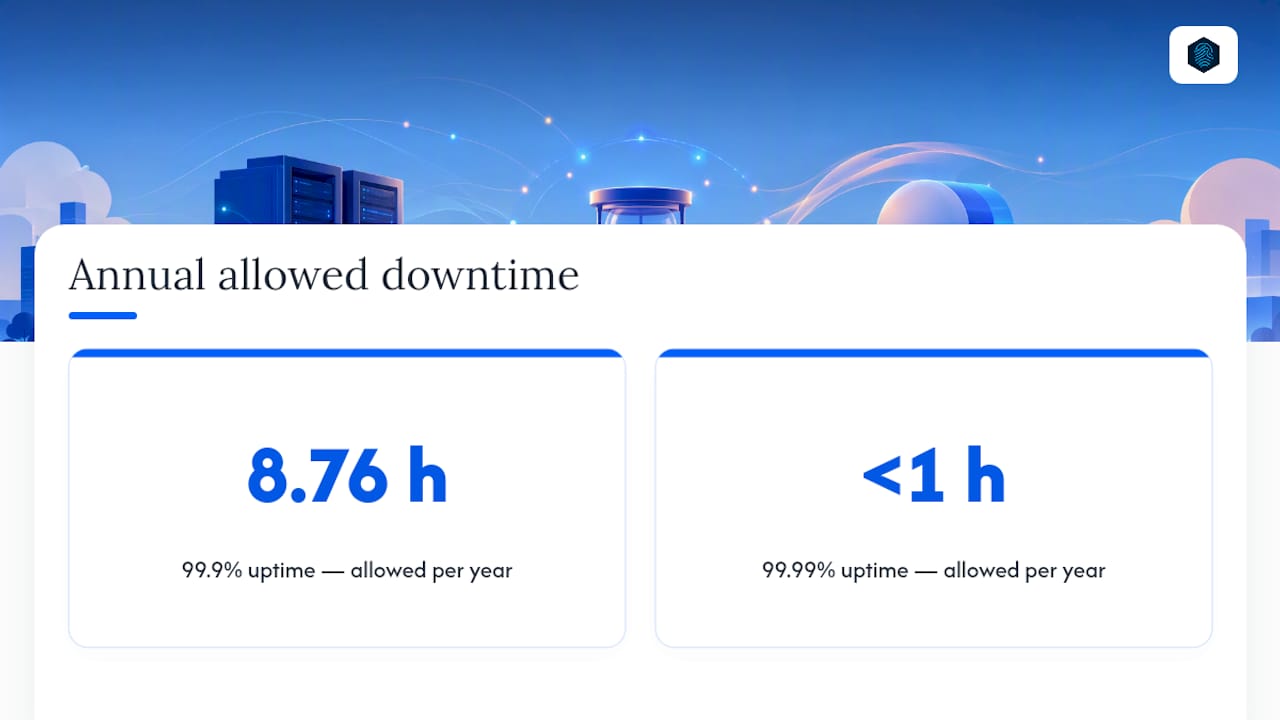
Uptime is where providers love to throw around numbers, and reasonable skepticism is warranted. A "99.9% uptime" guarantee sounds impressive until you do the math: that's still up to roughly 8.76 hours of allowed downtime per year. A 99.99% commitment cuts that to under an hour annually. The gap between those two decimal points is the entire cloud value proposition in miniature, since cloud infrastructure generally wins on scalability and reliability while VPS wins on control and fixed pricing.
Database-heavy applications deserve special attention here. If your workload does constant disk reads and writes, like an e-commerce catalog or a busy WordPress install with lots of dynamic content, local NVMe storage on a VPS can genuinely outperform a cloud instance sitting on networked storage. Distributed storage is built for resilience, not raw speed. The right question isn't "which is faster in general" but "does my workload care more about I/O latency or about surviving hardware failure without intervention."
Then there's the noisy neighbor problem, which affects both models but differently. On a VPS, you share a physical host with other customers, and if the hypervisor's resource isolation is weak, another tenant's traffic spike can steal CPU cycles or disk I/O from your instance. Reputable providers use strict resource capping to prevent this, but budget VPS plans sometimes oversell capacity. Cloud platforms face the same risk at the cluster level, but the ability to migrate a workload away from a congested node gives cloud providers a structural advantage in managing it. A well-configured VPS can still outperform a poorly architected cloud setup, so the provider's engineering quality matters as much as the model you pick.
Pricing and Billing: Fixed Bills vs. Metered Surprises
VPS pricing is refreshingly simple: you pick a plan, you pay that amount every month, and the bill doesn't change whether you use 10% or 90% of your allocated resources. That predictability is genuinely valuable for budgeting, especially for a small business owner who doesn't want a finance surprise tied to a traffic spike.
Cloud billing is usage-based, which is powerful and occasionally treacherous. You're charged for compute time, often by the hour, plus a collection of secondary line items that don't exist on a VPS invoice:
- Egress fees, charged when data leaves the cloud provider's network, which can add up fast for media-heavy or API-driven sites
- Public IPv4 address fees, since IPv4 scarcity has pushed several major providers to start charging for static addresses
- Snapshot and backup storage fees, billed separately from your compute costs
- Load balancer and networking charges, if your architecture uses managed networking components
These aren't hidden fees exactly, but they're easy to overlook when comparing a cloud instance's advertised hourly rate against a VPS's flat monthly price. Metered items like egress and snapshot storage can turn an attractively cheap cloud instance into a more expensive option once you add up a full month's usage.
Pro Tip: When comparing a VPS quote to a cloud quote, always calculate a full month's total cost of ownership, not the advertised hourly rate. Multiply the cloud instance's hourly price by 730 hours, then add estimated egress and storage fees, before putting it side by side with a VPS plan's flat price.
So when does each model actually save you money? Cloud billing shines for short-lived or ephemeral workloads, think a staging environment you spin up for a week, a batch processing job that runs for a few hours, or a seasonal spike you don't want to pay for year round. You turn it off, you stop paying. VPS wins for steady, always-on workloads, a company website, a client portal, an internal tool that runs 24/7 at roughly the same load every day. Paying an hourly cloud rate around the clock for a workload that never fluctuates usually costs more than a comparable flat-rate VPS plan.
Which Should You Choose: A Decision Checklist
Run through five questions honestly before you commit to either model, since the right answer depends entirely on your specific traffic pattern and risk tolerance, not on which option sounds more modern.
- How predictable is your traffic? If it's steady week to week, a VPS's fixed pricing makes sense. If it swings wildly or you expect rapid growth, cloud's autoscaling earns its cost.
- What does an hour of downtime cost you? A personal blog can absorb a few hours of downtime a year without consequence. An e-commerce checkout page cannot.
- Does your team need automation and infrastructure-as-code? If you're deploying through CI/CD pipelines or spinning up test environments constantly, cloud APIs save real engineering time.
- Is your workload disk I/O heavy? A database-driven application may run faster on a VPS with local NVMe than on cloud storage, even if the cloud instance has a higher CPU spec.
- What's your tolerance for variable monthly costs? If a finance team needs a fixed number for planning, cloud's metered billing can be a genuine headache.
Match those answers against three common situations:
The personal blog or hobby site. Low traffic, no revenue dependency, minimal automation needs. A basic VPS plan is not just adequate, it's the smarter financial choice. Start with the smallest plan a provider offers and upgrade only when analytics show you're actually approaching resource limits.
The stable small business site. Predictable daily traffic, moderate revenue impact if it goes down for an hour, no need for autoscaling. A mid-tier VPS with good local storage and a solid uptime guarantee covers this well. If growth is on the horizon, a scalable hosting setup that lets you upgrade without a full migration is worth prioritizing from day one.
The revenue-critical e-commerce or SaaS platform. Every hour of downtime has a dollar figure attached, and traffic can spike unpredictably around promotions or product launches. This is the clear case for cloud infrastructure, specifically a setup with autoscaling and automated failover. Budget for the added cost as insurance against lost sales, not as an optional upgrade.
Sizing, Selecting, and Migrating Without the Headaches
Once you've picked a model, sizing it correctly matters more than the model choice itself. A poorly sized VPS will feel slow. A poorly sized cloud setup will just cost more without delivering better performance.
Start with realistic sizing rules of thumb. A basic brochure site or blog rarely needs more than 1 to 2 CPU cores and 2 to 4GB of RAM. A WordPress site with moderate traffic and a handful of plugins usually wants 2 to 4 cores and 4 to 8GB of RAM, plus fast local storage if the database gets heavy use. An application server handling real-time processing or concurrent users typically needs 4 or more cores and 8GB or more of RAM, scaled up from there based on load testing.
Migration deserves its own checklist, because the biggest risk isn't the new server, it's the transition:
- Take a full backup of your current site, database, and configuration files before touching anything.
- Lower your DNS TTL (time to live) to a small value, like 300 seconds, at least 24 hours before the cutover so the switch propagates quickly.
- Set up the new environment as a staging copy first, and test it thoroughly before pointing live traffic at it.
- Verify database connections, SSL certificates, and any hardcoded IP references in your application code.
- Cut over DNS, monitor closely for the first few hours, and keep the old server running as a fallback for at least a week.
Pro Tip: After cutover, run a basic load test and check your monitoring dashboard for CPU, memory, and disk I/O over the first 48 hours. Problems that don't show up in a quick smoke test often surface once real traffic patterns kick in.
A virtual cloud server setup guide can walk you through provisioning specifics if you're moving toward the cloud side of this decision.
How inSave Hosting Supports Your VPS or Cloud Decision
inSave Hosting builds its plans around the exact tradeoffs covered above: predictable resource allocation, free migration handled by the team rather than left to the customer, and infrastructure backed by a 99.9% uptime commitment. Every plan includes a free SSL certificate, LiteSpeed with LSCache for faster page loads, and one-click WordPress installation for anyone moving a WordPress site between hosting models.
Match those capabilities against your checklist from earlier. Need managed migration so you're not the one running backup scripts at midnight? That's covered. Need staging tools to test a cutover before it goes live? Also covered. Need a unified dashboard instead of juggling multiple control panels? Same answer.
If you're unsure which resource tier fits your actual traffic, reach out to inSave Hosting's support team for a migration estimate before you commit to a plan.
Why Simplicity Usually Wins for Small Teams
Most small businesses overestimate how much infrastructure complexity they need and underestimate how much time that complexity costs them later. A predictable VPS, sized honestly and monitored properly, outperforms an overengineered cloud setup that nobody on a three-person team fully understands.
That said, ignore this bias the moment revenue is genuinely tied to uptime, or when traffic patterns are volatile enough that manual scaling can't keep pace. Test both under realistic load before deciding, and watch your monitoring dashboards, not your assumptions.
— Ihor
Get Your Hosting Set Up the Right Way
Whether you land on a VPS for its predictable monthly cost or decide your growth curve justifies cloud-style scalability, inSave Hosting's shared hosting plans give you a lower-cost starting point with free migration handled for you, so you're not stuck reconciling DNS records and database exports on your own. Every plan ships with a free SSL certificate, daily backups, and one-click WordPress installs, which covers most of the checklist from the sizing section above without extra configuration on your end.

If you're running a database-heavy site and want to see whether local NVMe performance could solve your slowdown before committing to a bigger infrastructure change, support teams can help analyze your traffic numbers and recommend a resource tier that matches. Browse the full hosting and domain lineup to compare plans, or start with a shared hosting plan today and upgrade later without a painful re-migration.
Sources
- What is a virtual private server (VPS)?
- Cloud VPS vs Traditional VPS 2026
- Cloud hosting vs VPS hosting: features, benefits, and differences explained | Contabo Blog
- Cloud VPS vs Cloud Server: Terminology and Pricing 2026
FAQ
Is VPS Better Than Cloud Hosting?
Neither is universally better. VPS wins for predictable budgets, steady traffic, and workloads that need fast local disk I/O; cloud wins for autoscaling, automatic failover, and unpredictable traffic patterns.
Is a VPS Different From a VPN?
Yes, they solve completely different problems. A VPS is a virtual server you rent to host websites or applications, while a VPN encrypts and routes your internet traffic for privacy, and the two aren't interchangeable despite the similar acronym.
What Are the Disadvantages of VPS Hosting?
The main drawbacks are manual scaling, no automatic failover if the physical host fails, and potential noisy neighbor issues on oversold plans. You also handle upgrades yourself rather than relying on autoscaling.
Is a VPS Just a Virtual Machine?
Essentially yes. A VPS is a virtual machine created through a hypervisor that partitions a physical server's resources, then sold as a hosting product with allocated CPU, RAM, and storage.
Does inSave Hosting Offer VPS or Cloud Plans?
inSave Hosting provides VPS and cloud server options alongside shared and WordPress hosting, with free migration and a 99.9% uptime commitment across its hosting lineup.