
An uptime SLA is a contractual promise that a service will be available a stated percentage of the time, backed by remedies (usually service credits) if the provider falls short. The math is fixed: a 99.9% target allows roughly 43 minutes and 50 seconds of downtime per 30-day month, while 99.99% shrinks that to about 4 minutes and 19 seconds. Those numbers only mean what they say once you know the measurement period and what counts as an outage.
TL;DR:
- Measurement periods can be calendar months or rolling windows, which can impact when outages are counted and acknowledged.
- SLAs are distinct from SLIs and SLOs, with SLAs being formal contracts that may include caps, exclusions, and claim procedures for breaches.
- Achieving higher availability levels often requires investment in redundant architecture, automated failover, and proactive monitoring practices.
- Providers' fine print, such as exclusions and claim windows, significantly affect the real reliability and value of uptime guarantees.
Table of Contents
- What Is an Uptime SLA, Exactly?
- SLA vs. SLI vs. SLO: What's the Difference?
- How Do You Choose the Right SLA Target?
- How Do You Measure and Report SLA Breaches?
- What Architecture Actually Meets These Targets?
- What Should an SLA Clause Actually Say?
- The Gap Between SLA Marketing and Real Reliability
- Get Hosting With an Uptime Commitment You Can Actually Verify
- Sources
- FAQ
What Is an Uptime SLA, Exactly?
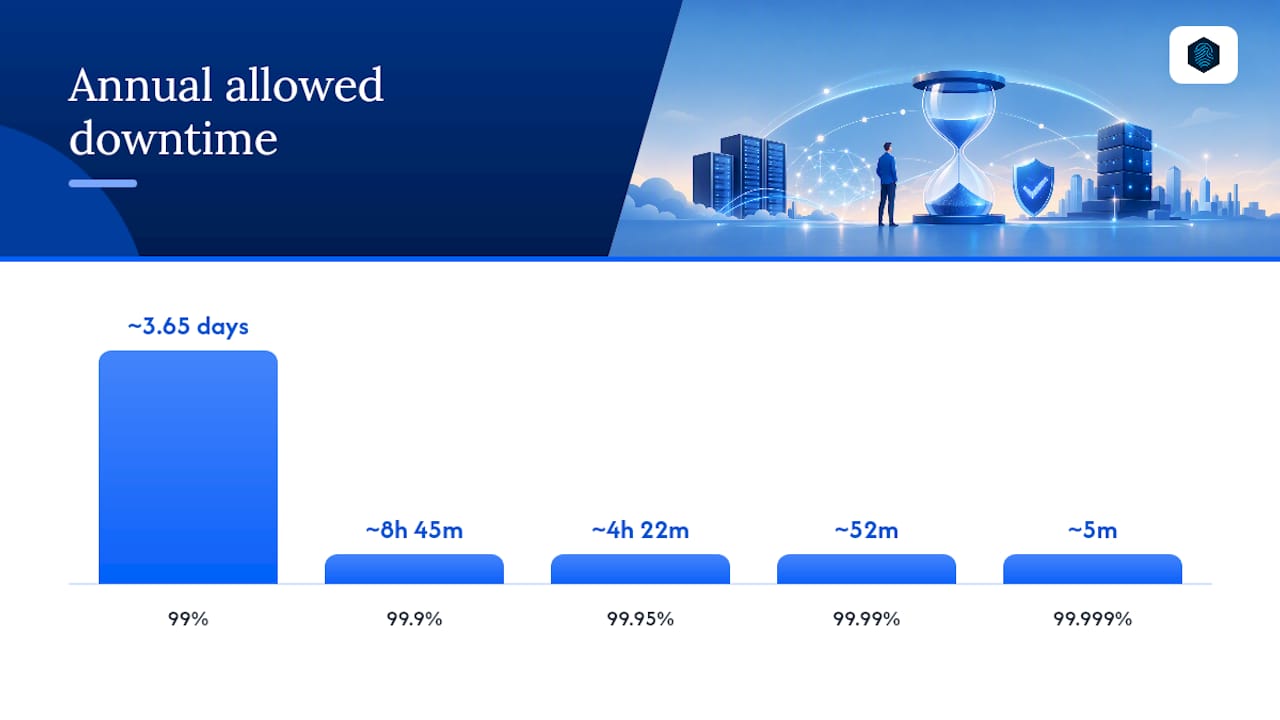
The formula behind every uptime figure is simple: allowed downtime equals the measurement period multiplied by (1 minus the availability target). Run that math across a 30-day month and the picture gets concrete fast.
| Availability Target | Downtime per Day | Downtime per 30-Day Month | Downtime per Year |
|---|---|---|---|
| 99% | ~14m 24s | ~7h 12m | ~3.65 days |
| 99.9% | ~1m 26s | ~43m 50s | ~8h 45m |
| 99.95% | ~43s | ~21m 36s | ~4h 22m |
| 99.99% | ~9s | ~4m 19s | ~52m |
| 99.999% | ~0.9s | ~26s | ~5m |
Say a provider promises 99.9% over a calendar month with 30 days. The allowed downtime is 30 × 24 × 60 × 0.001 minutes, which lands right at that 43 minutes and 50 seconds figure. Free online SLA calculators do this instantly, but knowing the formula lets you check any number a sales page throws at you.
One thing trips people up: whether the period is a fixed calendar month or a rolling 30 days. A rolling window resets daily and can hide a bad week once enough good days pile up behind it, so read the contract's exact wording before you trust the percentage.
SLA vs. SLI vs. SLO: What's the Difference?
These three terms get used interchangeably, and that's where a lot of confusion starts.
- SLI (Service Level Indicator) is the raw measurement, such as the percentage of successful requests over five minutes.
- SLO (Service Level Objective) is the internal target a team sets for that indicator, often stricter than what's promised to customers.
- SLA (Service Level Agreement) is the external, contractual commitment, with financial or contractual consequences attached.
A team might run an internal SLO of 99.95% while the customer-facing SLA only promises 99.9%, building in a buffer before anyone owes a credit. An availability percentage only means something once a measurement period and downtime definition are attached to it — the number alone is marketing copy.
The measurement period matters as much as the target. A calendar year with 99.9% availability tolerates almost nine hours of downtime, but a single four-hour outage during a critical sales weekend can feel far worse than the annual math suggests. Vendors also apply minimum event durations, meaning a 90-second blip might not count as an outage at all, and degraded performance (slow responses, partial errors) often sits in a gray zone the contract defines separately from full downtime. Read the exclusions section before you take the headline number at face value.
How Do You Choose the Right SLA Target?
Start with a rough dollar figure, not a marketing tier. Multiply your average hourly revenue (or the cost of lost productivity) by expected downtime hours, and you get a baseline number to compare against what higher availability actually costs to build.
- Estimate your downtime cost. If your site generates $2,000 an hour and downtime also risks customer trust, an hour of outage costs more than the lost sales alone.
- Match the tier to the use case. A personal blog or internal tool tolerates 99% or 99.5% fine. A customer-facing SaaS product usually needs 99.9% or better. Payment processing, healthcare systems, or anything with contractual penalties for the business itself often demands 99.99%.
- Understand the cost curve. Each additional "nine" tends to require redundant infrastructure, automated failover, and faster incident response, and that cost rarely grows in a straight line. Going from 99% to 99.9% is a modest engineering lift; going from 99.9% to 99.99% often means rearchitecting for high availability.
- Ask the stakeholder questions. What's the real cost of an hour down? Who absorbs that cost, engineering budget or the business line? Is the SLA a sales requirement, a regulatory requirement, or an internal comfort target?
Whether 99.5% counts as "good" depends entirely on what the service does — roughly 3.6 hours of downtime a month is fine for a marketing site and unacceptable for a checkout flow. Reviewing your uptime guarantee against actual business needs before signing anything saves a renegotiation later.
Pro Tip: Don't default to the highest SLA a vendor advertises. Match the target to your actual downtime cost, then pay for the tier that covers it, not the tier that sounds most impressive.
How Do You Measure and Report SLA Breaches?
Detecting a breach requires monitoring that mirrors how your real users experience the service, not just a single ping from one data center. Multi-region synthetic probes, combined with real-user monitoring, catch regional outages that a single check point would miss entirely, and running redundant monitoring tools avoids a blind spot if your primary monitor goes down with the service.
Filing a claim means producing evidence the provider actually accepts. That typically includes:
- Timestamped incident logs from independent monitoring, not just internal alerts
- Error rate data showing the threshold was crossed for the minimum required duration
- Public status page history or API logs, when the provider offers them
- A claim submitted within the window the contract specifies, usually within a reasonable period such as 30 days from the incident
Monitoring and reporting terms need to specify exactly what's monitored, whether degraded performance counts, and what threshold triggers a reportable event, and most contracts exclude scheduled maintenance, force majeure events, and outages caused by the customer's own misconfiguration. Service credits are usually a percentage of the monthly bill, tiered by how badly the target was missed, and almost always capped, often at 100% of that month's fee. Tracking KPIs and monitoring data consistently makes the difference between a credible claim and a dispute nobody can resolve.
What Architecture Actually Meets These Targets?
The SLA number on paper only holds up if the infrastructure behind it can support it. Three approaches cover most of the range: high availability (HA) commonly supports around four nines through redundant components and automated failover; fault tolerance (FT) pushes toward five nines but at a steep infrastructure cost; and disaster recovery (DR) exists for the catastrophic scenarios HA isn't built to absorb.
An SLA is a contractual tool, not a resilience plan by itself — HA handles routine failures, DR handles the events that take down a whole region or data center, and you generally need both. FT setups can reach roughly 99.999%, HA setups typically land near 99.99%, and DR complements either by defining how fast you recover from the failures neither can prevent.
Dependency management matters more than most teams assume. Choosing dependencies with an SLA equal to or better than your own target, and cutting unnecessary dependencies altogether, often improves achievable availability more than adding redundant servers does.
Observability closes the loop. Reducing mean time to detect (MTTD) and mean time to repair (MTTR) is often the fastest way to hit a stricter SLA without a full rebuild.
- Deploy across redundant availability zones with automated failover, not manual intervention.
- Write runbooks for the outage scenarios you can predict, and test them.
- Run failover drills on a schedule, not only after an incident forces one.
- Layer CDN and caching to absorb traffic spikes that would otherwise trigger cascading failures.
Pro Tip: A failover mechanism nobody has tested in six months is a theory, not a safeguard. Schedule the drill before the contract renewal, not after an outage proves it doesn't work.
Reviewing disaster recovery's role in business continuity alongside your HA setup closes most of the gap between what an SLA promises and what your infrastructure can deliver.
What Should an SLA Clause Actually Say?
A usable SLA clause needs specific, checkable language, not a bare percentage. A clear SLA spells out scope, uptime target, measurement method, minimum event duration, exclusions, the reporting and claim process, remedies, credit caps, and escalation or termination triggers.
- Scope: Which services, regions, and account tiers does the target cover?
- Measurement method: Calendar month or rolling window, synthetic probes or real-user data, and who runs the monitoring.
- Exclusions: Scheduled maintenance windows, force majeure, customer-side misconfiguration.
- Remedies and caps: Credit percentage per breach tier, and the maximum credit allowed in any billing cycle.
- Escalation and termination: What happens after repeated breaches, and when the customer can walk away.
A sample measurement fragment: "Availability is measured over a calendar month using independent third-party monitoring at five-minute intervals; any incident under two consecutive minutes is excluded." Negotiate maintenance windows explicitly rather than leaving "reasonable notice" undefined, and make sure the SLA's recovery time objective (RTO) lines up with your actual incident response runbooks, not just the sales deck.
The Gap Between SLA Marketing and Real Reliability
Most SLA marketing sells the percentage and skips the fine print, and that's backwards. A provider advertising 99.9% while quietly excluding degraded performance, capping credits at a token amount, and requiring claims within a 48-hour window has offered you far less protection than the number implies. The percentage is the least useful part of the contract to negotiate hard on; the exclusions and claim process are where the real value lives.
What tends to get underestimated is how much operational discipline, not architecture alone, decides whether an SLA gets honored. Redundant servers help, but a provider that publishes status history, runs consistent monitoring, and applies straightforward credit math earns trust that a headline percentage can't. Some hosting providers build their uptime commitment around operational consistency, using technologies like LiteSpeed, managed monitoring, and CDN integration to keep response times steady and outages short, rather than relying solely on a percentage number without operational backing.
— Ihor
Get Hosting With an Uptime Commitment You Can Actually Verify

Before you commit to any provider, ask three questions: What's the measurement method and period? What evidence do you provide if I need to file a claim? What's excluded from the uptime calculation? A provider that can't answer those clearly is asking you to trust a number with nothing behind it. If you run WordPress specifically, WordPress-optimized hosting pairs those uptime features with staging tools and automated security built for that platform.
Compare your current downtime allowance against what you actually need, then check inSave Hosting's shared hosting plans to see where your site fits.
Sources
For the calculation math, see UptimeRobot's breakdown of 99.9% uptime. For architecture guidance on meeting availability targets, see AWS Well-Architected's reliability guidance.
FAQ
What Is a 99.99% Uptime SLA?
A 99.99% uptime SLA allows about 4 minutes and 19 seconds of downtime per 30-day month, or roughly 52 minutes a year, and typically requires high-availability architecture with automated failover to sustain.
Is 99.5% Uptime Good Enough?
It depends on the service. 99.5% allows about 3.6 hours of downtime a month, which is fine for low-traffic or noncritical sites but usually too loose for revenue-generating or customer-facing applications.
What Does a Claim Window Mean in an SLA?
The claim window is the deadline, often 30 days from the incident, within which a customer must submit evidence and request a service credit; missing it usually forfeits the remedy entirely.
What Is an Uptime SLA?
An uptime SLA is a contractual commitment to a minimum availability percentage over a defined measurement period, paired with remedies, usually service credits, if the provider misses that target.