
TL;DR:
- Choosing the right PHP hosting affects your site's performance, security, and scalability.
- Reliable hosts support current PHP versions, offer robust hardware, and include essential developer tools.
A PHP web host is a server environment configured to run PHP code, process database queries, and deliver dynamic pages to visitors. PHP is the most widely used server-side scripting language as of 2026, powering everything from WordPress blogs to Laravel-based SaaS platforms. That dominance means your hosting choice directly affects your site's speed, security, and long-term maintainability. The right PHP hosting environment supports PHP 8.x, provides developer tools like Git and Composer, and scales with your project without forcing a painful migration later.
What features define a good PHP web host?
The single most important feature is current PHP version support. A host that still defaults to PHP 7.x forces you to run outdated, unsupported code with known security vulnerabilities. Look for hosts that support PHP 8.3 or above and let you switch versions from the control panel without opening a support ticket.

Performance hardware matters just as much as software configuration. High-concurrency plans use NVMe storage and 4.2GHz CPUs to keep response times under one second. That matters because a slow server compounds every other performance problem in your application stack.
PHP 8.x introduced the Just-In-Time compiler, which translates PHP code at runtime and significantly boosts CPU-intensive tasks. Frameworks like Laravel and Symfony benefit most from JIT combined with OPcache tuning. A host that exposes OPcache configuration gives you direct control over how aggressively PHP caches compiled bytecode.
Security features should be non-negotiable. The minimum acceptable set includes:
- Free SSL certificates on all plans, not just premium tiers
- Automated daily backups with one-click restore
- Web application firewall to block common PHP exploits like SQL injection and remote file inclusion
- Malware scanning with automatic quarantine
Developer tools separate a capable host from a basic one. Integrated Git, Composer support, and staging environments reduce deployment time and cut debugging effort significantly. SSH access is non-negotiable for any serious PHP project. Without it, you cannot run Artisan commands, debug Composer dependency conflicts, or inspect server logs directly.
Pro Tip: Before signing up, test whether the host lets you select your PHP version from the control panel on a free trial or money-back period. Hosts that require a support ticket for version changes will slow you down on every future project.
How does hosting architecture affect your PHP project?
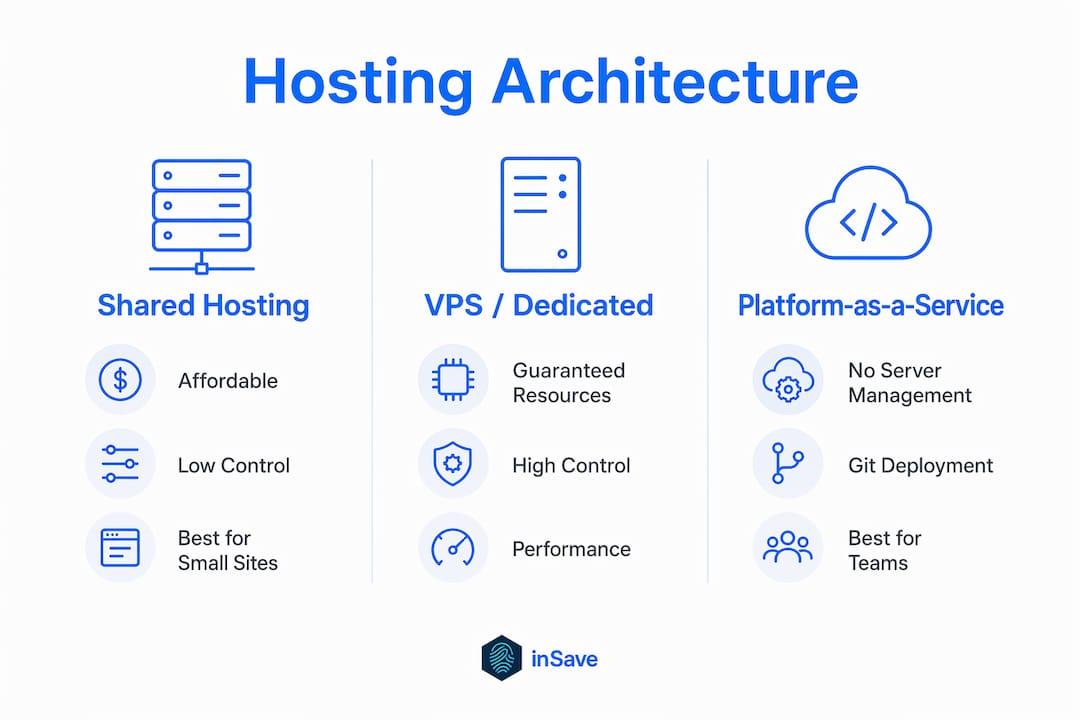
Architecture is the decision most developers underestimate. The type of server environment you choose shapes your deployment workflow, your ability to scale, and how much time you spend on server administration instead of writing code.
Shared hosting
Shared hosting places your site on a server alongside hundreds of other accounts. It is the most affordable entry point for PHP hosting services and works well for small projects, personal sites, and low-traffic applications. The trade-off is resource contention: a traffic spike on a neighboring account can slow your site. Shared hosting suits beginners and projects with predictable, modest traffic.
VPS and dedicated servers
A Virtual Private Server gives you a guaranteed slice of CPU and RAM isolated from other users. Dedicated servers go further, giving you the entire physical machine. Both options suit growing sites that need consistent performance and the ability to install custom software. The cost is higher, and you take on more server management responsibility unless you choose a managed plan.
Platform-as-a-Service
PaaS solutions abstract server management entirely, letting you deploy via Git push without touching a control panel. Build processes, dependency installation, and environment configuration happen automatically. PaaS platforms use service-oriented architecture with scalable backend components, which means your app scales horizontally without manual intervention. The trade-off is less direct control over the server stack and typically higher cost at scale.
| Architecture | Best for | Control level | Management effort |
|---|---|---|---|
| Shared hosting | Small sites, beginners | Low | Minimal |
| VPS | Growing projects, custom stacks | High | Moderate |
| Dedicated server | High-traffic, resource-intensive apps | Full | High |
| PaaS | Developer teams, Git-driven workflows | Abstracted | Very low |
Pro Tip: If your team spends more than two hours per week on server maintenance, a PaaS or managed VPS plan pays for itself in recovered developer time. Calculate that cost before defaulting to the cheapest shared plan.
Understanding website pricing structures across these architecture types helps you budget realistically before committing to a plan.
What practical considerations should guide your PHP hosting choice?
Matching a hosting plan to your actual project requirements prevents both overpaying and underperforming. Start with a realistic assessment of your resource needs.
Traffic and resource requirements. Estimate your expected monthly visitors and calculate the RAM and CPU that your PHP application needs under load. A Laravel application with database queries and session management needs more RAM than a static-content WordPress site. Most shared plans list memory limits in their documentation. Check that the limit matches your framework's minimum recommendation.
Budget versus features. Affordable PHP web hosting does not mean the cheapest plan available. It means the lowest cost that still covers your non-negotiable features: current PHP version, SSL, backups, and SSH access. Cutting corners on any of those four creates technical debt that costs more to fix later.
Scalability and upgrade paths. Choose a host that offers a clear upgrade path from shared to VPS or cloud without requiring a full migration. Migrating a PHP application to a new host mid-growth is disruptive and error-prone. inSave Hosting offers scalable shared hosting plans with PHP 8.x support built in, so you can start small and grow without switching providers.
Developer environment quality. A host with SSH, Git, Composer, and a staging environment lets you work the way modern PHP development demands. Without those tools, you deploy by FTP, test in production, and debug blind. That workflow is slow and risky.
Free hosting for production. Free PHP hosting lacks long-term support and guaranteed performance tiers for production environments. Free plans work for prototyping and learning. They fail under real traffic, real security threats, and real uptime requirements. Use free hosting to test a concept, then move to a paid plan before you launch.
How do you deploy and manage PHP apps on your host?
A clean deployment workflow reduces errors and makes rollbacks fast. These five steps cover the core process for any PHP project.
-
Set your PHP version first. Log into your control panel and select the PHP version your application requires. For Laravel 11, that is PHP 8.2 or above. For WordPress 6.x, PHP 8.1 or above. Running the wrong version causes silent failures that are hard to trace. Read more about PHP 8 in hosting before you configure your environment.
-
Use Git for all deployments. Push your code from a local branch to a remote repository connected to your host. This gives you a full history of every change, makes rollbacks a single command, and eliminates the risk of overwriting files manually. PaaS hosts automate build and deployment via Git workflows, saving substantial time compared to manual cPanel uploads.
-
Run Composer on the server. Install dependencies via SSH rather than uploading the vendor directory. This keeps your repository clean and ensures the server installs the exact versions your lock file specifies. SSH into your account and run
composer install --no-dev --optimize-autoloaderfor production deployments. -
Test in a staging environment before going live. A staging environment is an identical copy of your production site where you test changes without affecting real visitors. Push your changes to staging, verify behavior, then promote to production. This single practice prevents the majority of production incidents.
-
Set up cron jobs and monitor errors. Dynamic PHP applications rely on scheduled tasks for emails, cache clearing, and data processing. Configure cron jobs through your control panel and point them at your application's scheduler. Enable PHP error logging and review logs weekly. Catching a recurring error early costs minutes. Catching it after a customer complaint costs hours.
Key Takeaways
A reliable PHP web host combines current PHP version support, performance hardware, and developer tools to give your project a stable, secure foundation.
| Point | Details |
|---|---|
| PHP version support | Choose a host that supports PHP 8.3+ with easy version switching from the control panel. |
| Performance hardware | NVMe storage and high-clock CPUs keep PHP response times under one second at scale. |
| Architecture match | Match your hosting type to your project size: shared for small sites, VPS or PaaS for growth. |
| Developer tools | Git, Composer, SSH, and staging environments reduce deployment errors and debugging time. |
| Free hosting limits | Free PHP plans suit prototyping only. Production sites need guaranteed uptime and support. |
Why architecture beats feature lists every time
Most developers shopping for a PHP host spend their time comparing disk space and bandwidth. Those numbers rarely matter. What matters is whether the hosting architecture fits how you actually work.
I have seen teams pick a shared plan because it listed "unlimited storage" and then spend three weeks fighting resource limits, slow cron jobs, and a PHP version they could not change without emailing support. The feature list looked great. The architecture was wrong for the project.
Choosing the right platform architecture often matters more than features, and I agree completely. A PaaS environment with Git deployment and automatic scaling will outperform a feature-heavy shared plan for any team shipping code regularly. The PaaS costs more per month. It saves more per week in developer time.
The other thing I have learned is that free hosting creates a false sense of progress. Free hosting presents hidden risks when scaling, and those risks show up at the worst possible time: when your project gets real traffic. I have watched developers build an entire application on a free host, then face a painful migration right before launch because the free plan could not handle the load. Start paid, start right.
The best affordable PHP web hosting is not the cheapest plan. It is the plan that covers your real requirements without forcing you to upgrade in three months. Know your framework's resource needs, confirm SSH and Git access, and verify that staging is included before you commit.
— Ihor
inSave Hosting's PHP plans: performance without the premium price
PHP developers and website owners need a host that keeps pace with modern frameworks without charging enterprise prices for basic features.

inSave Hosting's shared PHP hosting plans include PHP 8.3+ support, LiteSpeed web server, LSCache, MariaDB, HTTP/2, and free CDN integration out of the box. Every plan ships with a free SSL certificate, automated backups, and one-click staging. Git and Composer access come standard, so your deployment workflow works from day one. Plans scale from entry-level shared hosting to configurations built for higher traffic, all backed by a 99.9% uptime guarantee. If you are building on Squarespace or a custom PHP stack, inSave Hosting covers the server side so you can focus on the code.
FAQ
What is a PHP web host?
A PHP web host is a server environment configured to execute PHP code, connect to databases, and serve dynamic web pages. It differs from a basic static host by supporting server-side scripting and PHP runtime configuration.
Which PHP version should my host support?
Your host should support PHP 8.2 or above, with PHP 8.3 preferred for new projects. Older versions no longer receive security patches, which exposes your application to known vulnerabilities.
Is shared hosting good enough for PHP projects?
Shared hosting works well for small sites, portfolios, and low-traffic applications. High-traffic PHP apps or frameworks like Laravel benefit from a VPS or PaaS environment with dedicated resources.
Do I need SSH access for PHP hosting?
SSH access is necessary for running Composer, executing framework CLI tools like Artisan, and inspecting server logs directly. Without it, your deployment and debugging options are significantly limited.
Can I use free PHP hosting for a live website?
Free PHP hosting suits prototyping and testing but lacks the performance guarantees and support levels that production sites require. Move to a paid plan before launching to real users.