
TL;DR:
- Upgrading to PHP 8 is critical for server security, performance, and compatibility with modern frameworks like Laravel 13.x. PHP 8's JIT compiler can triple runtimes for CPU-heavy tasks, while support for supported PHP versions ensures ongoing security patches. Delaying upgrades exposes servers to unpatched vulnerabilities and degraded response times, making timely migration essential for secure and efficient hosting.
Most developers treat a PHP version upgrade as a code compatibility task. Fix the deprecated functions, test the plugins, deploy. Done. But the role of PHP 8 in hosting goes well beyond syntax changes. It reshapes how your server handles requests, patches security vulnerabilities, and determines whether your application can even run on modern frameworks. If you're still on PHP 7.4 or earlier, you're not just running old code. You're running an unpatched server exposed to known exploits, with measurably slower response times and no vendor support when things break.
Table of Contents
- Key takeaways
- The role of PHP 8 in hosting environments
- Performance gains: what they look like on a real server
- Security: the case for staying on supported PHP branches
- Compatibility and migration: what actually breaks
- My take on PHP 8 hosting migrations
- PHP 8 hosting with Insave: built for performance and security
- FAQ
Key takeaways
| Point | Details |
|---|---|
| PHP 8 is a security requirement | PHP 8.0 and 8.1 are past end-of-life and receive no security patches, making upgrades critical. |
| JIT compilation speeds up hosting | PHP 8's Just-In-Time compiler can make runtimes significantly faster for CPU-heavy workloads. |
| Frameworks demand PHP 8.3+ | Laravel 13.x requires PHP 8.3 minimum, making older versions incompatible with current development stacks. |
| Staging before upgrading matters | Testing PHP 8 compatibility in a staging environment prevents breaking changes from reaching production. |
| Your host's PHP support defines your options | Choosing a host that actively supports PHP 8.3+ directly impacts your security and upgrade path. |
The role of PHP 8 in hosting environments
PHP 8 is not a minor patch. It introduced fundamental changes to how the language executes code, handles errors, and interacts with the server runtime. Understanding these changes explains why they matter at the infrastructure level, not just the application level.
The most significant addition for hosting performance is the Just-In-Time (JIT) compiler. In PHP 7.x, the engine compiled PHP code to opcodes and cached them. In PHP 8, JIT goes further by compiling those opcodes to native machine code at runtime. For CPU-intensive operations like image processing, complex calculations, or data transformation tasks, JIT can deliver runtimes up to 3x faster than older PHP versions. That translates directly to fewer server resources per request and better response times under load.
Beyond JIT, PHP 8 introduced several features that reduce unnecessary runtime overhead:
- Match expressions replace verbose switch statements with a cleaner, faster alternative that uses strict comparison by default, avoiding accidental type coercion bugs.
- Union types and named arguments catch type errors at the function signature level rather than mid-execution, meaning failures surface earlier and cleaner.
- Nullsafe operator removes the need for nested null checks that slow down code paths and clutter error logs.
- Fibers (PHP 8.1) enable cooperative multitasking within a single PHP process, useful for async operations in modern hosting setups.
- Readonly properties (PHP 8.1) and enums (PHP 8.1) reduce boilerplate and improve memory efficiency for object-heavy applications.
The gap between PHP 7.4 and PHP 8.x is not cosmetic. PHP 7.4 reached end-of-life in November 2022. Everything after that point runs without any upstream security fixes.
Pro Tip: If your hosting provider lets you select a PHP version, always check whether they provide server-level security patches for that version. A host offering PHP 7.4 in 2026 is offering you an unpatched runtime, regardless of their uptime guarantees.
Performance gains: what they look like on a real server
Benchmarks in controlled environments are one thing. How PHP 8 actually performs in shared and cloud hosting is a more nuanced picture, and it's worth understanding before you commit to an upgrade plan.
JIT in shared hosting: the honest picture
JIT compilation delivers the most dramatic gains in CPU-intensive, long-running processes. For typical WordPress or Laravel page loads, the gains are real but less dramatic than the headline numbers suggest. The bigger wins come from PHP-FPM tuning combined with PHP 8's improved memory model. In shared hosting environments, PHP-FPM configuration for pool isolation, process count, and memory limits determines whether PHP 8's upgrades translate into stability or cause resource contention between accounts.
Version-by-version comparison
| PHP Version | Status (2026) | Relative Speed | JIT Support | Security Patches |
|---|---|---|---|---|
| PHP 7.4 | End-of-life (Nov 2022) | Baseline | No | None |
| PHP 8.0 | End-of-life (Nov 2023) | +10-15% | Yes (limited) | None |
| PHP 8.1 | End-of-life (Dec 2024) | +18-22% | Yes | None |
| PHP 8.2 | Active (Dec 2026) | +25-30% | Yes (improved) | Yes |
| PHP 8.3 | Active (Nov 2027) | +30%+ | Yes (optimized) | Yes |
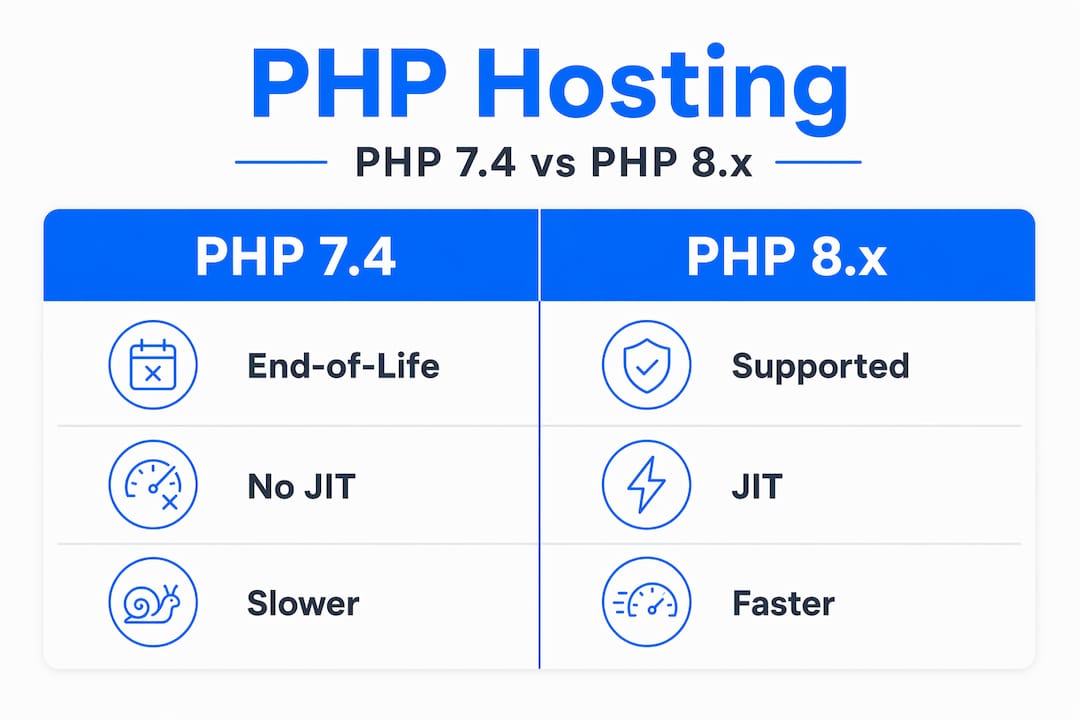
The practical takeaway from this table is not just about speed. It's about which versions are actually receiving patches. Running PHP 8.0 gives you JIT, but no security fixes. The combination of performance and security only exists in PHP 8.2 and above in 2026.
Pro Tip: When evaluating hosting providers, ask specifically which PHP 8.3 minor versions they support and how quickly they push patch-level updates. A host that runs PHP 8.3.10 in mid-2026 while 8.3.29 is available is leaving known vulnerabilities unaddressed.
For business owners, the impact of PHP 8 on server performance shows up concretely in time-to-first-byte metrics, checkout completion rates, and how much headroom your server has during traffic spikes. Getting this tuning right matters.
Security: the case for staying on supported PHP branches
This is where the PHP version conversation stops being optional. About 77% of websites run PHP, and a significant portion still operate on unsupported versions. Each of those installations receives zero upstream patches for any newly discovered exploit.
Here's what the end-of-life timeline means in practice:
- A vulnerability is discovered in PHP's core, often involving memory corruption, type confusion, or serialization flaws.
- The PHP team patches all actively supported branches (currently 8.2 and 8.3).
- End-of-life versions get nothing. Your PHP 7.4 or 8.0 installation stays vulnerable indefinitely.
- Exploit kits are updated to target known, unpatched CVEs within days or weeks of public disclosure.
- Your hosting account becomes a vector for malware injection, data theft, or server compromise.
PHP 8.3 is actively supported until November 23, 2027, making it the most stable and forward-compatible choice for production hosting right now. PHP 8.2 runs through late 2026.
The risk compounds when you consider that many teams delay patch-level upgrades even within supported versions. Being on PHP 8.3 does not protect you if you're running 8.3.5 when 8.3.29 is available. Patch-level maintenance is not optional maintenance.
Running an actively supported PHP release is the minimum bar for responsible hosting. The security window between patch release and exploit deployment shrinks every year. Waiting 90 days to apply a PHP security patch in 2026 is operationally equivalent to leaving a server door unlocked.
Good hosting providers make this transparent. They push PHP patch updates server-side, give you version switchers in your control panel, and clearly document which versions are supported. That transparency matters for your WordPress site's security posture as much as any firewall rule.
Compatibility and migration: what actually breaks
Moving from PHP 7.4 to PHP 8.x on a live hosting environment is where most teams hit friction. Not because PHP 8 is difficult, but because compatibility testing gets skipped or rushed. Here is what you need to know before making the switch.
What typically breaks during PHP 8 migration
The most common failure points are:
- WordPress plugins written against PHP 7.x that use deprecated functions like "strpos()
with nullable values,create_function(), or implicitfloattoint` conversions - Themes using legacy template functions removed in PHP 8.0
- Laravel applications on older major versions, since Laravel 13.x requires PHP 8.3 as a hard minimum
- Custom code using
matchkeyword as a variable name, which is now reserved - Third-party libraries that haven't updated their type declarations
WordPress itself now recommends PHP 8.2+ and is actively expanding compatibility with PHP 8.4 and 8.5. The CMS ecosystem has largely caught up, but individual plugins can still be stragglers.
Migration checklist for PHP 8 on hosting
Follow these steps before switching your production server:
- Run a static analysis tool like PHPStan or Rector against your codebase to identify PHP 8 incompatibilities before touching the server
- Set up a staging environment that mirrors your production PHP version and test the full upgrade there first
- Update all plugins, themes, and Composer dependencies to their latest stable versions before switching PHP
- Check each plugin's changelog for explicit PHP 8.x support notes
- Switch PHP version in staging, run your full site with error logging enabled, and document every error before touching production
- After upgrading production, monitor error logs for 24 to 48 hours before declaring the migration stable
Pro Tip: Use your hosting control panel's PHP version switcher to test PHP 8.3 in a staging subdomain before touching your main installation. Most quality hosts supporting PHP 8 compatibility in hosting make this a one-click operation per domain.
Choosing a host that actively maintains PHP-FPM pools with proper isolation also matters here. A shared host that doesn't isolate PHP processes between accounts can expose you to cascading failures when a neighboring account's code crashes a shared PHP worker.
My take on PHP 8 hosting migrations
I've watched teams agonize over PHP version upgrades for years, treating them as high-risk events when the real risk runs in the opposite direction. Every month a production site spends on PHP 7.4 or 8.0 in 2026 is a month of operating without security patches on a platform that powers the majority of the web.
What I've learned is that the teams who struggle most with PHP 8 migrations are the ones who skipped PHP 7.3 to 7.4 and 7.4 to 8.0 migrations when they were timely. Each skipped upgrade widens the compatibility gap and makes the next one feel like a bigger jump than it is. The solution is not to wait for a perfect migration window. It's to maintain a practice of staying within one major version of the current supported release.
The other pattern I see is over-relying on hosting providers to manage PHP version security passively. I've checked servers at well-known shared hosts running PHP 8.3 minor versions from six months prior. The major version was supported but the patch level was stale. Security patch updates on PHP 8.3 are routine maintenance, not optional extras. If your host doesn't treat them that way, that's a signal worth acting on.
What I tell developers who ask about PHP 8 beyond 8.3 is simple: watch the official PHP roadmap, start compatibility checks for new minor versions three months ahead of release, and choose hosting infrastructure that gives you control over which exact PHP version runs per domain. That last point is where hosting providers separate themselves. Control plus transparency plus fast patch deployment is the combination that actually keeps you secure.
— Ihor
PHP 8 hosting with Insave: built for performance and security

Insave Hosting runs on a modern technology stack that includes PHP 8.3 support alongside LiteSpeed, LSCache, MariaDB, HTTP/2, and free CDN integration. Every plan is designed so you can select and switch PHP versions per domain, test upgrades in a staging environment before they touch your live site, and stay current with patch-level updates without manual server administration. Whether you're running a high-traffic WordPress site or a Laravel-based web application, Insave's WordPress hosting and shared hosting plans give you the PHP 8 infrastructure to run securely and efficiently. Explore the full range of plans at Insave Hosting and find the setup that matches your performance and security requirements.
FAQ
What is the role of PHP 8 in hosting?
PHP 8 determines how your hosting server executes PHP code, with direct effects on speed, security, and framework compatibility. Hosting environments running PHP 8.3 benefit from JIT compilation, active security patches, and support for modern frameworks like Laravel 13.x.
Why should I upgrade to PHP 8.3 instead of staying on PHP 8.1?
PHP 8.0 and 8.1 are past end-of-life and receive no security patches, leaving your hosting environment exposed to unpatched vulnerabilities. PHP 8.3 is actively supported until November 2027 and receives both security and bug-fix updates.
Does PHP 8 actually make my website faster?
Yes, particularly for CPU-intensive workloads. PHP 8's JIT compiler compiles opcodes to native machine code at runtime, and combined with PHP-FPM tuning, sites consistently see faster response times compared to PHP 7.x equivalents.
Will my WordPress plugins break when I switch to PHP 8?
Some plugins written against PHP 7.x may fail on PHP 8 due to deprecated functions or removed behavior. WordPress recommends PHP 8.2+, and most actively maintained plugins support it. Testing in a staging environment first will catch issues before they affect your live site.
How do I know if my hosting provider supports PHP 8.3?
Check your hosting control panel for a PHP version selector and confirm the available versions include PHP 8.3.x with a recent minor release number. A provider maintaining current patch levels demonstrates that they treat PHP security updates as ongoing operational work, not a one-time setup task.