
HTTP/3 wins the performance argument on lossy, high-latency, and mobile connections because it runs over QUIC instead of TCP, giving each stream its own loss recovery and cutting the connection handshake to one round trip. On clean, low-latency networks the gap narrows to nearly nothing. The practical move: turn it on through a QUIC-capable CDN, measure real traffic, and let the data settle the debate for your specific site.
TL;DR:
- HTTP/3 offers significant performance benefits over HTTP/2 mainly on lossy or high-latency networks, with up to 88% improvement in ideal laboratory conditions.
- Real-world gains on typical connections are generally small, and routing infrastructure or congestion control algorithms like BBR can narrow the protocol advantage.
- Deploying HTTP/3 usually involves enabling it on a CDN with fallback to HTTP/2, without changing origin servers, but firewall and UDP blocking can silently downgrade performance.
- Proper testing requires verifying protocol support, checking headers, and measuring real user metrics over time, especially in mobile and congested network segments.
- A disciplined approach with staging, monitoring, and fallback plans ensures smooth upgrades without unexpected regressions.
Table of Contents
- HTTP/3 vs HTTP/2: The Core Technical Differences
- Is HTTP/3 Actually Faster Than HTTP/2? What the Benchmarks Show
- CDN-Terminated vs Origin-Native: How to Actually Deploy HTTP/3
- How to Enable HTTP/3: A Step-by-Step Checklist
- Diagnosing Regressions After Enabling HTTP/3
- Why inSave Hosting's Ops Team Treats Protocol Upgrades as Infrastructure Work
- Who Should Turn On HTTP/3 Right Now
- Where HTTP/3 Fits in the Real Optimization Roadmap
- Getting HTTP/2 and HTTP/3 Right Without Fighting Your Host
- Where to Read the Specs and Studies Yourself
- Sources
- FAQ
HTTP/3 vs HTTP/2: The Core Technical Differences
The single biggest difference between HTTP/3 and HTTP/2 isn't in the HTTP layer at all. It's underneath it, in the transport protocol carrying the bytes.
HTTP/2, defined in RFC 7540 back in 2015, runs on top of TCP. HTTP/3, standardized in RFC 9114 in 2022, runs on top of QUIC (RFC 9000), which itself sits on UDP. That single substitution, UDP instead of TCP, cascades into almost every other difference you'll read about in a quic vs http2 comparison.
TCP guarantees ordered, reliable delivery of a single byte stream. That's great for simple downloads, but HTTP/2 multiplexes many logical streams (your CSS, your JS, your API calls) over that one TCP connection. If a single packet gets dropped, TCP won't hand any stream its data until the missing packet is retransmitted and the whole sequence is back in order. QUIC handles loss per stream, so a dropped packet on one resource doesn't stall the other 47 requests riding the same connection.
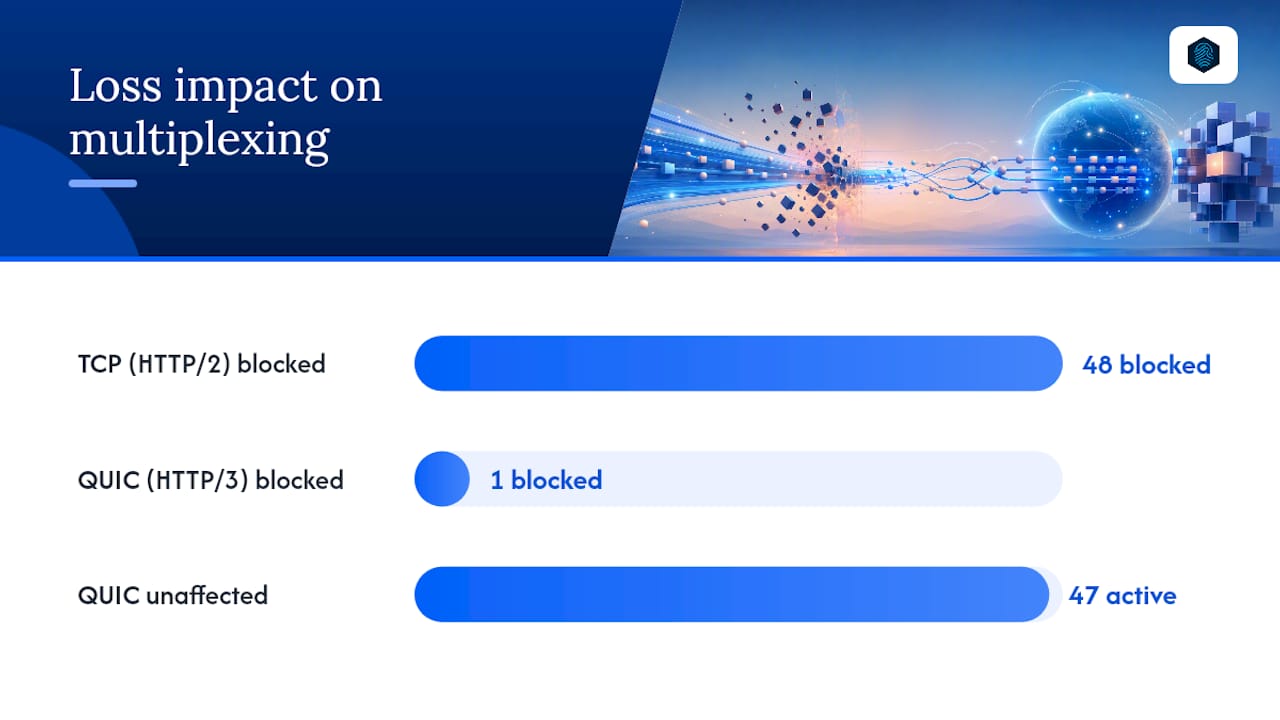
Handshakes are the other major split. HTTP/2 over TCP needs a TCP handshake, then a separate TLS handshake, typically two full round trips before any application data moves. QUIC folds the transport and TLS 1.3 handshakes into one process, getting a new connection to 1-RTT and a resumed connection to 0-RTT. For a mobile visitor with 150 milliseconds of round-trip latency to your origin, that's real time saved before the first byte of your page even starts rendering.
Header compression follows the same logic. HTTP/2 uses HPACK, which keeps a shared compression table between client and server, but that table itself becomes a serial dependency. If a packet carrying a table update goes missing, decoding stalls across streams that depended on it, a subtler form of head-of-line blocking hiding inside HTTP/2's own header format. HTTP/3 uses QPACK instead, which decouples header block decoding from strict packet order, so a single lost packet doesn't lock up header parsing for unrelated streams.
- Transport: HTTP/2 uses TCP; HTTP/3 uses QUIC over UDP.
- Handshake: HTTP/2 needs TCP plus TLS (2 RTTs); HTTP/3 combines both (1-RTT, or 0-RTT on resumption).
- Header compression: HTTP/2 uses HPACK; HTTP/3 uses QPACK, avoiding header-level stalls.
- Session continuity: QUIC's connection IDs let a session survive a client switching from Wi-Fi to cellular, something TCP's 4-tuple binding can't do.
Is HTTP/3 Actually Faster Than HTTP/2? What the Benchmarks Show
Yes, but the size of the win depends entirely on the network path, and pretending otherwise is how a lot of "HTTP/3 advantages" content misleads readers.
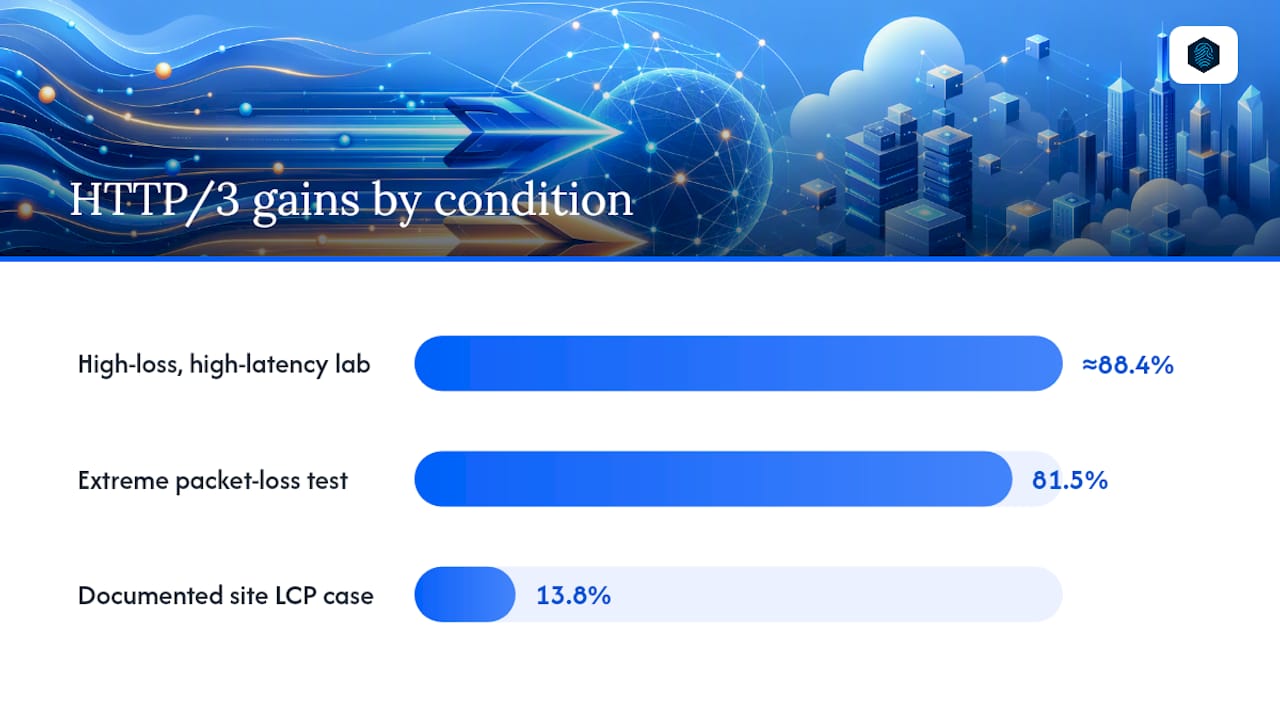
A 2024 study comparing the two protocols found HTTP/3 delivering up to an 88.36% improvement over HTTP/2 under high-loss, high-latency conditions, with a separate test run showing an 81.5% gain under extreme packet loss. Those are lab conditions engineered to stress the transport layer, but they map closely to what a real user experiences on a congested cellular network or a satellite connection. That same research found something operators often miss: routing HTTP/2 through a proxy running the BBR congestion control algorithm can close a meaningful chunk of that gap, meaning your actual infrastructure choices matter as much as the protocol version.
Real-world results are far more modest. Site-level monitoring generally shows small median improvements in Largest Contentful Paint and Time to First Byte for typical desktop traffic on decent connections, with one documented case showing a 13.8% LCP improvement after switching on a specific site. On a clean, low-latency path, like a visitor sitting near a data center talking to a nearby CDN edge, the difference between HTTP/2 and HTTP/3 can shrink to something barely worth mentioning.
| Network condition | Typical HTTP/3 vs HTTP/2 gain | What drives it |
|---|---|---|
| High packet loss / high latency (lab) | Up to ~88% | Per-stream loss recovery, no TCP-wide stall |
| Mobile / long-haul real-world traffic | Noticeable, situational | Faster handshake, connection migration |
| Low-loss, low-latency (data center to CDN) | Minimal to negligible | Little transport-level friction to fix |
Pro Tip: Don't trust a single Lighthouse run to answer "is HTTP/3 faster than HTTP2" for your site. Pull Time to First Byte, Largest Contentful Paint, Speed Index, and p99 latency from real user monitoring over at least a week, segmented by connection type, before you draw conclusions.
A small gain on TTFB in aggregate RUM data usually isn't worth architecting around. Gains concentrated in mobile segments are where HTTP/3's design advantages most clearly appear.
CDN-Terminated vs Origin-Native: How to Actually Deploy HTTP/3
Most sites don't need to touch their origin server at all to get HTTP/3 live. The deployment pattern you choose changes both the effort involved and where the performance gains land.
- CDN-terminated QUIC is the path most teams should start with. The CDN edge speaks HTTP/3 to visitors and advertises that support via the Alt-Svc header, while your origin server keeps talking HTTP/1.1 or HTTP/2 to the CDN behind the scenes. Nothing on your origin changes, and browser support across Chrome, Firefox, Safari, and Edge means the protocol negotiation happens transparently for the visitor.
- Origin-native HTTP/3 matters when you're serving clients directly, no CDN in front, such as an API consumed by a mobile app, or when you need QUIC's connection migration for long-lived streaming sessions. Server support varies: Caddy has had HTTP/3 built in for a while, LiteSpeed supports it natively, Nginx requires a specific build or module (worth checking the community's own notes on the rollout before assuming your build has it), and Apache's support still trails the others.
- Firewall and UDP blocking realities deserve attention before you flip anything on. Corporate networks and some ISPs block or throttle UDP traffic more aggressively than TCP, and a browser that can't complete a QUIC handshake will fall back to HTTP/2 automatically, assuming Alt-Svc negotiation is configured correctly. That fallback is a feature, not a bug, but it means a poorly configured origin can silently serve HTTP/2 to everyone and you'd never know without checking logs.
How to Enable HTTP/3: A Step-by-Step Checklist
Turning on HTTP/3 without a plan is how you end up debugging a mystery outage at 11 PM. Work through this in order.
- Confirm CDN support first. Most major CDNs, including Cloudflare, Fastly, and AWS CloudFront, support HTTP/3 as a toggle in the dashboard rather than a code change. Flip it on for a staging subdomain before production.
- Verify Alt-Svc is being sent. Check response headers in browser DevTools' Network tab, or
curl -Iagainst your endpoint, to confirm thealt-svcheader advertisesh3correctly. - Confirm the actual protocol used per request. Chrome's DevTools Network panel shows a "Protocol" column; look for
h3on subsequent requests once the browser has cached the Alt-Svc advertisement from the first visit. - If going origin-native, check TLS and ALPN. QUIC mandates TLS 1.3, no exceptions, so any origin server still running mixed TLS 1.2 configs needs an update first. ALPN negotiation must correctly advertise
h3alongsideh2andhttp/1.1. - Audit your reverse proxy and load balancer settings. If a proxy sits between the CDN and your app server, confirm
proxy_http_version 1.1(or higher) is set and keep-alive is enabled. A misconfigured proxy can quietly flatten HTTP/2's multiplexing benefits even when the edge is correctly serving HTTP/3 to visitors. - Run lab tests with simulated loss. Tools that let you inject artificial packet loss and latency (Chrome's network throttling, or dedicated network emulation) will show you the QUIC advantage far more clearly than a clean-network Lighthouse score ever will.
- Collect real user monitoring data for at least a week. Segment by connection type and geography before deciding whether the rollout is paying off. Our guide to hosting-level speed optimization covers the RUM setup basics if you haven't instrumented this yet.
Pro Tip: Keep an HTTP/2 fallback active permanently, not just during rollout. Some enterprise networks and older clients will never negotiate QUIC successfully, and you want that fallback to be a silent, tested path rather than a surprise.
Diagnosing Regressions After Enabling HTTP/3
Something feels off after the switch. Here's where to actually look, in the order that finds problems fastest.
- Check for silent UDP blocking. If your access logs show a spike in HTTP/2 connections that "should" be HTTP/3 based on Alt-Svc headers, that's usually a network blocking UDP, not a config bug on your end. Browser net-export logs (
chrome://net-export) will show failed QUIC handshake attempts falling back cleanly. - Inspect your load balancer's protocol handling. A load balancer or reverse proxy that terminates connections and re-establishes its own backend connection can flatten HTTP/2's multiplexing (and HTTP/3's, for that matter) if
proxy_http_versionisn't set correctly or keep-alive gets dropped between hops. - Watch for HTTP/2 closing the gap unexpectedly. If your origin or proxy uses the BBR congestion control algorithm, HTTP/2 throughput under load can approach HTTP/3's numbers in impaired network conditions. That's not a failure of your HTTP/3 setup, it's a legitimate case where transport-level tuning narrowed a protocol-level advantage.
- Pull CDN edge logs alongside origin logs. A mismatch between what the edge reports negotiating and what your origin sees tells you exactly where in the chain something's translating protocols incorrectly.
Why inSave Hosting's Ops Team Treats Protocol Upgrades as Infrastructure Work
Rolling out a new protocol version is infrastructure work, not a checkbox, and that's how inSave Hosting's engineering approach treats it. Every plan running on the platform serves over HTTP/2 by default, backed by LiteSpeed's web server stack, free SSL via automated TLS provisioning, and CDN integration that gives site owners a straightforward path toward QUIC-based delivery without touching origin configuration.
The pattern we see most often isn't a broken HTTP/3 rollout, it's a rollout with no staging step and no rollback plan. Test on a staging environment first, watch real user metrics for at least a week, and keep the previous protocol path live as a fallback. That single habit prevents almost every "why did our TTFB regress" support ticket we see after a protocol change.
That operational discipline, staging first, measuring before declaring victory, keeping fallbacks intact, comes straight from the QUIC protocol fundamentals that shape how modern hosting stacks are built today. It's a small discipline, but it's the difference between a smooth upgrade and a debugging session nobody enjoys.
Who Should Turn On HTTP/3 Right Now
If your traffic is mobile-heavy, global, or running through a CDN already, enable HTTP/3 at the edge now and measure with real user monitoring alongside synthetic tests. Keep HTTP/2 as a fallback; you lose nothing by leaving it active.
If you run a small local site on a mostly wired, low-latency audience, the performance case is weak enough that it can wait, put your effort into caching and image delivery first. If you operate APIs or services with a direct mobile client (no CDN in the middle), origin-native HTTP/3 deserves serious consideration for the connection migration benefits alone, not just raw throughput.
Where HTTP/3 Fits in the Real Optimization Roadmap
HTTP/3 is a targeted fix for a specific problem: unreliable networks, not a universal upgrade that makes every site faster. I'd tell any developer to fix caching headers, image delivery, and render-blocking resources before touching the protocol layer. Once those are handled, HTTP/3 is worth the afternoon it takes to test, and tooling for QUIC-level telemetry keeps getting better, which will make that afternoon shorter.
— Ihor
Getting HTTP/2 and HTTP/3 Right Without Fighting Your Host
Plenty of hosts leave protocol support as an afterthought, buried behind a support ticket or a plan tier you have to upgrade into just to get modern TLS. Some hosting providers build HTTP/2 support, free SSL, and CDN integration into their shared and WordPress-optimized plans by default, so testing a QUIC rollout may not require a migration project.

If you're running WordPress and want the caching and server stack already tuned for LiteSpeed and LSCache, the WordPress hosting plans get you there without manual server configuration. Developers who want origin-level control for testing origin-native HTTP/3 have a more natural fit with the VPS hosting options, which hand you the root access a protocol experiment actually needs. Many hosting providers offer free migration, allowing site owners to move their site to test changes on a staging environment with minimal setup. Check current plans and get a site migrated over this week to start measuring your own numbers instead of guessing from someone else's benchmark.
Where to Read the Specs and Studies Yourself
The RFCs and the benchmark data behind this comparison are public and worth reading directly if you're making an infrastructure decision.
- RFC 9114: the HTTP/3 specification itself.
- RFC 9000: the QUIC transport protocol underneath HTTP/3.
- RFC 7540: the HTTP/2 specification.
- The arXiv proxy vs. non-proxy performance study: the source of the high-loss benchmark figures cited above.
- DebugBear's real-world HTTP/3 testing: site-level LCP and TTFB comparisons.
Sources
- Performance Comparison of HTTP/3 and HTTP/2: Proxy vs. Non-Proxy Environments
- IETF status summary: HTTP/3 and QUIC
- HTTP/2 vs HTTP/3: Performance, security, and how to enable both
FAQ
Is HTTP/3 Faster Than HTTP/2?
On lossy or high-latency connections, yes, sometimes dramatically, with one 2024 study measuring gains up to 88.36% under severe network impairment. On clean, low-latency networks the difference is often small enough that most users wouldn't notice it.
What Is HTTP/2 and HTTP/3, in Plain Terms?
HTTP/2 and HTTP/3 are both versions of the protocol browsers use to request web pages, but they run on different transport layers underneath. HTTP/2 rides on TCP (RFC 7540), while HTTP/3 rides on QUIC over UDP (RFC 9114), which is the source of most of its performance advantages on unreliable networks.
Why Do Some Developers Say Enabling HTTP/2 Was a Mistake?
The complaint usually isn't about HTTP/2 itself, it's about misconfiguration. Running HTTP/2 through a reverse proxy or load balancer that doesn't correctly handle proxy_http_version or keep-alive settings can flatten its multiplexing benefits, leaving sites no faster than HTTP/1.1 despite the upgrade.
Is HTTP/3 Actually Being Used in Production?
Yes, widely. Major browsers, including Chrome, Firefox, Safari, and Edge, support it by default, and major CDNs offer it as a standard toggle rather than an experimental feature. Hosting providers build the underlying HTTP/2 and TLS infrastructure that makes a CDN-based HTTP/3 rollout straightforward on top.
Do I Need to Choose Between HTTP/2 and HTTP/3?
No, they coexist by design. A well-configured server or CDN advertises HTTP/3 support via the Alt-Svc header while still serving HTTP/2 to clients that can't negotiate QUIC, so there's no hard cutover moment to plan around.