QUIC is an encrypted, UDP-based transport protocol that folds the TLS handshake into connection setup and moves data across independent streams instead of one blocking pipe. It cuts round trips before the first byte arrives, stops one lost packet from stalling everything else, and lets a connection survive a network switch. Standardized by the IETF as RFC 9000, it's also the transport underneath HTTP/3.
TL;DR:
- QUIC reduces latency by merging TLS handshake with connection setup, typically achieving this in one round trip, especially benefiting high-latency or lossy networks.
- Its design allows independent streams with separate loss recovery, preventing slow or lost packets from blocking unrelated data across multiplexed HTTP/3 connections.
- Implementing QUIC requires current TLS 1.3 support and CDN compatibility for HTTP/3, with fallback to HTTP/2 ensuring reliable internet access for most clients.
- Although QUIC offers notable advantages over default TCP, properly tuned TCP configurations with modern congestion control can narrow the speed gap in optimized environments.
- Network infrastructure, especially middleboxes and firewalls blocking UDP, influences QUIC's deployment success, and real-world testing on diverse networks provides more accurate performance insights.
Table of Contents
- Where the QUIC Protocol Came From and How It Became a Standard
- How QUIC Works Under the Hood
- QUIC vs TCP: When the Speed Gains Are Real
- QUIC and HTTP/3: What Actually Changes for Web Developers
- QUIC Security Features and What They Mean for Network Visibility
- Who Supports QUIC Today: Browsers, CDNs, and Servers
- Testing QUIC on Your Own Site: Tools and Method
- A Rollout Checklist for Enabling QUIC on Your Site
- How inSave Hosting Approaches QUIC and HTTP/3 Readiness
- What the Evidence Actually Supports
- Sources
- FAQ
Where the QUIC Protocol Came From and How It Became a Standard
QUIC didn't start life as an IETF spec. Google built the first version, often called gQUIC, around 2012 as an internal experiment to see whether a transport protocol could evolve faster than TCP allows. TCP lives partly in operating system kernels, which means changing it requires updating billions of devices. That's slow. Google wanted a protocol it could tweak in user space, deploy through Chrome and its own servers, and iterate on without waiting for the entire internet to upgrade its kernels.
The experiment worked well enough that the IETF picked it up and spent years reworking it into an open standard, independent of any single company's implementation. That effort produced three foundational documents that define modern QUIC:
- RFC 9000 defines the core transport: streams, packets, connection IDs, and loss recovery.
- RFC 9001 specifies how QUIC uses TLS 1.3 to secure the handshake and encrypt payloads.
- RFC 9002 covers loss detection and congestion control algorithms.
The IETF QUIC Working Group still maintains these specs and coordinates extensions, including the mapping that lets QUIC carry HTTP/3 traffic. The design goals baked into all three documents were consistent from the start: shrink the latency tax of establishing a connection, avoid the "protocol ossification" that happens when middleboxes and firmware assume TCP-shaped traffic, and keep the door open for future changes without another decade-long standards fight.
How QUIC Works Under the Hood
QUIC runs on top of UDP rather than TCP, and that single decision explains most of what makes it different. UDP has no built-in reliability or ordering, so QUIC builds its own version of those features entirely in user-space code, inside the application or library, not the operating system kernel. That's what lets browser vendors and server operators patch bugs or add features by shipping a library update instead of waiting on an OS patch cycle.
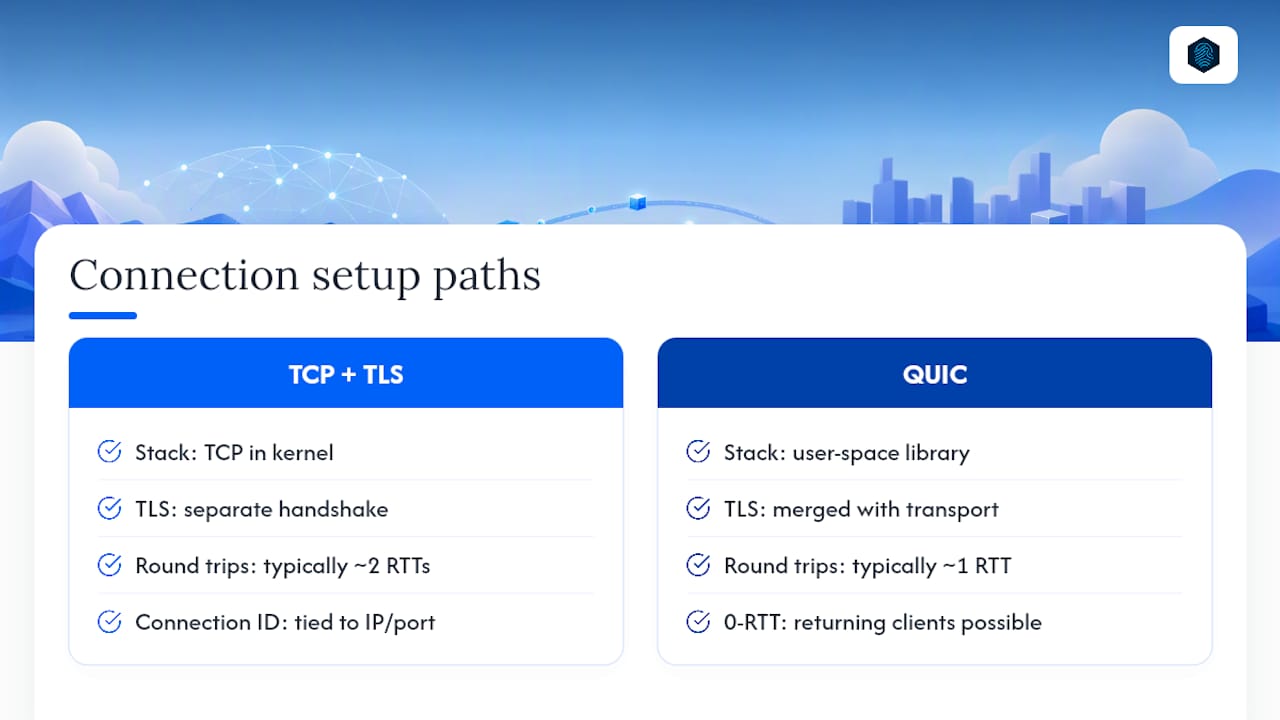
The handshake is where the latency savings start. A typical TCP connection headed for an encrypted site needs a TCP handshake first, then a separate TLS handshake on top of it, often adding up to two full round trips before any real data moves. QUIC merges those steps. The cryptographic handshake defined in RFC 9001 negotiates transport parameters and TLS 1.3 keys in the same exchange, typically completing in one round trip. Returning clients that have connected before can sometimes send application data immediately, in what's called 0-RTT. That's a real speed advantage, but it comes with a catch worth remembering: 0-RTT data lacks the forward-secrecy and replay protections of the rest of the session, so servers have to treat early data carefully rather than trusting it the same way as post-handshake traffic.
Streams are the other structural shift. Instead of one ordered byte pipeline like TCP, a QUIC connection can carry many independent streams, each with its own flow control and its own loss recovery. If a packet carrying data for stream 3 gets lost, streams 1, 2, and 4 keep flowing while stream 3 waits for retransmission. That's the fix for head-of-line blocking, a problem that has quietly slowed down multiplexed HTTP/2 connections for years whenever a single dropped TCP segment froze every request sharing that connection.
Under the surface, QUIC packets carry frames, small structured units that hold stream data, acknowledgments, or connection control information, and packet numbers are deliberately decoupled from stream offsets. That separation is what makes per-stream, independent loss recovery possible in the first place. Packet headers come in two flavors: long headers, used during the handshake, and short headers, used once the connection is established, since short headers carry less overhead per packet.
Connection IDs solve a separate problem entirely: what happens when a phone switches from Wi-Fi to a cellular network mid-download. TCP connections are identified by a four-tuple of IP addresses and ports, so a network change breaks the connection and forces a fresh handshake. QUIC assigns each connection an ID that lives independently of the underlying IP address, according to RFC 9000, so a client can keep the same session alive across a network switch without re-establishing anything at the application layer. Academic breakdowns of the protocol point to this connection ID design, alongside the combined handshake and per-stream reliability, as the core ideas that separate QUIC from a simple TCP replacement.
Loss detection and congestion control aren't bolted onto QUIC from outside, either. RFC 9002 defines algorithms for both directly inside the protocol, which means implementations can experiment with newer congestion control approaches (BBR-style algorithms, for instance) without touching kernel networking code at all.
Pro Tip: If you're debugging why a QUIC connection seems "stuck," check whether it's a single stream waiting on retransmission rather than assuming the whole connection has stalled. Per-stream recovery means the rest of your page assets are probably still loading fine.
QUIC vs TCP: When the Speed Gains Are Real
QUIC generally beats TCP on latency-sensitive and lossy connections, but tuned TCP configurations close that gap in some conditions, so "always faster" is the wrong way to frame the comparison. The honest answer is: it depends on the network, and by how much.
The handshake merger is the most consistent win. Because QUIC combines transport and TLS setup into roughly one round trip instead of the two required by TCP plus TLS, first-byte latency drops meaningfully on any connection where round-trip time is a real cost, satellite links, congested mobile networks, or long-haul international routes. That advantage shows up before a single byte of actual page content moves.
The second win is architectural rather than timing-based: per-stream loss recovery. On a lossy Wi-Fi network or a spotty cellular connection, a single dropped packet on a multiplexed TCP connection can freeze every resource sharing that connection until retransmission completes. QUIC isolates the damage to the affected stream.
A measurement study evaluating TCP options, QUIC, and CDN throughput found that QUIC frequently produces speed-ups over basic TCP configurations, with the advantage growing more pronounced on lossy links, though the difference narrows once TCP options are properly tuned.
That nuance matters more than marketing summaries usually admit. A well-tuned TCP stack with modern congestion control and window scaling isn't a pushover. QUIC's advantage is largest against unoptimized or default TCP setups, which, in fairness, describes a lot of real-world server configurations that nobody has touched since deployment.
The trade-off on the other side of the ledger is computational cost. Moving reliability and congestion logic into user space means QUIC implementations do more CPU work per packet than a TCP stack that offloads much of that work to the kernel and, on some hardware, to network interface cards directly. Engineering teams at CDN and browser vendors have spent real effort narrowing that gap:
- Packet coalescing, bundling multiple QUIC packets into fewer UDP datagrams, cuts per-packet overhead.
- Delayed acknowledgment strategies reduce the number of ACK packets a receiver has to generate.
- Kernel bypass techniques and optimized user-space networking libraries push QUIC's CPU cost closer to TCP's.
Cloudflare's engineering writeups on QUIC deployment describe exactly this kind of optimization work as necessary groundwork before QUIC performance claims translate into production reality. If you're evaluating QUIC for your own stack, measure time-to-first-byte and page-load-time under realistic packet loss rather than trusting a single benchmark run on a clean lab network, because the gap between QUIC and TCP shrinks or grows depending on how lossy the path actually is.
QUIC and HTTP/3: What Actually Changes for Web Developers
HTTP/3 is the application-layer protocol that runs on top of QUIC, the same way HTTP/2 runs on top of TCP. The request and response semantics you already know, methods, status codes, headers, don't change. What changes is everything underneath them.
HTTP/2 introduced stream multiplexing over a single TCP connection, which was a real improvement over HTTP/1.1's one-request-per-connection model. But because all those multiplexed streams still shared one TCP connection, a single lost packet could block every stream until it was retransmitted, the head-of-line blocking problem described earlier. HTTP/3 sidesteps that entirely by inheriting QUIC's independent, per-stream loss recovery.
Header compression also works differently. HTTP/2 uses HPACK; HTTP/3 uses QPACK, a variant designed specifically to work with QUIC's out-of-order stream delivery. HPACK assumes strict ordering, which QUIC doesn't guarantee across streams, so QPACK decouples the compression state from strict delivery order to avoid reintroducing the blocking problem QUIC was built to eliminate.
The practical friction shows up in network infrastructure. A few things worth knowing before you flip the switch:
- Some corporate firewalls and older middleboxes don't recognize UDP traffic on port 443 as legitimate web traffic and block or throttle it.
- CDN behavior around caching and edge routing generally works the same, but the transport handshake and connection reuse mechanics differ enough that some CDN configuration and rollout guidance is worth reviewing before enabling HTTP/3 broadly.
- Clients that can't negotiate HTTP/3 fall back to HTTP/2 over TCP automatically in virtually every modern implementation, so a hard outage from enabling HTTP/3 is unlikely if fallback is configured correctly.
QUIC Security Features and What They Mean for Network Visibility
TLS 1.3 isn't optional in QUIC, and it isn't a separate layer you can strip away to run an unencrypted connection. RFC 9001 builds TLS 1.3 directly into the transport handshake, so encryption applies to nearly everything, including most packet headers and all stream data, not just the payload the way some legacy protocols treat security as an add-on.
The 0-RTT feature mentioned earlier deserves a second look from a security angle specifically. Because 0-RTT data gets sent before the full handshake completes, it doesn't carry forward secrecy, and a network attacker who captures early data packets could potentially replay them against the server. Server implementations typically mitigate this by limiting what 0-RTT data is allowed to do, restricting it to idempotent requests, for instance, rather than treating it as fully trusted traffic. If you're implementing or configuring QUIC on the server side, that's a setting worth confirming rather than assuming the library handles it safely by default.
There's an operational trade-off tucked inside all this encryption, too. QUIC deliberately minimizes what's visible on the wire; even most packet headers are encrypted once a connection is established. That's a genuine privacy win against passive network observers and deep packet inspection systems. But it also means network operators lose some of the visibility they used to get from unencrypted TCP headers for troubleshooting and traffic classification.
- Traditional deep packet inspection tools built around TCP header inspection often can't classify QUIC traffic the same way.
- Network telemetry and debugging tools need QUIC-aware logging built into the application layer, since the transport layer won't expose the same diagnostic hooks TCP did.
- Enterprise networks that rely on middlebox inspection for security policy sometimes block UDP/443 outright rather than adapt, which forces a TCP fallback for every client behind that network.
Pro Tip: If your monitoring stack was built around TCP connection stats, don't assume it "just works" for QUIC. Confirm your server logs or APM tooling actually captures QUIC connection and stream metrics before you roll it out broadly, or you'll be flying blind on your busiest protocol.
Who Supports QUIC Today: Browsers, CDNs, and Servers
Every major browser engine now supports HTTP/3 and QUIC by default. Chrome, Firefox, Edge, and Safari have all shipped support, meaning most consumer traffic already arrives ready to negotiate QUIC if your server offers it. Major content delivery networks enable HTTP/3 as a standard option, often with a single configuration toggle rather than a complex deployment project.
On the server side, several open-source implementations have matured enough for production use:
- quiche, Cloudflare's Rust-based implementation, used widely in production CDN environments.
- quicly, a C implementation originally developed alongside the H2O web server.
- aioquic, a Python implementation popular for research, testing, and protocol experimentation rather than high-throughput production traffic.
- Chromium's QUIC stack, the reference implementation tracing back to Google's original gQUIC work.
QUIC's usefulness extends well past web browsing. DNS-over-QUIC gives DNS resolution the same latency and privacy benefits QUIC brings to HTTP, and Microsoft has adopted SMB over QUIC for enterprise file-sharing scenarios where clients connect over untrusted networks without a traditional VPN. Neither use case is niche curiosity anymore; both show up in production enterprise deployments where connection setup latency and network switching used to be genuine pain points.
Testing QUIC on Your Own Site: Tools and Method
Measuring QUIC's benefit for your specific site takes more than eyeballing a single page load. A defensible test compares like with like, under conditions that resemble your actual visitors.
- Pick a reference implementation matched to your stack. quiche integrates well with Rust and Nginx-adjacent deployments; aioquic suits Python testing and prototyping; Chromium's stack is what your browser-based testing will exercise regardless of server choice.
- Test in both lab and field conditions. Lab tests on a clean connection will understate QUIC's advantage; field testing across real mobile and Wi-Fi networks with actual packet loss shows the bigger differences.
- Track the right metrics. Time-to-first-byte, page load time, throughput, and retransmission rates all matter more than a single "load time" number.
- Run the same test with QUIC disabled and enabled, on the same page, same time window, ideally same geographic test locations, to isolate the transport's effect from other variables.
Implementation choice measurably affects your results, not just which protocol you're running. Comparative measurement work found throughput differences tied directly to which QUIC library and configuration was under test, not the protocol version alone.
Pro Tip: Don't trust a single synthetic benchmark tool's verdict on QUIC vs TCP. Run field measurements across a few days and multiple geographic regions before you draw conclusions, since network conditions vary enough hour to hour to skew a one-shot test.
A Rollout Checklist for Enabling QUIC on Your Site
Enabling HTTP/3 and QUIC isn't a single toggle decision, it's a short sequence of things worth confirming first.
- Confirm TLS 1.3 support on your certificate and server stack. QUIC requires it; there's no fallback path around this requirement.
- Check whether your CDN or edge layer already offers HTTP/3. Most major CDNs support it as a configuration option rather than requiring custom infrastructure work.
- Verify your server implementation is current. Older builds of common web servers may lack QUIC support entirely or ship an early, less-optimized version.
- Roll out progressively, starting with a staging environment or a percentage of production traffic, rather than switching every visitor over at once.
- Test fallback behavior specifically. Confirm that clients behind restrictive corporate firewalls or older middleboxes gracefully fall back to HTTP/2 over TCP rather than failing outright.
On resource planning, expect a modest CPU overhead increase from QUIC's user-space processing model, an effect documented in comparative computational-efficiency testing, though implementation-level optimizations like packet coalescing have narrowed that gap considerably since QUIC's earlier deployment years. Prioritize TLS 1.3 readiness and CDN configuration first; server-level tuning matters, but it's the second step, not the first.
How inSave Hosting Approaches QUIC and HTTP/3 Readiness
Getting real benefit from QUIC starts with the basics being solid: current TLS certificates, a CDN layer that speaks HTTP/3, and a server stack that doesn't choke under the added per-connection overhead. Some hosting plans include free SSL certificates, which cover the TLS 1.3 requirement without a separate purchase or renewal, and may also offer CDN integration for the edge-layer component.
If you're testing whether HTTP/3 helps your specific site, a staging environment is the right place to start rather than your live domain. Our staging tools let you roll out configuration changes and compare load times before anything touches production traffic. Pair that with the CDN speed and reliability guidance on our blog if you want a fuller picture of how the edge layer and transport protocol work together before you commit to a rollout schedule.
What the Evidence Actually Supports
The RFCs and measurement studies point to a more modest conclusion than most "QUIC is the future" pieces suggest: QUIC wins clearly on latency and loss resilience, but the size of that win depends entirely on the network you're testing against. Against unoptimized TCP, the gap is significant. Against carefully tuned TCP with modern congestion control, it narrows.
Where conventional advice falls short is treating QUIC adoption as a binary speed switch. It isn't. The real gain shows up on mobile networks, international routes, and lossy Wi-Fi, exactly the conditions most synthetic benchmarks don't simulate. A site tested only from a data-center-to-data-center connection will underestimate what QUIC actually does for real visitors on real networks.
If you're a site owner deciding where to spend limited engineering time, prioritize TLS 1.3 and CDN readiness before worrying about server-level QUIC tuning. The infrastructure layer determines whether you can even offer HTTP/3; the tuning only matters once that's solved. Skipping straight to congestion-control experiments before the basics are in place is a common and avoidable mistake.
— Ihor
Sources
Primary standards: RFC 9000, RFC 9001, and RFC 9002, maintained by the IETF QUIC Working Group. Developer reference: MDN's QUIC glossary entry.
- RFC 9000 - QUIC: A UDP-Based Multiplexed and Secure Transport
- Evaluating the Benefits: Quantifying the Effects of TCP Options, QUIC, and CDNs on Throughput
- IETF QUIC Working Group
FAQ
What Is the QUIC Protocol Used For?
QUIC is the transport protocol underneath HTTP/3, used to load websites faster by cutting handshake round trips and avoiding head-of-line blocking. It also powers DNS-over-QUIC and SMB over QUIC for faster, more secure DNS resolution and enterprise file sharing.
Should I Disable the QUIC Protocol?
Most users and site operators should leave QUIC enabled since browsers and servers fall back to HTTP/2 automatically when QUIC can't negotiate. Disabling it only makes sense if a specific corporate firewall or debugging tool has trouble handling encrypted UDP traffic on your network.
Is QUIC Faster Than TCP?
QUIC is generally faster than TCP on high-latency or lossy connections because it merges the transport and TLS handshake and recovers lost packets per stream instead of blocking the whole connection. On clean networks with well-tuned TCP, the gap narrows considerably.
Is HTTP/3 the Same as QUIC?
No. QUIC is the transport protocol; HTTP/3 is the application-layer protocol that runs on top of it, similar to how HTTP/2 runs on top of TCP. QUIC handles connection setup, encryption, and stream delivery, while HTTP/3 defines how requests and responses are formatted.