
TL;DR:
- Enabling HTTP/2 requires careful end-to-end configuration across all network components to realize its full performance benefits.
- While it reduces connection overhead and header size, TCP-level blocking still poses challenges in high-loss networks, and security vulnerabilities demand vigilant patching and monitoring.
If you think enabling HTTP/2 on your server is a one-click upgrade that automatically speeds up every site, the reality is more complicated. The role of HTTP/2 in hosting goes far deeper than browser support or a checkbox in your control panel. HTTP/2 rewrites how servers manage connections, process requests, and handle traffic at the transport layer. Get it right and you shave real latency from every page load. Get it wrong and you end up with misconfigured stacks, partial protocol support, and security vulnerabilities you didn't see coming.
Table of Contents
- Key Takeaways
- How HTTP/2 works in hosting environments
- Enabling HTTP/2 end-to-end in hosting stacks
- Performance benefits and limitations
- Security risks when deploying HTTP/2
- HTTP/2 and hosting architecture decisions
- My take on HTTP/2's real-world hosting impact
- How Insave makes HTTP/2 work out of the box
- FAQ
Key Takeaways
| Point | Details |
|---|---|
| Multiplexing changes server behavior | HTTP/2 carries multiple streams over one TCP connection, reducing connection overhead on the server. |
| End-to-end configuration is required | Enabling HTTP/2 only at the edge while backends stay on HTTP/1.1 eliminates most of the performance gain. |
| TCP-level blocking still exists | HTTP/2 solves HTTP-level head-of-line blocking but packet loss still stalls all streams on a TCP connection. |
| Security risks increase with HTTP/2 | New protocol modules expand the attack surface and require active patching and monitoring. |
| Some HTTP/1.1 tricks become counterproductive | Domain sharding and asset bundling hurt HTTP/2 performance rather than help it. |
How HTTP/2 works in hosting environments
To understand what HTTP/2 actually changes for a hosting environment, you need to start at the protocol level. Under HTTP/1.1, browsers open multiple parallel TCP connections to fetch page resources concurrently. Six connections per origin was the common workaround. Each connection carries its own handshake overhead, its own congestion window, and its own memory allocation on the server. For a site with 80 assets, this adds up to a measurable server load just from connection management.
HTTP/2 replaces that with multiplexed streams on a single TCP connection. A single connection carries multiple concurrently open streams, and each stream delivers frames independently. The server no longer spins up six connections per visitor. It handles one, with better utilization of existing resources.
The second major gain is HPACK header compression. Every HTTP request carries headers: cookies, user-agent strings, cache directives. Under HTTP/1.1, these headers are sent in plain text on every single request. HTTP/2's HPACK compression reduces redundant header data across requests, which matters significantly for pages with dozens of asset fetches. The bandwidth savings are modest per request but compound quickly at scale.
There are a few additional technical features worth understanding:
- Binary framing layer: HTTP/2 uses binary frames instead of text-based messages, making parsing faster and less error-prone for servers.
- Stream prioritization: Clients can signal which resources should be delivered first, though as noted in RFC 9218, prioritization support varies across implementations.
- Flow control per stream: Each stream has its own flow control window, separate from the connection-level window. Poor tuning of these windows can cause deadlock-like degradation on busy hosts.
- TLS and ALPN: HTTP/2 runs over TLS and uses ALPN to negotiate the protocol during the TLS handshake, so clients can start HTTP/2 without additional round trips.
Pro Tip: If you are running a cookie-heavy application, be aware that HTTP/2 header compression can be less efficient with large cookie values. RFC 9113 recommends splitting Cookie headers to improve HPACK compression efficiency.
Enabling HTTP/2 end-to-end in hosting stacks
Here is where most deployment mistakes happen. A common assumption is that if a client connects to a server using HTTP/2, the backend is also running HTTP/2. That assumption is wrong, and it costs you most of the protocol's value. Operators regularly misconfigure end-to-end HTTP/2 by enabling it at the load balancer while leaving backend services on HTTP/1.1.
To get full HTTP/2 benefits, every hop in the request chain needs to support the protocol. Here is how to think through that configuration:
- Load balancer layer: Layer 4 load balancers pass raw TCP traffic without inspecting application protocols, so they don't terminate HTTP. Layer 7 load balancers terminate HTTP connections, which means HTTP/2 must be configured on both the inbound side facing clients and the outbound side facing your app servers. If the egress side defaults to HTTP/1.1, you lose multiplexing between the load balancer and your application.
- Ingress controllers and proxies: Tools like NGINX or Envoy act as reverse proxies. Each one needs explicit HTTP/2 configuration for both upstream and downstream connections. Forgetting one proxy in a multi-tier stack breaks the chain.
- TLS and ALPN support: HTTP/2 relies on ALPN during TLS negotiation, so every component in the chain must use a TLS version and cipher suite compatible with HTTP/2. TLS 1.2 is the minimum; TLS 1.3 is preferred.
- Application backends: Platforms like Cloud Foundry default backend apps to HTTP/1.1 even when HTTP/2 is enabled at the router. You need explicit route-level configuration to push HTTP/2 all the way to the app.
- gRPC requirements: If you run gRPC services in your hosting environment, note that gRPC is built on HTTP/2 exclusively. Any component in the path that falls back to HTTP/1.1 will break gRPC traffic entirely, not just degrade it.
Pro Tip: After enabling HTTP/2, use a tool like "nghttp` or browser DevTools Network panel to verify the protocol negotiated for each asset request. You may find certain static asset servers or CDN edge nodes still serving HTTP/1.1 despite your configuration changes.
Performance benefits and limitations
The hosting performance improvements from HTTP/2 are real but they come with nuance. The headline benefit is reduced TCP connection overhead. Fewer connections mean faster congestion window ramp-up, better server memory usage, and lower CPU load from TLS handshake processing. For high-traffic sites, this translates to measurable savings in server capacity per concurrent user.
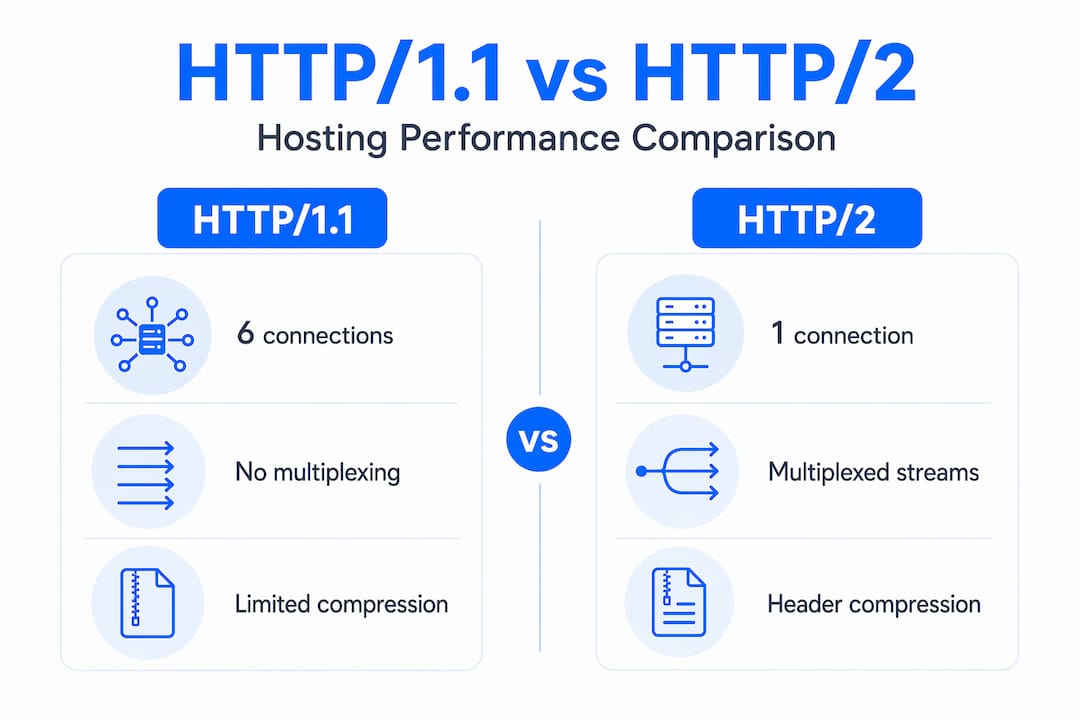
Here is how HTTP/2 compares to HTTP/1.1 across key hosting-relevant dimensions:
| Dimension | HTTP/1.1 | HTTP/2 |
|---|---|---|
| Connections per origin | 6 (browser limit) | 1 multiplexed connection |
| Header transmission | Plain text, repeated | HPACK compressed |
| Request concurrency | Parallel via multiple connections | Multiplexed streams |
| HTTP-level HOL blocking | Yes | Resolved |
| TCP-level HOL blocking | Yes | Still present |
| TLS requirement | Optional | Effectively required |
| Server push | Not supported | Supported (limited adoption) |
The critical limitation to internalize is that TCP-level head-of-line blocking remains a problem. When a TCP segment is lost, all multiplexed streams on that connection stall until retransmission completes. Under HTTP/1.1 with six connections, only one connection is blocked by a packet loss event. Under HTTP/2 with one connection, everything stops. This is why HTTP/2 can actually underperform HTTP/1.1 on high-loss network conditions like congested mobile networks.
The key performance considerations to keep in mind:
- Prioritize HTTP/2 for sites with many small assets, which benefit most from multiplexing.
- High-latency, low-loss connections see the greatest gains from HTTP/2.
- Flow control and prioritization require active tuning on heavily loaded servers; default settings are rarely optimal.
- Server push, while theoretically useful for preloading assets, has seen limited real-world adoption because incorrect push configurations waste bandwidth rather than saving it.
HTTP/2's transport efficiency gains come mainly from protocol-level improvements, not from changes to your application logic. As RFC 7540 clarifies, HTTP semantics remain identical. The performance difference is entirely in how those semantics are transported.
Security risks when deploying HTTP/2
Enabling HTTP/2 on a production hosting server is not a neutral operation from a security standpoint. Every new protocol module you activate expands your attack surface, and HTTP/2 modules in popular web servers have had serious vulnerabilities.

The most instructive case: Apache 2.4.67 shipped a patch for a critical mod_http2 vulnerability that exposed servers to possible remote code execution. That is not a theoretical risk. It is the kind of bug that gets exploited in the wild before most server operators apply the patch.
The operational security checklist for HTTP/2 hosting:
- Subscribe to security advisories for your web server (Apache, NGINX, LiteSpeed) specifically for HTTP/2 modules, not just the core server.
- Automate patching where possible. HTTP/2 vulnerabilities in widely deployed servers are high-value targets; manual patch cycles are too slow.
- Monitor for anomalous HTTP/2 traffic patterns, such as streams opened and closed at unusual rates, which can indicate denial-of-service attacks exploiting multiplexing.
- Test fallback behavior for clients that do not support HTTP/2. Your TLS configuration and ALPN setup should gracefully negotiate HTTP/1.1 for legacy clients without breaking the site.
- Audit monitoring tool compatibility. Not all application performance monitoring tools handle HTTP/2 frames correctly. Some report inflated request counts or miss stream-level errors entirely.
Security does not stop at the TLS certificate. Every protocol module you enable on a hosting server needs the same maintenance discipline as your application code.
Obtaining a valid SSL certificate is the foundational step before HTTP/2 deployment. Without TLS, HTTP/2 will not negotiate in any real-world browser scenario. You can review SSL certificate options as a prerequisite to any HTTP/2 rollout.
HTTP/2 and hosting architecture decisions
One of the most counterproductive things you can do after enabling HTTP/2 is leave your HTTP/1.1 optimization strategies in place. Several techniques that improved performance under HTTP/1.1 actively hurt HTTP/2 performance.
Domain sharding was a common trick where assets were spread across multiple subdomains to bypass the six-connection browser limit. Under HTTP/2, this forces the browser to open multiple TCP connections, undermining multiplexing entirely. You get the overhead without the benefit.
Asset bundling compresses many small files into fewer large ones to reduce HTTP/1.1 request overhead. Under HTTP/2, multiplexing handles many small requests efficiently, so large bundles slow down initial rendering by delaying the delivery of critical assets.
The architecture decisions that actually help under HTTP/2:
- Use a single origin per content type where possible to maximize multiplexing over one connection.
- Prioritize above-the-fold assets using resource hints (
<link rel="preload">) rather than server push. - Pair HTTP/2 with a CDN for edge delivery. CDNs that support HTTP/2 terminate connections close to users, which reduces the TCP segment loss probability that triggers HOL blocking. The role of CDN in hosting is amplified when the CDN negotiates HTTP/2 directly with end users.
- Review your caching strategy for HTTP/2. Fine-grained caching of individual assets becomes more practical when you are not penalized for the number of cache validation requests.
- For multi-domain architectures, consolidate where feasible. HTTP/2's multiplexing advantage disappears when assets are scattered across many origins requiring separate connections.
The bandwidth implications of HTTP/2 are also worth revisiting. HPACK compression reduces header overhead, which adds up meaningfully on high-request-rate hosting environments.
My take on HTTP/2's real-world hosting impact
I've spent a lot of time watching teams enable HTTP/2 and then wonder why their performance metrics didn't move as expected. The protocol is genuinely powerful. What I've found, though, is that most of the frustration comes from treating HTTP/2 as a hosting feature rather than a hosting architecture decision.
The operational complexity is consistently underestimated. I've seen production stacks where HTTP/2 was enabled at the CDN edge, traffic landed on an NGINX proxy still running HTTP/1.1, and no one realized the mismatch for months. The clients were negotiating HTTP/2 just fine. The backend was silently bottlenecking everything.
What I've learned is that the monitoring setup matters as much as the configuration. If your APM tools don't surface HTTP/2 stream-level data, you are flying blind. You need to verify protocol negotiation at each hop, not just assume it.
My honest opinion on HTTP/3: it solves the TCP HOL blocking problem by moving to QUIC. That's meaningful progress. But HTTP/2 is not going anywhere soon. The operational ecosystem around it is mature, the tooling is solid, and for the vast majority of hosting environments, properly configured HTTP/2 delivers real gains today. Work on getting HTTP/2 right end-to-end before you start planning a QUIC migration.
— Ihor
How Insave makes HTTP/2 work out of the box

Configuring HTTP/2 across every layer of a hosting stack is exactly the kind of complexity that gets in the way of shipping. Insave handles that infrastructure work so you don't have to. Every Insave hosting plan comes with HTTP/2 enabled by default, backed by free SSL certificates that provide the TLS foundation HTTP/2 requires. The LiteSpeed servers powering Insave's infrastructure are configured for ALPN-based HTTP/2 negotiation end-to-end, not just at the edge.
For WordPress users, Insave's WordPress hosting pairs HTTP/2 with LiteSpeed Cache and free CDN integration, so multiplexing and edge delivery work together without manual configuration. If you are moving an existing site, free migration ensures your stack arrives already optimized. Explore Insave's shared hosting plans to see performance specs and pricing.
FAQ
What is HTTP/2 and how does it differ from HTTP/1.1?
HTTP/2 is a major revision of the HTTP protocol that replaces HTTP/1.1's multiple parallel connections with multiplexed streams on a single TCP connection. It also adds binary framing and HPACK header compression to reduce bandwidth usage and request latency.
Does enabling HTTP/2 require an SSL certificate?
Yes. Browsers require TLS 1.2 or higher with ALPN support to negotiate HTTP/2, making a valid SSL certificate a practical requirement for any HTTP/2-enabled hosting deployment.
Why might HTTP/2 underperform HTTP/1.1 in some scenarios?
On high-packet-loss networks, TCP-level head-of-line blocking stalls all multiplexed streams on the single HTTP/2 connection simultaneously, whereas HTTP/1.1's multiple connections are only individually affected by packet loss events.
What does end-to-end HTTP/2 support mean in hosting?
End-to-end HTTP/2 means every component in the request path, including load balancers, reverse proxies, and application backends, is configured to use HTTP/2. Enabling HTTP/2 only at the edge while backends run HTTP/1.1 eliminates most of the performance benefit.
Is HTTP/2 safe to enable on shared hosting?
HTTP/2 is safe on shared hosting when the hosting provider actively maintains and patches their HTTP/2 server modules. Critical vulnerabilities like the Apache mod_http2 remote code execution flaw show that unpatched HTTP/2 modules carry real risk, making provider patch discipline a factor to verify before relying on the protocol.