
TL;DR:
- A secure domain protects DNS integrity, registrant privacy, and account ownership against hijacking and spoofing. Implementing DNSSEC, enabling domain lock, and choosing TLDs with built-in security features strengthen your defenses. Ongoing audits and maintenance ensure long-term protection against evolving threats.
A secure domain name is defined as a domain whose ownership, DNS records, and registrant identity are protected against hijacking, spoofing, and unauthorized transfer. Most website owners focus on SSL certificates and stop there. That gap is dangerous. DNS-based attacks like cache poisoning and DNS spoofing can redirect your visitors to malicious sites even when your SSL certificate is valid. Standards like DNSSEC (Domain Name System Security Extensions) and protocols like HSTS exist specifically to close that gap. Protecting your domain requires layered defenses, not a single checkbox.
What does a secure domain name actually protect?
A secure domain name protects three things: DNS integrity, registrant privacy, and account ownership. Each layer addresses a different attack surface, and failing any one of them can compromise the others.

DNS integrity means your domain's records cannot be forged. Without it, an attacker can poison a DNS resolver's cache and send your visitors to a fake site. Your SSL certificate will not stop this because the attack happens before the encrypted connection begins. Relying solely on HTTPS neglects the DNS layer entirely, which is where most redirection attacks occur.
Registrant privacy means your personal contact details are not publicly visible in WHOIS databases. Exposed contact data invites social engineering, spam, and targeted phishing against domain owners. Domain privacy services mask your real information with registrar-provided proxy details.
Account ownership means the registrar account controlling your domain is locked against unauthorized transfers. A stolen registrar login can result in a domain transfer completed within hours. Two-factor authentication (2FA) and registrar-level domain locks are the primary defenses here.
How does DNSSEC work to protect your domain?
DNSSEC protects your domain by cryptographically signing DNS records, so resolvers can verify that the response they receive is authentic and unmodified. Think of it as a chain of digital signatures stretching from the DNS root zone down through the top-level domain (TLD) to your specific domain. Every link in that chain must validate for the response to be trusted.
Here is how the process works in practice:
- Your DNS provider generates a pair of cryptographic keys: a Zone Signing Key (ZSK) and a Key Signing Key (KSK).
- DNS records are signed with the ZSK, and the KSK signs the ZSK's public key.
- A Delegation Signer (DS) record is published at the TLD level, linking your domain into the chain of trust.
- When a resolver queries your domain, it checks each signature against the published keys. A mismatch causes the query to fail rather than return a forged result.
One critical distinction: DNSSEC does not encrypt DNS traffic. It verifies authenticity, not confidentiality. SSL/TLS handles encryption of the connection between the browser and your server. DNSSEC secures the navigation step that happens before that connection is established. You need both.
Enabling DNSSEC is now straightforward with most registrars and DNS providers. Most offer a one-click toggle in their dashboard, after which you publish the DS record at your registrar. Understanding DNS management basics makes this process significantly less intimidating.
Pro Tip: After enabling DNSSEC, use a free validation tool like DNSViz or Verisign's DNSSEC Debugger to confirm your chain of trust is intact before assuming everything is working.
Which TLDs offer the strongest built-in security?
Your choice of top-level domain affects your security posture before you configure a single DNS record. Some TLDs carry technical security guarantees by design.
TLDs like .app and .dev are on the HSTS preload list, which means browsers refuse any non-encrypted connection to these domains at the browser level. You cannot accidentally serve your site over HTTP on a .app domain. That enforcement is baked into Chrome, Firefox, and Safari. For SaaS products and developer tools, .app and .dev signal both security and professional intent to users.
At the enterprise end of the spectrum, dotBrands represent the most controlled domain environment available. A dotBrand is a TLD owned and operated exclusively by one company, such as .google or .apple. DotBrands combine DNSSEC, strict HTTPS, and centralized TLS management within a closed registry, meaning no third party can register a domain under that TLD. Phishing incidents drop to near zero because attackers cannot create lookalike domains within the brand's own namespace.
For most small and medium businesses, the practical choice sits between these extremes. The table below compares TLD categories by security profile:
| TLD category | HTTPS enforcement | Registry access | Best for |
|---|---|---|---|
| .com / .net / .org | No (manual SSL required) | Open | General presence, brand recognition |
| .app / .dev | Yes (HSTS preload) | Open | SaaS, developer tools, tech products |
| Country code TLDs | Varies | Restricted by country | Local businesses, geographic targeting |
| dotBrands | Yes (universal DNSSEC + HSTS) | Closed (owner only) | Large enterprises, brand protection |
A common misconception is that TLD choice affects SEO rankings. Google treats all generic TLDs equally for ranking purposes. Your TLD choice affects trust signals and security, not search position. Explore domain extension options to find the right fit for your brand's security and identity goals.
Practical steps to secure your domain registration
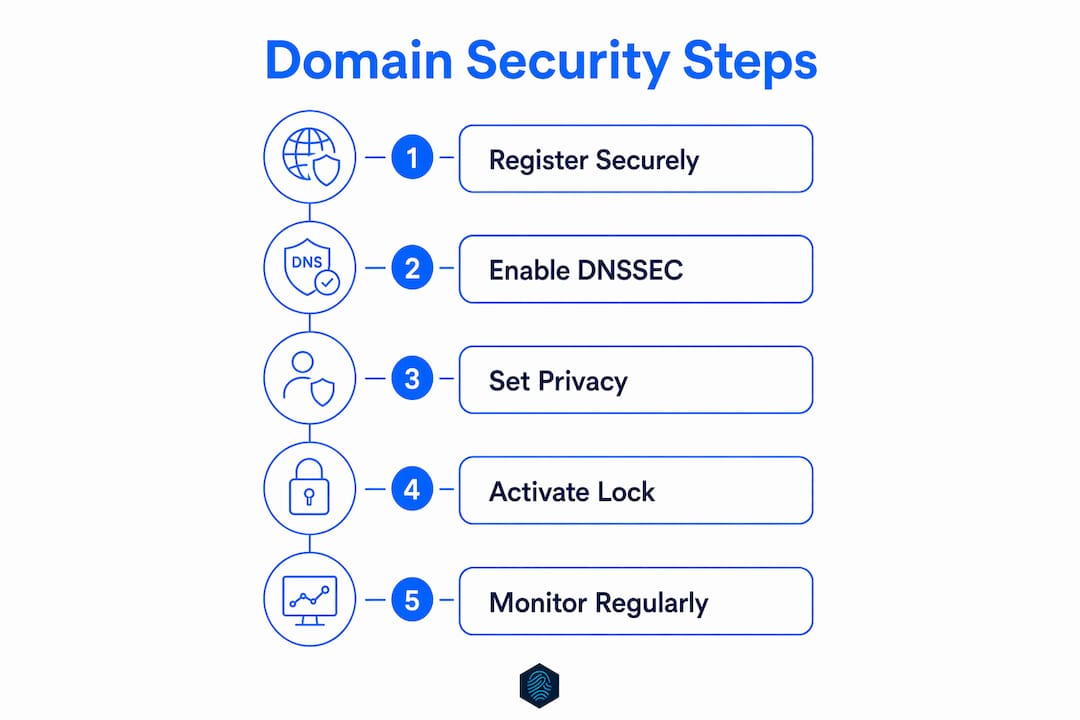
Securing a domain is not a one-time action. It requires several deliberate steps at registration and immediately after.
-
Register defensively. A lean defensive registration strategy covers your core .com plus .net, .co, and any category-specific TLD relevant to your industry. Add common misspellings of your brand name. This blocks typo-squatters and impersonators from registering lookalike domains that confuse your customers.
-
Enable domain lock. Most registrars offer a Registrar Lock (also called Transfer Lock) that prevents domain transfers without explicit owner authorization. Enable it immediately after registration and verify it is active in your registrar dashboard.
-
Activate two-factor authentication. Strong account security including 2FA prevents unauthorized access to your registrar account even if your password is compromised. Use an authenticator app rather than SMS-based 2FA, which is vulnerable to SIM-swapping attacks.
-
Enable domain privacy. Privacy protection replaces your personal contact details in WHOIS with registrar proxy information. This is especially important for individual domain owners whose home address would otherwise be publicly listed.
-
Deploy DNSSEC and SSL together. DNSSEC secures the DNS path; SSL/TLS encrypts the connection. Neither replaces the other. Configure both and verify each is functioning correctly before launching your site.
-
Set renewal alerts well in advance. Configure reminders at 90 days, 30 days, and 7 days before expiration. Forgotten renewals are among the most common causes of domain loss, and expired domains can be snapped up by squatters within hours of lapsing.
Pro Tip: When you buy a secure domain, register it for the maximum available term (often 10 years). Longer registration periods reduce the risk of accidental expiration and can signal legitimacy to search engines.
How do you maintain domain security over time?
Domain security is not set-and-forget. Ongoing maintenance prevents the slow erosion of protections that were correctly configured at launch.
DNSSEC requires active monitoring because cryptographic keys expire. Monitoring DNSSEC validation status and renewing keys before expiry is the most commonly neglected maintenance task. A DNSSEC misconfiguration or expired RRSIG (Resource Record Signature) causes DNS resolution failures for your entire domain, taking your site offline for all validating resolvers.
Email authentication standards work alongside DNSSEC to protect your domain's reputation. SPF (Sender Policy Framework), DKIM (DomainKeys Identified Mail), and DMARC (Domain-based Message Authentication, Reporting, and Conformance) records prevent attackers from sending email that appears to come from your domain. These records live in DNS, so DNSSEC's authenticity guarantees extend to them as well.
Consolidating domain management under a single registrar account with auto-renewal enabled eliminates the most common cause of unintentional domain loss. Spreading domains across multiple registrar accounts creates gaps in oversight. One account, one renewal calendar, one set of 2FA credentials.
Regular audits should cover these areas:
- DNSSEC chain of trust validation (monthly, using DNSViz or equivalent)
- DS record accuracy at the TLD registry level
- Registrar lock status for all domains
- WHOIS contact information accuracy
- SSL certificate expiration dates
- SPF, DKIM, and DMARC record integrity
Staying current with security practices for small businesses helps you catch emerging threats before they affect your domain's reputation or availability.
Key Takeaways
A secure domain name requires DNSSEC for DNS integrity, SSL/TLS for encrypted connections, defensive registration for brand protection, and strong account controls to prevent unauthorized transfers.
| Point | Details |
|---|---|
| DNSSEC is not optional | Cryptographic signing prevents DNS spoofing that SSL alone cannot stop. |
| TLD choice affects security | TLDs like .app enforce HTTPS at the browser level; dotBrands offer closed-registry protection. |
| Defensive registration matters | Register .com, .net, .co, and key misspellings to block impersonators and typo-squatters. |
| Account security is the first line | Enable 2FA and domain lock immediately after registration to prevent unauthorized transfers. |
| Maintenance prevents failure | Expired DNSSEC keys and forgotten renewals are the most common causes of domain security lapses. |
What most guides get wrong about domain security
The standard advice is "get SSL and you're protected." That advice is incomplete, and I've seen it cost businesses real traffic and real trust.
SSL encrypts the connection between your visitor's browser and your server. It does nothing to verify that the DNS response pointing to your server is legitimate. An attacker who poisons a DNS resolver's cache can redirect your visitors to a fake site, and the browser will show a padlock on the attacker's certificate, not yours. DNSSEC closes that gap. Most small business owners I've spoken with have never heard of it.
The second thing guides consistently undervalue is defensive registration. Registering your .com and calling it done leaves obvious attack surface open. A competitor or bad actor can register yourbrand.net or yourbrnad.com (note the typo) and run a phishing operation or simply confuse your customers. A lean defensive set costs less than most people assume and prevents problems that are genuinely difficult to fix after the fact.
The third gap is maintenance. Domain security configurations decay. DNSSEC keys expire. SSL certificates lapse. Registrar contact details go stale. The businesses that stay protected are the ones that treat domain security as a recurring task, not a one-time setup. A 15-minute quarterly audit covers everything that matters.
— Ihor
Domain security made simple with inSave Hosting
Getting your domain security right from day one is easier when your registrar and hosting provider handle the technical groundwork for you.

inSave Hosting offers domain registration with DNSSEC support, domain privacy, and registrar-level domain lock built into the registration process. Every hosting plan includes a free SSL certificate, so your DNS security and connection encryption work together from the start. Multi-TLD registration lets you build a defensive domain set without juggling multiple accounts. For businesses that need end-to-end protection, SSL certificate options including wildcard coverage are available alongside every hosting plan. Reliable 99.9% uptime and managed security features mean your protected domain stays online and accessible.
FAQ
What is DNSSEC and why does my domain need it?
DNSSEC is a security standard that cryptographically signs DNS records, preventing attackers from forging DNS responses and redirecting your visitors. Without it, your domain is vulnerable to DNS spoofing even if you have a valid SSL certificate.
Does SSL replace DNSSEC for domain security?
No. SSL encrypts the connection between a browser and your server, while DNSSEC verifies that the DNS response directing traffic to your server is authentic. Both are required for complete domain protection.
What TLDs are the most secure to register?
TLDs on the HSTS preload list, such as .app and .dev, enforce HTTPS at the browser level and offer built-in security advantages. DotBrands provide the highest level of control through closed registries and universal DNSSEC enforcement.
How do I prevent my domain from being hijacked?
Enable domain lock and two-factor authentication on your registrar account immediately after registration. These two controls block unauthorized transfers even if your account credentials are compromised.
How often should I audit my domain's security settings?
A quarterly audit covering DNSSEC validation, SSL expiration, registrar lock status, and WHOIS contact accuracy is sufficient for most businesses. Set calendar reminders and use free tools like DNSViz to automate DNSSEC checks.