
Establishing your business online starts with one critical step: registering a domain name. Many small business owners feel overwhelmed by the technical process and worry about making costly mistakes. This guide walks you through every step of domain registration, from choosing the perfect name to verifying your ownership. You'll learn how to avoid common pitfalls, select the right registrar, and secure your online identity with confidence. By the end, you'll have a clear roadmap to claim your digital real estate and start building your web presence.
Table of Contents
- Key Takeaways
- Preparing to register your domain
- Step-by-step guide to registering your domain
- Common mistakes and verification after registration
- Get started with inSave hosting and domain services
- How to register a domain: frequently asked questions
Key Takeaways
| Point | Details |
|---|---|
| Choose a strong domain name | Pick a name that reflects your business, is easy to spell, and short enough to remember. |
| Check availability and trademarks | Search for the domain and verify it does not infringe on registered trademarks. |
| Use a reputable registrar | Register through a trusted registrar to ensure official ownership and reliable support. |
| Protect with multiple extensions | Register additional extensions such as net and org to protect your brand. |
| Budget for renewals | Review the pricing structure because renewals may be higher after the first year. |
Preparing to register your domain
Before you start the registration process, you need to understand what you're actually buying. A domain name serves as your business's unique address on the internet, similar to a street address for a physical store. It's how customers find you online and remember your brand. Selecting the right domain name significantly impacts your brand recognition and online presence.
Think carefully about business relevance when choosing your name. Your domain should reflect what you do, be easy to spell, and stick in people's minds. Avoid numbers, hyphens, or unusual spellings that confuse potential customers. Keep it short, ideally under 15 characters. A plumbing business named "Quick Fix Plumbing" might choose quickfixplumbing.com rather than qckfxplmbng.com or quick-fix-plumbing123.com.
Checking existing trademarks protects you from legal headaches down the road. Search the USPTO database to ensure your desired domain doesn't infringe on registered trademarks. Even if a domain is available, using a trademarked name can result in expensive lawsuits and forced domain transfers. Spend 20 minutes on this research now to save thousands later.
Domain extensions matter more than you might think. While .com remains the gold standard for businesses, other extensions serve specific purposes:
- .com: Best for commercial businesses and general use
- .net: Originally for network services, now a solid alternative
- .org: Typically used by nonprofits and organizations
- .biz: Specifically designed for business use
- .co: Popular among startups and modern companies
- .io: Favored by tech companies and SaaS businesses
Pro Tip: Register multiple extensions of your domain name to protect your brand. If you secure yourbusiness.com, also grab yourbusiness.net and yourbusiness.org to prevent competitors or cybersquatters from confusing your customers.
Budget considerations extend beyond the initial registration fee. Most registrars offer attractive first-year prices but charge higher renewal rates. Review the complete pricing structure before committing:
| Cost Factor | Typical Range | What to Watch |
|---|---|---|
| Initial registration | $10-$20/year | Promotional rates expire |
| Renewal fees | $15-$35/year | Often 2-3x higher than initial |
| Privacy protection | $5-$15/year | Hides personal contact info |
| Domain transfer fees | $10-$15 | If switching registrars |
| Premium domains | $100-$10,000+ | Short or keyword-rich names |
Explore your domain name options early in the planning process. Many businesses discover their first choice is taken and need time to brainstorm alternatives. Starting this research weeks before you need the domain prevents rushed decisions and buyer's remorse.
Step-by-step guide to registering your domain
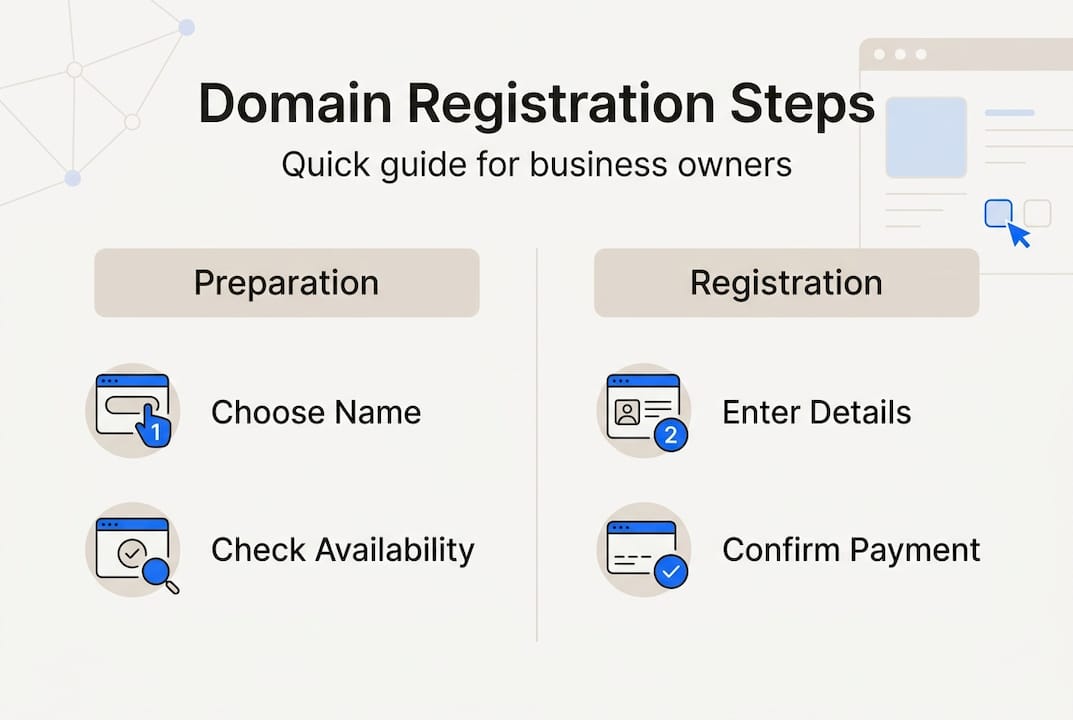
Now that you've prepared, let's walk through the actual registration process. Follow these steps in order to secure your domain without complications.
-
Search for your desired domain on a registrar's website. Visit a trusted domain registrar and enter your chosen name in the search bar. The system instantly checks availability across all extensions. If your exact match is taken, the registrar suggests alternatives with different extensions or slight variations. Don't settle for a confusing alternative just because your first choice is unavailable.
-
Confirm availability and select your domain extension. Once you find an available domain that matches your business, add it to your cart. Using a reputable registrar ensures official domain registration and better support. Compare extension prices if multiple options work for your brand. Remember that .com typically costs more but offers better recognition.
-
Fill out registration information accurately. The registrar requires contact details including your name, business name, email address, phone number, and physical address. This information becomes part of the public WHOIS database unless you purchase privacy protection. Double-check every field for typos. An incorrect email address means you won't receive critical renewal notices or verification links.
-
Choose registration length and add-on services. Most registrars offer registration periods from one to ten years. Longer registrations often include discounts and ensure you won't forget to renew. Consider these common add-ons:
- Domain privacy protection: Replaces your personal information in WHOIS with registrar details
- Auto-renewal: Automatically charges your payment method before expiration
- Email forwarding: Routes messages sent to your domain to an existing email account
- DNS management: Gives you control over where your domain points
-
Complete payment and confirm registration. Review your order summary carefully before submitting payment. Verify the domain spelling one final time. After payment processes, you'll receive a confirmation email with your domain details and account login information. Save this email in a dedicated folder for important business documents.
Pro Tip: Set a calendar reminder for 30 days before your domain expires, even if you enable auto-renewal. Payment methods expire, and you want a backup alert system to prevent accidental domain loss.
The entire registration process typically takes 5 to 15 minutes. Your domain becomes active immediately, though DNS propagation across the internet can take 24 to 48 hours. During this time, some users might not be able to access your domain yet. Understanding domain name basics helps you navigate these technical aspects with confidence.

| Registration Step | Time Required | Common Issues |
|---|---|---|
| Domain search | 2-3 minutes | Desired name taken |
| Information entry | 3-5 minutes | Typos in contact details |
| Add-on selection | 2-4 minutes | Unclear pricing |
| Payment processing | 1-2 minutes | Declined payment |
| Confirmation | Instant | Email in spam folder |
Access reliable domain registration services that guide you through each step with clear instructions and transparent pricing.
Common mistakes and verification after registration
Even experienced business owners make preventable errors during domain registration. Learning from these common mistakes saves you time, money, and frustration.
Typos in registration information create serious problems. A misspelled email address means you won't receive ownership verification or renewal reminders. An incorrect phone number prevents registrars from contacting you about security issues. Review every field twice before submitting. If you discover an error after registration, contact support immediately to update your details. Most registrars allow information changes, but some require verification steps that delay corrections.
Forgetting to renew before expiration is the costliest mistake. Registering without verification or neglecting renewal leads to domain loss. When domains expire, they enter a grace period where you can still renew at standard rates. After that, they move to a redemption period with fees up to $200. Finally, they become available for anyone to register. Competitors or domain speculators often snap up expired business domains and demand thousands for their return.
Verify domain ownership immediately after registration. Check your email inbox and spam folder for a verification message from your registrar. Click the confirmation link within the specified timeframe, usually 15 days. Unverified domains can be suspended, making your website and email inaccessible. This verification proves you control the email address associated with the domain and prevents fraudulent registrations.
Domain privacy and security deserve immediate attention. Without privacy protection, your personal contact information appears in public WHOIS databases. This exposes you to:
- Spam emails and robocalls
- Identity theft attempts
- Competitors researching your business
- Domain transfer scams
Enable two-factor authentication on your registrar account. This adds an extra security layer beyond passwords, preventing unauthorized access even if someone steals your login credentials. Understanding secure hosting importance extends to protecting your domain registration account.
Test your domain after registration to confirm everything works correctly. Open a web browser and type your domain name in the address bar. You should see either a placeholder page from your registrar or a "site not found" message if you haven't connected hosting yet. Both indicate your domain is active and resolving properly. If you see an error message or the page doesn't load after 48 hours, contact registrar support.
"Your domain name is your most valuable digital asset. Protect it with the same care you'd give to your business bank account or physical property deed. Enable all available security features and monitor your account regularly."
Set up email alerts for any account changes. Most registrars offer notifications when someone attempts to transfer your domain, modify DNS settings, or update contact information. These alerts help you catch unauthorized access attempts immediately. Configure alerts to go to multiple email addresses so you'll receive warnings even if one account is compromised.
Create a domain management checklist and review it quarterly:
- Verify contact information is current
- Confirm payment method on file hasn't expired
- Check domain expiration date and renewal status
- Review security settings and enabled protections
- Test domain resolution and website accessibility
- Audit any connected services like email or subdomains
Regular maintenance prevents small issues from becoming major crises.
Get started with inSave hosting and domain services
Registering your domain is just the first step toward building your online presence. You need reliable hosting to turn that domain into a functioning website that attracts customers and grows your business.
InSave Hosting simplifies the entire process by combining domain registration with powerful hosting solutions. When you register through inSave, you get a one-year free domain with hosting plans, eliminating separate fees and management headaches. Everything lives under one account with unified billing and support.

Our shared hosting plans include everything small businesses need: 99.9% uptime guarantee, free SSL certificates, easy WordPress installation, and 24/7 customer support. You won't need technical expertise to get your website running. The intuitive control panel lets you manage your domain, install applications, and configure email accounts in minutes.
Explore our complete domain registration services to secure your business name across multiple extensions. Protect your brand by registering .com, .net, and .org versions simultaneously. Bundle domain registration with hosting to save money and simplify management. Visit inSave Hosting to compare plans and find the perfect solution for your business website needs.
How to register a domain: frequently asked questions
How long does domain registration take?
Domain registration completes instantly after payment processes. Your domain becomes active immediately, but DNS propagation across global servers takes 24 to 48 hours. During this period, some users might not access your domain yet while others can.
Can I register a domain for free?
True free domain registration doesn't exist, but many hosting providers include a free domain for the first year with hosting plans. After that year, standard renewal fees apply. Some registrars offer free subdomains like yourbusiness.provider.com, but these don't provide the professional appearance or branding control of a proper domain.
What is domain privacy protection?
Domain privacy protection hides your personal contact information from public WHOIS databases. Instead of displaying your name, address, phone number, and email, the registrar's information appears. This service costs $5 to $15 annually and protects you from spam, identity theft, and unwanted solicitations. Check available domain name options that include privacy protection.
How do I transfer a domain to another registrar?
Transferring requires unlocking your domain in your current registrar's control panel and obtaining an authorization code. Provide this code to your new registrar and approve the transfer via email confirmation. The process takes 5 to 7 days and typically costs $10 to $15, which includes a one-year registration extension.
What happens if I don't renew my domain on time?
Expired domains enter a grace period of 30 to 45 days where you can still renew at standard rates. After that, they move to redemption status with fees up to $200. If you don't act within the redemption period, your domain becomes available for public registration. Anyone can claim it, and recovering it may cost thousands or prove impossible.