
TL;DR:
- Dedicated server hosting provides exclusive use of a physical server, ensuring optimal performance and security for high-volume workloads. Choosing between unmanaged and managed plans depends on your team's technical expertise, with managed services offering support for maintenance and recovery tools like IPMI or KVM. Businesses should select server location, hardware, and support features carefully to balance cost, latency, and uptime reliability.
Dedicated server hosting is defined as the exclusive use of a physical server by a single client, with no shared CPU, RAM, or storage with other users. That exclusivity is the foundation of every performance, security, and control advantage the model offers. Dedicated servers allocate exclusive CPU, RAM, and storage to one client, which means your workload never competes with a neighbor's traffic spike. For small to medium-sized businesses that depend on consistent uptime, fast page loads, and tight security, this model is the clearest path to infrastructure that actually matches your ambitions. inSave Hosting offers dedicated server plans built around those exact priorities.
What is dedicated server hosting, and who needs it?
Dedicated server hosting gives your business full ownership of a physical machine in a data center. You get root access, your choice of operating system, and complete control over how the server is configured. Enhanced security through tenant isolation means your data never shares hardware with unknown third parties, which matters enormously for e-commerce sites, healthcare portals, and any business handling sensitive customer data.
The businesses that benefit most are those with predictable, high-volume workloads. A growing online retailer running flash sales, a SaaS company with thousands of concurrent users, or a media site serving large video files all hit the ceiling of shared hosting quickly. Dedicated hosting removes that ceiling. If your site regularly strains shared resources or you need to meet specific compliance standards, dedicated hosting is the right category to evaluate.
Understanding the difference between dedicated and shared hosting is the first step before committing to a plan. Shared hosting splits one server among dozens of accounts. Dedicated hosting hands you the whole machine.
What are unmanaged versus managed dedicated servers?
The service level you choose shapes your daily experience as much as the hardware does. Unmanaged and managed dedicated servers sit at opposite ends of the responsibility spectrum.
Unmanaged dedicated servers
An unmanaged dedicated server puts full administrative responsibility on your team. You handle OS installation, security hardening, software updates, and troubleshooting. The provider supplies the hardware and network connectivity, nothing more. This option costs less per month, but the savings disappear fast if you lack in-house expertise. Unplanned downtime and emergency interventions carry real costs that rarely appear in the initial price comparison.
One critical mistake beginners make is deploying applications before securing the OS first. A server exposed to the internet without hardening can be compromised within hours. The correct sequence is: provision, secure, then deploy.
Pro Tip: Follow a "provision-secure-deploy" sequence on every unmanaged server. Set firewall rules, disable unused ports, and apply OS patches before you install a single application.
Managed dedicated servers
A managed server includes vendor support for patching, backups, monitoring, and incident response. Your team focuses on the application layer while the provider handles the infrastructure layer. This model costs more, but it transfers significant technical risk to professionals with 24/7 access to the hardware.
The key trade-offs between the two options:
- Unmanaged: Lower monthly cost, full control, requires strong in-house Linux or Windows server skills
- Managed: Higher monthly cost, shared control, ideal for teams without a dedicated sysadmin
- Support scope: Provider support covers hardware faults and connectivity, but software issues remain your responsibility on unmanaged plans
- Risk profile: Managed plans reduce exposure to configuration errors and missed security patches
How do you choose the right dedicated server?
Hardware specs, server location, and recovery options each affect your real-world experience. Getting these decisions right before you sign a contract saves significant time and money.
Hardware: CPU, RAM, and storage
Match your hardware to your actual workload. A high-traffic database server needs more RAM and fast NVMe SSD storage. A web server handling mostly static content can run efficiently on SATA drives with a solid RAID configuration. RAID 1 mirrors data across two drives for redundancy. RAID 10 combines mirroring and striping for both speed and fault tolerance.

Server location and latency
Physical server location directly impacts latency. A server in Dallas serves Texas-based users faster than one in Frankfurt. If your customers are primarily in the United States, a USA dedicated server in a central or coastal data center cuts response times measurably. Businesses serving European customers should look at dedicated servers in Europe, where data residency regulations like GDPR also apply.
Pro Tip: Run a latency test from your primary user locations to candidate data centers before committing. Tools like ping and traceroute give you real numbers, not marketing estimates.
Recovery options and out-of-band access
Out-of-band console access via IPMI or KVM lets you reach a server even when the OS crashes or SSH becomes unreachable. This is not a luxury feature. It is the difference between a 10-minute recovery and a multi-hour outage. Ask every provider whether IPMI access is included or costs extra.
The table below summarizes the key selection criteria:
| Criteria | What to evaluate |
|---|---|
| CPU and RAM | Match to peak workload, not average load |
| Storage type | NVMe SSD for databases, SATA for archival workloads |
| RAID configuration | RAID 1 for redundancy, RAID 10 for speed plus redundancy |
| Server location | Closest to your primary user base; check compliance requirements |
| Out-of-band access | IPMI or KVM included in the plan |
| Support scope | Hardware only vs. full managed support |
Uptime reliability also depends on how well you can recover from failure. Read the SMB website reliability guide for a practical framework on building resilient infrastructure.
Dedicated server hosting versus cloud hosting: which fits your business?
Dedicated and cloud hosting solve different problems. Knowing which one fits your situation prevents expensive mistakes.
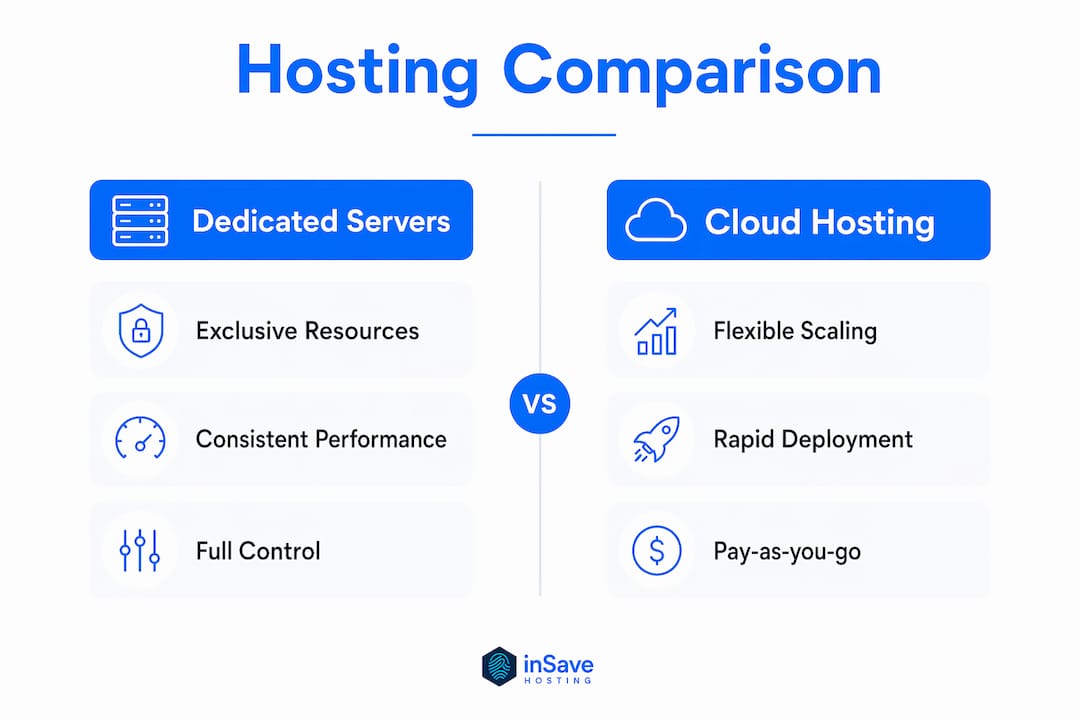
Dedicated servers deliver consistent raw performance because no other tenant shares the physical hardware. Cloud servers run on virtualized hardware shared across many clients, which introduces variable performance under heavy load. For workloads that run at a steady, predictable level, dedicated hardware wins on performance per dollar.
Cloud hosting wins on flexibility. You can spin up additional instances in minutes and scale back down when traffic drops. That elasticity makes cloud ideal for businesses with unpredictable or seasonal traffic patterns.
Hybrid infrastructure combines both models: a dedicated server handles the steady baseline workload, while cloud instances absorb traffic spikes. This approach improves cost efficiency because you pay for dedicated capacity only at the level you consistently need, then burst to cloud when demand exceeds that baseline.
Key differences at a glance:
- Performance: Dedicated servers offer better raw throughput and lower latency than virtualized cloud instances
- Security: Dedicated hosting isolates your infrastructure completely; cloud environments share physical hardware
- Scalability: Cloud scales in minutes; dedicated servers require hardware provisioning time
- Cost model: Dedicated servers carry a fixed monthly cost; cloud costs vary with usage
- Best use case: Dedicated for steady high-volume workloads; cloud for variable or unpredictable demand
For AI workloads specifically, the dedicated AI server model extends these same principles to GPU-intensive applications, where resource exclusivity matters even more.
What does dedicated server hosting actually cost?
Pricing for dedicated servers reflects hardware quality, location, and service level. Dedicated server costs typically range from $80 to $200 per month for entry-level configurations. That range expands significantly with higher-spec hardware or added management services. The monthly base price is rarely the full picture.
Additional costs to budget for:
- Managed services fee: Adds $50–$150 per month depending on the provider and scope
- Backup solutions: Automated off-site backups often cost extra and are not optional for production servers
- Security monitoring: Intrusion detection and DDoS protection may require separate add-ons
- Emergency support: Out-of-hours incident response can carry per-incident fees on unmanaged plans
- Hardware upgrades: RAM or storage upgrades mid-contract may incur setup fees
Geographic location also affects price. Cheap dedicated servers in the USA often reflect lower data center real estate costs in secondary markets like Dallas or Atlanta compared to New York or Los Angeles. Dedicated servers in Europe carry a premium in major hubs like Amsterdam or Frankfurt, partly due to stricter compliance infrastructure requirements.
The right budget question is not "what is the cheapest plan?" It is "what is the total cost of ownership when I include downtime risk, management overhead, and recovery time?" An unmanaged server at $80 per month that goes down for six hours costs far more than a managed server at $150 per month that recovers in 20 minutes.
Key Takeaways
Dedicated server hosting delivers the best performance, security, and control when your workload is consistent, your compliance requirements are strict, and your team has the expertise to manage or budget for managed support.
| Point | Details |
|---|---|
| Exclusive resources matter | Dedicated servers give you full CPU, RAM, and storage with no shared-tenant performance risk. |
| Managed vs. unmanaged is a skills decision | Choose managed if you lack a dedicated sysadmin; unmanaged only if your team can handle OS hardening. |
| Location drives latency | Place your server closest to your primary users and check regional compliance requirements. |
| Recovery tools are non-negotiable | Require IPMI or KVM out-of-band access from any provider before signing a contract. |
| Total cost beats sticker price | Factor in management fees, backup costs, and downtime risk when comparing plans. |
What I've learned from watching businesses pick the wrong server plan
Most SMBs I've seen get dedicated hosting wrong do so in the same way. They pick the cheapest unmanaged plan, assume the hard part is over, and then spend the next three months firefighting configuration problems they were not equipped to handle. The savings on the monthly bill evaporate in the first emergency support call.
The second mistake is treating server location as a minor detail. I've watched businesses run USA dedicated servers for a customer base that is 80% European, then wonder why their bounce rate is high. Latency is invisible until it costs you conversions. It always costs you conversions.
My honest advice for growing businesses: start with a managed server even if it feels like overpaying. You get to learn what your actual workload looks like without the risk of a misconfigured firewall taking you offline. Once you understand your traffic patterns and resource needs, you can make a smarter decision about whether to move to an unmanaged plan or invest in a hybrid setup. Read the guide on optimizing uptime for business before you finalize any infrastructure decision. The businesses that plan for failure modes before they happen are the ones that stay online when it matters most.
— Ihor
inSave Hosting's dedicated server plans for growing businesses
inSave Hosting builds its dedicated server offerings around the needs of small to medium-sized businesses that cannot afford downtime or configuration surprises. Plans include full root access, SSD storage, and 99.9% uptime backed by professional support teams who understand the difference between a hardware fault and a software misconfiguration.

Whether you need a managed server with hands-off infrastructure management or a bare-metal configuration you control completely, inSave Hosting has plans that match your technical level and budget. The dedicated server plans page lists current configurations with transparent pricing. If you are still comparing hosting models, the full hosting solutions catalog covers shared, cloud, and dedicated options side by side so you can make the right call for your business.
FAQ
What is the difference between dedicated and shared hosting?
Dedicated hosting gives one client exclusive use of a physical server. Shared hosting splits one server's resources among many accounts, which limits performance and security.
Is an unmanaged dedicated server right for my business?
An unmanaged dedicated server suits businesses with in-house Linux or Windows server expertise. Without that capability, unplanned downtime and emergency support costs raise the total cost of ownership significantly.
How does server location affect my website performance?
Placing your server closer to your primary users reduces latency and improves page load times. For US-based audiences, a USA dedicated server in a central data center delivers the best results.
What recovery tools should I require from a dedicated server provider?
Require IPMI or KVM out-of-band console access. These tools let you access and recover a server even when the operating system is unresponsive or SSH connections fail.
Can I combine dedicated and cloud hosting?
Yes. A hybrid model runs steady workloads on a dedicated server and uses cloud instances to handle traffic spikes. This approach balances cost efficiency with the flexibility to scale when demand rises unexpectedly.