
TL;DR:
- Free migration transfers website files, databases, and emails at no cost, typically completing within 24 to 72 hours. It does not include domain transfers, SSL setup, or complex site customization, which require separate arrangements. Proper preparation and secure credential sharing reduce risks, ensuring a smooth and reliable hosting switch.
Free migration is the service by which a hosting provider transfers your website from your current host to their servers at zero cost to you. The goal is to remove the technical barriers that stop website owners and developers from switching hosts. A standard free migration covers website files, databases, and email accounts, and most providers complete the process within 24–72 hours. Understanding exactly what this service includes, where it stops, and how to prepare for it will save you time, prevent data loss, and protect your site's uptime.
What is free migration in web hosting?
Free migration, formally called a complimentary website transfer service, is a no-cost technical process where a hosting provider's team moves your site assets from one server environment to another. The definition of free migration in this context is precise: it is a professional service, not an automated script, performed by technical staff on your behalf. Providers offer it because it serves their business interests as much as yours. Free migration functions as a loss-leader strategy, designed to acquire new clients and prevent churn caused by botched self-migrations.
The role of free migration goes beyond saving money. It transfers the technical burden from you to a team that handles server configurations daily. For small business owners and developers managing multiple client sites, that shift in responsibility is the real benefit.
What does a free migration service include and exclude?
What typically comes with the service
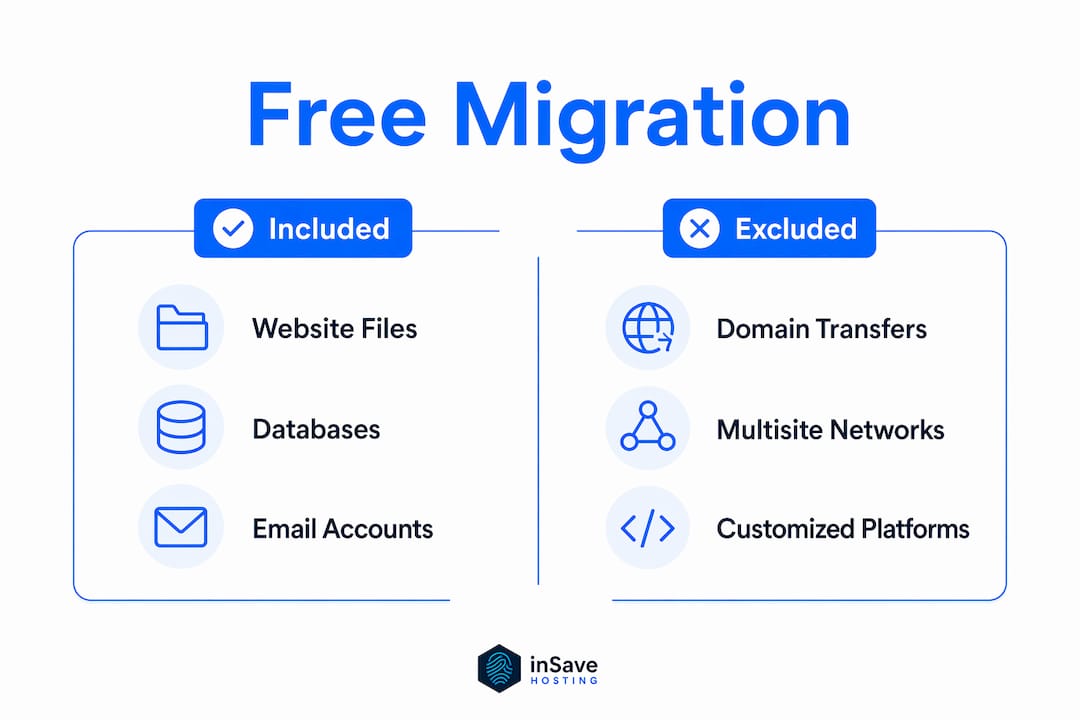
Most free migration packages cover three core components: website files, databases, and email accounts. The provider's team copies your public HTML directory, exports and imports your MySQL or MariaDB databases, and recreates your email inboxes on the new server. You are required to provide your current host's FTP or SSH credentials along with your CMS admin login, such as your WordPress username and password.
Providers generally cap the service at 1–3 websites per customer, and data volume limits apply to standard plans. Migrations typically complete within 24–72 hours, and clients receive status updates within 1–3 business days.
What free migration does not cover
The word "free" comes with real limits. The table below shows the most common inclusions and exclusions across standard free migration offers.
| Component | Included | Excluded |
|---|---|---|
| Website files (HTML, PHP, CSS) | Yes | N/A |
| MySQL or MariaDB databases | Yes | N/A |
| Email accounts and mailboxes | Yes | N/A |
| Domain transfer fees | No | Client manages separately |
| SSL certificate setup | No | Requires separate action |
| Multisite WordPress networks | No | Needs custom quote |
| Legacy or heavily customized platforms | No | Often incurs additional fees |
| DNS updates post-migration | No | Client responsibility |
Complex sites such as multisite networks or heavily customized legacy platforms fall outside the standard free migration deal. If your site runs on a custom framework or hosts dozens of subdomains under one WordPress install, expect to negotiate a paid migration or handle parts of it yourself. Domain transfer fees and SSL certificate renewals are also excluded, meaning you will need to manage DNS updates and certificate setups after the move completes.
Pro Tip: Before requesting a migration, ask your new provider for a written scope of what their free migration covers. Get the exclusions in writing so there are no surprises mid-transfer.
How does free migration minimize downtime and technical risks?
Downtime during a site move is the number one fear for website owners, and for good reason. Lost traffic, broken transactions, and damaged search rankings are all real consequences of a poorly executed transfer. Industry benchmarks target 99% uptime during migration, though complex sites may require a brief maintenance window.
The reason professional migration reduces risk comes down to what happens under the hood. Here is what a migration team handles that automated tools routinely miss:
- Database prefix remapping. WordPress installations use table prefixes like
wp_that must be updated in the database and config files simultaneously. A mismatch breaks the entire site. - File permissions normalization. Directories and files need specific permission settings (typically 755 and 644) on the new server. Incorrect permissions cause white screens or 403 errors.
- Config file path updates. Absolute file paths hardcoded in
wp-config.phpor.htaccessmust be rewritten to match the new server environment. - Server misconfiguration detection. Expert migration teams identify misconfigurations during the transfer that would otherwise cause post-launch failures.
- DNS propagation timing. Teams coordinate the DNS cutover to minimize the window where your site is unreachable during propagation.
These are the steps that trip up DIY migrations. A developer comfortable with cPanel may still miss a hardcoded absolute path buried in a plugin's settings table. A professional team catches it because they run the same checklist on every migration.
Pro Tip: Clean up your site before migration by removing unused plugins, deleting spam comments, and running a database optimization. Smaller, cleaner databases transfer faster and with fewer errors.

You can also review a full website migration checklist to prepare your site before handing it over to a migration team.
How do you keep your site secure during a free migration?
Security is the concern most website owners raise when they hear "give us your login credentials." The concern is legitimate. Handing over FTP, SSH, and CMS admin access to a third party carries real risk if not handled correctly.
The best practice for managing this risk is straightforward:
- Create a temporary admin account. Add a new WordPress admin user specifically for the migration team. Providing credentials via temporary restricted accounts is the recommended security approach, yet many site owners skip this step and share their primary login instead.
- Use a password manager for secure sharing. Tools like 1Password or Bitwarden allow you to share credentials without sending them in plain text over email.
- Revoke access immediately after migration. Delete the temporary admin account and change your FTP or SSH password as soon as the migration team confirms completion.
- Enable two-factor authentication. Turn on 2FA on your CMS before and after the migration to prevent unauthorized access during the transition window.
- Verify file integrity post-migration. Compare file counts and database row counts between the old and new server before pointing your DNS to the new host.
Reputable providers, including inSave Hosting, handle credentials through secure internal systems and do not store them beyond the migration window. Still, you should treat every migration as a security event and follow the steps above regardless of how trustworthy the provider appears. For a broader look at protecting your site, the website security checklist from inSave Hosting covers the full range of post-migration security steps.
Free migration vs. paid migration vs. DIY: which one fits your situation?
Not every site move is the same, and the right approach depends on your site's complexity, your technical skill level, and how much risk you can tolerate.
| Factor | Free Migration | Paid Migration | DIY Migration |
|---|---|---|---|
| Cost | $0 | $50–$500+ depending on scope | $0 (your time) |
| Technical skill required | Low | None | High |
| Suitable for complex sites | No | Yes | Depends on skill |
| Downtime risk | Low | Very low | High |
| Speed | 24–72 hours | Varies by scope | Varies by skill |
| Control over process | Low | Medium | Full |
| Support if something breaks | Yes | Yes | None |
Free migration is the right choice for most standard WordPress sites, small business websites, and portfolio sites running on shared hosting. It covers the majority of use cases without requiring you to touch a server.
Paid migration makes sense when your site runs on a multisite network, a custom PHP framework, or a legacy platform that predates modern hosting stacks. The additional cost buys you a scoped project with defined deliverables rather than a best-effort transfer.
DIY migration gives you full control but carries the highest risk. Common pitfalls include broken internal links from hardcoded URLs, missed database table updates, and SSL errors caused by mixed content after moving from HTTP to HTTPS. If you go the DIY route, the web hosting migration guide for small businesses is a practical starting point.
The real value of free migration lies in technical risk mitigation, not just the zero price tag. Technical issues cause most migration failures, and a professional team eliminates the majority of those failure points before they become your problem.
Key takeaways
Free migration succeeds when you understand its scope, prepare your site beforehand, and treat the credential handoff as a security event.
| Point | Details |
|---|---|
| Core definition | Free migration transfers your site files, databases, and emails to a new host at no charge. |
| Know the exclusions | Domain transfers, SSL setup, and complex multisite networks fall outside standard free migration. |
| Downtime target | Professional migrations aim for 99% uptime, handling database remapping and config updates manually. |
| Security best practice | Create a temporary restricted admin account for the migration team and revoke it immediately after. |
| Pre-migration cleanup | Removing unused plugins and optimizing your database reduces transfer time and lowers failure risk. |
Why i think most site owners underestimate what free migration actually does
After watching hundreds of site transfers go wrong and right, my honest view is this: most website owners treat free migration as a convenience perk, like free shipping on an order. That framing causes them to skip preparation and ignore the security steps, because they assume the provider handles everything.
The reality is that free migration is a technical collaboration, not a pickup and delivery service. The migration team handles the server-side complexity. You handle the site-side readiness. When owners show up with bloated databases, dozens of inactive plugins, and a single shared admin password they use for everything, the migration takes longer, carries more risk, and sometimes fails outright.
The providers I trust are the ones who send a pre-migration checklist before they touch anything. That checklist tells you they understand the process is a two-way responsibility. Providers who just ask for your credentials and say "we'll handle it" are the ones where things go sideways.
One more thing worth saying: effective communication during migration reduces client anxiety and improves the overall experience. If your provider goes silent for 48 hours after you hand over credentials, that is a red flag, not standard practice. You should receive status updates within 1–3 business days at minimum. Ask for them upfront if the provider does not offer them automatically.
Free migration is genuinely valuable. Use it correctly and it removes one of the most stressful parts of switching hosts. Treat it carelessly and it becomes the reason you spend a weekend restoring backups.
— Ihor
Move your site to inSave hosting without the technical headache
inSave Hosting includes free migration as a standard part of new customer onboarding, not as an upsell or a limited-time promotion. The migration team handles WordPress sites, standard PHP applications, and email accounts, covering the full technical transfer so you can focus on running your business instead of managing server configurations.

inSave Hosting is built for small to medium-sized businesses, developers, and website owners who need reliable performance without enterprise-level complexity. Plans include LiteSpeed servers, free SSL certificates, and one-year free domain registration alongside the migration service. If you are ready to switch hosts without the risk, explore the shared hosting plans at inSave Hosting or check out the WordPress hosting options designed specifically for WordPress site owners.
FAQ
What does free migration include for a standard website?
Free migration typically covers website files, databases, and email accounts. Most providers complete the transfer within 24–72 hours and limit the service to 1–3 sites per customer.
Does free migration cover domain transfers?
No. Domain transfer fees and DNS updates are the client's responsibility and fall outside standard free migration packages. You manage those separately after the site transfer completes.
How do i share credentials safely with a migration team?
Create a temporary restricted admin account in your CMS specifically for the migration team, then delete it immediately after the migration is confirmed complete. Avoid sharing your primary login credentials.
What types of sites are excluded from free migration?
Multisite WordPress networks, heavily customized legacy platforms, and sites exceeding standard data volume limits are typically excluded. These cases usually require a custom quote or a paid migration service.
How long does a free migration take?
Most free migrations complete within 24–72 hours, with status updates provided within 1–3 business days. Complex sites may take longer depending on database size and configuration requirements.