
TL;DR:
- SSL encryption serves as a lightweight Google ranking factor that primarily enhances user trust, analytics accuracy, and page load speed.
- Proper migration and ongoing management are essential to avoid traffic drops, canonical issues, and security warnings that harm SEO performance.
SSL, or Secure Sockets Layer, is the certificate technology that encrypts data between a browser and a web server, and its role in SEO is both direct and indirect. Google confirmed HTTPS as a ranking factor in 2014, making SSL the foundation of any technically sound website. Beyond that ranking signal, SSL shapes user trust, browser behavior, and analytics accuracy in ways that compound over time. Website owners and digital marketers who treat SSL as optional are leaving measurable performance on the table.
How does SSL affect SEO rankings directly and indirectly?
SSL's direct SEO impact is real but deliberately modest. Google treats HTTPS as a very lightweight ranking factor, affecting fewer than 1% of global queries. That means SSL alone will not push a thin-content page past a well-optimized competitor. What it does is act as a tiebreaker: when two pages are otherwise equal in quality and authority, the HTTPS version wins.
The indirect effects carry far more weight in practice. Google Chrome and Firefox now display "Not Secure" warnings on HTTP pages that contain form inputs, and browser security warnings directly reduce user engagement and conversion rates. A visitor who sees that warning on a contact form or checkout page is likely to leave immediately, driving up bounce rates and reducing dwell time. Both signals feed back into how Google evaluates page quality.
"There is no magical SEO boost from SSL alone; value comes from combined technical and content excellence." — Google's John Mueller
SSL also protects your analytics data. An HTTPS site preserves referral data more accurately than HTTP, because browsers strip referral headers when traffic passes from a secure page to an insecure one. Without SSL, organic and referral traffic can appear as direct traffic in Google Analytics, making it impossible to accurately measure channel performance. That data loss distorts every SEO decision you make downstream.
Key indirect SEO benefits of SSL include:
- Reduced bounce rates from eliminating browser security warnings on HTTP pages
- Preserved referral data for accurate traffic attribution in Google Analytics
- Improved user trust that supports longer sessions and deeper page engagement
- Eligibility for advanced browser features such as service workers and HTTP/2, which improve page speed
- Stronger backlink signals since HTTPS-to-HTTPS links pass referral data cleanly
What are the SEO risks and pitfalls during SSL/HTTPS migration?
Migrating from HTTP to HTTPS is where most SSL-related SEO damage actually happens. The certificate itself is not the risk. The migration process is.
Incorrect HTTP to HTTPS migration can cause short-term traffic drops between 5% and 60%, depending on how redirects and canonical tags are configured. Missing even a handful of high-authority URLs during the redirect process splits PageRank between the HTTP and HTTPS versions, diluting the ranking power you have built over time.
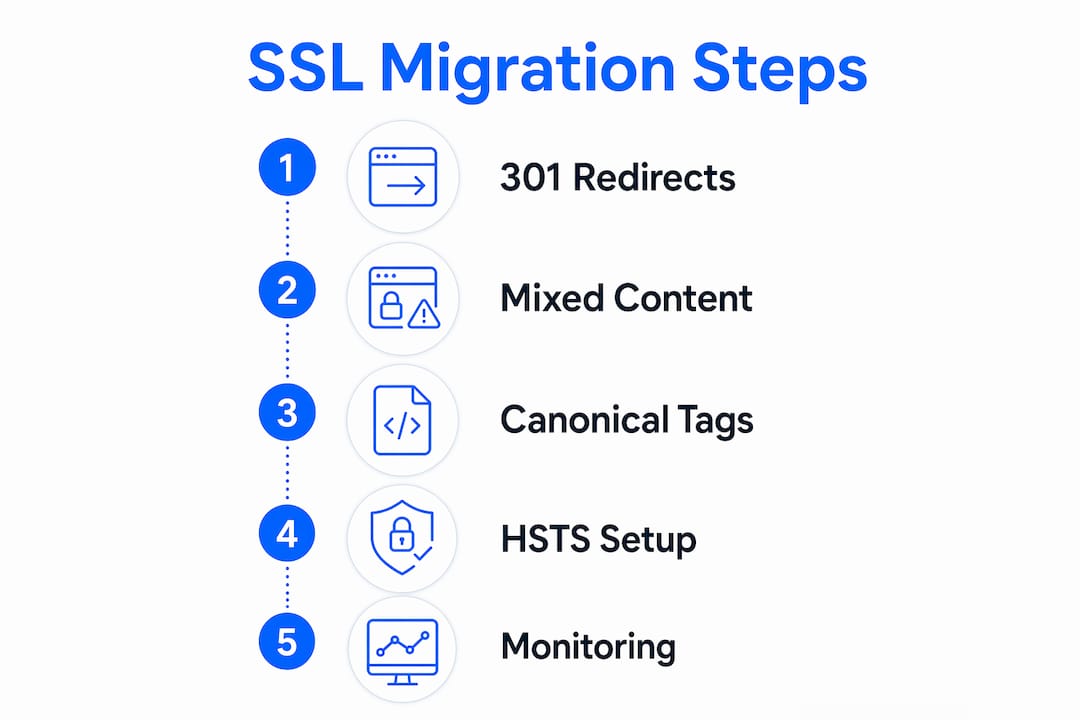
Follow this migration sequence to avoid the most common errors:
- Audit all HTTP URLs before touching any server settings. Export a full crawl using Screaming Frog or Sitebulb.
- Set up 301 redirects from every HTTP URL to its exact HTTPS counterpart. Redirect chains (HTTP to HTTP to HTTPS) slow crawl speed and bleed link equity.
- Fix mixed content by updating all internal links, image sources, scripts, and stylesheets to load over HTTPS. Mixed content breaks the browser lock icon and signals an incomplete migration.
- Update your XML sitemap to reference only HTTPS URLs, then resubmit it in Google Search Console.
- Update canonical tags across all pages to point to HTTPS versions.
- Reconfigure Google Analytics and Google Search Console to treat HTTPS as the primary property.
- Set HSTS headers only after the migration has been stable for several months.
| Migration Task | SEO Risk if Skipped |
|---|---|
| 301 redirects for all HTTP URLs | PageRank fragmentation, traffic loss up to 60% |
| Mixed content fixes | Broken HTTPS lock icon, reduced user trust |
| Canonical tag updates | Duplicate content signals, indexing confusion |
| Search Console HTTPS property | Missed crawl errors, incomplete performance data |
| Sitemap resubmission | Delayed indexing of HTTPS pages |
Pro Tip: HSTS preload is a permanent browser-level commitment. Once you submit your domain to the HSTS preload list, removal can take months due to browser update cycles. Only enable it after your HTTPS implementation has been stable across all subdomains for at least 90 days.
After migration, monitor HTTPS and HTTP properties separately in Google Search Console. Google treats them as distinct properties, and residual HTTP URLs that were missed during migration will only surface in the HTTP property's coverage report. Checking both properties weekly for the first 60 days catches indexing issues before they become ranking problems.
How does SSL contribute to user trust and overall website performance?
SSL is the baseline for safe user experience in every modern browser. The padlock icon in Chrome, Safari, and Firefox is the first visual trust signal a visitor processes before reading a single word of your content. For ecommerce sites and lead generation pages, that padlock is the difference between a completed transaction and an abandoned session.

The importance of SSL for websites goes beyond perception. HTTPS is a prerequisite for HTTP/2, the protocol that enables multiplexed requests and significantly faster page loads. Faster pages reduce bounce rates, increase pages per session, and improve Core Web Vitals scores. All three metrics influence Google's ranking algorithm. SSL is therefore not just a security feature. It is a performance enabler.
Pro Tip: If your site uses third-party scripts from Google Tag Manager, Facebook Pixel, or payment processors like Stripe, verify that every external resource loads over HTTPS. A single HTTP script call creates mixed content and strips the padlock from your entire site.
SSL also unlocks service workers, the browser technology behind Progressive Web Apps and offline caching. Service workers require HTTPS to function, and sites that use them load faster on repeat visits. That speed improvement reduces bounce rates and supports the kind of engagement metrics that indirectly help SEO over time.
For backlink quality, HTTPS matters in a specific technical way. When a referring site links to your HTTPS page from their own HTTPS page, the full referral data passes through. When that same link points to an HTTP page, the referral header is stripped and the visit registers as direct traffic. Maintaining HTTPS consistency protects the accuracy of your link-driven traffic data and the perceived value of your backlink profile.
What are the best practices for implementing SSL to maximize SEO benefits?
Choosing the right SSL certificate type is the first decision. The three main types serve different needs:
| Certificate Type | Best For | Trust Level |
|---|---|---|
| Domain Validation (DV) | Blogs, small business sites, portfolios | Basic encryption, no org verification |
| Organization Validation (OV) | B2B sites, professional services | Verified business identity |
| Wildcard SSL | Sites with multiple subdomains | Covers all subdomains under one cert |
Free DV certificates from Let's Encrypt secure the majority of HTTPS sites on the internet and are sufficient for most small to medium websites. Organization Validation certificates add a layer of business verification that builds credibility for B2B audiences. Wildcard certificates cover every subdomain under a single domain, which matters for sites running separate subdomains for blogs, shops, or staging environments.
Beyond certificate selection, these practices protect SEO performance after migration:
- Keep redirect chains to a single hop. HTTP to HTTPS in one step, not HTTP to HTTP to HTTPS.
- Audit canonical tags alignment and internal links quarterly to catch any HTTP URLs that reappear after CMS updates or plugin changes.
- Use Google Search Console's URL Inspection tool to confirm Google is indexing the HTTPS version of your most important pages.
- Check security-related headers including Content-Security-Policy and X-Frame-Options alongside HSTS, since they improve both security posture and page load reliability.
- Review your hosting environment. LiteSpeed servers with HTTP/2 support deliver HTTPS pages faster than Apache configurations without it, and page speed is a confirmed ranking factor.
The website migration checklist at inSave Hosting covers the full redirect and canonical verification process in detail, which is worth reviewing before you touch any server settings.
Key takeaways
SSL is a confirmed but lightweight ranking factor whose greatest SEO value comes from the indirect effects of user trust, preserved analytics data, and faster page delivery through HTTPS-enabled protocols.
| Point | Details |
|---|---|
| SSL as a ranking signal | Google confirmed HTTPS as a ranking factor, but it affects fewer than 1% of queries. |
| Indirect SEO impact | Browser warnings on HTTP pages raise bounce rates and reduce conversions, hurting rankings. |
| Migration risk is real | Missing 301 redirects can cause traffic drops between 5% and 60% during HTTPS migration. |
| Analytics accuracy | HTTPS preserves referral data; HTTP strips it, distorting channel attribution in Google Analytics. |
| Certificate choice matters | DV certificates suit most sites; OV adds B2B credibility; Wildcard covers all subdomains. |
Why SSL is non-negotiable in 2026, not just a checkbox
I have audited dozens of sites where SSL was treated as a one-time setup task, checked off and forgotten. That approach consistently produces the same problems: mixed content from a plugin update six months later, a canonical tag pointing back to HTTP after a CMS migration, or an HSTS header set too aggressively before the site was fully stable. None of these are catastrophic individually, but together they erode the SEO gains SSL was supposed to deliver.
The honest truth is that SSL will not rescue a site with thin content or a weak backlink profile. John Mueller has said as much directly. What SSL does is remove a ceiling. Without it, browser warnings, analytics distortion, and missed HTTP/2 performance gains all quietly suppress your rankings. With it properly implemented, you stop losing ground on technical factors and let your content do the actual work.
The migration phase is where I see the most damage. Marketers rush the redirect setup, skip the mixed content audit, and then wonder why rankings dropped after switching to HTTPS. The HTTPS migration guide process I follow now always includes a 30-day post-migration monitoring window in Google Search Console, checking both HTTP and HTTPS properties separately. That single habit has caught indexing issues that would have taken months to diagnose otherwise.
Treat SSL as the foundation of your technical SEO stack, not the whole building. Pair it with fast hosting, clean site architecture, and strong content, and the compounding effect over 6 to 12 months is measurable. Treat it as a magic ranking fix and you will be disappointed every time.
— Ihor
Get SSL and secure hosting from inSave Hosting
Every website inSave Hosting powers ships with a free SSL certificate included, so you are never starting from zero on security or SEO.

inSave Hosting offers domain validation SSL for blogs and small business sites, Organization Validation certificates for B2B credibility, and Wildcard SSL for sites running multiple subdomains. Every plan runs on LiteSpeed with HTTP/2 support, so your HTTPS pages load at the speeds Google rewards. Setup takes minutes, renewal is automatic, and the hosting infrastructure is built to keep your site secure and fast. Explore the full range of SSL certificates at inSave Hosting and get your site protected today.
FAQ
Does SSL directly improve Google search rankings?
SSL is a confirmed Google ranking factor, but it affects fewer than 1% of global queries. Its primary SEO value is indirect, through improved user trust, lower bounce rates, and preserved analytics data.
Can switching to HTTPS hurt my SEO?
Yes, temporarily. Incorrect migration with missing 301 redirects or mixed content can cause traffic drops between 5% and 60%. Proper redirect setup and post-migration monitoring in Google Search Console prevent lasting damage.
What SSL certificate type do I need for SEO?
A Domain Validation certificate is sufficient for most websites and provides the same HTTPS ranking signal as higher-tier options. Organization Validation and Wildcard certificates add business credibility and subdomain coverage but do not provide additional SEO ranking weight.
How does SSL affect my Google Analytics data?
HTTPS preserves referral traffic data when both the source and destination pages are secure. On HTTP sites, referral headers are stripped when traffic arrives from HTTPS pages, causing organic and referral visits to appear as direct traffic and distorting your channel reports.
What is HSTS and should I enable it?
HSTS (HTTP Strict Transport Security) forces browsers to connect only over HTTPS, eliminating redirect overhead and improving load speed. Enable it only after your HTTPS migration has been stable for at least 90 days, since removing HSTS preload can take months due to browser update cycles.