
Server location is not a direct ranking factor. Google has said as much, and the practical evidence backs it up: what actually moves rankings is the performance and user experience your server location produces, not the geographic coordinates on a data center. That distinction matters for how you spend your time and money.
Three situations still make origin location worth thinking about: dynamic, uncacheable content that hits your database on every request; contractual or regulatory data residency requirements; and sites operating in extremely competitive keyword spaces where every millisecond of latency counts. Outside those cases, a well-configured CDN usually closes the gap between a distant origin and a local one.
If you're not sure which camp you're in, the fix is rarely "move your server." It's usually:
- Add or reconfigure a CDN in front of your origin
- Fix origin-side performance (caching layer, database tuning, storage type)
- Measure before and after with real tools, not guesswork
Key Takeaways
Server location influences SEO indirectly through latency and Core Web Vitals, and a properly configured CDN resolves most of that influence for cacheable content.
| Point | Details |
|---|---|
| Location isn't a ranking factor | Google treats server location as a weak geotargeting signal; performance is what actually affects rankings. |
| CDN solves most cases | Cached responses often land under 200ms regardless of origin distance once a CDN is properly configured. |
| Watch cache-hit ratio | A low cache-hit ratio combined with high origin TTFB is the clearest sign proximity still matters. |
| Migration risk is procedural | Noindex tags, broken redirects, and canonical mismatches cause more ranking damage than the move itself. |
| inSave Hosting covers the fix | LiteSpeed, LSCache, NVMe storage, and free CDN integration address the performance side without a costly origin move. |
Table of Contents
- How Server Location Affects SEO Through Latency and Core Web Vitals
- Does a CDN Remove Server Location From the SEO Equation?
- When Does Server Location Actually Matter for Rankings?
- How to Choose a Server Location: A Practical Checklist
- Migration Checklist: Moving Servers Without Losing Rankings
- How to Test Whether Server Location Is Actually Your Problem
- What I've Learned Watching Site Owners Overreact to Server Location
- Get Origin Performance Right Without Overpaying for Location
- Sources
- FAQ
How Server Location Affects SEO Through Latency and Core Web Vitals
Server location doesn't touch rankings directly. It touches latency, and latency touches everything Google actually measures.
Every request between a visitor's browser and your server travels at a fixed physical speed limit. A visitor in Chicago hitting a server in Frankfurt adds real round-trip time before your page even starts loading, purely from distance. That delay shows up first in Time to First Byte (TTFB), the gap between the request going out and the first byte coming back. TTFB feeds directly into Largest Contentful Paint (LCP), one of Google's three Core Web Vitals, because nothing on the page can render until that first byte arrives.
Slow, distant origins create a second problem most site owners miss: crawl efficiency. Googlebot allocates a crawl budget partly based on how fast your server responds. A server that consistently answers slowly can see reduced crawl frequency, which delays indexing of new pages and content updates.
The numbers that matter: TTFB and Core Web Vitals function as part of your technical SEO foundation rather than a separate ranking signal, and they can be the tiebreaker between two otherwise similar pages competing for the same query.
To see this on your own site:
- Run PageSpeed Insights for lab and field data side by side
- Use WebPageTest to test from multiple global locations
- Pull real user monitoring (RUM) data if your analytics stack supports it
Does a CDN Remove Server Location From the SEO Equation?
For most content sites, yes, almost entirely.
A content delivery network stores copies of your static assets, images, CSS, JavaScript, and often full HTML on edge servers positioned near your visitors. When a request hits an edge node that already has the file cached, that's a cache hit, and the response comes back in milliseconds without ever touching your origin server. A cache miss means the edge node has to fetch fresh content from origin, which briefly reintroduces the distance penalty until the cache warms up again.
A CDN removes most geographic latency for cacheable content, and industry testing consistently shows cached responses landing under 200 milliseconds regardless of where the origin physically sits.
What a CDN typically handles well:
- Images, fonts, CSS, and JavaScript files
- Static HTML pages and cached full-page renders
- Content that doesn't change per visitor
What still hits your origin:
- Logged-in dashboards and account pages
- Search results, filtered product listings, and cart pages
- Anything with per-user personalization
Pro Tip: Check your cache-hit ratio before assuming a CDN has solved your latency problem. A CDN misconfigured with short cache lifetimes or aggressive cache-busting query strings can quietly serve mostly cache misses, leaving you paying for edge infrastructure without getting the benefit.
If your cache-hit ratio sits below 80% and most of your traffic hits dynamic routes, a CDN alone won't fix your speed problem. Origin proximity and origin performance start to matter again.
When Does Server Location Actually Matter for Rankings?
Four scenarios where origin location genuinely deserves your attention:
- High-frequency dynamic content. Sites with live pricing, real-time inventory, authenticated dashboards, or heavy API and WebSocket traffic bypass the cache on nearly every request. A distant origin means every one of those requests eats the full round-trip penalty.
- Data residency requirements. Healthcare, financial services, and certain government contracts require data to stay within specific borders. This isn't an SEO decision at all, it's a compliance one that happens to constrain where your server can sit.
- Sites without meaningful CDN coverage. If you're running on shared hosting with no edge caching layer and low cache-hit ratios, every visitor is hitting origin directly. Location becomes the dominant latency variable.
- Hyper-competitive keyword spaces. In markets where dozens of sites compete for the same commercial terms, server performance can function as a tiebreaker between pages that are otherwise evenly matched on content and links.
Outside these four cases, chasing a "closer" server is usually solving the wrong problem.
How to Choose a Server Location: A Practical Checklist
Start with where your revenue actually comes from, not where your team happens to sit. If 80% of your paying customers are in North America, optimize for North America, even if your developers are elsewhere.
From there, run through this sequence:
- Identify your primary audience's geographic concentration using analytics data, not assumptions.
- Set a TTFB target. Under 200 milliseconds from origin is a reasonable baseline for most workloads.
- Confirm storage type. NVMe drives consistently outperform older SSD and HDD configurations for database-heavy sites.
- Check protocol support. HTTP/2 or HTTP/3 support meaningfully reduces connection overhead versus HTTP/1.1.
- Verify caching technology at the server level, not just the CDN layer. LiteSpeed with LSCache handles this at the web server itself.
Before signing with any host, ask directly:
- What are your typical TTFB numbers from the regions where my audience lives?
- How many points of presence (PoPs) does your CDN integration cover?
- What's your uptime SLA, and what's your actual historical uptime?
- How are backups and snapshots handled, and how fast is restoration?
- What migration and support process do you offer if I need to move?
The decision flow is simple in most cases: CDN plus a reasonably positioned origin beats an origin chosen purely for proximity, unless you fall into one of the four scenarios above.
Migration Checklist: Moving Servers Without Losing Rankings
A server move is where SEO damage actually happens, not from the location change itself, but from the mistakes made during cutover.
- Take a full backup and test everything on a staging environment first.
- Record your current response headers, canonical tags, and structured data as a baseline for comparison.
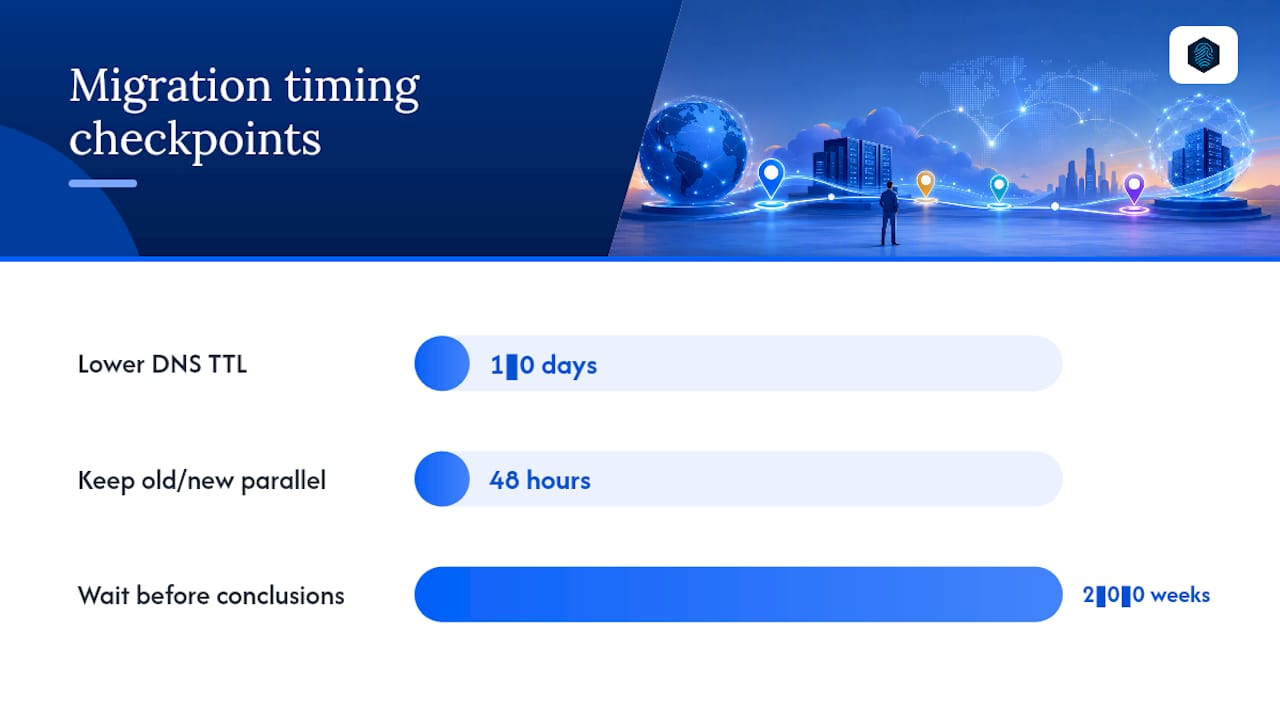
- Lower your DNS TTL a day or two before cutover so propagation happens fast once you flip the switch.
- During migration, confirm no
noindextags orrobots.txtdisallow rules carried over from staging. - Verify every redirect resolves correctly and check server logs for crawl errors in real time.
- After go-live, confirm indexing status in Google Search Console and watch Core Web Vitals for several weeks.
Google's own guidance on site moves flags exactly these failure points, staging blocks left live, broken redirects, canonical mismatches, as the most common causes of ranking drops during a move.
The single most preventable migration failure is a staging
noindextag or robots block that quietly survives the cutover. It costs nothing to check and can cost weeks of visibility to fix.
Pro Tip: Keep the old and new environments running in parallel for at least 48 hours after cutover. If something breaks, you want a fast rollback path, not a scramble.
Give the migration two to six weeks before drawing conclusions. That's roughly how long it takes crawlers to fully reprocess a site's performance and geographic signals after a move.
How to Test Whether Server Location Is Actually Your Problem
Run the same page through WebPageTest from at least three geographically distinct test locations. If load times vary wildly by region, distance is contributing. If they're roughly consistent, your CDN is already doing its job.
Pull PageSpeed Insights for both lab data and field data, and compare origin TTFB (test with the CDN bypassed) against edge TTFB. A large gap between the two, combined with a low cache-hit ratio, is the clearest signal that origin proximity would actually help.
Target thresholds worth working toward: cached responses under 200 milliseconds, LCP under 2.5 seconds. If you're hitting those numbers consistently across regions, moving your server won't move the needle. If you're not, figure out whether the bottleneck is cache configuration or the origin itself before you touch DNS.
- Test from 3+ locations with WebPageTest or GTmetrix
- Compare origin TTFB vs. edge TTFB
- Check cache-hit ratio alongside LCP and FCP
- Re-test after any change, don't assume, verify
What I've Learned Watching Site Owners Overreact to Server Location
Most of the panic around server location is misplaced energy. Site owners spend weeks agonizing over which country to host in when the actual fix is a properly configured caching layer and a CDN that's warmed correctly. LiteSpeed with LSCache, combined with free CDN integration, solves the latency problem for the overwhelming majority of content and small business sites before location ever needs to enter the conversation.
The honest trade-off nobody likes admitting: a closer origin, strict data residency, and low cost rarely coexist. Pick two. If your workload genuinely needs origin proximity, staging tools and free migration support make that move survivable without wrecking your rankings in the process.
— Ihor
Get Origin Performance Right Without Overpaying for Location
You don't need to chase a server on a specific continent to fix a speed problem, you need an origin that responds fast, and a caching layer that does its job. inSave Hosting is built around exactly that: LiteSpeed with LSCache, NVMe storage, free CDN integration, and HTTP/2/3 support, all included on plans priced for small and medium-sized business budgets rather than enterprise infrastructure spend.

If you're weighing a migration, free migration and staging tools mean you can test performance changes before your live site takes any risk. Compare current hosting plans and run your own TTFB numbers against what you're getting today, then decide if a move actually makes sense for your traffic.
Sources
- Site moves (no URL changes) — Google Developers
- Does Server Location and Speed Actually Impact Your Search Rankings? — The SEOSpot
FAQ
Where should my server be located for SEO?
Locate your server, or at minimum your CDN's points of presence, close to where the majority of your revenue-generating traffic actually comes from. For most sites, a CDN handles this without requiring you to move your origin at all.
What is a server location in hosting terms?
Server location refers to the physical data center where your website's files and database live, determined by the hosting provider's infrastructure rather than your visitors' location.
Does server location affect search rankings?
Not directly. Google treats it as a weak geotargeting signal at most, but the latency it introduces affects TTFB and Core Web Vitals, which do influence rankings and user experience.
What are the four types of SEO?
The four commonly recognized categories are on-page SEO (content and HTML elements), off-page SEO (backlinks and external signals), technical SEO (site speed, crawlability, and server performance), and local SEO (Google Business Profile and location-based signals).
How fast should my server respond for good SEO?
Aim for a Time to First Byte under 200 milliseconds and a Largest Contentful Paint under 2.5 seconds. Hosting technology like LiteSpeed and LSCache, paired with NVMe storage, makes hitting those numbers realistic on standard hosting plans.