Choose Multisite when most of your sites run the same theme, the same plugins, and the same team manages updates across the board. Choose single-site when a project involves ecommerce payments, a different owner, a possible future sale, or tooling that nothing else in your portfolio needs. Centralizing similar sites under one Multisite network cuts patching and plugin management down to a single pass, but it also means one bad update can ripple across every site at once. Isolation costs more in repeated work; it buys you a much smaller blast radius.
TL;DR:
- Multisite is most advantageous when most sites share themes, plugins, and management workflows, with at least 70% overlap to justify shared infrastructure.
- Updating a Multisite network requires a single push, but restoring individual sites is more complex and error-prone due to shared database tables and media paths.
- Migrating or splitting a site from a Multisite network involves extracting and rewriting serialized data, which can take over 40 hours of work per site.
- Single-site installs offer easier backups, restores, and security isolation, but lead to repeated licensing, maintenance, and monitoring efforts across multiple sites.
- Proper hosting with staging, caching, and resource headroom is critical for both architectures to minimize operational risks and handle traffic spikes effectively.
Table of Contents
- Multisite vs Single Site at a Glance
- Core Technical Differences: Database, Files, and URLs
- Weighing the Operational Trade-Offs
- What Running Either Setup Actually Requires
- The Real Cost of Migrating or Splitting Off a Site
- A Quick Checklist for Deciding
- User Roles: Super Admin vs Site Admin
- Performance and Resource Isolation
- Backup and Disaster Recovery Realities
- Security Considerations for Each Architecture
- Scalability: Where Each Architecture Hits a Ceiling
- Comparing the Real Costs: Hosting and Maintenance
- How inSave Hosting Reduces the Operational Friction of Either Choice
- Get the Hosting Foundation Right Before You Commit
- Sources
- FAQ
Multisite vs Single Site at a Glance
The daily grind looks different depending on which architecture you're running, and the gap shows up first in how updates get pushed. On a Multisite network, you update WordPress core, themes, and network-activated plugins once, and every subsite inherits the change instantly. On single-site installs, you repeat that same update across every property, every time, unless you've built your own automation around it.
Backups and restores flip the advantage around. A Multisite network backup is one big database with prefixed tables for every subsite, so restoring a single site out of that network usually means pulling out its specific tables and reattaching shared media, which is slower and more error-prone than it sounds. Single-site backups restore cleanly because there's nothing else in the database to untangle.
Here's how the two stack up on the things that matter most day to day:
- Updates and patches: One push covers the network on Multisite; single-site means repeating the same update on every install.
- Backups and restores: Multisite restores require extracting one site's tables from a shared database; single-site restores are self-contained.
- Plugin governance: Multisite lets you enforce a single approved plugin list network-wide; single-site leaves each install to drift on its own.
- Hosting footprint: One well-resourced server can run a Multisite network efficiently, while a fleet of single sites often means either shared hosting sprawl or several separate accounts.
- Common use cases: Multisite fits university department sites, franchise locations, and agency client networks with shared branding; single-site fits standalone stores, client sites meant to be sold, or anything with unique compliance needs.
A ten-location franchise with identical page templates is the textbook Multisite win. A single ecommerce store handling its own payment gateway is the textbook reason to keep it separate.
Core Technical Differences: Database, Files, and URLs
Multisite's biggest structural shift is the database. Instead of separate installs each with their own tables, a Multisite network runs on one shared database with prefixed tables like wp_2_posts and wp_3_options for each subsite, while the main site keeps the standard wp_ prefix. Single-site installs get their own fully independent database and file structure, with zero table-sharing to manage.
Uploads follow the same split. Multisite subsites store media under /wp-content/uploads/sites/{id}/, which works fine until you're integrating a CDN or a digital asset manager that expects a flat, predictable path. Single-site uploads sit in one straightforward folder, which tends to play nicer with third-party asset tools out of the box.
URL structure is where most people get surprised. Multisite networks choose between subdomains (site2.example.com), subdirectories (example.com/site2), or fully mapped custom domains, and that choice has to be locked in at setup. Subdomain mode needs wildcard DNS configured before you activate the network; subdirectory mode needs none of that but limits some plugin behaviors. Domain mapping adds another layer of DNS work per site. Single-site installs skip all of this because there's only ever one domain to configure.
Plugins and themes work at two levels on a network: network-activate to push a plugin to every subsite, or let individual site admins activate their own from an approved list. Some plugins and security tools behave differently once they detect a Multisite-aware environment, so compatibility isn't always guaranteed even for popular tools. On the SEO side, subdirectory structures tend to consolidate domain authority better than subdomains, which search engines can sometimes treat as semi-separate properties, as explained in this WordPress SEO Automation guide.
Weighing the Operational Trade-Offs
Multisite earns its reputation when the sites in question are genuinely similar. A university running twenty department sites, or a franchise brand running fifteen local pages, gets real efficiency from network-wide updates, shared user management, and one login for every site admin to worry about. The efficiency compounds the more sites you add, since the marginal cost of a new subsite is close to zero once the network is set up.
The drawbacks are structural, not cosmetic. A single bad plugin update can take down every subsite at once, and pulling one site back out of the network later is genuinely expensive work. Plugin compatibility is narrower too. Some plugins simply don't support Multisite, and others need special "network activate" versions that behave differently than their single-site counterparts.
Single-site installs trade that efficiency for isolation. A failure on one site never touches another, backups and restores are simpler, and you can tune caching, PHP memory limits, and security rules to that specific site's needs without compromise. The cost shows up in duplicated work: the same plugin license, the same update routine, and the same monitoring setup, repeated across every property.
- Multisite wins on shared updates, shared login management, and lower marginal cost per additional site.
- Multisite loses on blast radius, narrower plugin compatibility, and expensive extraction if you ever need to split a site off.
- Single-site wins on isolation, custom tuning, and simpler disaster recovery.
- Single-site loses on repeated licensing costs and duplicated administrative effort across every install.
Pro Tip: Before committing to Multisite, run a plugin compatibility audit on your current stack. A plugin that works fine on single-site can behave unpredictably once it's network-activated.
What Running Either Setup Actually Requires
Multisite demands more process discipline than most teams expect going in. Because a network-wide update touches every subsite simultaneously, staging isn't optional. You need a staging environment that mirrors network configuration, a testing matrix that checks the update against every active theme and plugin combination in use, and an approval gate before anything pushes to production.
Backup and rollback planning has to account for the shared database. Restoring one subsite means extracting its specific tables and reattaching its media library without breaking references to shared users or network settings. Single-site rollback is simpler by comparison: restore the one database, done.
Governance matters more on a network too. The Super Admin role controls network settings, plugin and theme availability, and user creation across every site, while individual site admins manage only their own content within those boundaries. Getting that split wrong, either by over-restricting site admins or under-restricting Super Admin access, is a common Multisite governance failure that shows up as either bottlenecked workflows or unauthorized changes nobody notices until something breaks.
On the hosting side, object caching, database replication, and adequate PHP worker counts matter more on Multisite than single-site, since one server is now handling the combined load of every subsite. A tool like staging environments built for WordPress can absorb a lot of this risk before it reaches production, and the same caching and PHP tuning covered in advanced hosting technology guides applies whether you're running one site or fifty.
The Real Cost of Migrating or Splitting Off a Site
Pulling a subsite out of a Multisite network is rarely a quick export and import. You're extracting that site's specific database tables, untangling shared users who may have accounts across multiple subsites, rewriting serialized data that references the old site ID and URL structure, and rebuilding the media path from the shared /sites/{id}/ folder into a standalone uploads directory. Then you need redirects mapped so nothing breaks for existing visitors or search rankings.
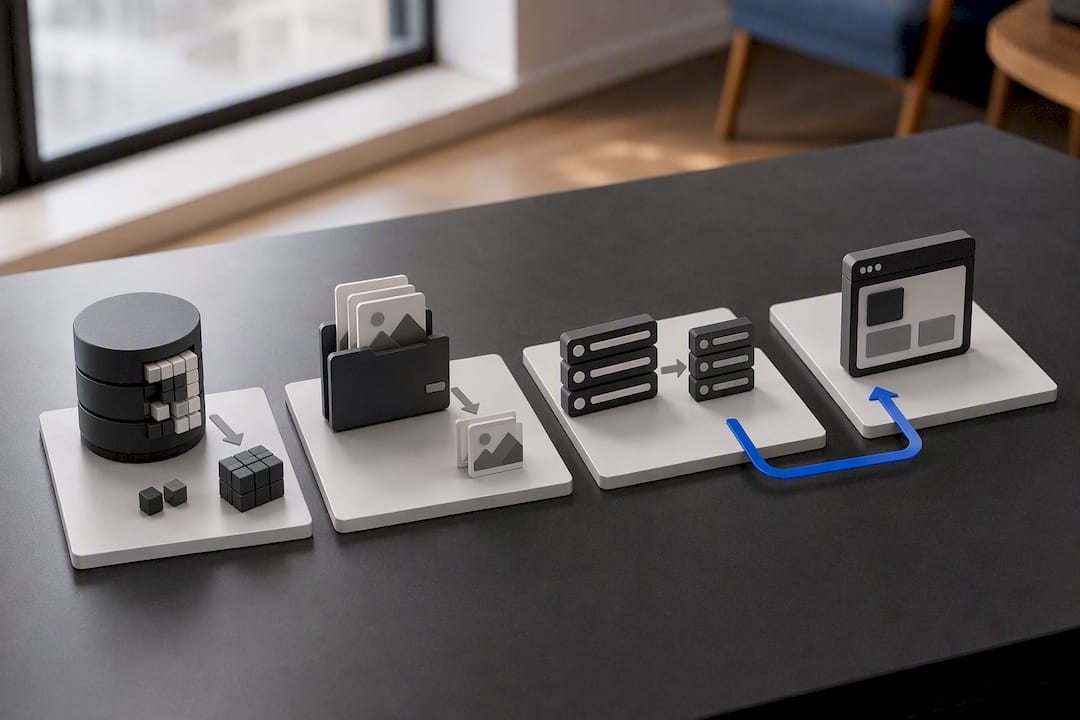
Serialized data is the part that trips people up. WordPress stores widget settings, theme options, and some plugin configurations as serialized PHP arrays, and those arrays often contain embedded URLs or site IDs. Change the site's context without carefully unserializing and rewriting that data, and you get broken widgets and silent configuration failures that don't show up until days later.
Practitioners doing this work regularly cite budgets of 40-plus hours per site extraction once you account for testing and redirect verification. That number is a real planning input, not a worst-case scenario. If you have any real chance of needing to split a site off later, factor that cost in now. A structured migration checklist helps keep the moving pieces from falling through the cracks during the process.
A Quick Checklist for Deciding
Run these six checks against your actual sites before committing to an architecture:
- Ownership: Do all the sites belong to one team or organization, or will some change hands independently?
- Content and plugin overlap: What percentage of your sites actually share themes and plugins? Below roughly 70%, the shared-code benefit of Multisite shrinks fast.
- Traffic profile: Are traffic spikes on one site likely to strain shared resources for the rest?
- Payment and ecommerce needs: Does any site process payments or handle compliance requirements the others don't?
- Sale or spinoff likelihood: Is there a real chance one site gets sold or spun out on its own later?
- Team capacity for governance: Does someone on your team have the bandwidth to own Super Admin responsibilities and staging discipline?
If four or more of these checks point toward shared ownership, high overlap, and no independent sale plans, Multisite is probably the stronger fit. If ecommerce, sale plans, or split ownership show up in your answers, keep sites separate. Either way, pilot the decision on a staging environment before touching production.
User Roles: Super Admin vs Site Admin
Multisite introduces a role that single-site installs don't have at all: Super Admin. This role sits above every subsite and controls network settings, decides which plugins and themes are available to activate, creates and deletes entire subsites, and manages users across the whole network. A site admin, by contrast, only manages content and settings within their own subsite and can't touch anything network-wide unless the Super Admin grants that access explicitly.
This split is powerful when it's set up deliberately, and it's a liability when it isn't. Franchises and universities use it well by giving Super Admin access to a small central IT team while handing content control to local site admins who never need to touch plugin settings. Get the boundary wrong, though, and you either end up with site admins who can't do their jobs because everything is locked down, or with too many people holding Super Admin credentials and no clear record of who changed what.
Single-site installs skip this complexity entirely. There's usually just an Administrator role and whatever lower roles (Editor, Author, Contributor) the site needs, with no network layer to think about. For teams without dedicated IT governance, that simplicity is a real advantage, not just an absence of features.
Performance and Resource Isolation
A Multisite network shares one PHP process pool, one database connection pool, and one caching layer across every subsite on that server. That's efficient when traffic is evenly distributed, but a traffic spike on one subsite, a product launch or a viral post, competes for the same PHP workers and database connections every other subsite depends on. Object caching and database query optimization matter more here because there's no natural isolation between sites absorbing the load.
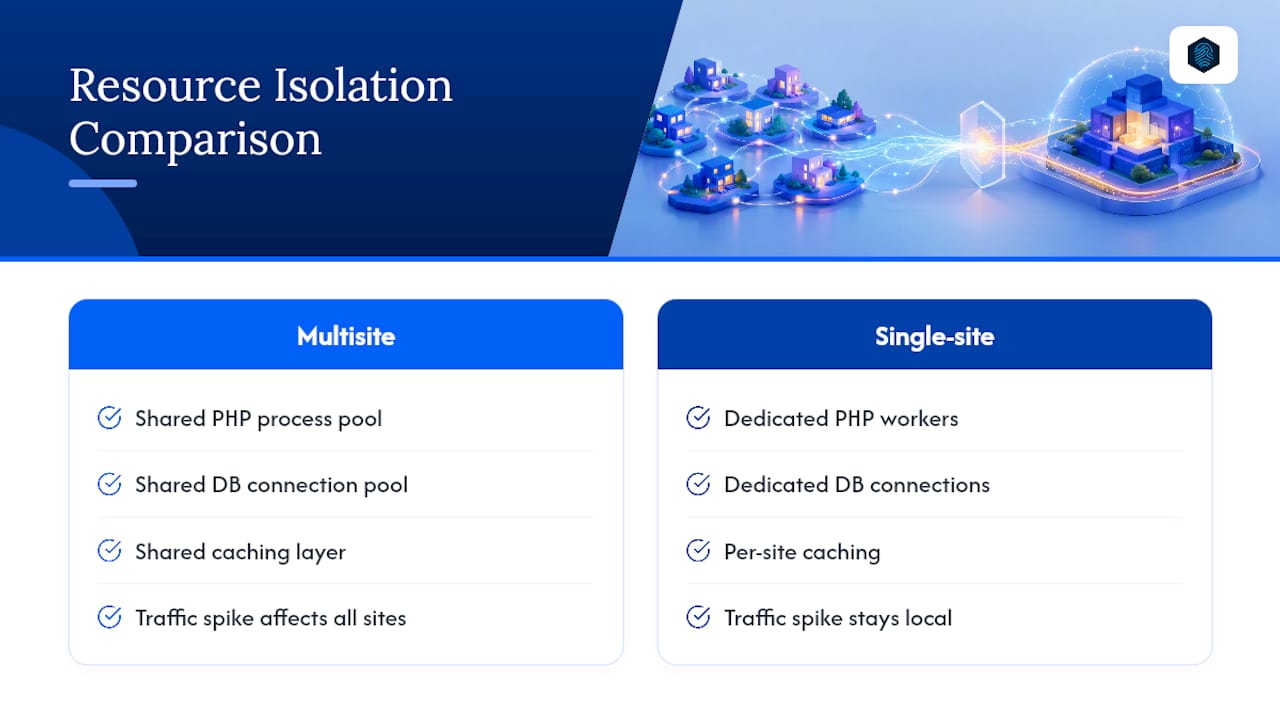
Single-site installs get their own resource allocation by default, especially on separate hosting accounts or containers. A traffic spike on one site doesn't touch the performance of another, because there's no shared infrastructure to compete over in the first place.
The practical fix on Multisite is investing in the caching and database tuning that keeps one subsite's load from degrading the rest. Persistent object caching (Redis or Memcached), sufficient PHP worker counts, and database replication for read-heavy queries all reduce the risk of one busy subsite dragging down a quiet one. Advanced hosting technologies like LiteSpeed and LSCache handle a lot of this automatically, but the underlying resource math still matters more on a shared network than it does on isolated single-site hosting.
Backup and Disaster Recovery Realities
Restoring a full Multisite network from backup is usually straightforward: one database, one set of files, one restore operation covering everything. The complexity shows up the moment you need to restore just one subsite without touching the rest. That requires pulling the specific prefixed tables for that site out of a shared database, reattaching its media from the shared uploads directory, and making sure shared user accounts and network settings still resolve correctly afterward.
Single-site disaster recovery has none of that entanglement. A backup covers one database and one file structure; a restore puts everything back exactly as it was, with no risk of breaking a neighboring site in the process. That simplicity is a real advantage during an actual outage, when speed matters more than anything else.
If you're running Multisite, plan your backup strategy around the assumption that you'll eventually need to restore one site independently, not just the whole network. Test that scenario before you need it for real.
Security Considerations for Each Architecture
Centralization cuts both ways on security. A single hardened configuration, one set of security headers, one WAF rule set, covers every subsite on a Multisite network at once, which is efficient. But a vulnerability in one network-activated plugin exposes every subsite simultaneously, since they all share the same codebase and, often, the same database.
Single-site installs contain a breach to that one site. If a single-site install gets compromised, the damage doesn't spread to any other property, because there's no shared infrastructure for an attacker to pivot through.
Best practice on Multisite is stricter plugin vetting than you'd apply on a single site, since one bad plugin choice has network-wide consequences. Limiting Super Admin credentials to as few people as possible, enforcing two-factor authentication at that level, and auditing network-activated plugins on a regular schedule all reduce exposure. Single-site security is more forgiving of experimentation precisely because mistakes stay contained.
Scalability: Where Each Architecture Hits a Ceiling
Multisite scales beautifully for adding more sites of the same kind. Once the network infrastructure is in place, spinning up subsite number fifty costs almost nothing compared to subsite number one. That's the entire value proposition for franchises and institutions adding locations or departments over time.
Where Multisite hits a ceiling is site diversity and raw traffic concentration. A network built for twenty similar brochure sites starts to strain when one subsite needs a completely different tech stack, a different hosting tier, or dramatically more resources than the others. At that point, you're either compromising the whole network's configuration to accommodate one outlier or accepting that outlier will underperform.
Single-site scaling is a different shape entirely: each site scales independently, with its own resource ceiling determined by its own hosting plan. That's a strength when your sites are genuinely different from each other, and a weakness when you're managing dozens of them and administrative overhead scales linearly with every new property. Growth plans should account for which kind of scaling your portfolio actually needs, not just which one sounds more efficient on paper.
Comparing the Real Costs: Hosting and Maintenance
Multisite can lower per-site hosting cost when the network shares one capable server efficiently instead of paying for a dozen separate hosting accounts. Maintenance cost drops too, since one update cycle, one security audit, and one backup routine covers the whole network instead of being repeated per site.
That efficiency depends entirely on the sites staying similar enough to share infrastructure without one dragging down the rest. The moment you need a beefier server to handle one subsite's traffic, that cost gets spread across every subsite on the network whether they benefit from it or not.
Single-site hosting costs scale linearly and predictably: each site gets its own plan, its own resources, and its own maintenance schedule. That's more expensive in raw hosting fees across a large portfolio, but each cost is isolated and easy to attribute to the specific site generating it. For a small number of sites, or sites with wildly different traffic and resource needs, single-site hosting often ends up cheaper overall once you account for the tuning and troubleshooting a mismatched Multisite network requires.
How inSave Hosting Reduces the Operational Friction of Either Choice
Whichever architecture you land on, hosting quality determines how much of this complexity you actually feel day to day. On Multisite, staging parity and object caching matter most, since one bad deploy or one resource spike affects every subsite at once. On single-site, per-site tuning and isolated backups matter more, since each install's performance and recovery plan should stand on its own.
Features like free migration tools, staging environments, LiteSpeed caching, and PHP8 support reduce the risk either setup carries. Multisite networks benefit most from the resource headroom and caching stack that keeps one busy subsite from starving the rest. Single-site installs benefit from fast, isolated backups and the ability to tune each install independently without touching anything else in the portfolio.
— Ihor
Get the Hosting Foundation Right Before You Commit
The architecture decision matters less than most guides suggest if your hosting can't support it properly. A Multisite network needs staging tools and resource headroom that many budget hosts simply don't offer, and a growing single-site portfolio needs a hosting plan that scales without forcing a migration every time you add a property.

WordPress hosting from inSave Hosting includes staging tools, free migration, LiteSpeed caching, and PHP8 support, whether you're piloting a Multisite network or running a single site that needs to grow without drama. If your portfolio is small or you're testing a Multisite pilot before committing fully, shared hosting plans give you a lower-cost entry point with the same performance stack. Talk to a hosting support team about your specific setup, or start a staging-enabled plan today and test your update workflow before you migrate anything live.
Sources
For deeper technical detail, the WordPress Developer Resources on Multisite cover network setup and database structure directly from the source. Multidots' comparison guide breaks down migration time estimates in more depth.
- Multisite — WordPress Developer Resources
- WordPress Multisite vs Single Site – Which Fits Your Needs? — Multidots
- WordPress Multisite Vs Single Site: Which One Should You Choose? — BlogVault
FAQ
Is It "Multi-Site" or "Multisite"?
WordPress's own documentation uses "Multisite" as one word, and that's the standard spelling across the developer community and official resources.
Is WordPress Multisite Worth It?
It's worth it when most of your sites share themes, plugins, and workflows. A commonly cited threshold is around 70% overlap or higher; below that, the administrative savings rarely outweigh the shared risk.
Is WordPress Outdated in 2026?
No. WordPress continues to power a large share of the web, and Multisite has been a core feature since WordPress 3.0, with universities, franchises, and enterprises still relying on it for centralized management today.
What Does Multisite Mean in WordPress?
Multisite is a WordPress feature that lets one installation run multiple sites from a single shared codebase and database, with a Super Admin managing the network and individual site admins managing their own subsites.
Do I Need Different Hosting for Multisite vs Single Site?
Multisite benefits from hosting with strong PHP worker capacity, object caching, and staging tools since it handles combined traffic for every subsite, while single-site hosting can be tuned more narrowly to that one site's needs; either way, a host offering staging and free migration, like inSave Hosting, reduces setup risk.