
Pick MariaDB when you need built-in multi-master clustering via Galera Cluster and a community thread pool at no extra licensing cost. Pick MySQL when your stack depends on managed cloud services like Amazon Aurora, or when Oracle-backed enterprise SLAs are non-negotiable. The two share a common ancestor and enough protocol compatibility that most MySQL 5.7-era applications swap over with minimal friction. MySQL 8.x is a different story: its default caching_sha2_password authentication plugin, native JSON binary storage, and JSON_TABLE() function can all break a migration before the first query runs.
Key decision levers at a glance:
- High availability / multi-master: MariaDB ships Galera Cluster in the community edition; MySQL requires InnoDB Cluster or Group Replication, which behaves differently under write conflicts.
- Analytics workloads: MariaDB ColumnStore adds a columnar engine directly to the community build; MySQL has no equivalent without a separate product.
- Managed cloud ecosystem: Aurora, Cloud SQL, and PlanetScale are MySQL-native; managed MariaDB options exist but are narrower.
- Compatibility caveat: MySQL 5.7 apps usually migrate cleanly. MySQL 8.x features — especially JSON operators, generated columns backed by binary JSON, and the new auth plugin — require targeted testing before any production swap.
Key Takeaways
MariaDB wins on community HA features and concurrency; MySQL wins on managed-cloud breadth and enterprise support, and the right choice depends on your topology, JSON usage, and operational model.
| Point | Details |
|---|---|
| HA topology is the top differentiator | Galera Cluster ships in MariaDB's community edition; MySQL requires InnoDB Cluster or an enterprise tier. |
| JSON behavior differs materially | MySQL stores JSON in a native binary format with partial updates; MariaDB aliases JSON to LONGTEXT with a partial function set. |
| Thread pool costs money in MySQL | MariaDB includes a thread pool in the community build; MySQL's thread pool is enterprise-only. |
| MySQL 8.x breaks most migrations | Auth plugin defaults, JSON_TABLE(), and GTID differences are the top three failure points when moving from MySQL 8.x to MariaDB. |
| Managed cloud favors MySQL | Aurora, Cloud SQL, and Azure Database are MySQL-native; managed MariaDB options are narrower across major cloud providers. |
Table of Contents
- Where MariaDB and MySQL are still compatible
- How do MariaDB and MySQL differ at a glance?
- Deep technical comparison: replication, storage, JSON, performance, and licensing
- Pre-swap checklist before migrating between MySQL and MariaDB
- Which database should you pick for your workload?
- Version-specific compatibility notes and breaking points
- How inSave Hosting decides which database to use for customer stacks
- Sources
- FAQ
Where MariaDB and MySQL are still compatible
Both databases descend from the same MySQL 5.1-era codebase, and that shared origin still matters. The wire protocol and client libraries (libmysqlclient, MySQL Connector/J, PDO_MySQL) work with both servers, which is what people mean when they call MariaDB a "drop-in replacement." For a large class of LAMP-stack applications, that description holds.
The shared surface includes:
- SQL dialect: Standard DML/DDL, stored procedures, triggers, and views behave identically for most common patterns.
- ACID compliance: Both engines enforce ACID guarantees through InnoDB, and InnoDB table files are broadly compatible across versions.
- Client protocol: The MySQL client protocol is compatible, so most drivers connect to either server without reconfiguration.
The limits arrive quickly once you move past the basics. As OpenLogic's comparison notes, the two projects have diverged enough that treating them as interchangeable for production decisions is a mistake. Specific friction points include:
- Authentication plugins: MySQL 8.0 defaults to
caching_sha2_password; MariaDB usesmysql_native_passwordby default. Older drivers fail silently or throw authentication errors. - MySQL 8.x-only features:
JSON_TABLE(), window function extensions, and the binary JSON storage format have no direct MariaDB equivalent. - Replication protocol: GTID implementation differs between the two, which matters for any topology that spans both servers.
Compatibility validation tests to run before any swap:
- Connect with your actual production driver and ORM, not just the CLI.
- Execute a representative sample of application queries, including any that use JSON operators (
->,->>). - Run a full backup and restore cycle, then verify row counts and checksums.
- Test replication failover if your topology uses GTID-based replication.
How do MariaDB and MySQL differ at a glance?
| Dimension | MariaDB | MySQL |
|---|---|---|
| Drop-in compatibility | High for MySQL 5.7; partial for 8.x | N/A (source) |
| Replication / HA | Galera Cluster (active-active, community) | Group Replication / InnoDB Cluster |
| Storage engines | InnoDB, Aria, ColumnStore, Spider, + more | InnoDB-focused; MyISAM legacy |
| JSON support | JSON alias to LONGTEXT; partial function set | Native binary JSON type; full operator set |
| Thread pooling | Built into community edition | Enterprise edition only |
| Licensing | GPL core; some enterprise components use BSL | GPL community; Oracle commercial enterprise |
| Managed cloud | Narrower (select cloud providers) | Broad (Aurora, Cloud SQL, PlanetScale) |
| Migration complexity | Low from MySQL 5.7; medium-high from 8.x | Low from MariaDB 10.x for most workloads |
The rows that most often force a migration rework are JSON support (operators and indexing behavior differ), authentication defaults, and replication topology. Everything else is usually configuration-level.
Deep technical comparison: replication, storage, JSON, performance, and licensing
Replication and high availability
MariaDB's answer to multi-master HA is Galera Cluster: virtually synchronous, active-active replication where reads and writes land on any node. Automatic membership handling means a node that crashes and rejoins does so without manual intervention. The trade-off is that Galera uses a certification-based conflict detection model, so write-heavy workloads with frequent row-level conflicts will see transaction rollbacks rather than queued writes.

MySQL Group Replication and InnoDB Cluster take a different approach. In single-primary mode (the default), only one node accepts writes, which eliminates most conflict scenarios but reintroduces a single write bottleneck. Multi-primary Group Replication exists but requires careful conflict-avoidance at the application layer. For teams that genuinely need active-active writes across nodes, Galera's model is operationally simpler to run.
Storage engines and analytics
MariaDB's engine lineup includes Aria (a crash-safe MyISAM replacement used internally for system tables), Spider (sharding across remote servers), and ColumnStore, a columnar storage engine suited for analytical queries over large datasets. ColumnStore lets a single MariaDB instance handle both OLTP and moderate analytical workloads without a separate data warehouse product.
MySQL's community edition focuses almost entirely on InnoDB. MyISAM remains available but is effectively legacy. For analytical workloads, MySQL users typically reach for a separate system.
JSON and data types
MySQL stores JSON documents in an internal binary format that enables partial in-place updates and efficient key/array-index lookups without parsing the full document. Generated columns backed by JSON paths allow indexing specific JSON fields, which is a meaningful performance lever for document-heavy schemas.
MariaDB implements JSON as an alias for LONGTEXT with a validation constraint. The practical result: JSON documents are stored as text, partial updates require rewriting the full value, and the -> and ->> shorthand operators behave differently or are absent in older MariaDB versions. Applications that rely on MySQL's JSON indexing patterns need schema changes before migrating.
Performance and concurrency
A MariaDB performance analysis found aggregate speed advantages for MariaDB across the tested releases, with gains in the 13%–36% range depending on workload. Those numbers come with a real caveat: benchmark results are highly sensitive to workload type, configuration tuning, and the specific versions compared. Run representative tests against your own schema and query mix before drawing conclusions.
The thread pool difference is more concrete. MariaDB ships a thread pool in the community edition, which reduces context-switching overhead under high connection counts. MySQL's thread pool is an Enterprise-only feature. For a high-concurrency web application running on the community edition of MySQL, this gap shows up at scale.
Security and authentication
MySQL 8.0's default authentication plugin is caching_sha2_password, which requires TLS or an RSA key exchange for the initial handshake. Many older drivers and ORMs default to mysql_native_password and fail without explicit configuration. MariaDB defaults to mysql_native_password (or ed25519 in newer versions), which is broadly compatible with existing tooling.
Both databases support data-at-rest encryption, SSL/TLS connections, and role-based access control. MySQL's Enterprise edition adds an audit plugin and advanced key management; MariaDB includes an audit plugin in the community build.
Licensing and governance
MySQL Community Edition is GPL-licensed; Oracle sells a commercial MySQL Enterprise Edition with additional tooling, support SLAs, and the enterprise thread pool. MariaDB's core server is also GPL, but some enterprise components in recent versions use the Business Source License (BSL), which restricts certain production uses until the license converts to GPL after a set period. For teams that require a fully open-source stack with no BSL exposure, this distinction matters.
Oracle's ownership of MySQL is a governance concern for some organizations. MariaDB was created specifically to maintain a community-controlled fork, and the MariaDB Foundation oversees the project. In practice, both projects release regularly and maintain active communities.
Backup, recovery, and cloud ecosystem
Both databases work with mysqldump, mysqlpump, and Percona XtraBackup. MariaDB adds mariabackup, a fork of XtraBackup tuned for MariaDB-specific features. Point-in-time recovery works similarly on both via binary logs.
The managed cloud gap is real. Amazon Aurora is MySQL-compatible (and PostgreSQL-compatible) but has no MariaDB-native variant. Google Cloud SQL and Azure Database both offer MySQL; managed MariaDB is available on select providers but with a narrower feature set and less ecosystem tooling. If your team wants a fully managed database with automatic failover, read replicas, and serverless scaling, MySQL's cloud options are broader.
Pro Tip: Before committing to a managed cloud database, verify that your ORM's generated SQL uses only the JSON operators and authentication methods supported by the target engine. A five-minute audit of your ORM's query log catches the most common migration failures before they reach production.
Pre-swap checklist before migrating between MySQL and MariaDB
A structured pre-migration process catches the failures that cost the most to fix in production.
- Inventory your current stack. Document the exact MySQL/MariaDB version, all storage engines in use (
SHOW TABLE STATUS), replication topology, authentication plugins (SELECT plugin FROM mysql.user), and any cloud-managed dependencies (Aurora, Cloud SQL). - Test client connectivity. Connect using your production driver and ORM, not just the CLI. Confirm the authentication plugin negotiation succeeds.
- Run JSON operator tests. Execute every query that uses
->,->>,JSON_TABLE(), or generated columns backed by JSON paths. These are the most common silent failures. - Test generated columns and JSON indexing. If your schema uses functional indexes or generated columns, verify they create and query correctly on the target engine.
- Validate GTID and replication. If you use GTID-based replication, test the full topology: primary promotion, replica reconnect, and cross-cluster replication configuration if applicable.
- Full backup and restore cycle. Run a complete backup, restore to a staging server, and verify row counts, checksums, and application smoke tests.
- DDL and atomicity tests. MariaDB supports atomic DDL differently than MySQL 8.x. Test schema migrations under your migration tool (Flyway, Liquibase).
- Evaluate HA topology. If moving to Galera, test state snapshot transfer sizing (
gcache),wsrep_gtid_modeconfiguration, and node rejoin under simulated failure.
Rollback plan: Keep the original server running as a replica of the new one during the cutover window. If the new server shows issues within the first 24–48 hours, promoting the original back takes minutes rather than hours.
Pro Tip: The single most common hidden failure is an authentication plugin mismatch combined with ORM-generated JSON operators. Run EXPLAIN on your top 20 slowest queries on the target engine before cutover. If any use JSON paths, verify the output matches what your application expects.
For teams planning a complex cross-cluster migration, NetFusion Designs' migration approach outlines a structured methodology worth reviewing alongside your own runbook.
Which database should you pick for your workload?
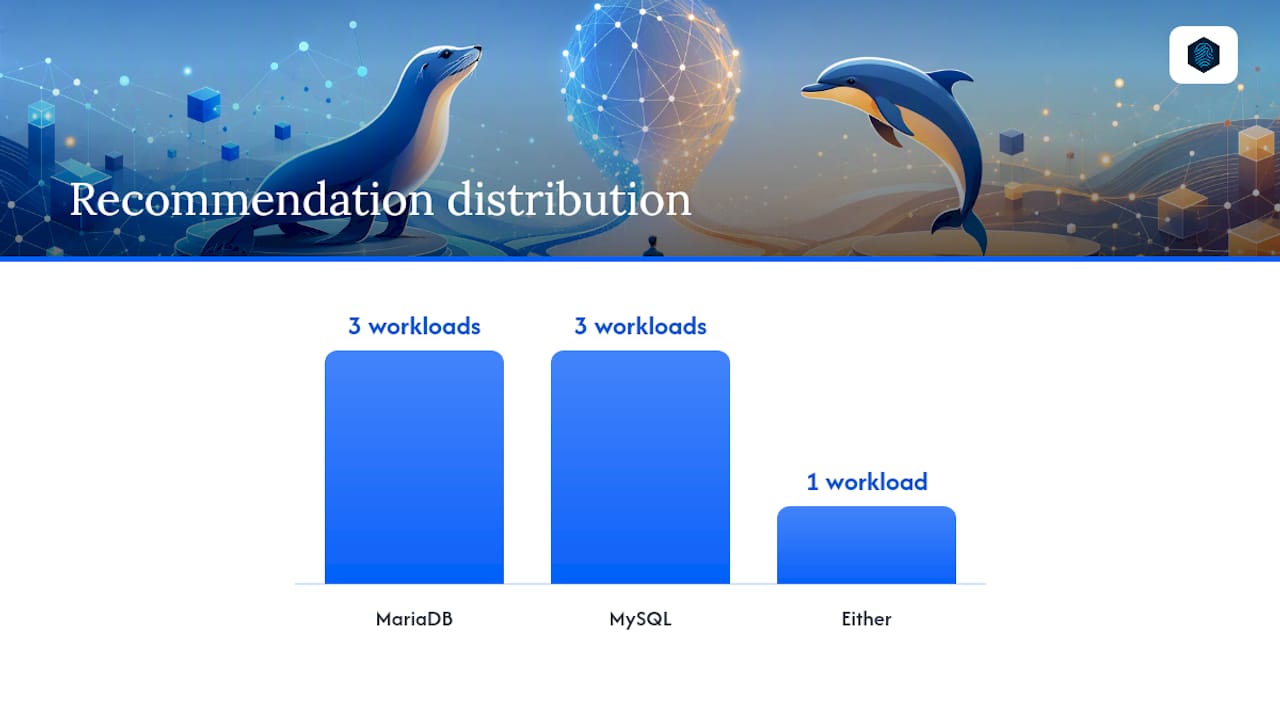
| Workload | Recommended choice | Primary reason | Migration complexity |
|---|---|---|---|
| High-concurrency OLTP (self-hosted) | MariaDB | Community thread pool; no enterprise license needed | Low from MySQL 5.7 |
| Multi-master / active-active HA | MariaDB | Galera Cluster included in community edition | Medium (topology redesign) |
| Analytics / mixed OLTP+OLAP | MariaDB | ColumnStore columnar engine available | Medium |
| Managed cloud (AWS, GCP, Azure) | MySQL | Aurora, Cloud SQL, Azure DB are MySQL-native | Low |
| Enterprise SLA + Oracle support | MySQL | Oracle commercial edition with certified support | Low |
| Legacy LAMP / WordPress (MySQL 5.7 era) | Either | Protocol compatibility is high; test before committing | Low |
| New SaaS multi-tenant app | MySQL | Broader managed-cloud ecosystem; JSON binary type | N/A (greenfield) |
A few workloads genuinely sit in the middle. Legacy LAMP applications on MySQL 5.7 can move to MariaDB 10.x with minimal friction, but the decision often comes down to operational preference and what your hosting provider supports. For WordPress specifically, both databases work well. MariaDB's thread pool gives a measurable edge under high concurrent connections, which matters on shared hosting plans.
If your team is already invested in AWS and uses Aurora, switching to MariaDB means giving up Aurora's serverless scaling, automated failover, and the broader RDS tooling ecosystem. That operational cost usually outweighs any performance advantage MariaDB offers at the database level.
Version-specific compatibility notes and breaking points
| Version pair | Key incompatibility | Action required |
|---|---|---|
| MySQL 8.0 → MariaDB 10.x | caching_sha2_password default auth plugin | Change user auth to mysql_native_password or update drivers |
| MySQL 8.0 → MariaDB 10.x | JSON_TABLE() not available in MariaDB 10.x | Rewrite queries using JSON_EACH() or application-side parsing |
| MySQL 8.0 → MariaDB 10.x | Binary JSON storage and partial update semantics | Audit JSON column usage; test all JSON path operators |
| MySQL 8.0 → MariaDB 10.x | GTID implementation differences | Reconfigure replication; test failover topology end-to-end |
| MySQL 5.7 → MariaDB 10.x | Minimal; charset defaults may differ | Verify utf8mb4 is set explicitly on both sides |
| MariaDB 10.x → 11.x | Some system variable renames; stricter SQL mode | Review release notes; test DDL migrations |
The MySQL 5.7 to MariaDB 10.x path is the cleanest migration in this space. Most applications need only a driver reconnect test and a charset verification. The MySQL 8.0 to MariaDB 10.x path is where teams get surprised: MySQL's native JSON type with its binary storage and JSON_TABLE() function has no direct equivalent in MariaDB 10.x, and the authentication default change breaks drivers that haven't been updated.
MariaDB 10.x to 11.x is generally smooth, but the project has accelerated its release cadence, and some system variable names changed between minor versions. Always test DDL migrations and stored procedure behavior when crossing a major version boundary.
- Auth plugin fix:
ALTER USER 'user'@'host' IDENTIFIED WITH mysql_native_password BY 'password'; - JSON_TABLE alternative: Use
JSON_EACH()in MariaDB or restructure the query to avoid lateral joins on JSON arrays. - Charset: Set
character_set_server=utf8mb4andcollation_server=utf8mb4_unicode_ciexplicitly on both servers to avoid silent collation mismatches.
How inSave Hosting decides which database to use for customer stacks
At inSave Hosting, MariaDB is the default database engine across shared hosting and WordPress-optimized hosting plans. The reasons are practical: MariaDB ships as the default in most major Linux distributions used in hosting environments, its community thread pool handles the connection spikes typical of shared hosting without requiring an enterprise license, and it integrates cleanly with LiteSpeed and LSCache for WordPress performance.
For customers running standard WordPress or PHP applications, the choice is transparent. The stack is tuned, backups run daily, and migrations between plans include a compatibility check as part of the process. If you're moving an existing application from a MySQL 8.x environment to an inSave Hosting plan, the most important step is requesting a compatibility audit from support before the migration. The authentication plugin difference and any JSON operator usages are the two items that most often need attention.
Customers who specifically require MySQL for a legacy application or a cloud-managed dependency can discuss that during onboarding. The goal is always a stable, well-supported stack, not a forced engine choice.

If you're ready to deploy on a stack that's already tuned for MariaDB performance, inSave Hosting's shared hosting plans include daily backups, free SSL, and one-click installs with no engine configuration required on your end.
Sources
The technical comparisons and migration recommendations in this article draw from the following primary sources:
- MySQL :: MySQL 26.7 Reference Manual :: 13.5 The JSON Data Type
- What is MariaDB Galera Cluster?
- Comparing MariaDB vs. MySQL | OpenLogic
FAQ
Is MariaDB better than MySQL?
Neither is universally better. MariaDB has advantages in community HA (Galera), thread pooling, and storage engine variety; MySQL leads on managed-cloud ecosystem breadth and Oracle enterprise support. The right choice depends on your workload and operational model.
Can MariaDB replace MySQL as a drop-in replacement?
For MySQL 5.7-era applications, yes in most cases. MySQL 8.x applications face real compatibility risks around the default authentication plugin, JSON_TABLE(), and binary JSON storage, so targeted testing is required before any production swap.
What are the main disadvantages of MariaDB?
MariaDB's JSON implementation is less capable than MySQL's native binary JSON type, its managed-cloud options are narrower (no Aurora equivalent), and some enterprise components now use the Business Source License rather than pure GPL.
Why is MariaDB called MariaDB instead of MySQL?
MariaDB was forked from MySQL by MySQL's original creator, Michael "Monty" Widenius, after Oracle acquired Sun Microsystems (which owned MySQL). It was named after his daughter Maria, following the same naming pattern as MySQL (named after his daughter My).
Is MariaDB faster than MySQL?
A MariaDB performance analysis found aggregate speed advantages for MariaDB across tested releases, but results are highly workload-dependent. Run benchmarks against your own schema and query mix before treating any published figure as definitive.