
For most small business and personal websites, Let's Encrypt is enough. Buy a paid SSL certificate only when you need OV or EV validation, vendor warranties, or procurement-ready invoicing and support. That's the short answer. Here's what drives it:
- Validation level: Let's Encrypt issues only Domain Validation (DV) certificates. If your industry, partners, or contracts require Organization Validation (OV) or Extended Validation (EV), you need a paid certificate.
- Procurement and support: Paid certificates come with invoices, SLAs, and human support. Free certificates from Let's Encrypt don't.
- Automation capability: Let's Encrypt is transitioning default lifetimes from 90 days down to 45 days, which makes automated renewal non-negotiable. If your host handles that automatically (as inSave Hosting does), the operational burden disappears.
Key Takeaways
For most SMBs, Let's Encrypt with hosting-managed automation is the right SSL choice; paid certificates are worth buying only when OV/EV validation, warranties, or procurement paperwork are genuinely required.
| Point | Details |
|---|---|
| Encryption strength is equal | Free and paid DV certificates use identical algorithms; server config determines real security. |
| Automation is mandatory | Let's Encrypt lifetimes are moving to 45 days, making ARI-capable automated renewal non-negotiable. |
| Pay for validation, not encryption | OV and EV certificates verify business identity; buy them only when contracts or compliance require it. |
| Wildcard needs DNS automation | Let's Encrypt wildcards require DNS-01 validation; paid wildcards are the fallback if DNS API isn't available. |
| inSave Hosting manages it for you | Automatic renewal, ARI support, wildcard options, and paid certificate invoicing are all included. |
Table of Contents
- How Let's Encrypt and paid SSL actually compare
- What DV, OV, and EV validation actually verify
- Does paying for SSL give you stronger encryption?
- Certificate lifetimes, renewals, and Let's Encrypt rate limits
- When vendor support, warranties, and invoices justify a paid certificate
- Wildcard and multi-domain certificates: what fits your architecture
- How to decide: a practical checklist for SMBs
- Getting HTTPS set up without the operational headache
- An honest take on the free vs. paid debate
- inSave Hosting takes the operational friction out of SSL
- Sources
- FAQ
How Let's Encrypt and paid SSL actually compare
Free and paid SSL certificates provide identical encryption strength. The real differences are operational. Here's where they diverge:
| Dimension | Let's Encrypt | Paid SSL |
|---|---|---|
| Cost | Free | Varies, typically tens to hundreds per year |
| Validation level | DV only | DV, OV, or EV |
| Support & warranty | None | Human support, SLAs, financial warranties |
| Automation & renewal | ACME/ARI required; hosting-managed available | Manual or automated; renewal reminders included |
| Certificate lifetime | 90 days (transitioning to 45 days) | 1 year (industry moving shorter) |
| Coverage scope | Single domain, SAN, wildcard (DNS validation) | Single domain, SAN, wildcard |
| Best for | Blogs, SMB sites, SaaS apps, WordPress | Finance, regulated commerce, enterprise procurement |
Encryption strength is identical across all DV certificates from trusted Certificate Authorities, whether free or paid. Where paid adds real value: identity endorsement through OV/EV, procurement artifacts like invoices and contracts, financial warranties, and dedicated account management.
What DV, OV, and EV validation actually verify
Validation level is the most misunderstood part of the free vs. paid SSL debate. It has nothing to do with encryption quality. It's about what the Certificate Authority checked before issuing the certificate.
Domain Validation (DV) confirms only that the applicant controls the domain. The CA sends a challenge, you respond, and the certificate is issued. No identity check, no business verification. This is what Let's Encrypt issues, and for the vast majority of websites, it's entirely sufficient. A visitor's browser shows the padlock. Traffic is encrypted. Done.
Organization Validation (OV) goes further. The CA verifies the legal existence of the organization, its address, and its phone number against public records. The certificate embeds that verified business identity. Visitors can inspect the certificate details and see the company name.
Extended Validation (EV) is the most thorough. It requires documentation, a verification call, and confirmation that the person requesting the certificate is authorized to act for the organization. EV used to trigger a green address bar in browsers, though most major browsers have since dropped that visual indicator.
When does OV or EV actually matter? A few clear scenarios:
- Financial services, healthcare, or legal firms where clients expect verified identity
- B2B suppliers whose enterprise customers require OV/EV in procurement contracts
- High-value e-commerce where brand trust is a conversion factor
- Regulated industries where compliance documentation requires certificate-level identity proof
For a local bakery, a freelance portfolio, or a WordPress blog, DV is the right call. For a payment processor or a government contractor, OV is the floor.
Pro Tip: Before buying OV or EV, ask your procurement contact or compliance officer exactly what the contract requires. Many contracts specify "SSL certificate" without specifying validation level. DV may satisfy the requirement, saving you $100–$200 per year.
Check the SSL certificate types guide for a deeper breakdown of OV and EV procurement implications.
Does paying for SSL give you stronger encryption?
No. The encryption algorithm, key length, and browser trust are the same for a DV certificate from Let's Encrypt and a DV certificate from a paid CA. Both use 2048-bit RSA or ECDSA keys. Both chain to roots trusted by every major browser. The difference is in validation level, support, warranty, and management, not in cryptographic strength.
What actually determines your real-world TLS security is server configuration, not which CA issued the certificate. Specifically:
- TLS protocol version: Disable TLS 1.0 and 1.1. Enable TLS 1.3.
- Cipher suites: Prefer ECDHE for forward secrecy. Drop RC4 and 3DES.
- HSTS: Send the
Strict-Transport-Securityheader so browsers never fall back to HTTP. - OCSP stapling: Reduces latency and improves revocation checking reliability.
- Certificate chain: An incomplete chain causes handshake failures on some mobile devices.
Pro Tip: Run your domain through SSL Labs' free server test at ssllabs.com/ssltest. An A+ rating is achievable with Let's Encrypt. A paid certificate won't move that score if your server config is weak.
For a practical walkthrough of TLS configuration, the SSL encryption guide for webmasters covers cipher selection and HSTS setup in plain language.
Certificate lifetimes, renewals, and Let's Encrypt rate limits
This is where Let's Encrypt's operational reality bites if you're not prepared. The transition from 90-day to 45-day default certificate lifetimes means renewals happen roughly eight times per year instead of four. Manual renewal at that frequency is not realistic for a business. Automation isn't optional anymore.
Let's Encrypt enforces rate limits to preserve service reliability as it scales toward a billion active certificates. Key limits to know:
| Endpoint / Limit | Value |
|---|---|
| Certificates per registered domain per 7 days | 50 |
| New orders per account per 3 hours | 300 |
| /acme/new-order request rate | 300 req/sec (burst 200) |
| Pending authorizations per account | 300 |
| ARI-coordinated renewals | Exempt from issuance limits |
The ARI exemption is the critical detail. ACME Renewal Information (ARI) renewals are exempt from issuance rate limits, which means an ARI-capable client renewing on schedule won't count against your domain's 50-certificate weekly cap. Most SMBs using a managed host never see rate limit errors because the host pools accounts and uses ARI.
Let's Encrypt issues certificates at very large scale and has redesigned its rate-limiting infrastructure using Redis and GCRA to handle the volume. Rate limits exist to protect that infrastructure, not to penalize normal use.
Practical steps to stay clear of problems:
- Use an ARI-capable ACME client (Certbot 2.x+, acme.sh, or your host's built-in automation)
- Test new configurations against Let's Encrypt's staging environment before production
- If you're building an integration that issues certificates for many customers, request a rate-limit increase through the documented form before you need it
- Let your host manage renewals if you're not running your own server
When vendor support, warranties, and invoices justify a paid certificate
The price gap between free and paid SSL exists because paid certificates sell identity validation, commercial accountability, and procurement-friendly paperwork, not stronger encryption. For some businesses, those extras are worth every dollar.
Typical commercial features in paid certificates:
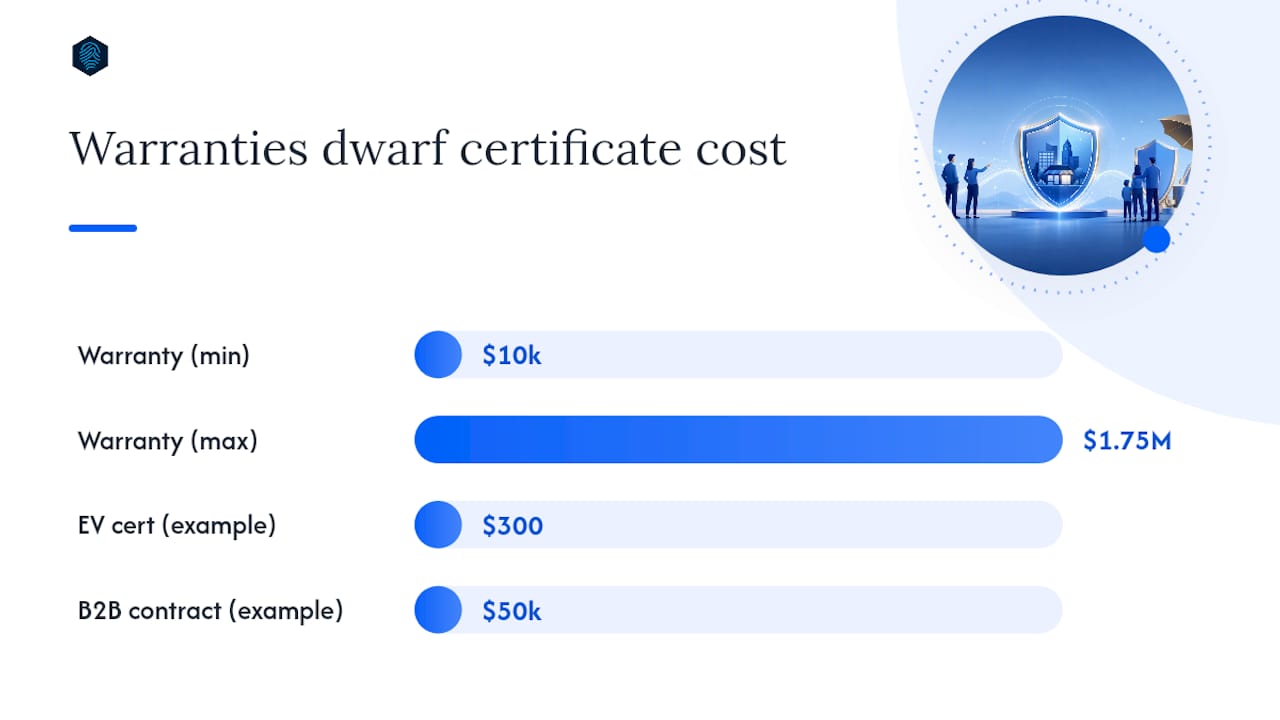
- Financial warranties ($10,000–$1.75 million depending on tier) covering losses from CA mis-issuance
- Named human support with SLA response times
- Invoices, purchase orders, and contract terms for accounting and procurement
- Enterprise account management for multi-domain or multi-site deployments
- Renewal reminder emails and dashboard tracking
When do those features actually matter?
- Your enterprise client's vendor onboarding checklist requires a certificate with a warranty
- Your insurance policy or compliance audit asks for documented certificate procurement
- Your finance team needs an invoice to process the expense
- You're a B2B supplier and your customer's security team will inspect the certificate chain
Pro Tip: Match the cost of paid features to the actual business risk. A $300 EV certificate for a $50,000 B2B contract is a rounding error. The same certificate for a personal portfolio is money wasted.
See CertFlow's analysis of paid certificate commercial features for a detailed breakdown of warranty tiers and what they actually cover.
Wildcard and multi-domain certificates: what fits your architecture
Coverage scope is where architecture decisions meet certificate costs. Three certificate types cover different patterns:
- Single-domain: Covers one hostname (e.g.,
www.example.com). Let's Encrypt issues these freely and automatically. - SAN/multi-domain: Covers multiple hostnames in one certificate. Let's Encrypt supports up to 100 SANs per certificate. Useful for sites with a handful of distinct subdomains or separate domains under one account.
- Wildcard: Covers all first-level subdomains (
*.example.com). Let's Encrypt issues wildcards, but only via DNS-01 validation, which requires your DNS provider to support API-based record creation.
The DNS validation requirement for wildcard SSL certificates adds complexity. If your DNS provider doesn't have an API, or your ACME client doesn't support it, wildcard automation breaks. Paid wildcard certificates don't have that constraint since they use manual or email-based validation.
Common SMB patterns and what fits:
- Single WordPress site: Single-domain Let's Encrypt, managed by your host
- Site plus staging subdomain: SAN certificate covering both, or two single-domain certificates
- SaaS app with customer subdomains: Wildcard Let's Encrypt via DNS-01, or paid wildcard if DNS automation isn't available
- Multiple separate client sites: Individual Let's Encrypt certificates per domain, managed at the host level
How to decide: a practical checklist for SMBs
Run through these questions in order. The first "yes" that applies determines your certificate type.
- Do your contracts, partners, or compliance requirements specify OV or EV? If yes, buy a paid OV or EV certificate.
- Do you need invoices, warranties, or SLA-backed support? If yes, buy paid.
- Do you have more than 50 subdomains under one registered domain that need certificates within a 7-day window? If yes, coordinate with your host or request a rate-limit increase from Let's Encrypt.
- Do you need a wildcard certificate and your DNS provider has no API? If yes, buy a paid wildcard.
- Can your host or ACME client automate renewals? If yes, Let's Encrypt works well.
- Is this a blog, portfolio, small e-commerce site, or internal tool? Let's Encrypt is the right call.
Decision mapping:
- Small local business or blog: Let's Encrypt, hosting-managed
- Early-stage SaaS: Let's Encrypt wildcard via DNS-01, or paid wildcard if DNS API isn't available
- Established e-commerce: Let's Encrypt for most pages; consider paid OV for checkout if your payment processor or brand guidelines require it
- B2B supplier with procurement rules: Paid OV, minimum
Pro Tip: A hybrid approach works well for larger sites. Use Let's Encrypt for content pages and subdomains, and a paid OV certificate for the specific transactional domain or subdomain your enterprise clients inspect.
Getting HTTPS set up without the operational headache
Three practical paths, in order of simplicity:
Option A: Hosting-managed SSL. Your host provisions, installs, and renews the certificate automatically. You verify it's working and move on. This is the right choice for most SMBs. When evaluating a host, confirm: automatic renewal is included, ARI is supported, and wildcard provisioning is available if you need it. inSave Hosting handles all of this.

Option B: ACME client automation. If you manage your own server, Certbot and acme.sh are the two most widely used clients. Both support ARI. Use Let's Encrypt's staging environment (acme-staging-v02.api.letsencrypt.org) when testing new configurations to avoid burning through rate limits. Once staging works, switch to production.
Option C: Paid certificate procurement. Download the certificate from your CA, install it on your server, and set a calendar reminder 30 days before expiration. Some paid CAs offer ACME issuance now, which removes the manual step.
For a step-by-step walkthrough of each path, the SSL setup guide for small businesses covers hosting-managed and ACME client options in detail.
Pro Tip: Verify renewal automation is actually working. Check your certificate expiry date 60 days after setup. If it hasn't renewed yet, test manually. Set an external monitor (UptimeRobot or StatusCake both offer free SSL expiry alerts) so you get notified before a lapse, not after.
One security note worth keeping: large-scale free certificate issuance has been used in phishing campaigns. A padlock doesn't mean a site is trustworthy, only that traffic is encrypted. Monitor your domain in certificate transparency logs (crt.sh is free) to catch unauthorized issuance.
An honest take on the free vs. paid debate
The conventional framing of this debate treats paid SSL as the "serious" option and free SSL as the budget compromise. That framing is wrong, and it costs SMBs money.
Let's Encrypt's short-lifetime, automation-first design is actually a better operational model than annual manual renewal. Certificates that renew every 45 days and are monitored automatically are less likely to expire unnoticed than certificates renewed once a year by a human who might be on vacation. The forced automation is a feature, not a limitation.
The real question isn't free vs. paid. It's whether your business needs identity validation beyond domain control, and whether your procurement process requires a paper trail. If the answer to both is no, Let's Encrypt is the professional choice. If either answer is yes, pay for the specific feature you need, not for "premium SSL" as a vague concept.
inSave Hosting takes the operational friction out of SSL
Choosing between Let's Encrypt and paid SSL is one decision. Actually keeping your certificate valid, renewed, and correctly installed is a different problem entirely, and it's the one that causes real outages.

inSave Hosting includes automatic SSL provisioning and renewal on all hosting plans, with ARI support built in so your certificates renew before they expire without any action on your part. Need a wildcard certificate for multiple subdomains? Wildcard SSL options are available with managed renewal. Need a paid OV certificate with an invoice for your procurement team? That's covered too through the SSL certificates page. Check available hosting plans and get your SSL sorted today.
Sources
- Shorter Certificate Lifetimes and Rate Limits - Let's Encrypt
- Free vs Paid SSL Certificates — What's the Real Difference? | CertFlow
- Let's Encrypt and Comodo issue thousands of certificates for phishing - Netcraft News
FAQ
Is Let's Encrypt SSL really free?
Yes. Let's Encrypt is a nonprofit Certificate Authority whose mission is to make HTTPS universally available at no cost. Some hosting providers or integrators may charge an administration fee, but the certificate itself is always free.
Why not use Let's Encrypt for everything?
Let's Encrypt issues only DV certificates and provides no commercial support, warranties, or invoicing. If your contracts require OV or EV validation, or your procurement team needs a paper trail, a paid certificate is necessary.
Does paid SSL improve your Google rankings?
Not directly. Google treats any valid HTTPS site the same regardless of whether the certificate is free or paid. The SEO signal comes from having HTTPS at all, not from the certificate tier.
Which SSL certificate is best for a small business?
For most small businesses, a Let's Encrypt DV certificate managed automatically by their hosting provider covers everything they need. Buy a paid OV certificate only if a client contract, compliance requirement, or procurement process specifically requires it.
Is SSL being phased out?
The term "SSL" is outdated. Modern connections use TLS (Transport Layer Security), but the industry still uses "SSL" colloquially. What is being phased out is older protocol versions: TLS 1.0 and 1.1 are deprecated. TLS 1.3 is current and preferred.