
Enable Brotli wherever your server and CDN support it, and never turn Gzip off. Brotli produces smaller files than Gzip with similar CPU cost, per DebugBear's testing, but some older clients and intermediaries still only understand Gzip. Set Brotli around level 4 for on-the-fly responses, Brotli 11 for pre-compressing static files during your build, and Gzip around level 6 as your dynamic fallback.
TL;DR:
- Using Brotli level 4 for dynamic responses offers size reductions of 15 to 25 percent over Gzip level 6 without increasing CPU load.
- Pre-compressing static files with Brotli level 11 during your build process provides optimal compression at no runtime CPU cost.
- Modern browsers nearly all support Brotli, but fallbacks to Gzip are necessary for older clients or non-HTTPS connections.
- Enable both Brotli and Gzip on your server, verify correct compression with tools like curl or DevTools, and monitor server CPU and transfer sizes over time.
- Avoid double-compression, compress only text assets, and gradually roll out higher compression levels while watching for CPU spikes or response delays.
Table of Contents
- Gzip vs. Brotli: How Much Smaller Are the Files?
- What Compression Levels Should You Actually Use?
- Do All Browsers Support Brotli Compression?
- How Do You Enable Brotli and Gzip on Your Server?
- How Do You Verify Which Encoding Your Server Sent?
- When Should You Pre-Compress Static Files Instead?
- What Mistakes Should You Avoid When Rolling This Out?
- The Bottom Line on Gzip vs. Brotli
- A Hosting Provider's Take on Rolling Out Compression
- Get Brotli and Gzip Configured Without Touching a Config File
- Sources
- FAQ
Gzip vs. Brotli: How Much Smaller Are the Files?
The size difference is the whole reason this debate exists, and how this improves user experience can also help you boost SEO and conversions with faster website speed. Brotli typically produces payloads smaller than Gzip for HTML, CSS, and JavaScript files, according to benchmark data from Panelica, and it does so at roughly the same CPU cost when you compare Brotli level 4 against Gzip level 6. That gap holds up across most text-based assets, though the exact number moves depending on how repetitive the content is. A CSS file full of repeated class names compresses further than a JavaScript bundle full of unique variable names.
Here's how the two stack up at their commonly recommended operating points:
| Factor | Gzip (level 6) | Brotli (level 4) |
|---|---|---|
| Typical size reduction (HTML/CSS/JS) | Baseline | 15–25% smaller |
| CPU cost for dynamic responses | Low | Comparable to Gzip 6 |
| Best use case | Universal fallback, dynamic content | Preferred encoding for modern clients |
| Decompression cost on the client | Negligible | Negligible |
| Requires HTTPS | No | Yes |
The decompression side barely matters. Whichever algorithm you pick, the browser unpacks the file in milliseconds. The real cost lives on your server, where compression happens on every request unless you've pre-compressed the file ahead of time.
A few things worth remembering when you're reading benchmark charts:
- Brotli's advantage grows at higher levels, but so does the CPU bill, which is why level 4 exists as the practical middle ground for live traffic.
- Text assets benefit far more than binary files, since images and fonts are usually already compressed.
- Adoption data from HTTP Archive shows Brotli usage for text resources climbing steadily, while Gzip remains close to universal across the web.
What Compression Levels Should You Actually Use?
Gzip runs on a scale from 1 to 9. Brotli runs from 0 to 11. Higher numbers squeeze out more bytes, but they also take longer to compute, and that time adds up fast when you're compressing the same response for thousands of concurrent visitors.
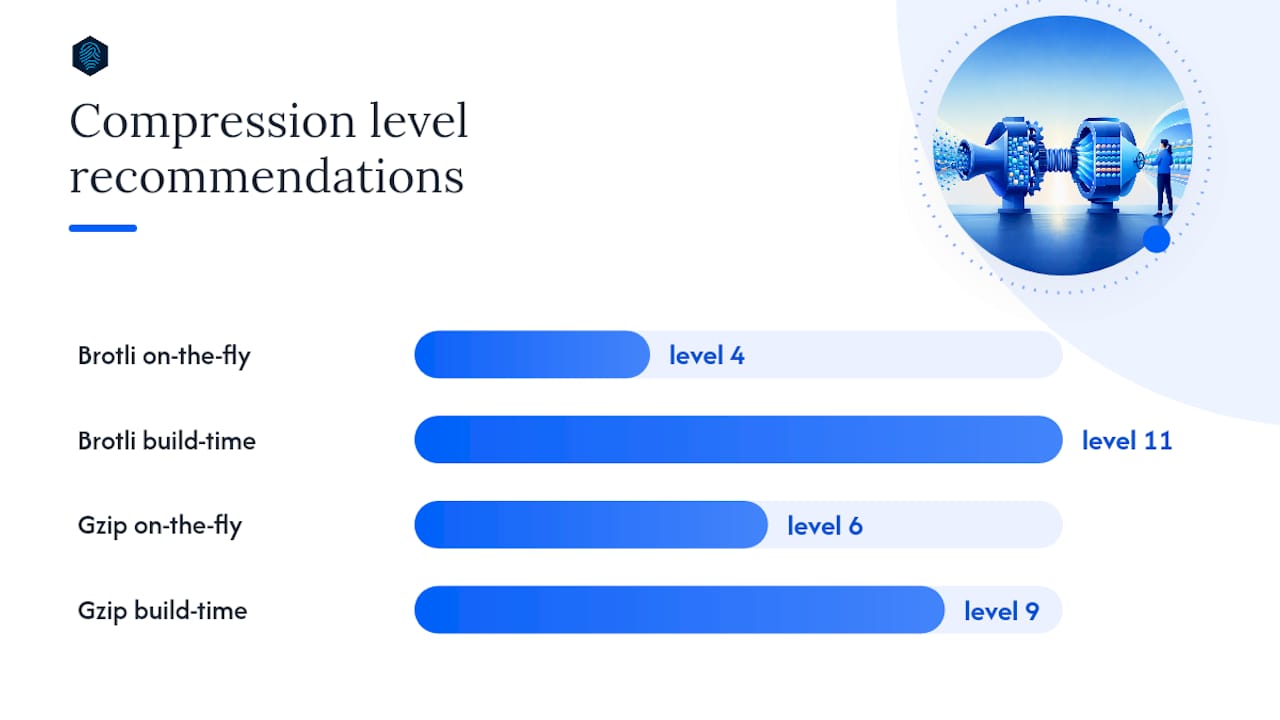
For anything generated on the fly, the safe defaults are Brotli 4 and Gzip 6. Panelica's benchmarks show Brotli 4 already beating Gzip 6 on size without asking your server for extra CPU cycles, which is exactly the trade you want on live traffic.
Levels 7 through 11 belong to a different job entirely. Save them for assets compressed once during your build process, then served thousands of times without ever being recompressed. A CI pipeline can afford to spend a few extra seconds squeezing a CSS bundle down with Brotli 11, because that cost is paid once, not on every page load.
- Dynamic HTML, API responses, anything generated per request: Brotli 4 or Gzip 6.
- Static CSS, JS, and SVG bundled at build time: Brotli 11 (or Gzip 9 if Brotli isn't available in your pipeline).
- Roll changes out gradually and watch server CPU graphs before pushing a higher level to full production traffic.
Pro Tip: Bump your on-the-fly Brotli level one notch at a time and watch CPU load for 24 hours before going further. A jump straight to level 9 on a busy dynamic endpoint can spike response times without you noticing until traffic peaks.
Do All Browsers Support Brotli Compression?
Your server picks the encoding based on the Accept-Encoding header the browser sends with every request. If that header lists br, and your server supports it, Brotli wins. If not, Gzip steps in.
Modern browser support for Brotli is very high in most usage datasets, according to DebugBear, with Internet Explorer as the notable holdout. Brotli also only works over HTTPS for HTTP responses, so an unencrypted site can't use it at all, which is one more reason plain HTTP has no place on a production site in 2026.
- Nearly all current desktop and mobile browsers accept Brotli.
- Older browsers and some legacy corporate proxies fall back to Gzip automatically.
- Certain CDNs and reverse proxies won't forward the
brencoding unless you configure them explicitly, so test through your full delivery chain, not just your origin server.
How Do You Enable Brotli and Gzip on Your Server?
Configuration looks a little different depending on your stack, but the logic is the same everywhere: turn both on, set sane levels, and let content negotiation do the rest.
- Nginx: Enable the
ngx_brotlimodule, then setbrotli on;withbrotli_comp_level 4;alongside your existinggzip on;andgzip_comp_level 6;directives. Turn onbrotli_static on;andgzip_static on;so Nginx serves pre-compressed.brand.gzfiles when they exist instead of compressing on every request, a behavior Nginx's own documentation confirms happens automatically once both modules are active. - Apache: Load
mod_brotlialongsidemod_deflate, then setBrotliCompressionQuality 4andAddOutputFilterByType BROTLI_COMPRESS text/html text/css application/javascript. Older Apache builds may not shipmod_brotliby default, so check your version before assuming it's available. - LiteSpeed: Most LiteSpeed-based hosting panels expose a simple toggle for Brotli alongside Gzip, since LiteSpeed's architecture supports both natively without extra modules.
- WordPress: WordPress itself doesn't compress output. That job belongs to the server, according to the WordPress Codex, so if a caching plugin also enables compression, you risk double-compressing responses or breaking delivery entirely. Turn off any compression toggle in your plugin and let the server handle it.
Exclude images, videos, and already-compressed font formats like WOFF2 from your MIME rules, since compressing already-compressed data wastes CPU for no benefit. Most configurations also skip files under roughly 256 bytes, where the compression overhead outweighs the savings.
How Do You Verify Which Encoding Your Server Sent?
Run curl -H "Accept-Encoding: br, gzip" -I https://yoursite.com and check the Content-Encoding line in the response. If it says br, Brotli is active; gzip means it fell back.
In Chrome DevTools, open the Network panel, click any request, and look for content-encoding under Response Headers. Compare the "Size" column against "Content" to see the actual bytes saved.
- Lighthouse flags missed opportunities under its "Enable text compression" audit, and it will tell you exactly which files aren't compressed.
- Track transferred bytes over time, not just a single test, since CDN caching can mask whether your origin is compressing correctly.
- Watch server CPU alongside field metrics like LCP, since a compression change that helps transfer size but spikes response time can hurt real-world load speed. Tracking the right performance metrics makes this easier to catch early.
When Should You Pre-Compress Static Files Instead?
Pre-compressing means generating .br and .gz versions of a file once, during your build, instead of compressing it fresh on every request. You get the best possible compression ratio with zero per-request CPU cost, since the server just serves a static file that already exists on disk.
- Generate both
.brand.gzversions of your CSS, JS, and SVG files as part of your CI pipeline, using Brotli 11 since the cost is paid once. - Deploy those files alongside the originals, either to your server or your CDN's origin storage.
- Confirm
brotli_staticandgzip_staticare enabled so the server checks for the pre-compressed file first instead of compressing on the fly.
Most CDNs and servers check for .br before falling back to .gz, so verify that order with a curl request after deployment. Small sites with assets that rarely change often see little practical benefit from this extra build step. Skip it if your static bundle is tiny or updates once a quarter.
Pro Tip: If you're using a CDN, confirm it actually forwards the br encoding to end users rather than decompressing and re-serving Gzip. Some older CDN configurations silently strip Brotli support even when your origin server sends it correctly.

What Mistakes Should You Avoid When Rolling This Out?
The most common failure is double-compression: a caching plugin compresses output, then the web server tries to compress it again, which can break delivery or leave responses uncompressed entirely. Check your response headers after any plugin update to catch this early.
- Never apply compression rules to images, videos, or WOFF2 fonts. They're already compressed, and forcing another pass wastes CPU for zero gain.
- Watch CPU usage closely any time you raise Brotli's dynamic level above 4 or 5.
- Roll changes out on staging first, then a percentage of production traffic, then everyone.
Pro Tip: Keep a rollback plan ready. If CPU spikes after a level change, dropping Brotli back to level 4 or disabling it temporarily in favor of Gzip alone takes seconds and buys you time to investigate.
The Bottom Line on Gzip vs. Brotli
Enable Brotli with Gzip as your fallback, and set conservative levels for anything generated per request.
- Turn on both algorithms at the server level.
- Verify with curl or DevTools that the right encoding is actually being sent.
- Monitor CPU and transfer size for a few days before raising any level further.
A Hosting Provider's Take on Rolling Out Compression
Enabling Brotli sounds simple until you watch CPU graphs during a traffic spike. The safer path is treating it as infrastructure, not a checkbox: default to conservative levels, verify through the full delivery chain, and let the server handle it instead of stacking plugin-level compression on top. If you're on managed hosting, ask your provider to confirm your current settings rather than guessing.
— Ihor
Get Brotli and Gzip Configured Without Touching a Config File
Every plan on inSave Hosting runs on LiteSpeed with Brotli enabled by default for domains that support it, Gzip active as the automatic fallback, and free SSL provisioned from day one, since Brotli requires HTTPS to work at all.

That means no editing nginx.conf, no chasing down mod_brotli, and no risk of the double-compression trap that breaks sites when a caching plugin fights the server for control. Our managed WordPress hosting pairs that setup with free migration and staging environments, so you can test compression changes safely before they touch your live site. If you're moving from a host where you're not sure what's enabled, our team can confirm your current configuration and adjust it. Check available plans and get started with a hosting account today.
Sources
- Brotli vs. GZIP: Improve Page Speed With HTTP Compression
- Gzip vs Brotli Compression: Configuration and Benchmarks
- ngx_http_gzip_module — Nginx documentation
- HTTP Archive
FAQ
Is Brotli compression better than Gzip?
Brotli typically compresses HTML, CSS, and JavaScript 15% to 25% smaller than Gzip at a comparable CPU cost, making it the better default wherever the client and server both support it.
Should I use Brotli on my site?
Yes, as long as your server supports it and your site runs on HTTPS, since Brotli requires an encrypted connection; keep Gzip enabled alongside it for older browsers and intermediaries.
Is Zstd better than Brotli for web content?
Zstd compresses and decompresses quickly and is gaining HTTP support, but Brotli's dictionary is tuned specifically for web text, which keeps Brotli the practical choice for typical HTML, CSS, and JS delivery today.
Does Brotli have compression levels?
Yes, Brotli offers levels 0 through 11, compared to Gzip's 1 through 9; level 4 works well for dynamic responses, while level 11 suits static assets compressed once during a build.