
A dedicated IP pays off if you send high volumes of email, need a partner or payment processor to allowlist your address, or manage a VPN where consistent access matters more than saving a few dollars a month. You get sender reputation control, stable remote access, and fewer CAPTCHA interruptions. The trade-off is real: monthly fees, the work of warming up a new IP, and full responsibility for keeping your reputation clean.
TL;DR:
- A dedicated IP is most beneficial for high-volume email sending, strict allowlisting requirements, or predictable VPN and API access needs.
- Proper configuration of SPF, DKIM, and DMARC records is essential for a dedicated IP to improve email deliverability and reputation.
- Warming up a new IP over several weeks is necessary to build trust with mailbox providers and avoid deliverability issues.
- Costs include a monthly fee and the responsibility to monitor and maintain the IP’s reputation, with full ownership of any damage from poor sending practices.
- For small-volume senders or those using managed email services, a shared IP from an established provider often outperforms a dedicated IP.
Table of Contents
- What Are the Real Dedicated IP Benefits?
- Do You Actually Need One? Six Common Scenarios
- The Costs and Responsibilities Nobody Mentions Upfront
- A Six-Question Checklist Before You Buy
- How inSave Hosting Handles Dedicated IP Requests
- What Site Owners Get Wrong About Dedicated IPs
- Get a Dedicated IP Set Up the Right Way
- Sources
- FAQ
What Are the Real Dedicated IP Benefits?
The benefits split into two buckets: email control and access predictability. Neither has much to do with making your website load faster, and it helps to get that out of the way early.
Email deliverability is the biggest reason people ask about dedicated IPs. A shared IP means your sending reputation is tangled up with everyone else using that same address. If another customer on your host's shared pool gets flagged for spam, your emails can land in junk folders too, even though you did nothing wrong. A dedicated IP isolates you from that. But isolation cuts both ways: a brand-new dedicated IP has zero reputation with Gmail, Outlook, and Yahoo, so you have to build it up. That means setting a PTR record, publishing SPF and DKIM, and adding a DMARC policy, then sending gradually increasing volume over several weeks rather than blasting your full list on day one. Amazon SES's documentation on dedicated IPs lays this out clearly: standard dedicated IPs require manual warm-up, while managed dedicated IP pools automate that ramp-up and scale per mailbox provider automatically. If you send irregular volume, a managed pool often beats a standalone dedicated IP.
Here's the part most guides skip: if you send fewer than a few thousand emails a month, a shared pool from an established provider will usually outperform a fresh dedicated IP, simply because that shared pool already has years of accumulated trust. A reputable transactional email service can be cheaper and more reliable than maintaining your own IP reputation from scratch.
Allowlisting and stable access is where dedicated IPs earn their keep outside of email. Corporate VPNs, partner APIs, and payment gateways frequently restrict access by source IP address. If your office network or VPN endpoint uses a shared, rotating IP, you can't hand your bank's API team a static address to whitelist, because it might change tomorrow. A dedicated IP fixes that. This matters for developers integrating with a partner's sandbox environment, or for a small business whose payment processor demands an IP allowlist before releasing production credentials.
Fewer CAPTCHAs and fewer reputation-based blocks follow naturally from a clean, exclusive address. Shared IPs sometimes carry the sins of previous tenants or noisy neighbors, which triggers extra verification steps on login pages or admin panels. A dedicated IP with no history of abuse tends to trigger fewer of those friction points, particularly for repeated admin logins or automated API calls.
Migration and prelaunch access is a quieter but genuinely useful benefit. While DNS is still propagating after a domain move, previewing your site by its IP address lets you confirm everything works before flipping the switch publicly. The same IP gives you a stable FTP or SSH endpoint for direct server access, independent of whatever domain changes are in flight. If you're planning a move, our DNS hosting guide covers propagation timing in more detail.
Isolation from bad neighbors is real but partial. A dedicated IP means you're not sharing blocklist risk with strangers on the same address. It does not, however, give you meaningful DDoS protection on its own. A dedicated IP is just as attackable as a shared one; if anything, it removes the anonymity a shared address provides.
According to Fastly's explainer on dedicated IPs, a dedicated address gives you control over reputation and a predictable endpoint, but it does not automatically improve site speed or overall security.
- Email reputation isolated from other tenants, but starts at zero and needs warming
- Static address for allowlisting with VPNs, partner APIs, and payment gateways
- Fewer CAPTCHA and verification prompts tied to shared-IP history
- Usable during DNS migration for previewing and direct server access
- Separation from bad-neighbor blocklist risk, without built-in DDoS protection
Pro Tip: Before you assume you need a dedicated IP for HTTPS, check whether your host supports SNI. Nearly every modern browser does, which means the old justification of "one IP per SSL certificate" rarely applies anymore.
Do You Actually Need One? Six Common Scenarios
Most readers fall into one of these situations. If you don't recognize yourself in the first four, you probably don't need a dedicated IP yet.
- You send high-volume transactional or marketing email. Order confirmations, password resets, or newsletter campaigns at meaningful scale mean your sending reputation is worth protecting on its own address rather than sharing it with strangers.
- A partner, VPN, or payment gateway requires IP allowlisting. If a bank, payment processor, or client's internal system demands a fixed address before granting access, a dynamic or shared IP simply won't satisfy that requirement.
- You need IP-based staging during a migration. Developers moving a site between hosts often want to verify the new server responds correctly before DNS fully propagates.
- You run a legacy or licensed application that identifies clients by IP. Some older enterprise software, VPN concentrators, or licensing systems still authenticate connections by source address rather than modern token-based methods.
- You operate your own mail server rather than using a managed service. Running Postfix or Exchange yourself puts the entire reputation burden on you, and a dedicated IP is close to mandatory in that setup.
- You're a small blog or single-site owner using a third-party transactional email provider. In this case, you almost certainly don't need one. Piggybacking on an established shared pool gets you better deliverability with none of the warm-up work.
The Costs and Responsibilities Nobody Mentions Upfront
A dedicated IP typically adds a recurring monthly fee on top of your hosting or email plan, and that's the smaller cost. The bigger one is time and discipline.
Warming up a new IP is not optional if you're using it for email. Sending a full list blast on day one tells mailbox providers you look exactly like a spammer, since legitimate senders build volume gradually. A sensible pace starts small, often a few hundred messages daily, and doubles roughly every few days over two to four weeks while watching bounce and complaint rates. AWS's own guidance on standard dedicated IPs makes this manual warm-up explicit, versus managed pools that automate it.
Once you own that reputation, you own the fallout too. Poor list hygiene, high spam complaint rates, or careless bulk sending will tank your dedicated IP's standing, and unlike a shared pool, there's no one else's good behavior to dilute the damage. A dedicated IP is not a substitute for real security or compliance controls either. Frameworks like PCI DSS require proper network segmentation and access controls, not just a unique address assigned to your account.
Before buying, ask your provider directly: does this IP persist if I change plans, and what happens during renumbering? Confirm whether outbound mail actually routes through the dedicated IP you're paying for, since some setups route mail through a separate relay entirely.
- Monthly add-on fee, often comparable to upgrading a hosting tier instead
- Two to four weeks of gradual warm-up before full sending volume is safe
- Full ownership of reputation fallout from spam complaints or bad list hygiene
- No built-in compliance or security guarantee beyond IP isolation
A Six-Question Checklist Before You Buy
Run through these before adding a dedicated IP to your cart.
- Does your outbound mail actually use the IP you'd be paying for? Check your email's Received headers, or ask your provider directly, before assuming a dedicated IP will fix a deliverability problem it isn't even touching.
- Does a partner or platform require IP allowlisting? If yes, a static dedicated IP isn't optional. If no, weigh whether the fee buys you anything concrete.
- Will you send enough volume to maintain a healthy reputation? An IP that goes quiet for weeks between sends loses reputation just as easily as one that gets abused.
- Does your provider support PTR records and let you set SPF, DKIM, and DMARC? Without these, a dedicated IP does very little for deliverability on its own.
- What's the provider's policy on IP persistence and renumbering? Ask this before you build months of reputation on an address that might change.
- Have you compared total cost against a managed email service or a hosting upgrade? Sometimes the smarter move is choosing the right hosting tier instead of bolting on an IP add-on.
Pro Tip: If your main goal is HTTPS on a custom domain, check for SNI support first. Most hosts have supported it for years, and a dedicated IP won't move that needle at all.
If your infrastructure needs go beyond IP address, like network configuration during a VPN rollout, partners such as CloudSprout's managed IT services can help with allowlisting setup and firewall configuration that a hosting provider alone won't handle.
How inSave Hosting Handles Dedicated IP Requests
inSave Hosting runs on LiteSpeed, HTTP/2, PHP8, and MariaDB, with free CDN integration and a 99.9% uptime target across shared and WordPress-optimized plans. That performance backbone stays the same whether or not you add a dedicated IP, because speed comes from server architecture, not from address assignment.
Customers on eligible plans can request a dedicated IP through the account dashboard or by contacting support directly, and our team confirms outbound mail routing before you start any warm-up schedule.
A dedicated IP only delivers value once the supporting pieces are in place. Skipping PTR, SPF, DKIM, or DMARC setup is the most common reason people pay for a dedicated IP and see no deliverability improvement at all.
Steps we walk customers through:
- Verify which outbound IP your mail traffic actually uses
- Set PTR, SPF, DKIM, and DMARC records correctly the first time
- Build a warm-up schedule matched to your realistic sending volume
- Monitor bounce and complaint rates during the first month
Free SSL and one-click WordPress installs come standard, so the dedicated IP conversation stays focused on what it's actually for: email reputation and allowlisting, not general site security.
What Site Owners Get Wrong About Dedicated IPs
The conventional advice treats a dedicated IP like a general upgrade, something you buy alongside more storage or bandwidth because bigger sounds better. That's backwards. A dedicated IP solves exactly two problems: sender reputation isolation and address based allowlisting. It solves nothing else, and treating it as a security or speed purchase wastes money you could put toward actual server resources.
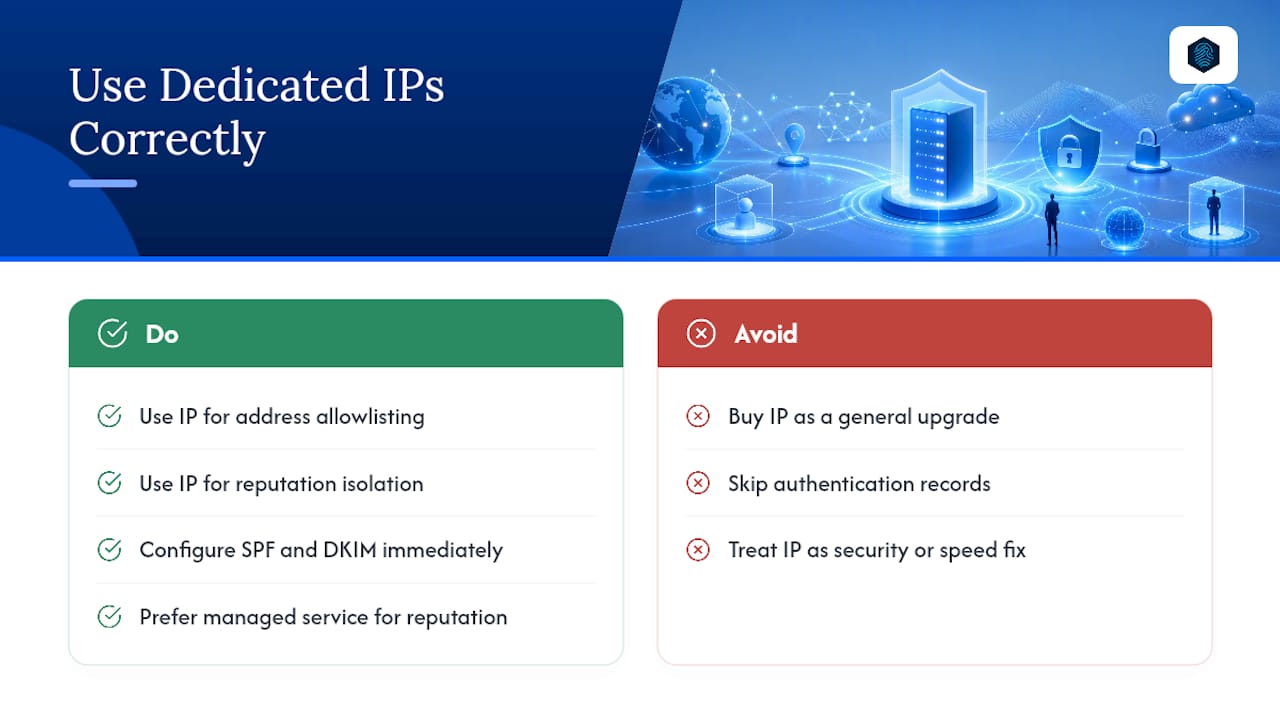
The bigger mistake is buying the IP and skipping the configuration work that makes it useful. I've seen the same pattern repeatedly: someone adds a dedicated IP for email, never touches SPF or DKIM, and wonders why deliverability didn't improve. The IP was never the bottleneck. The missing authentication records were.
If you take one thing from this, prioritize the allowlisting use case over the email use case unless you're sending serious volume. A partner requiring a static address is a hard requirement with no workaround. A shaky sender reputation, on the other hand, is often better solved by a managed service that's already spent years building trust you'd need weeks or months to earn on a fresh IP.
— Ihor
Get a Dedicated IP Set Up the Right Way
inSave Hosting includes dedicated IP options on select shared and WordPress hosting plans, with support confirming your outbound mail routing and PTR setup so you're not guessing whether the configuration actually works.

If you've read this far and recognized your situation in the allowlisting or email volume scenarios above, the next step is straightforward. Check your current shared hosting plan to see if a dedicated IP add-on fits, or reach out to our support team first if you want help confirming whether your mail traffic will even route through it correctly. We'll walk you through PTR, SPF, DKIM, and DMARC setup as part of onboarding, and help you build a warm-up schedule that matches your real sending volume instead of guessing at one.
Sources
- Dedicated IP addresses for Amazon SES
- Do You Need a Dedicated IP Address for Your Website? - QDE
- What is a dedicated IP address and what are its benefits | Fastly
- Hostlist
FAQ
What Are the Downsides of a Dedicated IP Address?
You take on full responsibility for sender reputation, pay an added monthly fee, and must warm up the address gradually before sending full volume, since a poorly managed dedicated IP can hurt deliverability worse than a shared one.
Is a Dedicated IP Worth the Money?
It's worth it if you send high email volume, need a partner to allowlist your address, or run your own mail server; for a small blog using a reputable third-party email service, it usually isn't.
Is a Dedicated IP Better Than a VPN?
They solve different problems. A dedicated IP is a static address you own for hosting or email, while a VPN encrypts and routes your traffic, sometimes through a dedicated IP if the provider offers one for consistent allowlisting.
How Much Does a Dedicated IP Cost?
Cost varies by host and plan, typically added as a monthly fee on top of hosting or email service pricing. inSave Hosting includes dedicated IP options on select plans, so check your current plan's specifics before assuming you need to upgrade tiers.