
DDoS protection for a website means intercepting malicious traffic at the network edge, before it ever reaches your server, and filtering it out while real visitors get through. If your site isn't behind one yet, the fastest fix is enabling edge or CDN filtering plus a web application firewall (WAF) and traffic monitoring today. That combination stops the two things that actually cost you money: downtime and the customers who leave during it.
TL;DR:
- Most DDoS attacks against protected sites are mitigated within seconds, preventing long outages and reducing recovery time.
- Layered defenses, including edge filtering, adaptive WAFs, rate limiting, and DNS resilience, are necessary to handle different attack types like volumetric, protocol, and application-layer floods.
- Deploying an integrated solution with built-in CDN, WAF, and monitoring, such as inSave Hosting, simplifies setup and provides effective protection for small and mid-size sites.
- Relying on challenge modes long-term can harm user experience; they should be used only as short-term mitigation during attacks.
- Costs for protection are generally low for small sites, with most existing hosting plans offering sufficient basic features to mitigate common threats.
Table of Contents
- How DDoS Protection Actually Works
- What Kinds of DDoS Attacks Should You Watch For?
- What Protection Methods Should You Actually Deploy?
- How Do You Choose the Right DDoS Protection?
- Setting Up DDoS Protection: A Step-by-Step Checklist
- What Do You Do During an Active DDoS Attack?
- Is DDoS Protection Worth the Cost?
- inSave Hosting: Built-In Protection Without the Extra Setup
- What Small Sites Get Wrong About DDoS Defense
- Sources
- FAQ
How DDoS Protection Actually Works
The core idea is simple: stop bad traffic before it hits your origin server. When your site sits behind an edge network or content delivery network (CDN), every request routes through that layer first. Legitimate visitors pass through. Malicious floods get filtered, absorbed, or dropped based on rate limits, behavioral signatures, and IP reputation scoring.
This matters because origin servers, even well-provisioned ones, have finite bandwidth and connection limits. A flood that never reaches them can't take them down. Edge networks, by contrast, are built to absorb traffic at a scale most single servers never could.
Speed matters as much as capacity. Cloudflare reports that most attacks against edge-protected sites are mitigated in a few seconds, which is the difference between a blip nobody notices and an outage that shows up in your uptime logs. Slower detection means longer exposure, more strain on your database and application layer, and a longer recovery window afterward.
What Kinds of DDoS Attacks Should You Watch For?
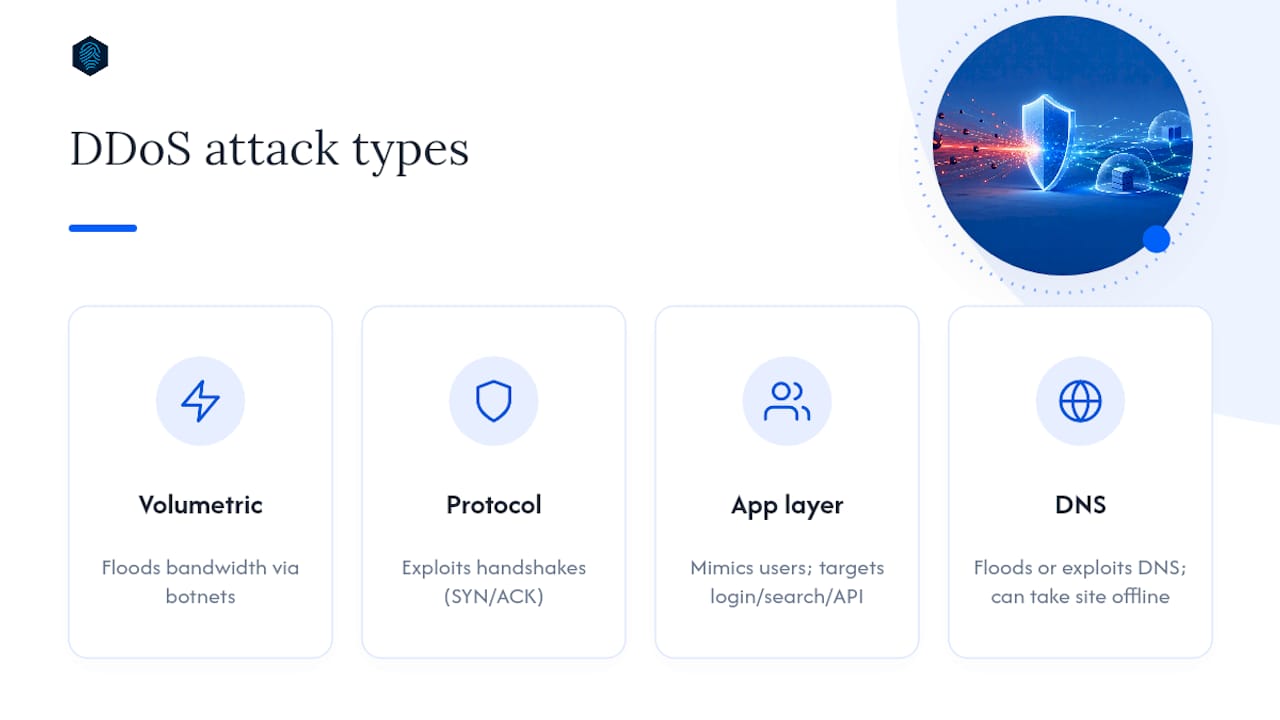
Not every attack looks the same, and your defenses need to match the threat.
Volumetric attacks (Layer 3/4) flood your network with raw traffic volume, often using botnets to overwhelm bandwidth before requests ever reach your application.
Protocol attacks like SYN floods or ACK floods exploit how servers handle connection handshakes, tying up resources until legitimate connections can't get through.
Application-layer attacks (Layer 7) mimic real user behavior, hammering login pages, search functions, or APIs with requests that look legitimate individually but overwhelm your server in volume.
DNS attacks target the lookup layer itself, either flooding your DNS provider or exploiting misconfigured resolvers, which can take your site offline even if your hosting is untouched.
Each type demands a different countermeasure, which is why layered defense beats any single tool.
What Protection Methods Should You Actually Deploy?
You don't need every tool on day one, but you need a stack that covers each attack layer.
- Always-on edge/CDN scrubbing absorbs volumetric traffic before it reaches your origin, and it should run continuously, not just when you notice a problem.
- A managed WAF with adaptive rulesets catches Layer 7 threats like credential stuffing and API abuse; static rule lists tend to generate more false positives than adaptive ones, which matters if you don't want to accidentally block real customers.
- Rate limiting and token-based throttling cap how many requests a single source can make, slowing down automated abuse without blocking humans outright.
- CAPTCHA or "under attack" challenge modes work as a short-term brake, but lean on them too long and you'll hurt conversions and search rankings.
- Autoscaling and aggressive caching reduce how much traffic ever touches your origin server, which blunts broad, shallow floods aimed at exhausting resources.
- Multi-provider DNS resilience prevents a single point of failure at the lookup layer, where an outage can take you offline even if your server is fine.
Google Cloud's own guidance frames this well: combining load balancers, CDN caching, and adaptive protections does more to mitigate large-scale attacks than any single layer alone.
Pro Tip: Set your cache TTLs more aggressively during high-traffic periods, like a product launch or a press mention. Longer cache lifespans mean fewer requests ever reach your origin, which gives you a buffer if traffic suddenly spikes for the wrong reasons.

How Do You Choose the Right DDoS Protection?
Run every option through the same checklist before you commit.
- Coverage across Layer 3 through Layer 7. A provider that only handles volumetric floods leaves your login pages and APIs exposed.
- Mitigation capacity and time-to-mitigate (TTM). Ask for real numbers, not marketing language. Sub-3-second mitigation is achievable and worth asking about directly.
- False-positive controls. Adaptive, machine learning-based rules block attackers without locking out real customers.
- Logging and forensics access. You need to see what happened after an attack, not just that traffic dropped.
- A written mitigation SLA. If a provider doesn't commit to a response time in writing, that's worth noting.
Also ask directly: Does onboarding require DNS or routing changes that expose your origin IP? What's the cost model if traffic spikes during an actual attack? The SEI CMU guidance on layered defense also recommends reducing your attack surface and monitoring normal traffic baselines, so you can actually tell when something's wrong.
Red flags to walk away from: surge pricing that spikes your bill mid-attack, no adaptive protection (just static rules), no SLA at all, or a provider that demands your TLS private keys without a clear technical reason.
Setting Up DDoS Protection: A Step-by-Step Checklist
Work through this in order rather than trying to do everything at once.
- Harden your DNS first. Move to a provider built for resilience and lower your TTLs so failover changes propagate quickly if something goes wrong.
- Enable edge or CDN protection. This is your first line of defense against volumetric traffic.
- Turn on a managed WAF. This catches application-layer threats that a CDN alone won't stop.
- Tune your caching. Push more static content to the edge to reduce load on your origin server.
- Set autoscaling rules and traffic alerts. Configure thresholds now, before you need them under pressure.
Test the whole setup before you need it. Simulate a DNS failover, confirm your alerts actually fire, and check that your uptime monitoring catches problems fast enough to matter. A runbook that's never been tested is just a document.
What Do You Do During an Active DDoS Attack?
Once you're under attack, speed and clarity matter more than perfection.
- Switch on selective challenge modes to filter suspicious traffic without locking out everyone.
- Route traffic through scrubbing centers if your provider offers them.
- Increase cache aggressiveness immediately to reduce load on your origin.
- Call your host, CDN provider, and DNS provider in that order, and ask each one what they're already seeing on their end.
Pro Tip: Keep a printed or offline copy of your provider contact list. If your attack has taken down your email or internal tools, you don't want your incident response plan to live in the same system that just went down.
After the attack clears, collect logs, update your firewall signatures, and revise your runbook with whatever you learned. Skipping this step means you'll relearn the same lessons next time.

Is DDoS Protection Worth the Cost?
Most hosting plans bundle basic protection at no extra charge, which covers small-scale volumetric attempts. Standalone mitigation services and enterprise-grade scrubbing cost more, but they scale to match serious, sustained attacks.
The math is straightforward: estimate your hourly revenue loss during downtime, then compare it to a protection plan's monthly cost. For most small sites, routing traffic through a CDN with a managed WAF covers the real risk. Dedicated scrubbing only makes sense once your traffic volume or revenue actually justifies the added spend.
inSave Hosting: Built-In Protection Without the Extra Setup
Piecing together a CDN, a separate WAF vendor, and a third monitoring tool works, but it's also three logins, three bills, and three support lines to call when something breaks. inSave Hosting folds those pieces into one plan: 99.9% uptime, free CDN integration, and managed security features that run in the background without you configuring a separate stack.

Every plan includes 360 monitoring that watches for the traffic anomalies that precede an attack, not just the outage itself. If you're running WordPress, the WordPress-optimized hosting tier pairs that protection with LiteSpeed caching, which does double duty: faster page loads and less origin traffic exposed during a spike. Free SSL and daily backups round out the setup, so if something does slip through, you're not rebuilding from nothing.
If your current host treats security as an add-on you have to configure yourself, take a look at inSave Hosting's plans and see which tier matches your traffic pattern. Getting set up takes less time than researching three separate vendors.
What Small Sites Get Wrong About DDoS Defense
The biggest mistake I see isn't a missing tool. It's owners who assume DDoS protection is an enterprise problem, something you buy after you're big enough to be a target. That logic gets it backward. Smaller sites often get hit by opportunistic, low-effort attacks precisely because attackers assume there's no protection in place.
The second mistake is over-relying on challenge modes as a permanent fix rather than a short-term brake. CAPTCHAs left running for weeks quietly bleed conversions and search visibility, and most owners never connect the dip to the security setting they forgot about.
Start with the layered basics: edge filtering, a managed WAF, and DNS resilience. That covers the overwhelming majority of what actually hits small and mid-size sites.
— Ihor
Sources
- FBI — Efforts to combat illegal DDoS attacks
- SEI CMU insights — Four best practices for DDoS prevention and response
FAQ
How do I protect my website from DDoS attacks?
Route your traffic through a CDN or edge network with a managed WAF enabled, harden your DNS with a resilient provider, and set up traffic monitoring so you catch anomalies early. For most small to mid-size sites, a hosting plan with built-in CDN and security features covers this without separate vendor management.
Is it illegal to DDoS a website?
Yes. In the United States, launching a DDoS attack is a federal crime prosecutable under the Computer Fraud and Abuse Act, regardless of the attacker's motive or the target's size.
Is DDoS protection worth it?
For nearly every website, yes. Basic edge and WAF protection is often bundled into hosting plans at low or no extra cost, and the alternative, unplanned downtime and lost revenue, almost always costs more than the protection itself.
How much does DDoS protection cost?
Costs range from free (bundled into many hosting plans) to significant monthly fees for enterprise-grade scrubbing services. Most small sites don't need the enterprise tier; a CDN, managed WAF, and DNS resilience typically cover the realistic risk level.
What's the fastest way to recover if my site is already under attack?
Enable challenge modes and route traffic to scrubbing immediately, then contact your host, CDN, and DNS providers in that order. Afterward, collect logs and update your incident runbook so response is faster next time.