
Upgrade to a VPS when your site repeatedly hits CPU, RAM, or process limits on shared hosting, or when you need root access for custom software. Common triggers include traffic spikes that knock your site offline, control-panel errors during normal use, and slow database or email performance that optimization alone can't fix. Decide between managed and unmanaged based on whether you have someone who can handle server administration.
TL;DR:
- Sustained CPU usage above 70-80% and RAM consistently over 80-85% during normal operation indicate the need to upgrade to a VPS.
- Disk I/O bottlenecks are indicated by disk usage above 80% and I/O wait exceeding 10%, which cannot be fixed by caching alone.
- Upgrading should be considered only after optimizing website performance with CDN, caching, and code improvements, not solely based on slow site metrics.
- Migration benefits include free assistance, a reduced risk of downtime, and the ability to handle predictable traffic growth more reliably.
- Managed VPS is recommended for teams lacking server administration skills, while unmanaged plans suit those comfortable with Linux and server tools.
Table of Contents
- Seven Clear Signs You Need a VPS
- What Metrics Actually Prove You Need to Upgrade?
- Managed or Unmanaged VPS: Which Fits Your Team?
- How Do You Migrate from Shared Hosting to a VPS?
- What Should You Fix Before You Pay for More Server?
- What Twenty Years of Watching Sites Outgrow Their Hosting Teaches You
- How inSave Hosting Handles Your Move to VPS
- Sources
- FAQ
Seven Clear Signs You Need a VPS
Most site owners don't wake up one day and decide to move to a VPS. They get pushed there by a pattern of small failures that eventually add up to a real business problem. Here's the checklist inSave Hosting's support team hears most often from customers who eventually make the switch.
-
Traffic spikes crash your site at the worst times. A product launch, a press mention, or a seasonal sale sends visitors up, and the site slows to a crawl or goes down entirely. Shared hosting caps resources tightly, so unpredictable demand is the fastest way to expose that ceiling.
-
You keep hitting control-panel limits. Warnings about entry processes, CPU seconds, or inode counts that occur regularly are indicators your account has outgrown its plan. They're your host telling you that your account has outgrown its plan.
-
You need to install system-level software. Redis, a custom PHP extension, Node.js for a build process, or scheduled cron jobs that run every few minutes all require access shared hosting rarely allows.
-
Downtime happens often, and maintenance windows drag on. One outage a year is normal. Weekly hiccups, or maintenance that takes hours instead of minutes, signal that the server is overcommitted.
-
Your database or email queue backs up. Contact forms that silently fail, checkout emails that arrive an hour late, or database timeouts during checkout are symptoms of shared resources under strain, not bugs in your code.
-
You have security or compliance requirements that demand isolation. Storing payment data, health information, or client files under a contract that specifies dedicated resources rules out shared environments by default.
-
You're planning growth you can actually forecast. If you know a marketing push or seasonal pattern is coming, a VPS gives you predictable, isolated resources instead of hoping shared capacity holds.
Two or three of these showing up together is a stronger signal than any single one on its own.
What Metrics Actually Prove You Need to Upgrade?
Gut feeling isn't a great upgrade strategy. Numbers are better, and they're easier to defend when you're the one explaining a cost increase to a business partner.
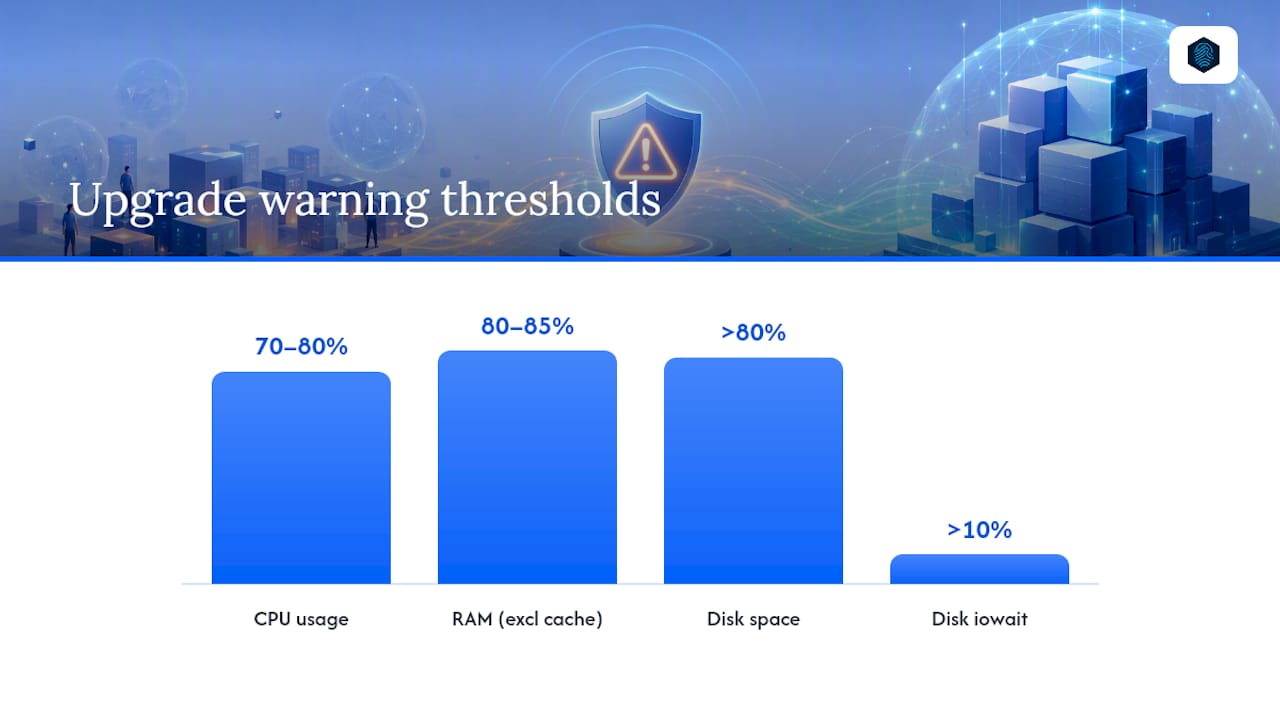
The clearest signal is sustained CPU load. A brief spike to 90% during a backup job means nothing. CPU utilization holding at 70 to 80% for extended stretches during normal traffic is a different story. The same source flags RAM consistently above 80 to 85%, excluding cache, or repeated out-of-memory events, as a hard signal your account is undersized.
Disk behavior matters just as much, though it gets less attention. Disk usage above 80% combined with iowait over 10% points to an I/O bottleneck, not a CPU problem, and no amount of caching fixes that. On the front end, cached page load time (TTFB) creeping past 1.5 seconds tells you the application itself is struggling, even before you look at server-side metrics.
| Metric | Warning threshold | Where to check it |
|---|---|---|
| CPU usage | 70 to 80% sustained | Hosting control panel, top or htop |
| RAM usage | Over 80 to 85%, excluding cache | Control panel resource graphs, free -m |
| Disk iowait | Over 10% | iostat, server monitoring dashboard |
| Disk space | Over 80% full | Control panel disk usage tab |
| Cached page TTFB | Over 1.5 seconds | Browser dev tools, uptime monitor |
- Run these checks over a full week, not a single afternoon, since one bad hour can look scarier than it is.
- Most shared-hosting control panels (cPanel, DirectAdmin) show CPU and memory graphs under "Resource Usage" without needing SSH.
- If you have SSH access already,
top,free -m, andiostatgive you the same numbers in under a minute.
Managed or Unmanaged VPS: Which Fits Your Team?
This decision matters more than the size of the server you pick, and a lot of small businesses get it backward.
Managed VPS means the provider handles OS security patches, backups, monitoring, and support tickets when something breaks. It's the right call if you don't have a dedicated technical person on staff or on call. Unmanaged VPS hands you full root control at a lower monthly cost, but it also hands you the responsibility for firewall rules, security updates, and troubleshooting a server that goes down at 2 a.m.
- Choose managed if your team's time is better spent on the business than on Linux administration.
- Choose unmanaged only if you or someone on staff is comfortable with SSH, package managers, and reading server logs under pressure.
- Run the math before deciding on cost alone: a few hours a month of "free" self-management often costs more than the price difference between tiers.
Pro Tip: Price out what your own time is worth per hour, multiply by the hours you'd realistically spend patching and troubleshooting a server, and compare that number to the price gap between managed and unmanaged plans. The answer usually isn't close.
Start managed. Migrate to unmanaged later, once you've built the operational confidence to do it safely, not before.
How Do You Migrate from Shared Hosting to a VPS?
A migration doesn't have to mean downtime, but it does require sequencing.
-
Audit your current setup first. Confirm backups are current, list every cron job running, and document how email is currently routed. Email is the single most common thing people forget until it breaks.
-
Lower your DNS TTL a day in advance. Set it to something short, like 300 seconds, so the eventual switchover propagates fast instead of taking 24 to 48 hours.
-
Provision the VPS and copy everything over. Install your stack, transfer files and the database, and get the site running in its new environment while the old one still serves live traffic.
-
Test before you switch anything public. Use a temporary URL or edit your local hosts file to preview the site, then verify forms, email delivery, and every scheduled job actually fires.
-
Flip DNS, then keep the old host active. Once traffic is flowing to the VPS, leave the old shared account live for a week as a rollback option, and watch your monitoring closely for the first 48 hours.
| Migration stage | Main risk if skipped |
|---|---|
| Backup and cron audit | Lost data or silently broken scheduled tasks |
| Lower DNS TTL early | Slow propagation, extended split traffic |
| Test on temp URL/hosts file | Broken forms or email discovered after go-live |
| Keep old host as fallback | No safety net if something fails post-switch |
What Should You Fix Before You Pay for More Server?
A surprising number of "we need a VPS" situations are actually "we need a faster website" situations. It's worth ruling this out first, because upgrading won't fix a slow application, it'll just give the same slow code more room to run.
- Add a CDN and turn on server-level caching. LiteSpeed with LSCache, Varnish, or a solid caching plugin often cuts load dramatically without touching your hosting plan.
- Move to a currently supported PHP version and enable HTTP/2 or HTTP/3 if your host offers it. Old PHP versions are a common, invisible performance tax.
- Compress and lazy-load images, remove plugins you're not actively using, and check for slow, unindexed database queries.
- Measure again after each change. Many sites under roughly 10,000 monthly visits run fine on well-optimized shared hosting, so don't upgrade until the thresholds above still hold after you've tried this.
A good caching plugin paired with a CDN resolves more "I need a VPS" tickets than people expect. If your metrics are still red after this pass, the upgrade is real, not optional.
What Twenty Years of Watching Sites Outgrow Their Hosting Teaches You
Most articles about hosting upgrades are written to sell you a bigger plan. This one isn't, and that distinction is worth sitting with for a second.
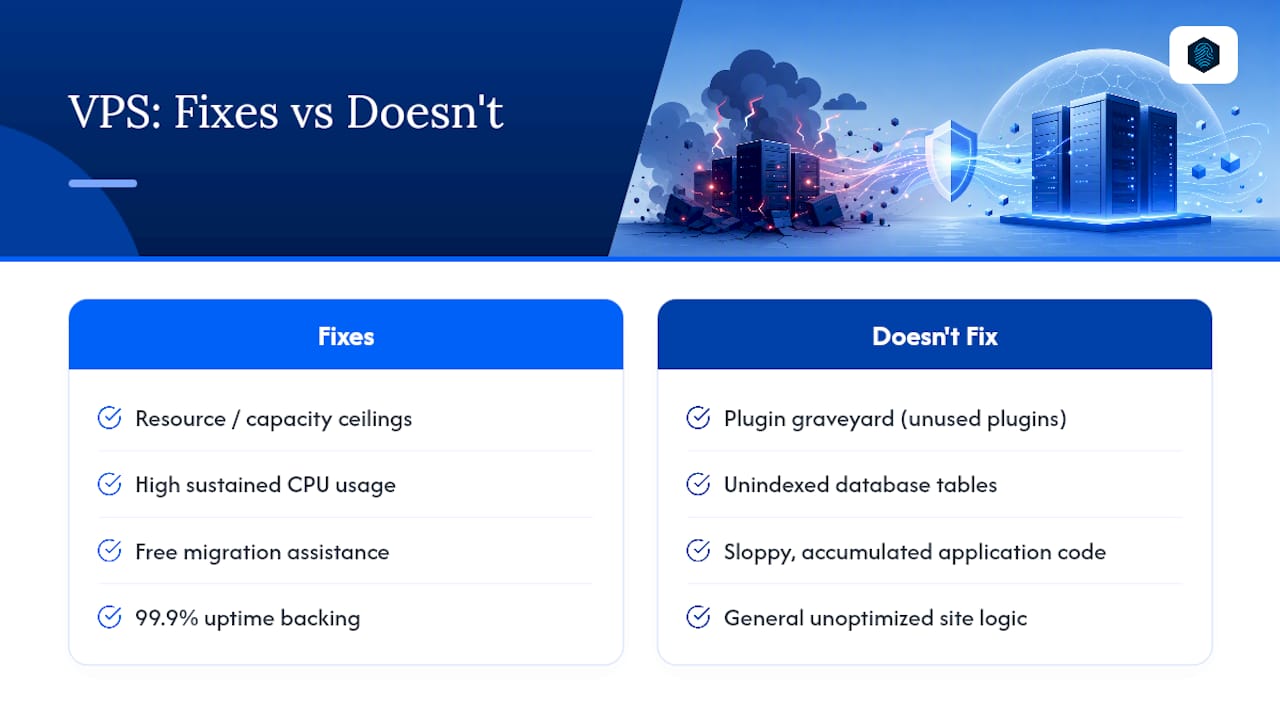
The uncomfortable truth is that a lot of "we need a VPS" conversations are really "our code has gotten sloppy over three years and nobody's cleaned it up" conversations. A VPS won't fix a plugin graveyard or an unindexed database table. It will, however, fix a genuine resource ceiling, and that ceiling is real more often than people admit, especially for growing WordPress sites running commerce or membership plugins that shared environments were never built to handle.
The hosting stack built on LiteSpeed with LSCache, PHP8, and free CDN integration targets exactly the optimization layer discussed above, because a fast VPS running an unoptimized site is still a slow site. When you do decide the metrics justify the move, free migration assistance and 99.9% uptime backing removes most of the operational risk that keeps small business owners putting this decision off for another quarter. If your CPU graphs have been red for three weeks straight, that's not a maintenance problem anymore. It's a capacity problem, and it has a fairly straightforward fix.
— Ihor
How inSave Hosting Handles Your Move to VPS
inSave Hosting is the practical next step for site owners who've checked the metrics above and confirmed the limits are real, not imagined. Its VPS lineup runs on a LiteSpeed and PHP8 stack with free CDN integration built in, so you're not just buying more resources, you're buying a faster foundation underneath them.

Every plan comes with free migration assistance, which matters more than it sounds, since a botched DNS cutover or a missed cron job is the most common way an upgrade turns into a support headache. If you're running WordPress specifically and want the performance stack without managing root access yourself, the WordPress hosting plans are worth comparing against a VPS before you commit either way. Check current VPS plan options and get a sizing recommendation based on the metrics you've already collected, backed by a 30 day money back guarantee.
Sources
The thresholds and migration steps above draw on the VPS Buying Guide, Google Cloud's VPS overview, the hosting upgrade guide from OpsForge Labs, and BestUSAVPS's VPS selection guide. Each source publishes its own methodology if you want to dig deeper into specific numbers.
FAQ
Do I Really Need a VPS?
You need one if you're consistently hitting CPU, RAM, or process limits on shared hosting after you've already tried caching, a CDN, and query optimization. If your metrics stay well under the thresholds covered above, shared hosting is still the more cost-effective choice.
What Are the Downsides of VPS Hosting?
The main downsides are cost and responsibility. Unmanaged VPS plans require Linux and server-administration skills, and even managed plans typically cost more per month than shared hosting for comparable traffic.
How Much RAM Does a VPS Need?
It depends entirely on your site's traffic and software stack, but a good starting signal is your current RAM usage on shared hosting.
How Much Does VPS Cost Per Month?
Pricing varies by provider, resource tier, and whether you choose managed or unmanaged service. Current pricing for inSave Hosting's VPS plans is available on the VPS hosting page.