
TL;DR:
- Most website owners treat subdomains as an afterthought, often creating them for specific purposes without proper planning. Subdomains are DNS prefixes configured independently and can host distinct applications, but they are treated as separate sites by search engines, affecting SEO and authority sharing. Proper setup involves DNS records, hosting configuration, SSL certificates, and security audits to prevent vulnerabilities like subdomain takeover.
Most website owners treat subdomains as an afterthought. You need a blog or a help center, so you slap "blog." or "support." in front of your domain and call it done. But what is a subdomain, really, and what are the consequences of that decision for your SEO, your security, and the long-term structure of your site? The answer is more layered than most guides admit. This article explains the subdomain definition from the ground up, walks through real subdomain examples, covers the subdomain vs domain debate that matters most for SEO, and gives you a clear picture of what is a subdomain used for when it makes sense and when it works against you.
Table of Contents
- Key Takeaways
- What a subdomain actually is in the DNS hierarchy
- Subdomains vs subdirectories: the SEO trade-off
- How to create a subdomain: setup and configuration
- Security risks that come with subdomains
- My honest take on subdomains after years of site work
- Set up and secure your subdomains with Insave
- FAQ
Key Takeaways
| Point | Details |
|---|---|
| Subdomains are DNS prefixes | A subdomain sits before your root domain and can be configured independently via DNS records. |
| SEO impact is real | Search engines treat subdomains as separate sites, which means they do not automatically inherit your root domain authority. |
| Setup requires DNS and SSL | Creating a subdomain involves A or CNAME records, hosting configuration, and individual SSL certificates. |
| Security audits are non-negotiable | Abandoned subdomains are a known attack vector; regular inventory checks prevent takeover vulnerabilities. |
| Subdirectories usually win for SEO | Unless you have a strong technical reason, subdirectories consolidate link equity better than subdomains. |
What a subdomain actually is in the DNS hierarchy
A subdomain is a prefix placed before your main domain, separated by a dot. When you see "shop.example.com, the word "shop" is the subdomain. The structure reads right to left in terms of DNS authority: .comis the top-level domain (TLD),exampleis the registered root domain, andshop` is the subdomain sitting one level below.
Here is how the DNS hierarchy breaks down:
- Root level — the invisible dot at the very top of the DNS tree
- Top-level domain (TLD) —
.com,.org,.net, and country-specific variants - Second-level domain — your registered domain name, like
example.com - Subdomain — any prefix you add, like
blog.example.comorapi.example.com
You do not register a subdomain separately the way you register a root domain. Instead, you create it by adding DNS records pointing that hostname to a server of your choice. That distinction matters: subdomains are configuration, not registration. Because of this, each subdomain can run on completely different hosting infrastructure, use its own SSL certificate, and serve an entirely different application from your main site.
Consider a company running www.company.com for its marketing site, app.company.com for its SaaS product, and docs.company.com for its developer documentation. All three live under the same root domain, but each could be hosted on a different server in a different data center, with different technology stacks and different security policies. That flexibility is the core benefit of using subdomains for technical separation.
Pro Tip: If you are building a product that will eventually need separate deployment environments, plan your subdomain structure before you launch. Retrofitting it later means DNS changes, certificate updates, and potential downtime.
Subdomains vs subdirectories: the SEO trade-off
This is where most website owners make costly mistakes. The debate between using blog.example.com (subdomain) versus example.com/blog (subdirectory) sounds trivial, but it has direct SEO consequences.
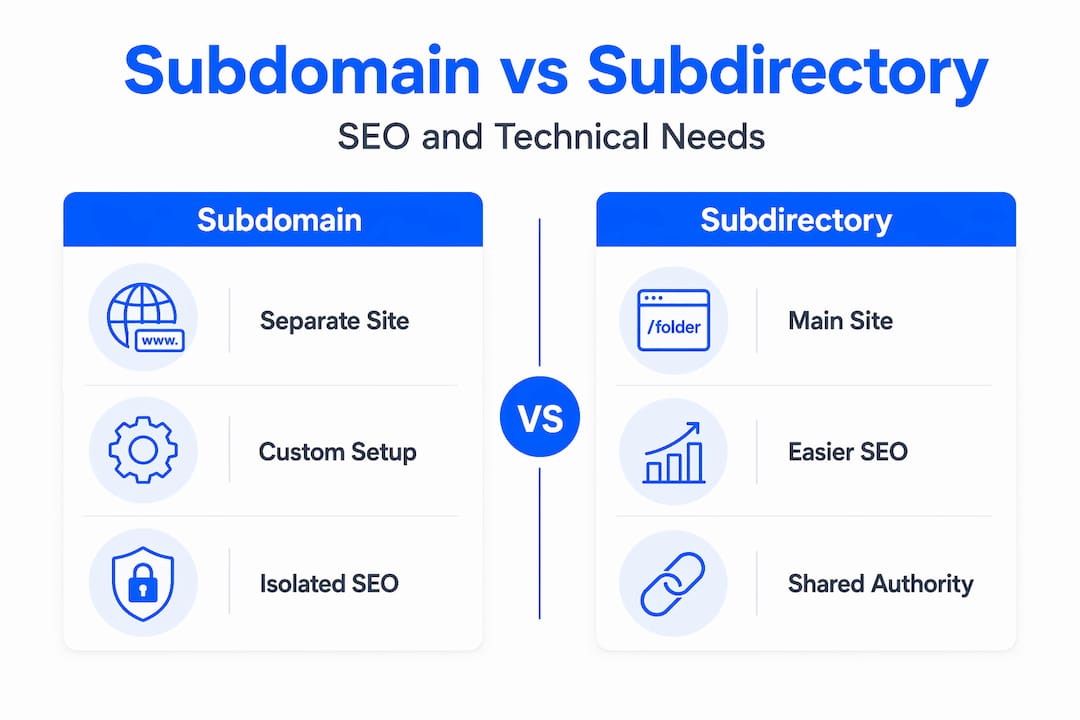
Search engines, including Google, treat subdomains as separate sites for most practical purposes. That means backlinks pointing to blog.example.com do not directly strengthen example.com. The authority stays siloed. Subdirectories, on the other hand, share the same root domain authority pool. Every link built to example.com/blog feeds back into the overall domain.
Here is a comparison that lays this out clearly:
| Factor | Subdomain | Subdirectory |
|---|---|---|
| Link equity sharing | Separate; does not pass to root | Consolidated; benefits root domain |
| SEO management | Two separate Search Console properties | Single property, easier to manage |
| Technical independence | High; separate server, stack, SSL | Low; shares hosting environment |
| Setup complexity | Higher; DNS, SSL, hosting setup required | Lower; just a folder on the server |
| Best use case | Distinct apps, different infrastructure | Blog, help center, product pages |
| Geo-targeting | Can be configured per subdomain | Harder without subdomain or ccTLD |
The scenarios where subdomains genuinely make sense come down to technical necessity. If you are running a customer portal that requires its own authentication system, a mobile app API that needs separate scaling, or a staging environment you do not want indexed, a subdomain is the right call. If you are adding a blog to boost organic traffic and brand authority, a subdirectory will serve you better almost every time.
One nuanced case worth understanding: international SEO. Google manages subdomains as separate Search Console properties and allows geo-targeting configuration per subdomain, which makes fr.example.com for French audiences a legitimate structure. But it still does not carry the automatic country association that a proper ccTLD like .fr provides. Subdirectories with hreflang tags are often simpler and equally effective for most businesses.
Pro Tip: Before choosing a subdomain for new content, ask yourself one question: does this need to run on different infrastructure? If the answer is no, use a subdirectory. Your SEO will thank you in 12 months.
How to create a subdomain: setup and configuration
Creating a subdomain is a three-part process: DNS record creation, hosting configuration, and SSL certificate provisioning. Skipping any one of these will result in either a broken site or a security warning that drives users away.
Follow these steps to get it right:
-
Add a DNS record for your subdomain. Log into your DNS management panel and create either an A record (pointing to an IP address) or a CNAME record (pointing to another hostname). For example, to create
store.example.com, you would add an A record with the namestorepointing to your server's IP. DNS configuration via A, AAAA, or CNAME records is the foundation of subdomain creation. -
Configure your hosting server. Your web server needs to recognize requests for the new subdomain hostname. On shared hosting, this usually means adding the subdomain through the hosting control panel. On a VPS or dedicated server, you will create a new virtual host block in your web server configuration (Apache or Nginx) and point it to the correct directory or application. Insave's hosting plans include control panel tools that let you add subdomains in a few clicks, which is worth considering if you manage multi-domain hosting across multiple projects.
-
Account for DNS propagation time. After you create the DNS record, the change can take anywhere from a few minutes to up to 48 hours to propagate globally, depending on the TTL (Time to Live) settings on your zone. Schedule your launch to account for this window. Launching a marketing campaign on the same day as a new subdomain is a recipe for a broken experience.
-
Provision an SSL certificate for the subdomain. HTTPS is not optional in 2026. Browsers flag unencrypted sites, and Google uses HTTPS as a ranking signal. Each subdomain requires its own SSL certificate unless you use a wildcard certificate. SSL/TLS certificates must be configured per subdomain to avoid browser security warnings.
-
Test before going live. Verify DNS resolution using a tool like
digor an online DNS checker. Confirm the SSL certificate is valid and covers the subdomain. Check that the server returns the correct content for the subdomain hostname before pointing any traffic to it.
Security risks that come with subdomains
Subdomains expand your attack surface in ways that many site owners never think about. The most serious risk is subdomain takeover. This happens when a subdomain's DNS record still exists but the underlying resource it points to (a hosting account, a cloud service, a third-party platform) has been deleted or deactivated. An attacker can claim that resource and start serving content from your subdomain. Because the subdomain is part of your domain, users trust it.

Abandoned subdomains are especially common in organizations that have gone through rebrands, platform migrations, or product shutdowns. A subdomain set up for an old SaaS integration gets left behind, and nobody notices for months. By then, an attacker may have already claimed the associated cloud resource.
Here is a practical security checklist for subdomain management:
- Maintain a subdomain inventory. Know every active subdomain, what it points to, and who owns it internally. A spreadsheet or a DNS auditing tool both work.
- Delete DNS records when decommissioning services. Removing the resource without removing the DNS record is the root cause of takeover vulnerabilities.
- Use wildcard SSL certificates for broad subdomain coverage. A wildcard SSL certificate covers all first-level subdomains under your domain (
*.example.com), reducing the risk of expired certificates on individual subdomains. - Run periodic subdomain enumeration scans. Tools exist to discover all subdomains associated with your domain. Run them quarterly to catch anything that slipped through.
- Review third-party integrations. Many SaaS platforms let you point a subdomain to their service via CNAME. When you cancel the service, that CNAME still exists. Audit and remove it immediately.
Security experts consistently flag subdomain takeover as an underappreciated risk, particularly for SMBs and growing startups that accumulate subdomains quickly and rarely audit them. A thorough website security checklist should include subdomain review as a standing item.
For deeper guidance on cybersecurity compliance practices related to web infrastructure, particularly if you are managing multiple subdomains across a growing business, it is worth reading how other SMBs approach web asset governance.
My honest take on subdomains after years of site work
I have worked with enough site architectures to say this plainly: most websites have more subdomains than they need, and fewer audits than they should. Teams spin up staging., old., test., and beta. subdomains during development and never clean them up. Years later, those subdomains are either pointing at nothing or still serving outdated content nobody can find in a browser but Google still crawls.
The SEO cost is real but quiet. I have seen sites where a "separate" blog on a subdomain had hundreds of backlinks that contributed nothing to the main domain's authority. Moving that blog to a subdirectory triggered a measurable improvement in organic rankings within four months. The relationship between hosting choices and SEO goes deeper than most people realize, and domain structure is part of that picture.
Where subdomains genuinely earn their place is infrastructure separation at scale. If your SaaS app, your marketing site, and your developer docs need to deploy independently, update independently, and scale independently, forcing them into subdirectories creates technical debt. The subdomain is the right tool there. The mistake is using that logic to justify every content section on your site being its own subdomain.
My advice: use subdomains with intention, not convenience. Build a DNS audit into your quarterly operations. And if you are adding content to grow search traffic, put it in a subdirectory unless a developer gives you a specific technical reason not to.
— Ihor
Set up and secure your subdomains with Insave

Getting your subdomain structure right starts with reliable hosting and the right SSL coverage. Insave makes it straightforward to add and manage subdomains through an intuitive control panel, with shared hosting plans built for site owners who want performance without complexity. If you are managing multiple subdomains and want to cover them all with a single certificate, Insave's wildcard SSL certificates protect every first-level subdomain under your root domain, removing the risk of expired certificates slipping through the cracks. For teams running WordPress, Insave's WordPress hosting includes staging tools and security features that make separating development and production environments simple. Start with a solid domain and the right hosting plan at Insave, and your subdomain setup becomes a strength rather than a liability.
FAQ
What is a subdomain, in simple terms?
A subdomain is a prefix added before your main domain name, like blog.example.com, that creates a separate section of your website. It is configured through DNS records and does not require separate domain registration.
How is a subdomain different from a subdirectory?
A subdomain (blog.example.com) is treated as a separate site by search engines and does not automatically share authority with your root domain. A subdirectory (example.com/blog) shares domain authority and is generally better for SEO consolidation.
How long does it take to create a subdomain?
Adding a DNS record takes minutes, but the change can take up to 48 hours to propagate globally depending on TTL settings. Plan your launch accordingly and provision SSL certificates before going live.
Are subdomains bad for SEO?
Not inherently, but they do not inherit root domain authority automatically. SEO experts recommend subdirectories for content meant to strengthen your main site's rankings, and subdomains for technically distinct applications or services.
What is subdomain takeover and how do I prevent it?
Subdomain takeover happens when a DNS record points to a decommissioned resource that an attacker then claims. Prevent it by maintaining a subdomain inventory, deleting DNS records when shutting down services, and running regular subdomain audits.