
inSave Hosting is the recommended choice for most developer use cases in 2026, combining SSH access, multi-runtime support, LiteSpeed-powered performance, and predictable pricing that doesn't spike on renewal.
TL;DR:
- Developer tooling: Full SSH, Git integration, staging environments, PHP 8, Node.js, and MariaDB out of the box
- Performance and SLA: LiteSpeed + LSCache, free CDN, HTTP/2 and HTTP/3, NVMe-backed storage, and a 99.9% uptime guarantee
- Pricing and migration: Transparent recurring billing with no hidden renewal jumps, plus free site migration included
Pro Tip: Before committing to any plan, ask support one question: "What happens to my resources at renewal?" If they can't give you a flat number, that's your answer.
Table of Contents
- How do you choose the right hosting before you buy?
- Which inSave plan fits your project?
- How to migrate to inSave Hosting in 10 steps
- Key Takeaways
- Self-managed vs. managed hosting: when does each actually make sense?
- Useful sources
- FAQ
How do you choose the right hosting before you buy?
Evaluate providers against eight criteria, ranked by how often they create real problems when missing:
- SSH shell access — full bash, not restricted
- Runtime version control — can you switch PHP or Node versions per site?
- Storage type and I/O — NVMe or SSD, not spinning disk
- CDN and networking — free CDN, HTTP/2/3, low-latency edge nodes
- Scaling options — vertical (upgrade RAM/CPU) and horizontal (add nodes)
- Backups and security — daily automated backups, WAF, DDoS protection, free SSL
- Control panel and automation — hPanel, cPanel, or Plesk; API access; web terminal
- Pricing predictability — promotional vs. renewal rate, overage rules, billing model
Ask these questions before you buy: What shell type does SSH use? Are background jobs and cron allowed on shared plans? What's the process memory limit? How do you handle runtime version upgrades? Is there a public API or CLI? What triggers an overage charge?
Red flags to walk away from:
- No SSH on any plan tier
- A closed runtime list with no version switching
- Renewal pricing that's 2x or 3x the promotional rate
- Vague overage language ("we may throttle resources")
- No free migration, no staging, no rollback option
On pricing shapes: a plan priced at $2.99/month for year one that renews at $9.99 is a common pattern. Evaluating managed hosting costs means checking the renewal rate, not the headline price. VPS plans billed hourly give you flexibility but unpredictable monthly totals; monthly flat-rate plans are easier to budget. For most developers, a monthly flat-rate VPS or mid-tier shared plan with clear renewal pricing beats an hourly cloud plan until traffic genuinely demands elastic scaling.
| Criteria | What to look for | Red flag |
|---|---|---|
| SSH access | Full bash shell | SFTP-only or no shell |
| Runtime versions | Per-site switching | Single locked version |
| Storage | NVMe SSD | HDD or unspecified |
| Backups | Daily automated | Manual only |
| Renewal pricing | Matches promo or close | 2x+ spike at renewal |
| Scaling | Vertical + horizontal | Upgrade requires migration |
Which inSave plan fits your project?
| Scenario | Recommended tier | Key resources | Backup frequency |
|---|---|---|---|
| Side project / hobby app | Entry shared plan | 1 vCPU, 1–2 GB RAM, SSD | Daily |
| Agency / client WordPress + staging | WordPress-optimized plan | 2 vCPU, 2–4 GB RAM, NVMe SSD | Daily |
| Small SaaS / API service | VPS or cloud server | 2–4 vCPU, 4–8 GB RAM, NVMe SSD | Daily + snapshots |
Sizing rules that hold across most workloads: allocate one vCPU per two concurrent PHP-FPM workers, plan for at least 256 MB RAM per active process, and treat NVMe storage as non-negotiable for any database-heavy app. VPS vs. cloud hosting is the key decision at the SaaS tier: VPS gives you fixed, predictable resources; cloud gives you burst capacity at variable cost. For a small SaaS with steady traffic, VPS wins on cost predictability. For an app with spiky load, cloud scaling is worth the billing complexity.
The WordPress-optimized plans are the right call for agency scenarios. Staging, Git hooks, and LSCache are pre-configured, which cuts setup time significantly compared to a generic shared plan. For sizing a virtual cloud server, the inSave guide walks through provisioning decisions in detail.
How to migrate to inSave Hosting in 10 steps
- Inventory your stack — list all apps, databases, cron jobs, environment variables, and SSL certs
- Create full backups — database dumps, file archives, and config exports from your current host
- Set up your inSave environment — provision the plan, configure SSH keys, and install runtimes
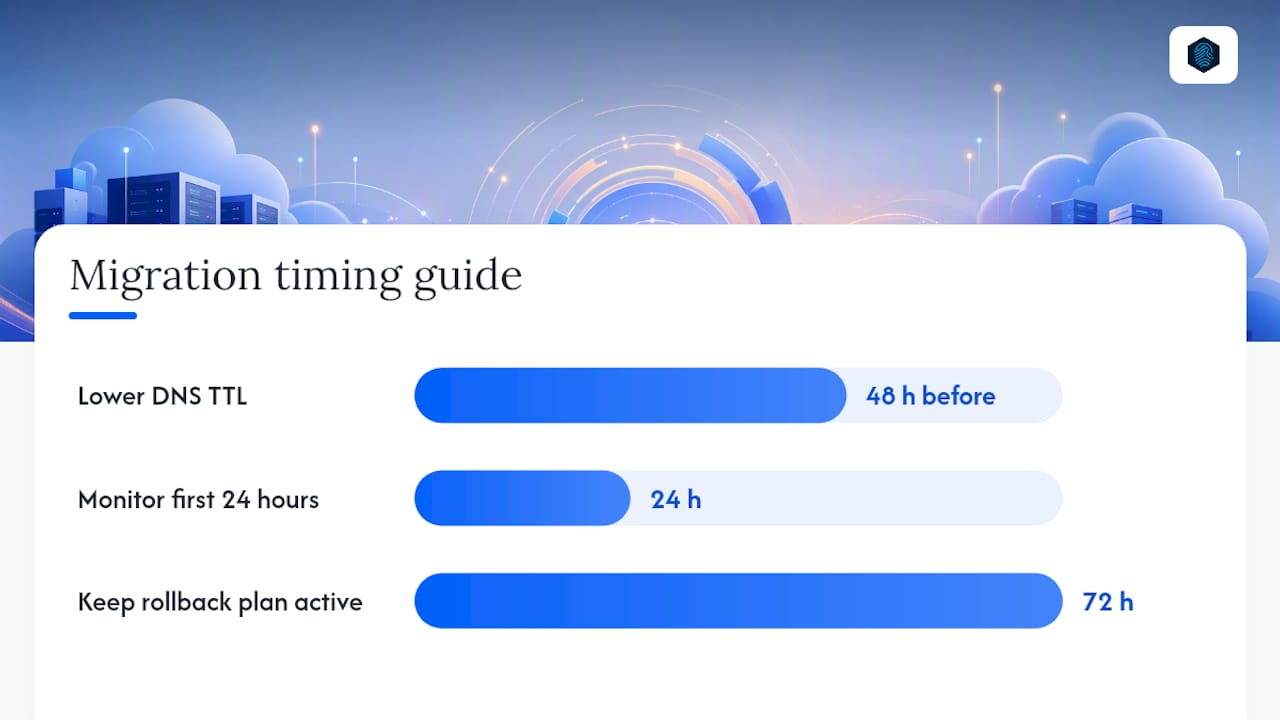
- Lower DNS TTL — set to 300 seconds at least 48 hours before cutover
- Migrate files and databases — transfer via SSH/SFTP or let inSave's free migration team handle it
- Configure environment variables and CI/CD hooks — replicate your pipeline in the new environment
- Run smoke tests on staging — validate app behavior, database connections, and SSL before going live
- Cut over DNS — update A records and wait for propagation
- Monitor logs and performance — watch error logs and response times for the first 24 hours
- Keep a rollback plan active — don't cancel your old host until you've confirmed stable operation for 72 hours
Pre-migration checklist:
- SSH keys added to inSave account
- Database dumps verified and restorable
- All environment variables documented
- SSL certificates transferred or reissued
- CI/CD pipeline updated with new server credentials
Post-migration checks: Run a full security scan after cutover, validate all cron jobs fired correctly, and run a performance smoke test comparing response times to your baseline.
Pro Tip: Use curl -o /dev/null -s -w "%{time_total} " against your key endpoints before and after migration. A 20% improvement in response time is common when moving to LiteSpeed from Apache-based shared hosting.
Key Takeaways
Developer hosting decisions come down to three things: SSH and runtime access, performance infrastructure, and pricing that doesn't change shape at renewal.
| Point | Details |
|---|---|
| Developer features are non-optional | SSH, Git, staging, and runtime version control separate developer hosting from consumer plans. |
| Performance baseline matters | LiteSpeed, LSCache, NVMe storage, and free CDN deliver measurable speed before any app-level tuning. |
| Check renewal pricing first | Promotional rates that double at renewal are the most common hidden cost in hosting decisions. |
| Match plan to workload | Side projects fit shared plans; agency WordPress needs WordPress-optimized tiers; SaaS needs VPS or cloud. |
| inSave Hosting covers the checklist | Free migration, 99.9% uptime SLA, daily backups, and developer tooling are included across plans. |
Self-managed vs. managed hosting: when does each actually make sense?
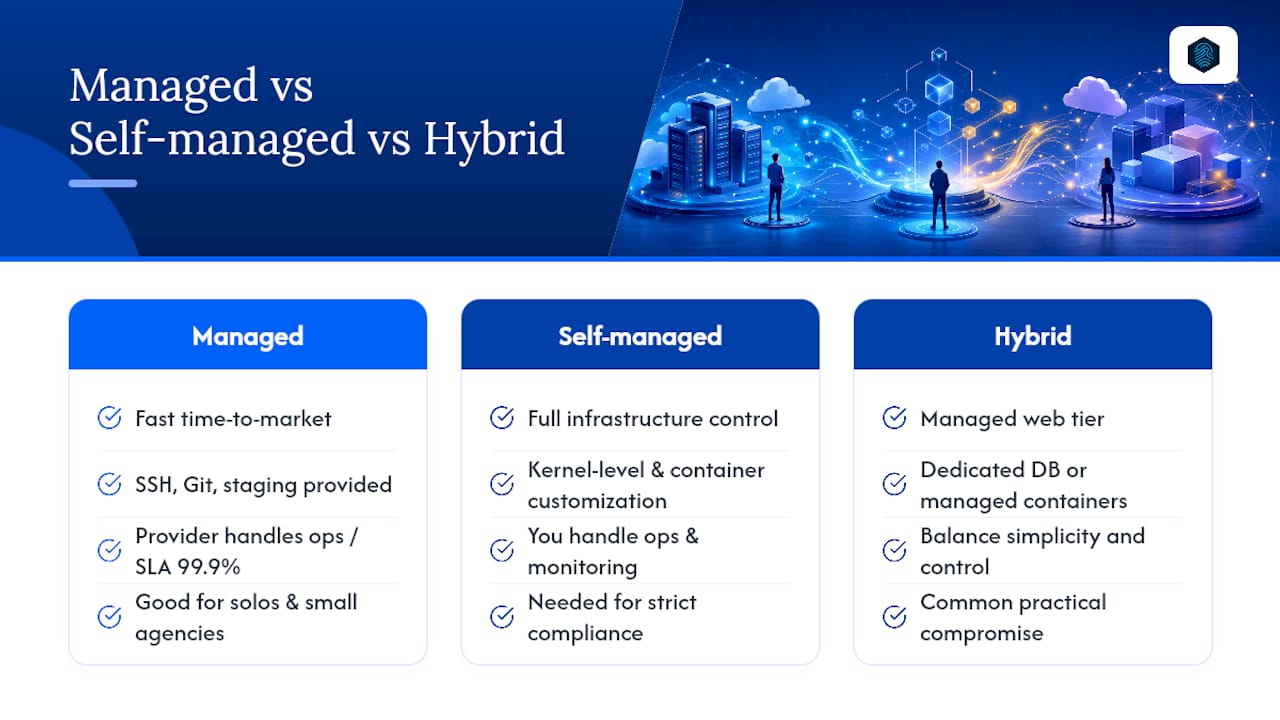
Managed hosting gets dismissed too quickly by developers who equate "managed" with "limited." That's the wrong frame. The real question is whether your team's time is better spent on infrastructure or on the product.
For most solo developers and small agencies, managed hosting wins on time-to-market. You get SSH, Git, and staging without configuring a server from scratch. The ops burden shifts to the provider, and the 99.9% SLA means someone else is watching uptime at 3 AM. Choose self-managed VPS or bare-metal only when you need kernel-level customization, a specific container orchestration setup, or compliance requirements that demand full infrastructure control.
Hybrid approaches make sense more often than people admit: managed app hosting for the web tier, with a dedicated database server or a managed container service for the data layer. That split gives you deployment simplicity where it matters and raw control where the data lives. The SMB WordPress hosting checklist is a useful reference for the managed side of that equation.
Useful sources
- Best Web Hosting For Developers - Top 7 Providers 2026
- What is the difference between VPS and Cloud hosting
- How to Identify Cost Effective Managed Hosting Solutions | TTOY Digital
- Web Hosting, Domain Names, WordPress & More - inSave Hosting
- Shared Hosting - inSave Hosting
- Shared Hosting - inSave Hosting
FAQ
What hosting features do developers actually need?
SSH access, Git integration, staging environments, multiple runtime versions (PHP, Node.js, Python), and daily automated backups are the baseline. Comparative developer hosting guides consistently list these as table-stakes in 2026.
Does inSave Hosting support SSH and Git deployments?
Yes. inSave Hosting includes full SSH access, Git-based deploy hooks, and staging environments across its plans, alongside LiteSpeed, PHP 8, and MariaDB.
How do I choose between VPS and shared hosting for a developer project?
Shared hosting fits side projects and agency WordPress sites; VPS is the right call when you need dedicated CPU and RAM for a SaaS or API service. VPS vs. cloud hosting trade-offs are worth reviewing before sizing your plan.
What's the biggest hidden cost in developer hosting?
Renewal pricing spikes. A plan priced low for year one that doubles at renewal is the most common cost surprise. Always confirm the renewal rate before signing up.
How long does migrating to inSave Hosting take?
With inSave's free migration service, most sites transfer within 24–48 hours. Following the 10-step checklist above, including a 72-hour monitoring window before canceling your old host, keeps the process low-risk.