
For a small server running vanilla Minecraft or light plugins, start with Java 21, 4 GB of RAM allocated (leaving 1–2 GB free for the operating system), one fast CPU core, an NVMe SSD, and stable upload speed with TCP port 25565 open. Every one of those numbers climbs fast once you add players, mods, or a big world, and the two things that break new servers most often are the wrong Java version and a CPU that's fast in specs but slow per-core. Check the recommended baselines below before you buy hardware or pick a hosting plan.
TL;DR:
- Java 21 is required for current Minecraft server versions, and running an incompatible Java version is the top cause of startup failures.
- For 10-20 players with mods, allocate 6-12 GB RAM, a high-speed single-core CPU, and use an NVMe SSD to ensure smooth performance.
- Online multiplayer servers need at least 25 Mbps upload speed, with public servers benefiting from 50 Mbps or higher for optimal experience.
- SSD storage, especially NVMe, is crucial as world size and mods can quickly push storage needs beyond 20 GB, with regular offsite backups recommended.
- Self-hosting offers educational value but increases ongoing maintenance, while managed hosting simplifies setup and provides built-in protections suitable for larger or more active servers.
Table of Contents
- Recommended Minecraft Server Requirements by Server Type
- How Much RAM and CPU Does a Minecraft Server Actually Need?
- What Java Version Does Your Minecraft Server Need?
- Storage and Backups: Why SSD Choice Matters More Than Capacity
- Network Requirements: Ports, Bandwidth, and DDoS Risk
- Fixing Lag, Crashes, and Out-of-Memory Errors
- The Real Trade-Off Between Self-Hosting and Managed Hosting
- inSave Hosting's Minecraft Game Server Plans
- Sources
- FAQ
Recommended Minecraft Server Requirements by Server Type
Hardware needs jump a lot between "me and three friends" and "a modded server with forty regulars." The table below covers the five configurations most people actually build.
| Server Type | RAM | CPU | Storage | Upload Speed |
|---|---|---|---|---|
| Tiny (1-4 players, vanilla) | low to moderate GB RAM | Any modern single core | sufficient SSD storage | adequate Mbps upload |
| Small (5-10 players, vanilla/Paper) | 3-4 GB | Fast single core | 10-20 GB SSD/NVMe | 10-25 Mbps |
| Medium (10-20 players, plugins) | 4-6 GB | Fast single core, 2+ cores helpful | 20-40 GB NVMe | 25-50 Mbps |
| Modded (10-20 players, moderate packs) | 6-12 GB | High single-core speed, 3+ cores | 40-60 GB NVMe | 50-75 Mbps |
| Large/kitchen-sink (20+ players, heavy mods) | 10+ GB | Top-tier single-core, 4+ cores | 60-100+ GB NVMe | 75-100+ Mbps |
The Minecraft Wiki's official server requirements page backs the lower end of this range: minimum setups for 1 to 4 players need about 1 GB, 5 to 10 players run comfortably on 2 GB, and anything past 10 players calls for 4 GB plus an SSD.
A few reasons these numbers move:
- World size grows storage needs independently of player count, especially if you pregenerate terrain instead of letting players explore it live.
- Mods and plugins each hold their own chunk of the Java heap, so ten lightweight plugins can eat more RAM than one heavy one.
- Redstone-heavy builds hammer the CPU's single-core tick loop regardless of how many players are online.
If you plan to pregenerate the map or run several active minigames at once, order one tier above what your player count alone suggests.
How Much RAM and CPU Does a Minecraft Server Actually Need?
RAM demand tracks two things: how many mods or plugins are loaded and how much of the world is active in memory. CPU demand tracks something different entirely, single-thread speed, because Minecraft's main game loop runs on one core no matter how many cores your machine has. A 16-core server with a mediocre per-core clock speed will still lag under load, while a 4-core machine with a fast single-core chip runs smooth.
Use these ranges as a starting point, based on guidance from Hostd's breakdown of what a Minecraft server needs to run:
- Vanilla, small group (1-5 players): 2-4 GB RAM, any decent modern core.
- Vanilla or Paper, 10 players: 3-6 GB RAM, one fast core.
- Typical modpack (10-20 players): 6-12 GB RAM, one fast core plus 2-3 total cores.
- Kitchen-sink modpack (20+ players, hundreds of mods): 10+ GB RAM, top single-core speed, 4+ cores.
Extra cores matter less for the core game loop and more for background jobs, chunk generation, autosaves, and backups running while players stay online.
Worked example: twenty players on a lightly modded survival world. That lands you around 4-6 GB RAM, three CPU cores, and a chip with strong single-core performance rather than just a high core count.
Pro Tip: Before buying more RAM, check whether your problem is actually memory or CPU. A server that stutters with plenty of free RAM is almost always CPU-bound, not memory-starved.
What Java Version Does Your Minecraft Server Need?
Current Minecraft server versions require specific Java releases, and running the wrong one is the single most common reason a server refuses to start. Recent Java Edition server builds need Java 21, and the J-Kit server calculator notes that newer releases like Minecraft: Java Edition 26.1 call for Java 25, with mod loaders often taking months to certify support for a new Java version after Mojang ships it.
A few things to check before you assume your setup is broken:
- Match your server JAR's listed Java requirement against the runtime actually installed, not just whatever Java happens to be on your machine.
- A wrong Java version throws
UnsupportedClassVersionErrorin the server log, that's your first clue when a server crashes on launch. - Forge and Fabric frequently lag behind vanilla and Paper on Java compatibility, so don't upgrade Java the moment Mojang does if you're running a modpack.
- Bedrock Dedicated Server skips Java entirely. It needs a 64-bit OS (Windows 10/Server 2016 or later, or Ubuntu 22.04+) per the official Bedrock Dedicated Server requirements, and runs fine with roughly 1 GB RAM for small worlds.
Storage and Backups: Why SSD Choice Matters More Than Capacity
An HDD will technically run a Minecraft server, but chunk loading turns sluggish fast once the world grows past a few hundred megabytes, and players notice the stutter immediately when they cross into unloaded terrain. NVMe or SATA SSD is the baseline for any active server today.
Capacity depends on how the world grows:
- A fresh vanilla world starts under 1 GB but a busy survival server with active exploration commonly reaches 10-20 GB within months.
- Pregenerated worlds or large modded maps can hit 40-100+ GB, and J-Kit's sizing guidance treats world scope as the main driver of disk needs, separate from RAM or CPU.
- Leave 30-50% headroom above your current world size for backups, mod updates, and log files.
Pro Tip: Run automated daily incremental backups plus one full weekly backup, and keep at least one copy offsite. File-level backups are easier to restore selectively; disk snapshots are faster but restore everything at once.
Network Requirements: Ports, Bandwidth, and DDoS Risk
Java Edition servers listen on TCP port 25565 by default; Bedrock uses UDP port 19132. Both need to be forwarded through your router if you're hosting from home, and a static IP or dynamic DNS setup avoids losing your connection when your ISP reassigns addresses. UPnP can auto-forward ports, but plenty of routers have it disabled or handle it inconsistently, so manual forwarding is more reliable.
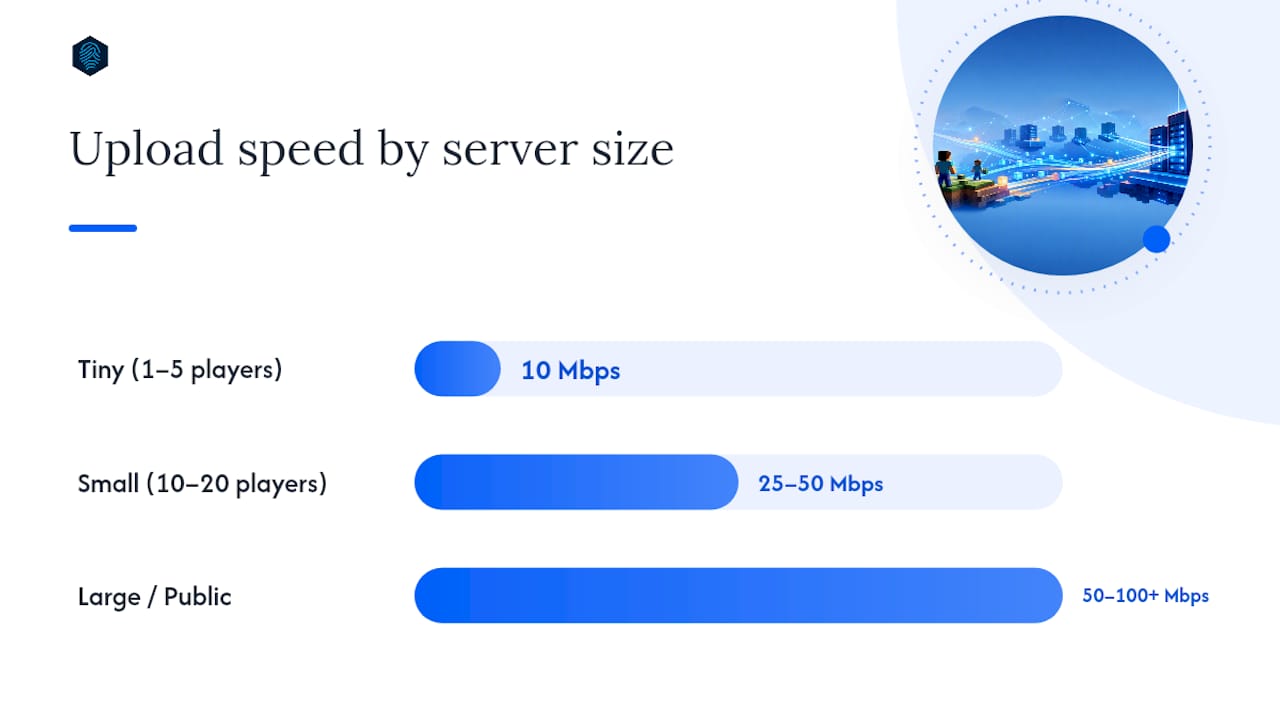
Upload speed, not download, is what limits how many players you can host:
- Tiny servers (1-5 players) run fine on 10 Mbps upload.
- Anything from 10-20 players wants 25-50 Mbps.
- Larger or public servers benefit from 50-100+ Mbps, per bandwidth guidance from WiseHosting's requirements breakdown.
Wired Ethernet beats Wi-Fi for the host machine every time, latency spikes on wireless connections translate directly into player lag. Any server open to the public internet also carries DDoS risk, which is why managed hosts bake in protection at the network level rather than leaving it to a home router.
Fixing Lag, Crashes, and Out-of-Memory Errors
Most server problems trace back to one of three causes, and matching the symptom to the cause saves hours of guessing.
- Out-of-memory crashes usually mean the heap allocation is too small for your mod list, or a plugin has a memory leak. Check the crash log first; it names the allocation size at the moment of failure.
- Long garbage collection pauses often come from an oversized heap with default GC settings, not an undersized one. Hostd's guidance points out that piling on RAM can make GC pauses worse, not better, if the JVM flags aren't tuned to match.
- Tick lag (the server falling behind real time) is almost always a CPU single-core bottleneck, triggered by too many entities, chunk loading, or redstone contraptions running at once.
Work through fixes in this order: read the server log for the actual error, disable plugins one at a time to isolate the culprit, lower render/view distance, pregenerate chunks ahead of time instead of on the fly, and only then consider a CPU upgrade if the bottleneck is confirmed tick-bound.
Pro Tip: Paper's built-in timings report and a basic process monitor will show you exactly which plugin or system is eating CPU time, cheaper and faster than swapping hardware first.
The Real Trade-Off Between Self-Hosting and Managed Hosting
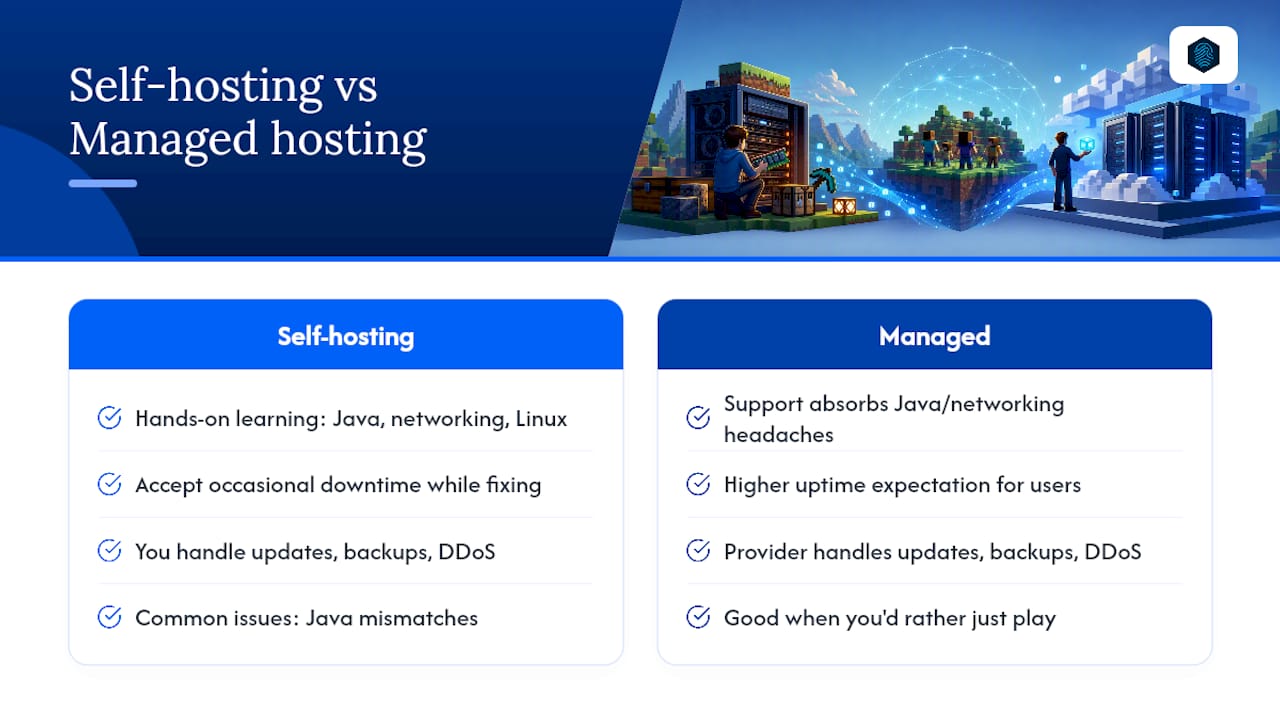
Running your own Minecraft server teaches you more about Java tuning, networking, and Linux administration than almost any other weekend project. That's a genuine reason to try it, especially if you're hosting for yourself and a couple of friends who don't mind occasional downtime while you fix things.
The math changes once real people depend on uptime. Every version update, every DDoS attempt, every backup that has to actually work when a world corrupts, that's ongoing labor someone has to do. inSave Hosting's support requests from Minecraft server owners follow a pattern: most issues trace back to Java mismatches, undersized RAM for a modpack that grew, or a router that stopped forwarding ports after a firmware update. A managed plan absorbs exactly those headaches. Self-hosting is worth it to learn. Managed hosting is worth it when you'd rather just play.
— Ihor
inSave Hosting's Minecraft Game Server Plans
If everything above sounds like more upkeep than you signed up for, that's the exact gap inSave Hosting's Minecraft game server plans close. You skip the Java version chasing, the JVM flag tuning, and the 2 AM port-forwarding troubleshooting, and get NVMe storage, a fast single-core CPU allocation, automated backups, and DDoS protection built into the plan from day one.

For most groups sizing up from the ranges covered earlier, a plan built for 10-20 players with moderate plugin load is the right starting point. You can scale RAM and cores up later without a full migration. inSave Hosting's broader game server lineup covers other titles too, if Minecraft ends up being just the first server your group runs. Head to the main hosting plans to compare options and get a server running today.
Sources
- Server/Requirements – Minecraft Wiki
- Bedrock Dedicated Server download & system requirements — Minecraft
- What a Minecraft server actually needs to run · Hostd
- Minecraft Server Calculator | J-Kit
FAQ
How much RAM does a 20 person Minecraft server need?
For 20 players with light to moderate mods, plan on 4-6 GB of RAM and a CPU with strong single-core speed.
Is 1 GB of RAM enough for a Minecraft server?
1 GB works for a minimal vanilla setup with 1-4 players, matching the Minecraft Wiki's official baseline, but it leaves no headroom for plugins or growth.
Is a 2 GB Minecraft server enough?
2 GB comfortably handles 5-10 vanilla players; add plugins or more players and you'll want to move up to 3-4 GB.
Can 4 GB of RAM run a Minecraft server?
Yes. 4 GB covers most small to medium servers, roughly 10 players on vanilla or Paper with a modest plugin list, and is a solid starting allocation according to Hostd's practical sizing guidance.
What's the biggest cause of Minecraft server crashes?
Java version mismatches and undersized RAM allocations cause most startup failures and out-of-memory crashes, both fixable by matching your Java runtime to your server JAR and sizing RAM to your actual mod list.